Outline ·
[ Standard ] ·
Linear+
Home Networking ASUS Malaysia Networking User & Technical Support, Managed by ASUS Malaysia Representative
|
hiha123
|
 Jan 2 2018, 08:45 PM Jan 2 2018, 08:45 PM
|
Getting Started


|
Hi Asus my I use my router Asus RT-N12D1,when i use full speed download and use to see TM hypptv box,i see some time got some lagging at the screen and see the router cpu usage is about 80-95% use,is it the router CPU and RAM are bottleneck? need to change a good router? Attached thumbnail(s)
|
|
|
|
|
|
hiha123
|
Jan 8 2018, 08:04 PM
|
Getting Started
|
Hi Asus MY IT is all Asus router RT-AC1300UHP,RT-AC-58U,RT-AC1200G+,RT-N18U, all can support IPTV from TM STB Box? I ask TM there say STB use different VLAN to play there are no lagging on IPTV,but when i download use fullspeed the screen will become lag,my own router is RT-N12D1,maybe will change the router the selected Got a question is IGMP Proxy and IGMP Snooping want to open when use the IPTV function?  Attached thumbnail(s) Attached thumbnail(s)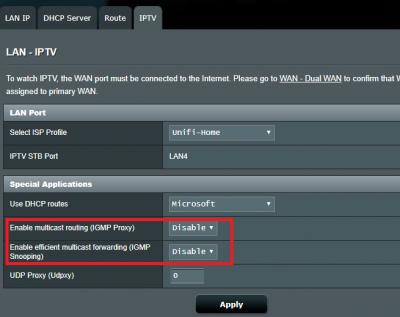
|
|
|
|
|
|
hiha123
|
Jan 8 2018, 09:32 PM
|
Getting Started
|
QUOTE(AVFAN @ Jan 8 2018, 09:29 PM) i hv used rt ac1300uhp and rtn12hp_b1. both pulg n play for hypptv stb, lan port#4. the bandwidth for hypptv is separate from the other. download full speed does not affect stb at all. if u get lag with hypptv, it may be due to yr stb failing or a localized unifi problem. But my STB is new,i want know is it my own router cant handler my download and STB on same time because when i use 30mb donwload full speed the cpu usage become 85-100% ald and the STB will become lagging  |
|
|
|
|
|
hiha123
|
Jan 11 2018, 03:47 PM
|
Getting Started
|
QUOTE(ASUSmy @ Jan 11 2018, 03:16 PM) Hi hiha123, Yes, all our router support HyppTV. You can try do monitoring by log in to the router and in the Network Map, you can see the Status at right. Try download using full speed and monitor the CPU and RAM usage on router GUI and see the HyppTV will lag or not. You no need to do any other changes on the IPTV tab beside selecting the ISP profile. Thank you Hi Asus MY I Have try about 4days ald everyday use about 4hour i use download full speed when download from google drive that are never lag about,but when i change to BT download and Steam games download that hypptv become lag,is it the BT download and another download are more eat router CPU from another?  |
|
|
|
|
|
hiha123
|
Jan 12 2018, 11:37 AM
|
Getting Started
|
QUOTE(AVFAN @ Jan 12 2018, 10:44 AM) .. unifi 100mbps. .. asus rt-ac1300uhp (rm530)... ac router .. asus usb-ac55 (rm250)... ac wireless adaptor best so far since installation 2 weeks ago: results for the pc+wifi adaptor on 5ghz. 50ft, 1 staircase, 1 wall, 1 cabinet:   see like so good got use 5GHz try?and got use hypptv play when download full speed? hypptv got lagging? |
|
|
|
|
|
hiha123
|
Jan 12 2018, 11:45 AM
|
Getting Started
|
QUOTE(voncrane @ Jan 12 2018, 11:41 AM) Like a proud father...  Hypptv service is not supposed to lag or be affected by the usage of the main internet plan. This is because, TM has reserved an additional 20Mbps just for Hypptv services. This 20Mbps is separate from the subscribed plan. So one could max out internet speeds and still watch smooth Hypptv channels. but router if cpu not strong will become lagging,so i will also buy the RT AC1300UHP |
|
|
|
|
|
hiha123
|
Jan 12 2018, 12:24 PM
|
Getting Started
|
Hi AVLAN  When u use torr or bt at full speed how about the router CPU usage?how many% when download at full speed? This post has been edited by hiha123: Jan 12 2018, 12:26 PM |
|
|
|
|
|
hiha123
|
Jan 12 2018, 11:47 PM
|
Getting Started
|
QUOTE(AVFAN @ Jan 12 2018, 05:37 PM) checked for u... my ac1300uhp... torr speed average 12.5MBps which is about 100mbps. cpu usage... core 3... 28-33%, sometimes spike to 40%. other cores... 10-25%. at the same time, hypptv... all good, no lag as usual. when torr done, cpu usage falls to almost nothing as expected. observation was for a few minutes only. after see u result use at 100mb haha i will buy RT-AC1300UHP ald,i use my RT-N12D1 30mb fullspeed cpu usage about80-100% That RT-AC1300UHP core is 717 MHz, 4 cores My RT-N12D1 core is 1,the 1core is 300MHz Maybe this is different  This post has been edited by hiha123: Jan 12 2018, 11:50 PM This post has been edited by hiha123: Jan 12 2018, 11:50 PM |
|
|
|
|
|
hiha123
|
Feb 6 2018, 12:00 AM
|
Getting Started
|
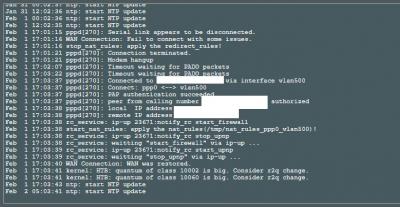
QUOTE(AVFAN @ Feb 5 2018, 09:31 PM) bro, i like to help as i m using rtac1300uhp. but i do not understand what u r saying, what the problem is. unifi gave u 2 in 1 modem router?? Ern,when i use full speed download and use hypptv,after feel hour the picture modem hangup(see like every 24 hour will hangup 2time,my place is very good for router and modem ),cant use internet about 10sec then Wan restored,bcz i see maybe now TM gave all VDSL2 modem is 2 in 1,i scare about later i cant use my new asus router if the old modem really want to change  |
|
|
|
|
|
hiha123
|
Feb 6 2018, 02:52 PM
|
Getting Started
|
QUOTE(dkoh703 @ Feb 6 2018, 12:07 PM) I think I had similar problem as you do, i.e: modem hangup then WAN disconnected and restored after 1-2 days. After changing the VDSL modem, I don't face this issue anymore. The old VDSL modem is from Huawei, the new one from ZTE, not sure if it makes any different. Another observation is - for the old VDSL modem the Internet light is consistently blinking, and the new one is constantly ON. And I am using Asus RT-AC58U router.  I modem hangup about 10sec,if there gave ZTE modem is it 2in1?how u setting to use own router and the STB box? |
|
|
|
|
|
hiha123
|
Mar 1 2018, 12:07 PM
|
Getting Started
|
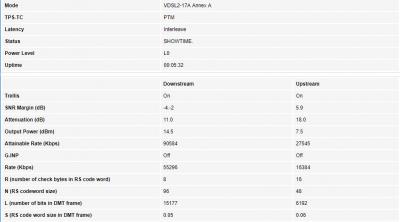
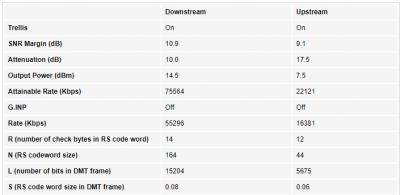
Hi Asus My after TM change the modem,this modem hangup come again,same with my old N12D-1,i now use RT-AC1300UHP, is it maybe my DSL line maybe broken?i use the new firmware ald  Attached thumbnail(s) Attached thumbnail(s)
|
|
|
|
|



 Quote
Quote





 0.1006sec
 0.95
0.95
 7 queries
 GZIP Disabled