

Is Asus DSL N12E can setup unifi? Any idea how to do it?
Home Networking ASUS Malaysia Networking User & Technical Support, Managed by ASUS Malaysia Representative
Home Networking ASUS Malaysia Networking User & Technical Support, Managed by ASUS Malaysia Representative
|
|
 Jan 12 2018, 12:06 PM Jan 12 2018, 12:06 PM
|
 
Newbie
1 posts Joined: Jan 2018 
|
Is Asus DSL N12E can setup unifi? Any idea how to do it?
|
|
|
|
|
|
Jan 12 2018, 12:13 PM
|

All Stars
24,454 posts Joined: Nov 2010
|
QUOTE(hiha123 @ Jan 12 2018, 11:37 AM)  see like so good got use 5GHz try?and got use hypptv play when download full speed? hypptv got lagging? see like so good got use 5GHz try?and got use hypptv play when download full speed? hypptv got lagging? Mind u, i am one of those that torr big time.  QUOTE(voncrane @ Jan 12 2018, 11:41 AM) Like a proud father... Sure i am!  This 100mbps + asus networking devices has taken my household to a diff level... androidtv, android boxes, pc, etc. And it is very stable... ethernet or wifi, 100-104 most of the time. I probably do not need a speed ugrade for a long time. So, those strugglng with 100mbps wifi, worried about too many things like interference, do relax. And no need to cut an arm or a leg for that. This post has been edited by AVFAN: Jan 12 2018, 12:16 PM |
|
|
Jan 12 2018, 12:24 PM
|
|
Junior Member
198 posts Joined: Nov 2017
|
Hi AVLAN
 When u use torr or bt at full speed how about the router CPU usage?how many% when download at full speed? When u use torr or bt at full speed how about the router CPU usage?how many% when download at full speed?This post has been edited by hiha123: Jan 12 2018, 12:26 PM |
|
|
Jan 12 2018, 12:26 PM
|
|
All Stars
24,454 posts Joined: Nov 2010
|
QUOTE(hiha123 @ Jan 12 2018, 12:24 PM) When u use torr or bt at full speed how about the router CPU usage?how many% when download at full speed?Next opportunity, i check. This post has been edited by AVFAN: Jan 12 2018, 12:27 PM |
|
|
Jan 12 2018, 01:10 PM
Show posts by this member only | IPv6 | Post
#7745
|

Senior Member
7,120 posts Joined: Oct 2011 From: Wakanda 
|
QUOTE(AVFAN @ Jan 12 2018, 12:13 PM) Hypptv... Everything i did last in few years and now.... never seen hypptv lag. Good good.. Now I can recommend the RT-AC1300UHP for those who want similar performance but not the added features of the RT-AC55UHP. Mind u, i am one of those that torr big time. Sure i am! This 100mbps + asus networking devices has taken my household to a diff level... androidtv, android boxes, pc, etc. And it is very stable... ethernet or wifi, 100-104 most of the time. I probably do not need a speed ugrade for a long time. So, those strugglng with 100mbps wifi, worried about too many things like interference, do relax. And no need to cut an arm or a leg for that.  |
 |
Jan 12 2018, 02:58 PM
|

Senior Member
2,319 posts Joined: Mar 2010
|
QUOTE(Brian191311 @ Jan 12 2018, 12:06 PM) Is Asus DSL N12E can setup unifi? Any idea how to do it? Hi Brian191311,DSL-N12E unable to use on UNIFI line. UNIFI require VDSL modem to work. Thank you |
|
|
|
|
|
Jan 12 2018, 04:02 PM
|

Junior Member
37 posts Joined: Jun 2013
|
Hello everyone. I am currently using the RT-AC55UHP router.
Occasionally throughout the day, when I am browsing the internet using my smartphone or playing media using my android box, it seems that my WiFi will disconnect itself for a few seconds and reconnects as I notice the "Connected to [WiFi name]" pop up when this happens. Any method to fix this? Thanks in advance. |
|
|
Jan 12 2018, 05:03 PM
|

Senior Member
5,714 posts Joined: Mar 2007 
|
QUOTE(zhariffPTS @ Jan 12 2018, 04:02 PM) Hello everyone. I am currently using the RT-AC55UHP router. Have you got the latest firmware? Are you getting a stable Wifi signal and not too far from your router?Occasionally throughout the day, when I am browsing the internet using my smartphone or playing media using my android box, it seems that my WiFi will disconnect itself for a few seconds and reconnects as I notice the "Connected to [WiFi name]" pop up when this happens. Any method to fix this? Thanks in advance. |
|
|
Jan 12 2018, 05:12 PM
|
|
Junior Member
31 posts Joined: Nov 2017
|
QUOTE(ASUSmy @ Jan 11 2018, 03:09 PM) Hi dkoh703, Hi ASUSMy,From the log I can see there is a message saying the "Serial link appears to be disconnected". This mean there is a disconnection from the modem side. Jan 10 22:02:47 pppd[2788]: Serial link appears to be disconnected. You can try changing the cable between the router and the modem first. And can you save me the full system log? Because you mention it disconnected quite often. Thank you Did you see any problem in the System Log that I sent? |
|
|
Jan 12 2018, 05:37 PM
|
|
All Stars
24,454 posts Joined: Nov 2010
|
QUOTE(hiha123 @ Jan 12 2018, 12:24 PM) Hi AVLAN checked for u... my ac1300uhp... When u use torr or bt at full speed how about the router CPU usage?how many% when download at full speed?torr speed average 12.5MBps which is about 100mbps. cpu usage... core 3... 28-33%, sometimes spike to 40%. other cores... 10-25%. at the same time, hypptv... all good, no lag as usual. when torr done, cpu usage falls to almost nothing as expected. observation was for a few minutes only. |
|
|
Jan 12 2018, 05:56 PM
|

Senior Member
4,782 posts Joined: Jan 2003
|
QUOTE(AVFAN @ Jan 12 2018, 05:37 PM) checked for u... my ac1300uhp... Pretty good, I think.torr speed average 12.5MBps which is about 100mbps. cpu usage... core 3... 28-33%, sometimes spike to 40%. other cores... 10-25%. at the same time, hypptv... all good, no lag as usual. when torr done, cpu usage falls to almost nothing as expected. observation was for a few minutes only. Anyway, I'm glad I moved to a 2 device solution - edgerouter X as wired router, ac68u as wifi AP. Downloading at about 164 Mbps (i.e. 19.6 MiB/s) and the edgerouter's dual core CPU is still 96% idle. That's half of my Time Fibre 300mbps speed. 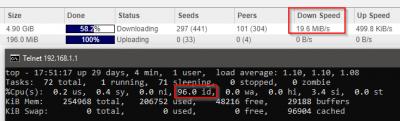
This post has been edited by kmrdeva: Jan 12 2018, 05:59 PM |
|
|
Jan 12 2018, 11:47 PM
|
|
Junior Member
198 posts Joined: Nov 2017
|
QUOTE(AVFAN @ Jan 12 2018, 05:37 PM) checked for u... my ac1300uhp... torr speed average 12.5MBps which is about 100mbps. cpu usage... core 3... 28-33%, sometimes spike to 40%. other cores... 10-25%. at the same time, hypptv... all good, no lag as usual. when torr done, cpu usage falls to almost nothing as expected. observation was for a few minutes only. after see u result use at 100mb haha i will buy RT-AC1300UHP ald,i use my RT-N12D1 30mb fullspeed cpu usage about80-100%  That RT-AC1300UHP core is 717 MHz, 4 cores My RT-N12D1 core is 1,the 1core is 300MHz Maybe this is different  This post has been edited by hiha123: Jan 12 2018, 11:50 PM |
|
|
Jan 13 2018, 12:00 AM
|
|
All Stars
24,454 posts Joined: Nov 2010
|
QUOTE(hiha123 @ Jan 12 2018, 11:47 PM) after see u result use at 100mb haha i will buy RT-AC1300UHP ald,i use my RT-N12D1 30mb fullspeed cpu usage about80-100% That RT-AC1300UHP core is 717 MHz, 4 cores My RT-N12D1 core is 1,the 1core is 300MHz Maybe this is different time to upgrade! |
|
|
|
|
|
Jan 13 2018, 02:39 PM
Show posts by this member only | IPv6 | Post
#7754
|

Senior Member
2,471 posts Joined: Jan 2003
|
does ASUS RT-N66U rev.B1 support unifi IPTV? If i flashed to Tomato 3rd party firmware, does it still support as well?
|
|
|
Jan 13 2018, 08:33 PM
Show posts by this member only | IPv6 | Post
#7755
|
|
Junior Member
40 posts Joined: Oct 2006
|
Hi,
My fren time broadband router rip d. So he is interested in getting Asus to replace his faulty time router.... Any model here able to do that? If yes and how to set it up? Any step step guide? |
|
|
Jan 14 2018, 12:13 AM
|
|
Senior Member
7,120 posts Joined: Oct 2011 From: Wakanda
|
QUOTE(ramnkc @ Jan 13 2018, 08:33 PM) Hi, See below.. Next time, please use the search feature.. Much faster for you to get answers to questions already answered cuz you don't have to post and then wait for a response.My fren time broadband router rip d. So he is interested in getting Asus to replace his faulty time router.... Any model here able to do that? If yes and how to set it up? Any step step guide? QUOTE(ASUSmy @ Jan 3 2018, 10:23 AM) Hi K4iz3n, As I know there is no special setting for TIME. The connection type is PPPoE and key in the account user name and password. If you still unable to connect to the Internet, can you share the system log in the router? Thank you QUOTE(SilentVampire @ Jan 11 2018, 02:20 PM) Any Asus router is able to support Time 100Mbps but will suggest you to get a good router that is dual band and support AC. You should state your budget. |
|
|
Jan 14 2018, 09:29 PM
|

Junior Member
245 posts Joined: Feb 2010
|
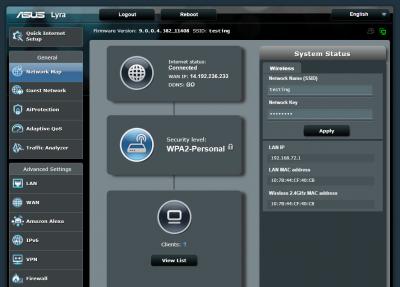
QUOTE(HuorEarfalas @ Jan 5 2018, 09:36 PM) Is Lyra now officially supported with Maxis Fibre? Got the beta FW from ASUS, tested on my Maxis Home Fiber.It is working perfectly This post has been edited by pl95077: Jan 14 2018, 09:30 PM Attached thumbnail(s) 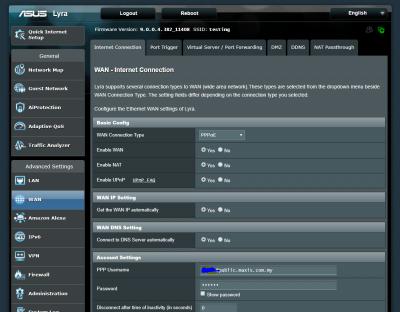
|
|
|
Jan 15 2018, 05:47 AM
Show posts by this member only | IPv6 | Post
#7758
|
|
Newbie
12 posts Joined: Apr 2013
|
QUOTE(NightFelix @ Jan 9 2018, 04:03 PM) how much u bot? RM409 |
|
|
Jan 15 2018, 09:50 AM
|
|
Junior Member
31 posts Joined: Nov 2017
|
QUOTE(dkoh703 @ Jan 12 2018, 05:12 PM) Hi ASUSMy, Wasted RM450 bought the ASUS RT-AC58U which is giving me the same problem as the Dlink router provided by TM Unifi. Should have bought the Prolink or TPlink instead.Did you see any problem in the System Log that I sent? |
|
|
Jan 15 2018, 12:58 PM
|
|
Junior Member
31 posts Joined: Nov 2017
|
What is the recommended setting for the below for Unifi Home?
Internet Detection? Additonal pppd options? Enable VPN+DHCP Connection? 
|
| Change to: |  0.0271sec 0.0271sec
 0.53 0.53
 6 queries 6 queries
 GZIP Disabled GZIP Disabled
Time is now: 9th December 2025 - 04:33 PM |
 Quote
Quote