Welcome Guest ( Log In | Register )

826 Pages « < 761 762 763 764 765 > » Bottom

Outline · [ Standard ] · Linear+

Home Networking ASUS Malaysia Networking User & Technical Support, Managed by ASUS Malaysia Representative

views
     
yongtjunkit
post Jul 26 2023, 10:16 AM

Look at all my stars!!
*******
Senior Member
2,516 posts

Joined: Mar 2016
QUOTE(ASUSmy @ Jul 26 2023, 09:59 AM)
Hi yongtjunkit,

If you are referring to the model RT-AX92U, I will need to test it first with the latest firmware and get back to you.

I am using it as node and connect LAN cable to my PC.

You can always downgrade the firmware to verify it if you think the latest firmware caused this.

Thank you
*
Yup, I’m referring to the AX92U on the latest firmware that was released in July
AVFAN
post Jul 26 2023, 03:55 PM

20k VIP Club
*********
All Stars
24,456 posts

Joined: Nov 2010
QUOTE(blacktubi @ Jul 26 2023, 09:54 AM)

I will recommend the ASUS TUF-AX4200

Excellent product, almost flagship level performance at mid-tier price point

Get it before ASUS increase the price, they have been slowly raising their prices over the years laugh.gif
*
Ok, thanks, will check it out.
TSASUSmy
post Jul 28 2023, 11:23 AM

Look at all my stars!!
*******
Senior Member
2,319 posts

Joined: Mar 2010
QUOTE(yongtjunkit @ Jul 25 2023, 11:26 PM)
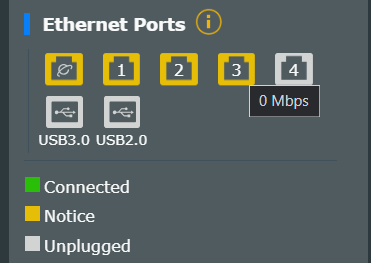
I see if let's say for bug fixes like the following bug in the ASUSWRT WebUI?
Firmware version: 3.0.0.4.388_23630

user posted image
*
QUOTE(ASUSmy @ Jul 26 2023, 09:59 AM)
Hi yongtjunkit,

If you are referring to the model RT-AX92U, I will need to test it first with the latest firmware and get back to you.

I am using it as node and connect LAN cable to my PC.

You can always downgrade the firmware to verify it if you think the latest firmware caused this.

Thank you
*
Hi yongtjunkit,

I have tested the latest firmware and indeed there is a bug on the Ethernet ports status. Will feedback to RD and get back to you when there is a fix.

Thank you

This post has been edited by ASUSmy: Jul 28 2023, 11:23 AM
krofal
post Jul 29 2023, 08:59 PM

Getting Started
**
Junior Member
133 posts

Joined: Feb 2012
Hi @ASUSmy,

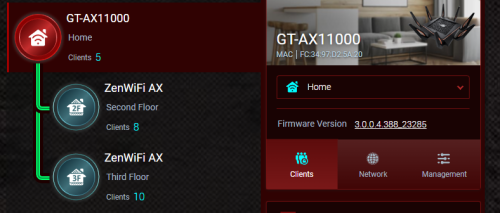
I currently have a setup as below. My current issue is sometimes when I move from 2nd or 3rd floor to ground floor where the AX11000 is, the wifi loses connection and takes a long time to reconnect. If I try to manually join the wifi again, it says wrong password and I will only be able to join the network after waiting several minutes. Any suggestions or ideas on what's wrong? Thanks in advance!

user posted image
blacktubi
post Jul 29 2023, 09:27 PM

-
Group Icon
Elite
8,415 posts

Joined: Jul 2008

QUOTE(krofal @ Jul 29 2023, 08:59 PM)
Hi @ASUSmy,

I currently have a setup as below. My current issue is sometimes when I move from 2nd or 3rd floor to ground floor where the AX11000 is, the wifi loses connection and takes a long time to reconnect. If I try to manually join the wifi again, it says wrong password and I will only be able to join the network after waiting several minutes. Any suggestions or ideas on what's wrong? Thanks in advance!

user posted image
*
Don't use smart connect feature and disable roaming assistant on Wi-Fi professional settings should fix it.
neuromancerx
post Aug 14 2023, 12:10 AM

Enthusiast
*****
Junior Member
879 posts

Joined: Jan 2007
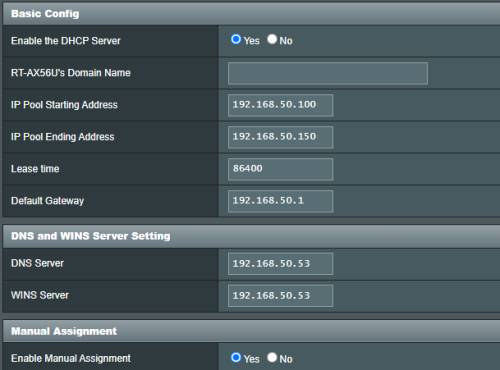
I have pi-hole and i want all client to use this as sole DNS server. Below is my router DHCP option setting, i explicitely set my pi-hole address (192.168.50.53) only

user posted image

However, i can see router's ip address being advertised as additional/secondary DNS server also

user posted image

I remembered there is an option or check box to advertise router's ip address as additional dns server, but i could not find it.

How can i remove router address from being advertised as DNS?

This post has been edited by neuromancerx: Aug 14 2023, 12:11 AM
PRSXFENG
post Aug 14 2023, 11:26 AM

Look at all my stars!!
*******
Senior Member
2,608 posts

Joined: Nov 2020


QUOTE(neuromancerx @ Aug 14 2023, 12:10 AM)
I have pi-hole and i want all client to use this as sole DNS server. Below is my router DHCP option setting, i explicitely set my pi-hole address (192.168.50.53) only

user posted image

However, i can see router's ip address being advertised as additional/secondary DNS server also

user posted image

I remembered there is an option or check box to advertise router's ip address as additional dns server, but i could not find it.

How can i remove router address from being advertised as DNS?
*
Yeah it's one of the annoyances of AsusWRT
I think the checkbox is only on newer firmware (386) or Merlin

An alternative is to set via cli, follow this comment on Reddit
https://www.reddit.com/r/pihole/comments/ma...comment/grva31i

So note that you'll probably have leaks over ipv6 as well
LoNeLyKiRa
post Aug 14 2023, 11:39 AM

Getting Started
**
Junior Member
114 posts

Joined: Mar 2008
hi is there any asus router with wifi 6e at the moment
PRSXFENG
post Aug 14 2023, 03:57 PM

Look at all my stars!!
*******
Senior Member
2,608 posts

Joined: Nov 2020


QUOTE(LoNeLyKiRa @ Aug 14 2023, 11:39 AM)
hi is there any asus router with wifi 6e at the moment
*
Got, such as ROG Rapture GT-AXE16000 or ROG Rapture GT-AXE11000

of course, not cheap
blacktubi
post Aug 14 2023, 04:46 PM

-
Group Icon
Elite
8,415 posts

Joined: Jul 2008

QUOTE(PRSXFENG @ Aug 14 2023, 03:57 PM)
Got, such as ROG Rapture GT-AXE16000 or ROG Rapture GT-AXE11000

of course, not cheap
*
There's the ZenWiFi Pro ET12 as well biggrin.gif

At this moment, I think Wi-Fi 6E is most suitable as a mesh backhaul since there's really not much 6GHz supported devices out there.
neuromancerx
post Aug 16 2023, 01:26 PM

Enthusiast
*****
Junior Member
879 posts

Joined: Jan 2007
QUOTE(PRSXFENG @ Aug 14 2023, 11:26 AM)
Yeah it's one of the annoyances of AsusWRT
I think the checkbox is only on newer firmware (386) or Merlin

An alternative is to set via cli, follow this comment on Reddit
https://www.reddit.com/r/pihole/comments/ma...comment/grva31i

So note that you'll probably have leaks over ipv6 as well
*
Followed the instructions and my problem is now solved. Thanks for sharing the link.
cool.seabreeze
post Aug 24 2023, 01:20 PM

New Member
*
Junior Member
45 posts

Joined: Dec 2019
Hi All

I am on maxis fibre on maxis infrastructure. My maxis fibre connection disconnect quite frequently, usually between 12noon to 2pm, on hot sunny days.

Recently Maxis has provided me a ZTE 4G wireless router MF283V, so I plan to use this as a backup to plug into the 2nd WAN port of a Asus router.

What's the cheapest Asus router that has 2 WAN ports, with one acting as a backup WAN? I know there is a RT-AX86U Pro but that's about RM1400.

How quick will a Asus router use the backup WAN if the main WAN is disconnected? Or is this configurable in the Asus router?
Would be great if the router will use the backup WAN in 2 to 3 minutes if the main WAN is disconnected.


TSASUSmy
post Aug 24 2023, 02:32 PM

Look at all my stars!!
*******
Senior Member
2,319 posts

Joined: Mar 2010
QUOTE(cool.seabreeze @ Aug 24 2023, 01:20 PM)
Hi All

I am on maxis fibre on maxis infrastructure.  My maxis fibre connection disconnect quite frequently, usually between 12noon to 2pm, on  hot sunny days.

Recently Maxis has provided me a ZTE 4G wireless router MF283V, so I plan to use this as a backup to plug into the 2nd WAN port of a Asus router.

What's the cheapest Asus router that has 2 WAN ports, with one acting as a backup WAN?  I know there is a RT-AX86U Pro but that's about RM1400.

How quick will a Asus router use the backup WAN if the main WAN is disconnected?  Or is this configurable in the Asus router?
Would be great if the router will use the backup WAN  in 2 to 3 minutes if the main WAN is disconnected.
*
Hi cool.seabreeze,

You may refer to the link below on how to setup the Dual WAN and how to check with router support Dual WAN.

https://www.asus.com/my/support/FAQ/1011719/

You may refer to the demoui on how the setting looks like.
https://demoui.asus.com/Advanced_WANPort_Content.asp

Thank you
cool.seabreeze
post Aug 25 2023, 11:17 AM

New Member
*
Junior Member
45 posts

Joined: Dec 2019
QUOTE(ASUSmy @ Aug 24 2023, 02:32 PM)
Hi cool.seabreeze,

You may refer to the link below on how to setup the Dual WAN and how to check with router support Dual WAN.


You may refer to the demoui on how the setting looks like.


Thank you
Thank you for the links.

I have now configured my my RT-A X3000 for Dual WAN. I did not realised that the normal LAN ports can be configured as WAN port.
I powered off the Huawei ONT and the switch to backup WAN2 was quite fast.

Thanks again!
myrancid
post Aug 26 2023, 06:19 PM

Casual
***
Junior Member
355 posts

Joined: Nov 2013
Is it ok to put router near to microwave ?
PRSXFENG
post Aug 26 2023, 07:29 PM

Look at all my stars!!
*******
Senior Member
2,608 posts

Joined: Nov 2020


QUOTE(myrancid @ Aug 26 2023, 06:19 PM)
Is it ok to put router near to microwave ?
*
your 2.4Ghz peformance may become significantly affected when the microwave is on
pokchik
post Aug 27 2023, 04:16 PM

I'm getting too old for this sh*t
******
Senior Member
1,304 posts

Joined: Mar 2010


Hi ASUSmy,

I've been using my trusted RT-AC86U (2x units with AiMesh) since 2018 - the performance was perfect for my usage. I love it.

TLDR;

a) My RT-AC86U cannot achieve the full 500Mbps Unifi speedtest.
b) Factory reset & simple re-setup/config cannot connect to the internet.
c) iPhone 13 cannot connect to the 5G wifi.


===============================


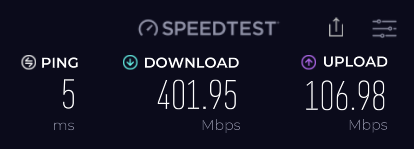
There's a slight issue recently (not that critical but it bugs me) when I re-contracted for SWU3.0 (300Mbps with free upgrade to 500Mbps for 1 year).

1. The speedtest result is always limited to ~390Mbps to ~420Mbps. DL speed is okay.
user posted image

I've configured the provided DLink routers by TM, and I can achieve ~500Mbps as noted below, showing that it's not a problem on the line/Unifi side.
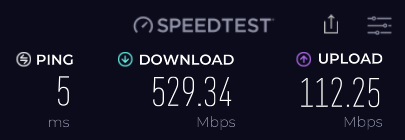
user posted image


The ASUS routers are running with the latest firmware.
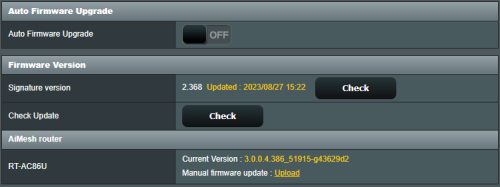
user posted image


2. I started troubleshooting my RT-AC86U routers, including :

- Performing factory reset.
- Interchanging the main/mesh units.

Nothing works yet, also leading me to further problems :

3. Performing factory reset - the units were reset, but the funny thing is - my standard WAN/Unifi configuration cannot link the router to connect to the internet.

- Tried with either Advanced setup or Wizard setup, both with just configuring my PPoE Unifi username/password, not touching anything else, yet the router cannot connect to the internet.

4. I am able to solve this if I just upload back my current saved configuration settings (*.cfg file) - luckily I saved the setting.

- The funny thing is, the configs from (3) vs. (4) are literally the same Unifi username/password, but the one done manually after Factory Reset doesn't work. *confused*

5. Now my last problem is.. somehow, after doing these troubleshootings, my iPhone 13 cannot connect to the 5G Wifi.. it just states 'Unable to join the network'
whereas all my other gadgets, phones, smart tv etc. connects just fine (even my iPhone XR).

It works well before I did all the troubleshooting, also it can connect to the DLink 5G wifi just fine.

Any thoughts how to troubleshoot further? I'm tempted to try and upload an older firmware as my next course of action.. but any other proposals are welcomed.

Thank you for your support!

This post has been edited by pokchik: Aug 27 2023, 04:16 PM

TSASUSmy
post Aug 28 2023, 10:39 AM

Look at all my stars!!
*******
Senior Member
2,319 posts

Joined: Mar 2010
QUOTE(pokchik @ Aug 27 2023, 04:16 PM)
Hi ASUSmy,

I've been using my trusted RT-AC86U (2x units with AiMesh) since 2018 - the performance was perfect for my usage. I love it.

TLDR;

a) My RT-AC86U cannot achieve the full 500Mbps Unifi speedtest.
b) Factory reset & simple re-setup/config cannot connect to the internet.
c) iPhone 13 cannot connect to the 5G wifi.
===============================
There's a slight issue recently (not that critical but it bugs me) when I re-contracted for SWU3.0 (300Mbps with free upgrade to 500Mbps for 1 year).

1. The speedtest result is always limited to ~390Mbps to ~420Mbps. DL speed is okay.

user posted image

I've configured the provided DLink routers by TM, and I can achieve ~500Mbps as noted below, showing that it's not a problem on the line/Unifi side.

user posted image
The ASUS routers are running with the latest firmware.

user posted image
2. I started troubleshooting my RT-AC86U routers, including :

- Performing factory reset.
- Interchanging the main/mesh units.

Nothing works yet, also leading me to further problems :

3. Performing factory reset - the units were reset, but the funny thing is - my standard WAN/Unifi configuration cannot link the router to connect to the internet.

- Tried with either Advanced setup or Wizard setup, both with just configuring my PPoE Unifi username/password, not touching anything else, yet the router cannot connect to the internet.

4. I am able to solve this if I just upload back my current saved configuration settings (*.cfg file) - luckily I saved the setting.

- The funny thing is, the configs from (3) vs. (4) are literally the same Unifi username/password, but the one done manually after Factory Reset doesn't work. *confused*

5. Now my last problem is.. somehow, after doing these troubleshootings, my iPhone 13 cannot connect to the 5G Wifi.. it just states 'Unable to join the network'
whereas all my other gadgets, phones, smart tv etc. connects just fine (even my iPhone XR).

It works well before I did all the troubleshooting, also it can connect to the DLink 5G wifi just fine.

Any thoughts how to troubleshoot further? I'm tempted to try and upload an older firmware as my next course of action.. but any other proposals are welcomed.

Thank you for your support!
*
Hi pokchik,

For the Internet connection, do check whether you got select the ISP profile or not. You can check it at LAN->IPTV->ISP Profile.

When doing the speedtest, do make sure the QoS and AiProtection is disabled.

As for your iPhone, try forget the SSID profile and join the network again. If still same, try changing the WiFi channel on the router.

You can check the video on my signature on how to setup the Internet connection using QIS.

Thank you

This post has been edited by ASUSmy: Aug 28 2023, 10:42 AM
SpikeTwo
post Aug 28 2023, 11:28 AM

無敵 PC Elitist
*******
Senior Member
5,464 posts

Joined: Jan 2003
From: Über Special Forces Gaming Room
please recommend an Asus router to replace the Maxis Koan?
budget friendly ones? Thanks!
rathishsiva
post Aug 29 2023, 03:56 PM

Casual
***
Junior Member
413 posts

Joined: Nov 2006
QUOTE(ASUSmy @ Aug 24 2023, 02:32 PM)
Hi cool.seabreeze,

You may refer to the link below on how to setup the Dual WAN and how to check with router support Dual WAN.

https://www.asus.com/my/support/FAQ/1011719/

You may refer to the demoui on how the setting looks like.
https://demoui.asus.com/Advanced_WANPort_Content.asp

Thank you
*
Hi, not sure if you can help me on this. I have tried to enable failover mode but it just doesnt work for me.

My setup :

1. Primary Router : AX86U
2. Maxis Router : AR2140
3. Maxis 4G Backup Dongle : MF833V
4. Fiber Infra : Unifi (on high rise)

Steps :

1. Plugged in MF833V into AR2140
2. LAN 1 (from AR2140) to LAN 1 (AX86U) - nothing else plugged into AR2140, Primary WAN on AX86U is on 2.5Gbps port
3. Enabled Dual Wan on faileover on AX86U (Primary WAN 2.5Gbps port, Secondary WAN on LAN 1)
4. In AX86U page, it shows as primary WAN connected by secondary WAN as cold backup
5. Switch off BTU, internet disconnected by waited 5 mins no failover (no internet connection)

Any ideas?

826 Pages « < 761 762 763 764 765 > » Top
 

Change to:
| Lo-Fi Version
0.0377sec    0.54    6 queries    GZIP Disabled
Time is now: 13th December 2025 - 12:49 AM