

QUOTE(482baby @ Jul 19 2023, 09:43 AM)
@ASUSmy please reply my question and because I am not understand?
How many times do you want to ask? Me and several other users already answered those questionsHome Networking ASUS Malaysia Networking User & Technical Support, Managed by ASUS Malaysia Representative
|
|
 Jul 21 2023, 10:50 AM Jul 21 2023, 10:50 AM
|
 
All Stars
14,909 posts Joined: Jul 2005  
|
QUOTE(482baby @ Jul 19 2023, 09:43 AM) @ASUSmy please reply my question and because I am not understand? How many times do you want to ask? Me and several other users already answered those questions |
|
|
|
|
|
Jul 21 2023, 11:19 AM
|
 
Elite
8,415 posts Joined: Jul 2008
|
QUOTE(XeactorZ @ Jul 21 2023, 10:12 AM) Been using TUF-AX3000 since year 2020 with unifi 300mbps package No harm to turn on Wi-Fi 6, in my testing it doesn't seem to slow down speed for my Wi-Fi 5 / 802.11ac devices.All device can get around 200+ mbps speed with Wi-Fi 5 Since now I had more and more device support Wi-Fi 6, should I turn on Wi-Fi 6 on my router?  But, I will turn off Wi-Fi 6 on 2.4GHz band. Some of my smart home devices don't play well with Wi-Fi 6. |
|
|
Jul 21 2023, 11:27 AM
|

All Stars
31,608 posts Joined: Aug 2010
|
QUOTE(blacktubi @ Jul 21 2023, 11:19 AM) No harm to turn on Wi-Fi 6, in my testing it doesn't seem to slow down speed for my Wi-Fi 5 / 802.11ac devices. No idea can turn off Wi-Fi 6 2.4Ghz band or not, let me try tonight But, I will turn off Wi-Fi 6 on 2.4GHz band. Some of my smart home devices don't play well with Wi-Fi 6. If not mistaken only can select enable or disable Wi-Fi 6 only  |
|
|
Jul 21 2023, 11:48 AM
|
|
Elite
8,415 posts Joined: Jul 2008
|
QUOTE(XeactorZ @ Jul 21 2023, 11:27 AM) No idea can turn off Wi-Fi 6 2.4Ghz band or not, let me try tonight You can't disable them separately if you use smart connect functionIf not mistaken only can select enable or disable Wi-Fi 6 only |
|
|
Jul 21 2023, 12:52 PM
|
|
All Stars
31,608 posts Joined: Aug 2010
|
QUOTE(blacktubi @ Jul 21 2023, 11:48 AM) You can't disable them separately if you use smart connect function I am using smart connect, 2.4Ghz and 5Ghz as same SSID  So I had to turn it off |
|
|
Jul 21 2023, 02:00 PM
|

Newbie
32 posts Joined: Jul 2015 
|
I want to know if second router as satellite may I know do I need to plug cable to setup AI Mesh and anybody can provide step by step to setup AI-Mesh System if available video,if have video setup much more better.I already setup AI-Mesh but show disconnected and second router put at the same room with master router Asus.Firmware already update latest firmware.@AsusMY
Master router is TUF-AX5400 Satellite Router is GT-AC2900 
|
|
|
|
 |
Jul 21 2023, 04:05 PM
|

Senior Member
2,319 posts Joined: Mar 2010
|
QUOTE(baka96 @ Jul 21 2023, 02:00 PM) I want to know if second router as satellite may I know do I need to plug cable to setup AI Mesh and anybody can provide step by step to setup AI-Mesh System if available video,if have video setup much more better.I already setup AI-Mesh but show disconnected and second router put at the same room with master router Asus.Firmware already update latest firmware.@AsusMY Hi baka96, Master router is TUF-AX5400 Satellite Router is GT-AC2900
Can you try fix the 5GHz channel on the TUF-AX5400 to other channel, such as 149? Thank you |
|
|
Jul 21 2023, 04:11 PM
|

Junior Member
64 posts Joined: Sep 2009
|
I am planning to get ASUS ZenWiFi Pro ET12 and do a wired back haul for my new condo around 2400sqf.
Want to ask, will those smart home appliances have problem connecting to mesh? because now I am using tplink mesh, and my home appliance like robot cleaner and xiaomi cctv connection is not stable, wondering if Asus mesh also will have same problem? |
|
|
Jul 22 2023, 11:23 AM
|
|
Elite
8,415 posts Joined: Jul 2008
|
QUOTE(edison8904 @ Jul 21 2023, 04:11 PM) I am planning to get ASUS ZenWiFi Pro ET12 and do a wired back haul for my new condo around 2400sqf. ASUS products are more flexible Want to ask, will those smart home appliances have problem connecting to mesh? because now I am using tplink mesh, and my home appliance like robot cleaner and xiaomi cctv connection is not stable, wondering if Asus mesh also will have same problem? If it doesn't work well by default, you can change some settings to enhance compatibility for the 2.4GHz band Other mesh products don't let you to do this |
|
|
Jul 23 2023, 12:46 PM
|

Junior Member
879 posts Joined: Jan 2007
|
I have this weird issue suddenly. When i have a client connected to this network (wired and wireless), client able to get DHCP. However client unable to ping this router LAN ip address which is the default gateway address. Client still able to ping other devices in the network.
From Windows workstation i can see router's mac address from arp and nbtstat command. I just factory reset the router however the observing the same issue. It happened to certain clients only ie my PC, another workstation and few smartphones. |
|
|
Jul 24 2023, 10:30 AM
|
|
Senior Member
2,319 posts Joined: Mar 2010
|
QUOTE(neuromancerx @ Jul 23 2023, 12:46 PM) I have this weird issue suddenly. When i have a client connected to this network (wired and wireless), client able to get DHCP. However client unable to ping this router LAN ip address which is the default gateway address. Client still able to ping other devices in the network. Hi neuromancerx,From Windows workstation i can see router's mac address from arp and nbtstat command. I just factory reset the router however the observing the same issue. It happened to certain clients only ie my PC, another workstation and few smartphones. Can you provide more information on the problem you faced? 1) Router model 2) Router firmware version 3) Is there any other AP, switch or repeater on your network beside the router? 4) PC Windows version, including the build version. Thank you |
|
|
Jul 25 2023, 02:19 PM
|

Junior Member
14 posts Joined: Jul 2012
|
Hi All Experts, I plan to setup mesh wifi in my home. My house is double storey, around 1900 sq ft. The current unifi plan is 300Mbps, modem and router are placed at living hall, hence the 5G signal very weak at 3x bedrooms at first floor. No network cable in my house, only can use wireless for backhaul.
My idea is to place master router at living hall then place another mesh router at first floor bedroom. There are three Asus mesh product are in my bucket list now- XT8, XT12, and ET12. Need your suggestion if XT8 enough to cover whole house with full 5G signal? Or I need to get stronger one XT12? If get ET12, can 6G work properly for backhaul? Cos I see some comment here mention 6G shorter range, and not sure if my scenario can use this way or not. Thank you very much |
|
|
Jul 25 2023, 03:15 PM
Show posts by this member only | IPv6 | Post
#15233
|
|
Senior Member
2,516 posts Joined: Mar 2016
|
Hi ASUSmy, just wondering is the AX92U EOL in malaysia?
https://www.asus.com/event/network/EOL-product/ |
|
|
|
|
|
Jul 25 2023, 05:07 PM
|
|
Senior Member
2,319 posts Joined: Mar 2010
|
QUOTE(yongtjunkit @ Jul 25 2023, 03:15 PM) Hi ASUSmy, just wondering is the AX92U EOL in malaysia? Hi yongtjunkit,https://www.asus.com/event/network/EOL-product/ Yes, the RT-AX92U is no longer available in the market. Thank you |
|
|
Jul 25 2023, 05:14 PM
Show posts by this member only | IPv6 | Post
#15235
|
|
Senior Member
2,516 posts Joined: Mar 2016
|
QUOTE(ASUSmy @ Jul 25 2023, 05:07 PM) Hi yongtjunkit, I see, what does this mean for existing AX92U users, for firmware updates, techincal support,etc? Yes, the RT-AX92U is no longer available in the market. Thank you Does this also mean that we would need to replace the router? |
|
|
Jul 25 2023, 05:40 PM
|
|
Senior Member
2,319 posts Joined: Mar 2010
|
QUOTE(yongtjunkit @ Jul 25 2023, 05:14 PM) I see, what does this mean for existing AX92U users, for firmware updates, techincal support,etc? Hi yongtjunkit,Does this also mean that we would need to replace the router? Depend on what kind of updates, even though the model is EOL, there is still update for this model. The latest firmware was July. ASUS RT-AX92U Firmware version 3.0.0.4.388_23630 Version 3.0.0.4.388_23630 2023/07/05 Normally you will still have major security update. As for the features will need to see the hardware still can support or not. Thank you yongtjunkit liked this post
|
|
|
Jul 25 2023, 11:26 PM
Show posts by this member only | IPv6 | Post
#15237
|
|
Senior Member
2,516 posts Joined: Mar 2016
|
QUOTE(ASUSmy @ Jul 25 2023, 05:40 PM) Hi yongtjunkit, I see if let's say for bug fixes like the following bug in the ASUSWRT WebUI?Depend on what kind of updates, even though the model is EOL, there is still update for this model. The latest firmware was July. ASUS RT-AX92U Firmware version 3.0.0.4.388_23630 Version 3.0.0.4.388_23630 2023/07/05 Normally you will still have major security update. As for the features will need to see the hardware still can support or not. Thank you Firmware version: 3.0.0.4.388_23630 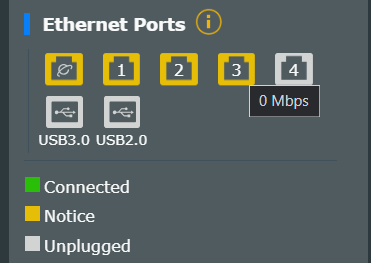 |
|
|
Jul 26 2023, 09:26 AM
|

All Stars
24,456 posts Joined: Nov 2010
|
QUOTE(ASUSmy @ Jul 25 2023, 05:40 PM) hi, asusmy. i checked back my last posts here... 5.5 yrs ago!  currently using RTAC1300UHP, no mesh. unifi 800mbps, double storey house, longest distance about 60ft diagonal. average 3-4 devices at any time, max 8; most are not new, 2-8 years old. for last 5 years, i hv been pleased with the router, good. lately, i am using wifi upstairs quite a bit more. for pc, android tv, entertainment boxes.... netflix 4khdr, disney+H uhd, etc. it's OK overall but sometimes, the signal gets too weak, disruption. at this time, what current model and setup wud u recommend? not in a rush as i am planning to change a couple of devices to new first. what else shud i be mindful when buying new devices? TQVM! |
|
|
Jul 26 2023, 09:54 AM
|
|
Elite
8,415 posts Joined: Jul 2008
|
QUOTE(AVFAN @ Jul 26 2023, 09:26 AM) QUOTE(ASUSmy @ Jul 25 2023, 05:40 PM) hi, asusmy. i checked back my last posts here... 5.5 yrs ago! currently using RTAC1300UHP, no mesh. unifi 800mbps, double storey house, longest distance about 60ft diagonal. average 3-4 devices at any time, max 8; most are not new, 2-8 years old. for last 5 years, i hv been pleased with the router, good. lately, i am using wifi upstairs quite a bit more. for pc, android tv, entertainment boxes.... netflix 4khdr, disney+H uhd, etc. it's OK overall but sometimes, the signal gets too weak, disruption. at this time, what current model and setup wud u recommend? not in a rush as i am planning to change a couple of devices to new first. what else shud i be mindful when buying new devices? TQVM! Excellent product, almost flagship level performance at mid-tier price point Get it before ASUS increase the price, they have been slowly raising their prices over the years |
|
|
Jul 26 2023, 09:59 AM
|
|
Senior Member
2,319 posts Joined: Mar 2010
|
QUOTE(yongtjunkit @ Jul 25 2023, 11:26 PM) I see if let's say for bug fixes like the following bug in the ASUSWRT WebUI? Hi yongtjunkit,Firmware version: 3.0.0.4.388_23630 If you are referring to the model RT-AX92U, I will need to test it first with the latest firmware and get back to you. I am using it as node and connect LAN cable to my PC. You can always downgrade the firmware to verify it if you think the latest firmware caused this. Thank you |
| Change to: |  0.0308sec 0.0308sec
 0.32 0.32
 6 queries 6 queries
 GZIP Disabled GZIP Disabled
Time is now: 13th December 2025 - 03:56 PM |
 Quote
Quote