Welcome Guest ( Log In | Register )

826 Pages « < 759 760 761 762 763 > » Bottom

Outline · [ Standard ] · Linear+

Home Networking ASUS Malaysia Networking User & Technical Support, Managed by ASUS Malaysia Representative

views
     
gibranhashim
post Jun 28 2023, 09:29 PM

New Member
*
Newbie
11 posts

Joined: Feb 2013
QUOTE(eclectice @ Jun 28 2023, 09:51 AM)
Unifi provides the D-LINK DPN-FX3060V optical network router for 1 and 2 Gbps plans. I think it employs proprietary firmware developed for Unifi (as has previously occurred with all Unifi routers/modems).

The D-Link DPN-FX3060V optical network or ONR router is a fiber gateway with wireless access that acts as a fiber "modem" (the ONT) and a wireless router in one.

You should get two DPN-FX3060V units to create a mesh network: one as the main mesh router and one as a mesh node. If not, please reconfirm with Unifi.

user posted image

Double-NAT

You may have heard about single NAT and double NAT. By default, your mesh network is in a single NAT configuration with DPN-FX3060V primary router.

Single NAT and double NAT are two different ways of using Network Address Translation (NAT) to connect multiple devices to the internet.

Single NAT is the most common way to use NAT. In a single NAT configuration, there is one router that performs NAT for all of the devices on the network. This router has a public IP address that is assigned by the internet service provider (ISP). The router then translates the private IP addresses of the devices on the network to the public IP address. This allows the devices on the network to communicate with the internet.

Double NAT occurs when there are two routers that perform NAT. This can happen if you have a router from your ISP and then you add another router to your network. The second router will also perform NAT, which will create a second layer of translation.

You may need to set up a double NAT configuration to use your Asus mesh router (ZenWifi ET12) with the DPN-FX3060V router to extend your wireless network. This is because the Asus router's wireless mesh capabilities and the DPN-FX3060V's wireless mesh technology are incompatible. Unlike the DPN-FX3060V, the Asus router does not support the WIFI EasyMesh standard via its AiMesh technology.

https://www.wi-fi.org/discover-wi-fi/wi-fi-easymesh
https://dongknows.com/asus-aimesh-overview/

user posted image

While the Unifi FAQ statement is partially true, it may not be entirely accurate. If you have a wireless mesh router from a brand other than Asus that supports EasyMesh, such as the TP-LINK Deco series, you can connect it to the DPN-FX3060V mesh to extend your network coverage without performing any double-NAT configuration. However, it's important to note that the performance of the connected router may be negatively impacted if the EasyMesh implementation in the DPN-FX3060V or TP-LINK Deco is crippled or has limitations. So, you have no choice but to perform a double-NAT configuration.

The steps on how to create a double NAT configuration between an ASUS router and a DPN-FX3060V router via LAN cable:

https://dongknows.com/double-nat-vs-single-nat/

Take note that Double NAT can cause problems with some applications and services, such as gaming and file sharing.

Bridge Mode

Another alternative to double-NAT is bridge mode: setting the primary router (ISP gateway) as a bridge can be an alternative to using double NAT.

In this setup, the primary router acts as a bridge, forwarding all network traffic to the secondary router to handle routing and NAT. This eliminates double NAT issues in gaming, file sharing, and VoIP. With only one NAT device to manage, network setup is simplified, and all devices can access the full internet bandwidth, improving performance.

Since it is really difficult to get a proper user manual for DPN-FX3060V, I can't help you in this regard.

WIFI cert for DPN-FX3060V from WIFI Alliance

[attachmentid=11471674]

The aforementioned double-NAT and bridge mode enables you to take advantage of certain helpful AiMesh features. If you don't care about that, you may simply configure the Asus router as an access point (AP) or a repeater.

I recommend against using the ET12's 6GHz band as a wireless backhaul in the AiMesh configuration if you have a large home with more than two stories and at least six rooms to cover because it has a shorter range and may not give enough coverage for your needs.
*
Thanks for this. Is it possible to switch off the Wi-Fi function on the provided router/modem and get the ET12 to handle the wi fi? Also should I just get a second hand ONU online and connect the ET12 to that instead?
Jason2021
post Jun 28 2023, 11:56 PM

New Member
*
Junior Member
8 posts

Joined: Nov 2021
Hi I am using ASUS ZenWifi ProXT12. My Unifi package is 800 Mbps. When I test internet speed using the ASUS app, it will always reach max speed. But when I test using the Speedtest app, it can only achieve max 400 plus Mbps. I am using same mobile phone (Samsung S22 Ultra) for both tests. Do you have such issue & how to rectify it? Thanks

Jason2021
post Jun 29 2023, 01:06 AM

New Member
*
Junior Member
8 posts

Joined: Nov 2021
QUOTE(pull007 @ Feb 25 2023, 11:27 PM)
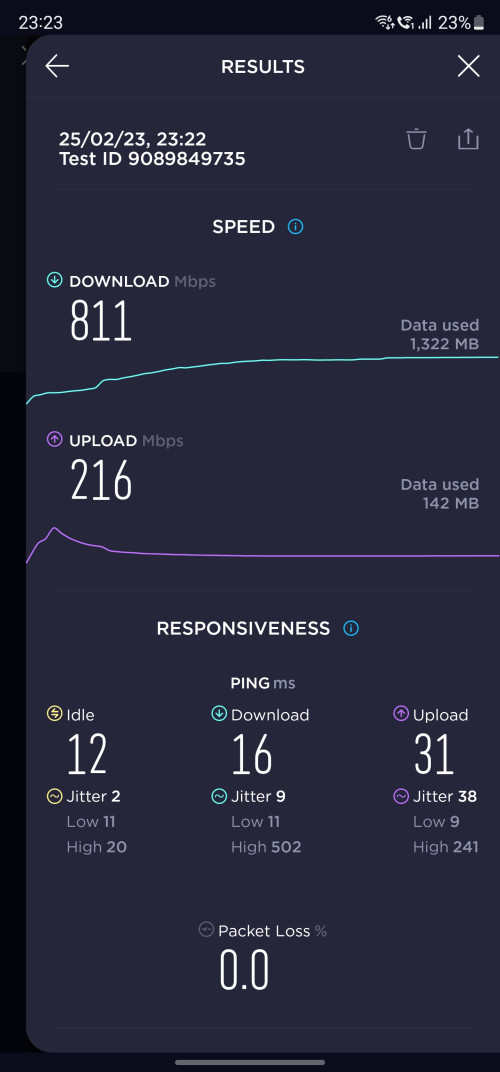
Just want to update, after a hard reset of both of my asus xt12 routers, I get full speed now. Didn't know what happen last time. Probably didn't set up properly.

Now I'm happy. smile.gif. No extra tweak of settings needed

user posted image

I'm subscribed to unifi 800Mbps
*
Hi @pull007 I searched through the forum & just saw your post with exact same issue i am facing now. May I know after hard reset the routers do we need to reconnect all the devices to the wifi network or is there any way to save the setting & reapply it? thanks.
eclectice
post Jun 29 2023, 12:41 PM

Look at all my stars!!
*******
Senior Member
2,734 posts

Joined: Mar 2008
QUOTE(Jason2021 @ Jun 28 2023, 11:56 PM)
Hi I am using ASUS ZenWifi ProXT12. My Unifi package is 800 Mbps. When I test internet speed using the ASUS app, it will always reach max speed. But when I test using the Speedtest app, it can only achieve max 400 plus Mbps. I am using same mobile phone (Samsung S22 Ultra) for both tests. Do you have such issue & how to rectify it? Thanks
*
It's important to understand that while the ASUS Router app provides a user-friendly interface for accessing your router's web interface, the actual speed test is conducted from the router's side (AsusWRT), not the app itself. Both the Speedtest app and the built-in speed test available through the ASUS router app and its web interface (AsusWRT) use the OOKLA service to conduct the test. However, it's worth noting that the test server used can affect the results, which may vary between the two apps.

To get a more accurate comparison, it's recommended to use the same test server for both tests. Additionally, wireless interference and signal strength can also affect the speed test results on your smartphone. To eliminate these factors and obtain a more accurate measurement of your internet performance, you can try running the speed test from a wired device connected directly to your router or using the ASUS router app or AsusWRT web interface to test speed. Remember to use the same test server for both tests to ensure a fair and accurate comparison.

This post has been edited by eclectice: Jul 3 2023, 09:39 AM
eclectice
post Jun 29 2023, 12:55 PM

Look at all my stars!!
*******
Senior Member
2,734 posts

Joined: Mar 2008
QUOTE(gibranhashim @ Jun 28 2023, 09:29 PM)
Thanks for this. Is it possible to switch off the Wi-Fi function on the provided router/modem and get the ET12 to handle the wi fi? Also should I just get a second hand ONU online and connect the ET12 to that instead?
*
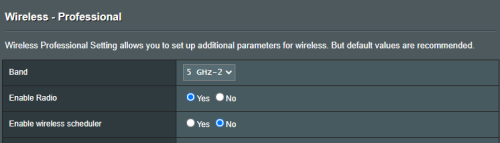
Yes, it's usually possible to disable the Wi-Fi function on the provided router/modem and let the Asus ZenWifi ET12 handle the Wi-Fi network instead. This way, you can take advantage of the mesh capabilities of the ET12 and potentially improve the coverage and performance of your wireless network. It also saves your electricity bill by turning off the wireless service that you don't need on the ONR (ISP gateway).

To disable the Wi-Fi function on the DPN-FX3060V, I think you can usually do so through the router's web-based interface (the app). Look for a setting related to wireless or Wi-Fi, and you should be able to turn it off from there.

On the Asus router, this setting is available in its Wireless advanced settings. You need to choose which WIFI band to turn its radio off.

user posted image

Regarding replacing the ONR provided by Unifi with a third-party ONU/ONT, it's important to note that this may not be possible without getting support from Unifi. Some ISPs may require you to use their specific ONR or have strict compatibility requirements, so it's best to check with ISP (Unifi) first before attempting to replace the ONR with a third-party ONU/ONT. Additionally, some ISPs may not provide support or warranty for third-party equipment, so you should weigh the risks and benefits before making a decision.

This post has been edited by eclectice: Jun 29 2023, 01:04 PM
eclectice
post Jul 4 2023, 04:59 PM

Look at all my stars!!
*******
Senior Member
2,734 posts

Joined: Mar 2008
I'm not going to start using beta firmware just yet. However, I need additional information on some of the latest beta features in ZenWIFI XT12, such as VLAN-only networking.

ASUS ZenWiFi Pro XT12 Firmware version 9.0.0.6.102.4856
Version 9.0.0.6.102.4856
Beta Version
49.55 MB
2023/03/21
Be noted: This is an early stage beta, there might be bugs. This version can be downgraded via web GUI only.

1. Recap new features of 3.0.0.6.102: Guest network Pro(SDN), VLAN, Auto USB WAN backup, iPhone tethering, Multi-services WAN.
2. Re-defined VLAN, supports Trunk, Access mode with VLAN-only-network.
3. Synchronize Guest network pro (SDN) with VLAN, create/delete new VLAN-only-network will create/delete a new profile in Guest network as well.
4. Port isolation and AP isolation to restrict device access to each other.
5. Re-defined multi-service WAN, disable it by default.
6. Add surfshark VPN in VPN fusion.


ASUS ZenWiFi Pro XT12 Firmware version 9.0.0.6.102.3506
Version 9.0.0.6.102.3506
Beta Version
48.88 MB
2022/12/30
Be noted: This is an early stage beta, there might be bugs. This version can be downgraded via web GUI only.

New Features:
1. Add Guest Network Pro:
• Kids WiFi: Create a network for kids that blocks access to adult content and has a schedule to control when the network is available.
• VPN WiFi: Create a VPN network that connects to 3rd party VPN services or with ASUS site to site VPN(https://www.asus.com/support/FAQ/1048281/) to encrypts your internet connection and hides your IP address to protect your online activities from being tracked or monitored.
• IoT WiFi : Create an IoT (Internet of Things) network that blocks malicious traffic* and only allows 2.4GHz devices to connect.
• Guest WiFi: Create a guest network with a WiFi schedule and access rights to control when and how guests can use the network.
2. Add VLAN in LAN settings.
3. Add Multi-services WAN, create multiple profiles on a single WAN interface.

https://www.asus.com/my/networking-iot-serv...enWiFi-Pro-XT12

This post has been edited by eclectice: Jul 4 2023, 05:21 PM
axoloke
post Jul 11 2023, 05:13 PM

On my way
****
Senior Member
631 posts

Joined: Jan 2003
From: Pearl Of The Orient


Anyone have a recommendation for a quick small wifi solution for a small branch office? I normally deploy Cisco AP's but this is for a small (possibly temporary) office hence might just put a couple of Asus solutions in.

It will need to be able to integrate with our Cisco switches (Vlan aware) as well. If I'm not mistaken, I will tag the traffic on the switch port if there's no tagging on the Asus device itself.

Stability would be the priority not raw speed. Thanks.

This post has been edited by axoloke: Jul 11 2023, 05:17 PM
blacktubi
post Jul 11 2023, 06:02 PM

-
Group Icon
Elite
8,415 posts

Joined: Jul 2008

QUOTE(axoloke @ Jul 11 2023, 05:13 PM)
Anyone have a recommendation for a quick small wifi solution for a small branch office? I normally deploy Cisco AP's but this is for a small (possibly temporary) office hence might just put a couple of Asus solutions in.

It will need to be able to integrate with our Cisco switches (Vlan aware) as well. If I'm not mistaken, I will tag the traffic on the switch port if there's no tagging on the Asus device itself.

Stability would be the priority not raw speed. Thanks.
*
Get a few RT-AX57 and run them on access point mode should work pretty well as long as you tag the VLAN on the switch port and you are not expecting any VLAN SSID or 802.1x integration.

Keep it not more than 20 clients for each AP for optimal performance, this is not Meraki / Cisco gear. tongue.gif
axoloke
post Jul 12 2023, 10:08 AM

On my way
****
Senior Member
631 posts

Joined: Jan 2003
From: Pearl Of The Orient


QUOTE(blacktubi @ Jul 11 2023, 06:02 PM)
Get a few RT-AX57 and run them on access point mode should work pretty well as long as you tag the VLAN on the switch port and you are not expecting any VLAN SSID or 802.1x integration.

Keep it not more than 20 clients for each AP for optimal performance, this is not Meraki / Cisco gear. tongue.gif
*
Thanks ya for the info.

Yeah, I'm aware these are not enterprise level devices biggrin.gif
kkranger
post Jul 14 2023, 11:37 AM

New Member
*
Junior Member
23 posts

Joined: Oct 2007


Hi all.

Need your opinion. I bought at ROG GT AC2900 during Covid 2020 and now having some issues with it.
1. Past 1 month the internet speed and its connection is up and down. It will improve after i resatrt the router and after few days, the problems comes back again.
2. Sometimes the LED lights are out but the router is half working. Some gadgets are connected and some nare not.
3. I cant log in to its web GUI.

I have never updated its firmware. Would factory reset and updated software help me with the modem? Or should i just buy a new one? Thanks.
eclectice
post Jul 17 2023, 02:26 PM

Look at all my stars!!
*******
Senior Member
2,734 posts

Joined: Mar 2008
QUOTE(kkranger @ Jul 14 2023, 11:37 AM)
Hi all.

Need your opinion. I bought at ROG GT AC2900 during Covid 2020 and now having some issues with it.
1. Past 1 month the internet speed and its connection is up and down. It will improve after i resatrt the router and after few days, the problems comes back again.
2. Sometimes the LED lights are out but the router is half working. Some gadgets are connected and some nare not.
3. I cant log in to its web GUI.

I have never updated its firmware. Would factory reset and updated software help me with the modem? Or should i just buy a new one? Thanks.
*
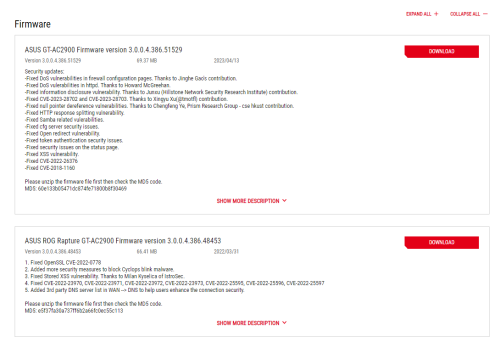
Wow, there are only two firmware upgrades for this model so far:

user posted image

https://rog.asus.com/my/supportonly/rog_rap.../helpdesk_bios/

I'm not sure if you purchased it during the COVID period since the first firmware release wasn't until 2022. Could you please clarify when you bought it?

You may want to consider updating the firmware to see if it can help extend the life of your router.

However, based on my personal experience with the RT-AC88U router I purchased in 2019, which exhibited similar symptoms to what you're experiencing, I decided to replace it instead.

When I ran a speed test, the results showed that it was only delivering half of the normal speed that my 800 Mbps Unifi package subscribed to. After confirming with the TM technician that the speed test was done using their stock mesh router, I opted to upgrade to the Asus ZenWIFI AX XT8 (2022) 2-pack for my first home.

This was a wise choice, as I had previously purchased the same Asus ZenWIFI AX XT8 system for my neighbor in 2020 and it's still performing well today.

Now, I have another Asus ZenWIFI AX XT8 mesh system joined together with a 2-pack ZenWIFI XT12 (2023) for my other home.

This post has been edited by eclectice: Jul 17 2023, 02:55 PM
PRSXFENG
post Jul 17 2023, 05:49 PM

Look at all my stars!!
*******
Senior Member
2,608 posts

Joined: Nov 2020


QUOTE(eclectice @ Jul 17 2023, 02:26 PM)
Wow, there are only two firmware upgrades for this model so far:

user posted image

https://rog.asus.com/my/supportonly/rog_rap.../helpdesk_bios/

I'm not sure if you purchased it during the COVID period since the first firmware release wasn't until 2022. Could you please clarify when you bought it?

You may want to consider updating the firmware to see if it can help extend the life of your router.

However, based on my personal experience with the RT-AC88U router I purchased in 2019, which exhibited similar symptoms to what you're experiencing, I decided to replace it instead.

When I ran a speed test, the results showed that it was only delivering half of the normal speed that my 800 Mbps Unifi package subscribed to. After confirming with the TM technician that the speed test was done using their stock mesh router, I opted to upgrade to the Asus ZenWIFI AX XT8 (2022) 2-pack for my first home.

This was a wise choice, as I had previously purchased the same Asus ZenWIFI AX XT8 system for my neighbor in 2020 and it's still performing well today.

Now, I have another Asus ZenWIFI AX XT8 mesh system joined together with a 2-pack ZenWIFI XT12 (2023) for my other home.
*
US Site suggests it existed since 2019
https://www.asus.com/us/supportonly/rog%20r.../helpdesk_bios/

Still, would recommend to update to latest firmware
482baby
post Jul 19 2023, 09:43 AM

New Member
*
Newbie
13 posts

Joined: Jul 2015
QUOTE(482baby @ May 28 2023, 11:21 AM)
I have three question need to enquiry at below:

1.)May I know current new Asus router for AX Series or Zenwifi Series,the usb port can do usb cable printer sharing to print out document?

2.)Zenwifi and AX Series router can mix to do AI-Mesh Wifi?

3.)These two unifi and maxis what different and can i do customize vlan number and these two unifi what different and a few maxis and what different also and may i know vlan number same?Please see pictures.

[attachmentid=11468872]      [attachmentid=11468873]
*
@ASUSmy please reply my question and because I am not understand?
PRSXFENG
post Jul 19 2023, 10:59 AM

Look at all my stars!!
*******
Senior Member
2,608 posts

Joined: Nov 2020


QUOTE(482baby @ Jul 19 2023, 09:43 AM)
@ASUSmy please reply my question and because I am not understand?
*
another forum user and me have already responded to your question a while back...
blacktubi
post Jul 19 2023, 11:49 AM

-
Group Icon
Elite
8,415 posts

Joined: Jul 2008

QUOTE(482baby @ Jul 19 2023, 09:43 AM)
@ASUSmy please reply my question and because I am not understand?
*
Let me clarify further for you

1- USB printer sharing depends heavily on the printer driver. Most modern printers no longer support USB sharing on router. And, ASUS wouldn't know which printer can work as they won't buy all printers to test them.

2- Yes, you can rojak all ASUS routers with AiMesh feature.

3- Refer to the reply previously by another forummer
kkranger
post Jul 20 2023, 11:13 AM

New Member
*
Junior Member
23 posts

Joined: Oct 2007


QUOTE(eclectice @ Jul 17 2023, 02:26 PM)
Wow, there are only two firmware upgrades for this model so far:


I'm not sure if you purchased it during the COVID period since the first firmware release wasn't until 2022. Could you please clarify when you bought it?

You may want to consider updating the firmware to see if it can help extend the life of your router.

However, based on my personal experience with the RT-AC88U router I purchased in 2019, which exhibited similar symptoms to what you're experiencing, I decided to replace it instead.

When I ran a speed test, the results showed that it was only delivering half of the normal speed that my 800 Mbps Unifi package subscribed to. After confirming with the TM technician that the speed test was done using their stock mesh router, I opted to upgrade to the Asus ZenWIFI AX XT8 (2022) 2-pack for my first home.

This was a wise choice, as I had previously purchased the same Asus ZenWIFI AX XT8 system for my neighbor in 2020 and it's still performing well today.

Now, I have another Asus ZenWIFI AX XT8 mesh system joined together with a 2-pack ZenWIFI XT12 (2023) for my other home.
*
Thanks so much for the reply. Bought it in 2020. Will try to update this weekend and hopefully it works.

Was also thinking of buying XT8. Maybe will go for it if it doesnt work. Thanks ya
kkranger
post Jul 20 2023, 11:14 AM

New Member
*
Junior Member
23 posts

Joined: Oct 2007


QUOTE(PRSXFENG @ Jul 17 2023, 05:49 PM)
US Site suggests it existed since 2019
https://www.asus.com/us/supportonly/rog%20r.../helpdesk_bios/

Still, would recommend to update to latest firmware
*
Noted with thanks.
sadlyfalways
post Jul 20 2023, 02:53 PM

Regular
******
Senior Member
1,185 posts

Joined: Nov 2020
Hey guys! I'm in the midst of contemplating which new router to buy before upgrading to unifi 1gbps plan

Anyone here who is using an X model asus router with wireshark to 3rd party vpn?

May I know what kinds of speeds you can get?

Right now i'm using an old ac86u as my vpn router, and tp link deco x90 as access point

deco can reach 800mbps without vpn

if enable vpn to singapore surfshark server via asus router can get 200mbps

its ok buy with multiple people at home can get really show

what speeds do you guys get?
eclectice
post Jul 21 2023, 09:28 AM

Look at all my stars!!
*******
Senior Member
2,734 posts

Joined: Mar 2008
QUOTE(sadlyfalways @ Jul 20 2023, 02:53 PM)
Hey guys! I'm in the midst of contemplating which new router to buy before upgrading to unifi 1gbps plan

Anyone here who is using an X model asus router with wireshark to 3rd party vpn?

May I know what kinds of speeds you can get?

Right now i'm using an old ac86u as my vpn router, and tp link deco x90 as access point

deco can reach 800mbps without vpn

if enable vpn to singapore surfshark server via asus router can get 200mbps

its ok buy with multiple people at home can get really show

what speeds do you guys get?
*
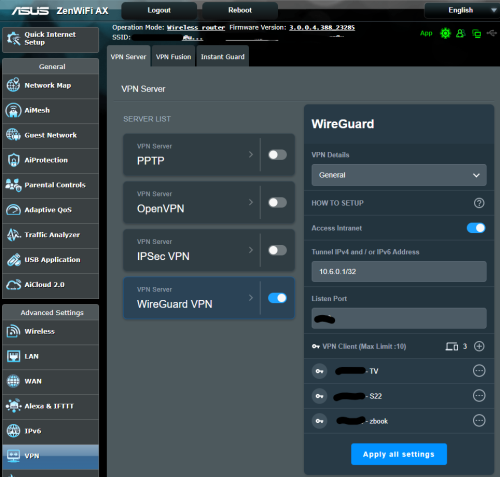
Did you mean WireGuard instead of Wireshark? I have set up WireGuard clients on devices like phones and Android TVs with my router as the WireGuard server, and it works quite well and is fast. However, I have stopped using it because it only allows tunneling over UDP and not TCP, which means I cannot bypass firewalls using TCP port 443.

user posted image

This post has been edited by eclectice: Jul 21 2023, 12:08 PM
XeactorZ
post Jul 21 2023, 10:12 AM

♥ PandaDog ♥
*********
All Stars
31,608 posts

Joined: Aug 2010
Been using TUF-AX3000 since year 2020 with unifi 300mbps package

All device can get around 200+ mbps speed with Wi-Fi 5

Since now I had more and more device support Wi-Fi 6, should I turn on Wi-Fi 6 on my router?

826 Pages « < 759 760 761 762 763 > » Top
 

Change to:
| Lo-Fi Version
0.0290sec    0.22    6 queries    GZIP Disabled
Time is now: 13th December 2025 - 03:56 PM