Welcome Guest ( Log In | Register )

Outline · [ Standard ] · Linear+

Home Networking ASUS Malaysia Networking User & Technical Support, Managed by ASUS Malaysia Representative

views
     
pokchik
post Jul 14 2018, 07:56 PM

I'm getting too old for this sh*t
******
Senior Member
1,304 posts

Joined: Mar 2010


Dear Sifus,

I'm just looking at RT-AC1300UHP specs and found this:

Attached Image

Q1
With AC capability stated as 'up to 150Mbps',
does this mean that for users of Time 300/500Mbps,
this router will then cap their wifi 5GHz speed
to the 150Mbps level max?

Versus

RT-AC86U:

Attached Image

Which can deliver 1700Mbps via 5GHz.

Assumption: users have devices capable to reach 300Mbps/500Mbps speeds too.

Are my observations correct?

----

Q2

I'm assuming that for normal users (i.e. gaming, streaming, dloading, etc.)
will not really feel that much of an effect if RT-AC1300UHP really caps with 150Mbps
wireless speed, am I right?

pokchik
post Jul 14 2018, 09:37 PM

I'm getting too old for this sh*t
******
Senior Member
1,304 posts

Joined: Mar 2010


ah, noted.. printing details.. bangwall.gif
pokchik
post Sep 16 2018, 06:34 PM

I'm getting too old for this sh*t
******
Senior Member
1,304 posts

Joined: Mar 2010


a snapshot of my network-connected equipments show 1-2 devices with ~800Mbps Tx/Rx,

Attached Image

does this mean that those equipments are really connecting with such speeds?

i'm using RT-AC86U.
pokchik
post Sep 16 2018, 06:39 PM

I'm getting too old for this sh*t
******
Senior Member
1,304 posts

Joined: Mar 2010


QUOTE(SilentVampire @ Sep 16 2018, 06:38 PM)
I think it is theoretical max speed than actual speed.
*
thought so. sweat.gif

just curious, thanks sifu~!
pokchik
post Oct 3 2018, 05:41 PM

I'm getting too old for this sh*t
******
Senior Member
1,304 posts

Joined: Mar 2010


QUOTE(St. Teh @ Oct 3 2018, 05:33 PM)
Hi Sifus

I stayed in a 3 storey house, currently using AC86U at ground floor, able to achieve >500mbps with LAN and 480mbps with wireless. Due to my major activities in 3rd floor, i using an old Asus router (RC12N) as a repeater, which not support AiMesh, speed test barely hit 45mbps.

Would it be a better i buy an AC68U which support AiMesh in order to boost up the speed, not looking forward to 400mbps but at least 300mbps+-

Thank you in advance
*
So your take:

Current:-

RC12N @ 3rd Floor (Repeater)
-----------------
N/A @ 2nd Floor
-----------------
AC86U @ Ground Floor (Main Router)


Your Proposal:-

AC86U @ 3rd Floor (Mesh Node)
-----------------
N/A @ 2nd Floor
-----------------
AC86U @ Ground Floor (Main Router)


- Not sure how effective it will be since I'm imagining that the distance between main router to mesh node is quite far (with 1-floor gap in-between).
- You probably need something on the 2nd Floor as an intermediate Mesh node instead?

How about:

AC68U @ 3rd Floor (Mesh Node)
-----------------
AC68U @ 2nd Floor (Mesh Node)
-----------------
AC86U @ Ground Floor (Main Router)


Not sure if this can deliver at least 300Mbps to 3rd floor, though (theoretically it should).
My proposal is to put 2x AC68U since it's sufficient to deliver your speed with lower cost compared to 2x AC86U.

I'm currently using 2x AC86U for my 2-storey house, but I can't vouch on the speed since I'm only connecting with 10Mbps.
No issues to get full 10Mbps in either floors though.

Other sifus should be able to give better advice, though.

This post has been edited by pokchik: Oct 3 2018, 05:48 PM
pokchik
post Oct 4 2018, 10:26 AM

I'm getting too old for this sh*t
******
Senior Member
1,304 posts

Joined: Mar 2010


QUOTE(ericwidaz @ Oct 4 2018, 10:16 AM)
Hi there,

I have signed up for Maxis' 30MB plan. I was thinking of getting ASUS RT-AC51U+ to replace Maxis' stock router. I was wondering, for the setup, is it similar to Unifi, or is it setup differently?
*
probably this can help?


pokchik
post Oct 8 2018, 02:21 PM

I'm getting too old for this sh*t
******
Senior Member
1,304 posts

Joined: Mar 2010


Dear ASUSMY, my network is setup via AiMesh with 2x RT-AC86U (local purchase) for Unifi 100Mbps.

I started having problems recently - Internet disconnected, initially intermittent and then permanently unable to connect (Physical LED lights up Red).

At first, I started to troubleshoot basic stuffs - re-start, reboot, change cables, etc. But it's unable to work.

I started to re-use the stock TM router DLink DIR-850L, and it's working fine.

I then focus again on my RT-AC86Us, tweaked some settings and still not working.
Interchanged the routers (Main/Mesh nodes), but still not working.

My last resort: try rolling back to an older firmware, because I remember that this problem materialized
after upgrading to the latest firmware 3.0.0.4.384_32799. I have used them since Jan'19 without issues.

So I downloaded an older FW 3.0.0.4.384_32797.. and it works fine!
Internet is connected again, no issues.

Any chance that you know why is this happening?

I've just rolled-back 1 router's FW and monitoring right now.

I'll perform some comparisons on new FW & WAN info (not into details, though) and share again in this topic later.


pokchik
post Oct 8 2018, 10:12 PM

I'm getting too old for this sh*t
******
Senior Member
1,304 posts

Joined: Mar 2010


QUOTE(blacktubi @ Oct 8 2018, 02:29 PM)
doh.gif

and here i thought my router wants to die on me..

seems like i have similar experience as this guy:
https://www.snbforums.com/threads/asus-rt-a...20/#post-427910
except mine comes with additional problem of internet disconnection & unable to re-connect again with internet with Version 3.0.0.4.384.32799
(no matter what i did: power cycle, factory reset, exchanging nodes, you name it).

i've now reverted to FW Version 3.0.0.4.384.32797, and just finished setting up again my mesh network
but i noticed some unstable wireless links with my mesh node.

will monitor in the next few days and probably will revert back to FW Version 3.0.0.4.384.21140 to check if it's really much more stable.

thanks sifu!

Update 08/10/2018 11:31PM

I spoke too soon. Internet disconnected just now, and I've just rolled back to FW Version 3.0.0.4.384.21140 for both routers. sweat.gif

Let's see how it fares in the next days.

This post has been edited by pokchik: Oct 8 2018, 11:33 PM
pokchik
post Apr 6 2020, 05:34 PM

I'm getting too old for this sh*t
******
Senior Member
1,304 posts

Joined: Mar 2010


QUOTE(ProfessorHi @ Apr 6 2020, 05:29 PM)
Kinda out of budget... So far, the current router can cover the whole of ground and first floor, just a bit issue with covering the second floor. Btw, how good is the latency for a mesh network?
*
what is your current router, btw?

my experience with 2x RT-AC86U Mesh:

https://forum.lowyat.net/index.php?showtopi...post&p=95498046

Speed : stable, 100Mbps DL/50Mbps UL for both nodes (main & mesh).

Main Node : RT-AC86U (1st Floor)
Ping 8-9ms
Jitter 1-2ms

Mesh Node : RT-AC86U (Gnd Floor)
Ping 9-10ms
Jitter 6-7ms

This post has been edited by pokchik: Apr 6 2020, 05:38 PM
pokchik
post Apr 6 2020, 06:01 PM

I'm getting too old for this sh*t
******
Senior Member
1,304 posts

Joined: Mar 2010


QUOTE(ProfessorHi @ Apr 6 2020, 05:49 PM)
Current Router is RT-N12HP, used for quite a long time. The Ping looks really good but the price is a problem... cry.gif
*
alamak, for 2.5 sty - RT-N12HP doesn't seem to fit bro.

i can tell you even for RT-AC86U, i started using 2yrs back with my Streamyx 8Mbps,
it was godsend - my old problems of wifi not stable, etc. really vanished with it.

now with Unifi 100Mbps and WFH since the past 3 weeks - i really am glad that i invested in it,
small difference compared to working in the office.

what's good with ASUS is the AiMesh feature - in case you have 2x ASUS routers
but your top floor is not covered well enough, you can add 1 more mesh node to boost the coverage.


This post has been edited by pokchik: Apr 6 2020, 06:08 PM
pokchik
post Nov 8 2020, 07:04 PM

I'm getting too old for this sh*t
******
Senior Member
1,304 posts

Joined: Mar 2010


-deleted.

This post has been edited by pokchik: Nov 8 2020, 07:08 PM
pokchik
post Nov 8 2020, 07:08 PM

I'm getting too old for this sh*t
******
Senior Member
1,304 posts

Joined: Mar 2010


QUOTE(Angel of Deth @ Nov 6 2020, 08:38 AM)
Everything, including factory reset. It worked fine if you only use the router, but not concurrently with the VOIP phone and IPTV STB.

ASUSs firmware just like their motherboard's BIOS always break something. I think this company have serious quality assurance's issue.
*
Asus FW.. I'm still using the very old RT-AC86U FW till now to avoid issues.

Background: https://forum.lowyat.net/index.php?showtopi...post&p=90516492

did I mention the WAN gets disconnected every time I turn-off my Desktop PC (which is LAN cable connected to the router)?
no issues with the older FW though.
pokchik
post Nov 8 2020, 07:09 PM

I'm getting too old for this sh*t
******
Senior Member
1,304 posts

Joined: Mar 2010


QUOTE(LawdRetep @ Nov 8 2020, 07:05 PM)
Hmmm i've tried using multiple cat 5e ethernet cables that were 100% working and supporting gigabit speeds. Still capped at 100mbps.

Talked to TM, they're in the process of opening a report. Think they'll get one of their technicians to come over one of these days.

If they can't find any issues on their end, probably router wonky like you said.
*
have you tried reverting back to the old TM router to check if there's any issue directly from TM's side?
pokchik
post Nov 8 2020, 08:16 PM

I'm getting too old for this sh*t
******
Senior Member
1,304 posts

Joined: Mar 2010


QUOTE(LawdRetep @ Nov 8 2020, 07:20 PM)
the only TM router i have is the ancient DIR-615 lol.

but i did check with a couple of friends around the area la.

They on 500Mbps could get +/- 360Mbps, which is perfectly reasonable i'd say.

but for me to get 100Mbps on a 800Mbps connection...
*
well, it's a point-based connection too..

rule of troubleshooting - A/B - B/A swap.

just to ensure you eliminate it's purely router problem.

but since TM will assign a technician to check - leave it to them then.
pokchik
post Jan 8 2021, 11:57 AM

I'm getting too old for this sh*t
******
Senior Member
1,304 posts

Joined: Mar 2010


QUOTE(Ichibanichi @ Jan 7 2021, 01:17 AM)
Today my new ASUS TUF AX3000 arrived.

Just complete setup to replace my old RT-AC68U

[attachmentid=10749889]

To  ASUSmy
Now my Maxis VOIP solve already

Next try to setup ai-mesh with AC68U  smile.gif  smile.gif
*
any issues with adding RT-AC68U as mesh node for your TUF-AX3000?
pokchik
post Jan 8 2021, 12:10 PM

I'm getting too old for this sh*t
******
Senior Member
1,304 posts

Joined: Mar 2010


QUOTE(laksamana @ Jan 8 2021, 12:03 PM)
AC68U is still a very capable router imo
*
it still is, though one of my RT-AC68U goes kaput (been using 2x with AI Mesh) and now I'm looking at purchasing a newer AX router like you.

glad to hear that it's working fine.

now time to shop for AX router.
pokchik
post Jan 8 2021, 04:48 PM

I'm getting too old for this sh*t
******
Senior Member
1,304 posts

Joined: Mar 2010


QUOTE(laksamana @ Jan 8 2021, 12:59 PM)
I'm using AX86U as main, with AX3000 and AX55 as mesh nodes

I won't recommend AX55, as the signal strength on both 2.4 and 5 is poor imo
*
Expected as it’s a cheaper router. Thanks for the tip!
pokchik
post Aug 27 2023, 04:16 PM

I'm getting too old for this sh*t
******
Senior Member
1,304 posts

Joined: Mar 2010


Hi ASUSmy,

I've been using my trusted RT-AC86U (2x units with AiMesh) since 2018 - the performance was perfect for my usage. I love it.

TLDR;

a) My RT-AC86U cannot achieve the full 500Mbps Unifi speedtest.
b) Factory reset & simple re-setup/config cannot connect to the internet.
c) iPhone 13 cannot connect to the 5G wifi.


===============================


There's a slight issue recently (not that critical but it bugs me) when I re-contracted for SWU3.0 (300Mbps with free upgrade to 500Mbps for 1 year).

1. The speedtest result is always limited to ~390Mbps to ~420Mbps. DL speed is okay.

user posted image

I've configured the provided DLink routers by TM, and I can achieve ~500Mbps as noted below, showing that it's not a problem on the line/Unifi side.

user posted image


The ASUS routers are running with the latest firmware.
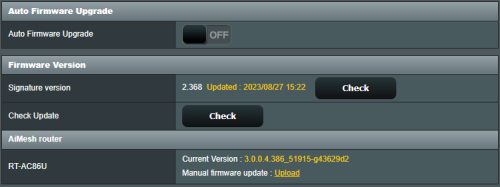
user posted image


2. I started troubleshooting my RT-AC86U routers, including :

- Performing factory reset.
- Interchanging the main/mesh units.

Nothing works yet, also leading me to further problems :

3. Performing factory reset - the units were reset, but the funny thing is - my standard WAN/Unifi configuration cannot link the router to connect to the internet.

- Tried with either Advanced setup or Wizard setup, both with just configuring my PPoE Unifi username/password, not touching anything else, yet the router cannot connect to the internet.

4. I am able to solve this if I just upload back my current saved configuration settings (*.cfg file) - luckily I saved the setting.

- The funny thing is, the configs from (3) vs. (4) are literally the same Unifi username/password, but the one done manually after Factory Reset doesn't work. *confused*

5. Now my last problem is.. somehow, after doing these troubleshootings, my iPhone 13 cannot connect to the 5G Wifi.. it just states 'Unable to join the network'
whereas all my other gadgets, phones, smart tv etc. connects just fine (even my iPhone XR).

It works well before I did all the troubleshooting, also it can connect to the DLink 5G wifi just fine.

Any thoughts how to troubleshoot further? I'm tempted to try and upload an older firmware as my next course of action.. but any other proposals are welcomed.

Thank you for your support!

This post has been edited by pokchik: Aug 27 2023, 04:16 PM

pokchik
post Sep 12 2023, 10:23 PM

I'm getting too old for this sh*t
******
Senior Member
1,304 posts

Joined: Mar 2010


QUOTE(ASUSmy @ Aug 28 2023, 10:39 AM)
When doing the speedtest, do make sure the QoS and AiProtection is disabled.
Thank you
*
user posted image

duhhhhh.. I forgot to 'Apply' after turning off QoS.. now it works with full speed..


Change to:
| Lo-Fi Version
0.0726sec    0.45    7 queries    GZIP Disabled
Time is now: 13th December 2025 - 04:13 AM