

QUOTE(bear1009 @ Dec 8 2022, 12:22 PM)
i saw an update 388 for V2 how about V1
Be patience. It'll come sooner or later as ASUS did promise to release the 388 firmware for all AX routersThis post has been edited by sHawTY: Dec 8 2022, 12:43 PM
Home Networking ASUS Malaysia Networking User & Technical Support, Managed by ASUS Malaysia Representative
|
|
 Dec 8 2022, 12:42 PM Dec 8 2022, 12:42 PM
|
 
All Stars
14,909 posts Joined: Jul 2005  
|
QUOTE(bear1009 @ Dec 8 2022, 12:22 PM) i saw an update 388 for V2 how about V1 Be patience. It'll come sooner or later as ASUS did promise to release the 388 firmware for all AX routersThis post has been edited by sHawTY: Dec 8 2022, 12:43 PM bear1009 liked this post
|
|
|
|
|
|
Dec 9 2022, 03:47 PM
Show posts by this member only | IPv6 | Post
#14942
|

Senior Member
966 posts Joined: Apr 2016 
|
QUOTE(joeyrm @ Dec 4 2022, 09:58 PM) Hi all, My one is ADP-45BW 19V 2.37A don't know which barrel sizeI need to find a replacement power adapter for an RT-AX88U at my parents house. I,’ve been searching onlne but not sure what is wattage (45w or 65W) and connector size (4.0mm*1.3mm or 5.5mm*2.5mm) comparible with the router. I’ve been getting different information from different websites and currently unsure which one to choose. Appreciate if someone can help me on this. TQ  |
|
|
Dec 9 2022, 04:54 PM
|

Junior Member
116 posts Joined: Jul 2005
|
QUOTE(prokiller1199 @ Dec 9 2022, 03:47 PM) My one is ADP-45BW 19V 2.37A don't know which barrel size Thanks bro. |
|
|
Dec 13 2022, 11:47 PM
|

Junior Member
377 posts Joined: Nov 2010
|
QUOTE(neekun @ Dec 5 2022, 07:51 AM) I hardly restart my Asus router, connection is consistently at 800mbps unless there is network issue with TM. Maybe once a month i do a manual restart or when there is a firmware update then i am forced to restart. I am on GT-AX11000. Did you try calling TM on this? QUOTE(BTS1501 @ Dec 5 2022, 01:49 PM) 2 options, either schedule daily reboot in system or downgrade firmware (until you find one that is stable), remember to do hard reset. Had encountered this on old Asus router, after downgrade firmware no more slow download speed after a few hrs or days QUOTE(xphr3ak @ Dec 5 2022, 03:45 PM) Hi, No issue here. Speed drop abit but not that drastic like yours. QUOTE(prokiller1199 @ Dec 5 2022, 05:43 PM) Never encounter this low download speed on my router. Already on for 6 months uptime. Using ax88u btw. What I think maybe the wireless chip overheat or bug then it slow down your wifi performance maybe. QUOTE(blacktubi @ Dec 6 2022, 04:00 PM) I changed the firmware and then did a hard reset. So far already turned on for 7-8 days with no problem with the wifi speed. It remains consistent 700-800mbps. Will continue to monitor. Thanks a lot guys. |
|
|
Dec 15 2022, 06:52 AM
|
|
Junior Member
76 posts Joined: Dec 2008
|
Hi,
I need help. I just bought asus xt12 mesh wifi. But when I do speed test on my mobile phone, I only got 300-400Mbps but my unifi is 800Mbps. The result would be the same anywhere in the house, even if I stood directly in front if the router. May I know what can I do to get max speed? This post has been edited by pull007: Dec 15 2022, 06:53 AM |
|
|
Dec 15 2022, 09:19 AM
|
|
Senior Member
966 posts Joined: Apr 2016
|
QUOTE(pull007 @ Dec 15 2022, 06:52 AM) Hi, What phone? to get full speed, u need WiFi 6 + 160mhz bandwidth.I need help. I just bought asus xt12 mesh wifi. But when I do speed test on my mobile phone, I only got 300-400Mbps but my unifi is 800Mbps. The result would be the same anywhere in the house, even if I stood directly in front if the router. May I know what can I do to get max speed? |
|
|
|
|
|
Dec 17 2022, 09:51 PM
|
|
Senior Member
1,185 posts Joined: Nov 2020
|
QUOTE(pull007 @ Dec 15 2022, 06:52 AM) Hi, if you not happy i can buy it from you lmao. i cant afford new oneI need help. I just bought asus xt12 mesh wifi. But when I do speed test on my mobile phone, I only got 300-400Mbps but my unifi is 800Mbps. The result would be the same anywhere in the house, even if I stood directly in front if the router. May I know what can I do to get max speed? |
|
|
Dec 20 2022, 11:18 PM
|
|
Senior Member
1,185 posts Joined: Nov 2020
|
Hello, I am overseas now, and got new phone.
I am unable to control my asus router anymore through the app because i forgot to bind it with my account is there any way i can connect the app back without being there in person? I help parents with wifi issues, so will be good if i can access it on my phone i have tried ddns, downloaded openvpn and connected, open app still ask to connect to wifi even when internet is routed through home router any tips ? |
|
|
Dec 21 2022, 03:12 PM
|

Junior Member
11 posts Joined: Jan 2011
|
HI Asus support,
i'm having a weird issue whereby i can't access certain websites, i tried using google DNS and cloudflare DNS same, tried turning off AI protection same, turned off firewall same, tried adding website into allowed exception list no luck, same goes with mobile device and any other computer in my home can't access some website. this persist in both LAN & Wifi, i've even gone ahead and performed a full reset of the router as well. FW is updated as well i tried using personal hotspot and access website, no issues. Model: TUF Gaming AX5400 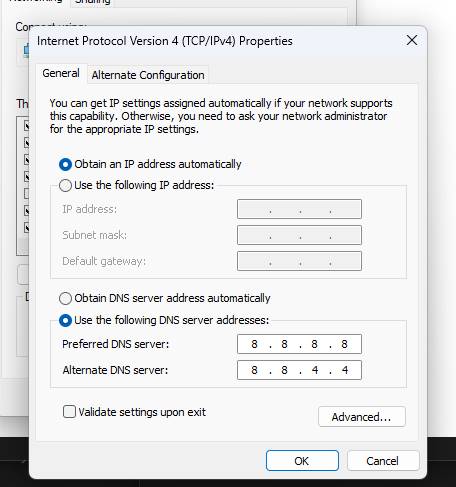 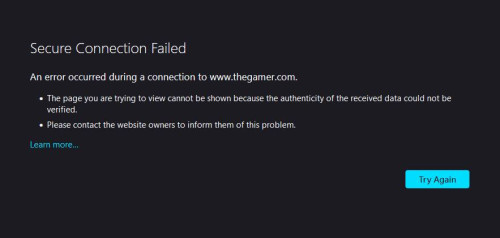 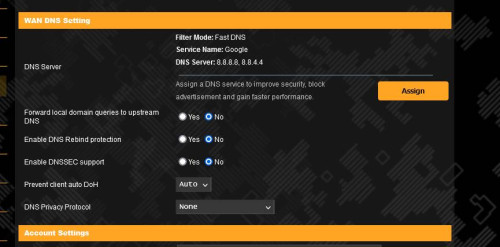 |
|
|
Dec 22 2022, 08:18 AM
Show posts by this member only | IPv6 | Post
#14950
|

Junior Member
374 posts Joined: Mar 2010
|
QUOTE(trishala21 @ Dec 21 2022, 03:12 PM) HI Asus support, Which ISP are you using? (TM Unifi, Maxis, Digi, Celcom, Time, Allo)i'm having a weird issue whereby i can't access certain websites, i tried using google DNS and cloudflare DNS same, tried turning off AI protection same, turned off firewall same, tried adding website into allowed exception list no luck, same goes with mobile device and any other computer in my home can't access some website. this persist in both LAN & Wifi, i've even gone ahead and performed a full reset of the router as well. FW is updated as well i tried using personal hotspot and access website, no issues. Model: TUF Gaming AX5400 |
|
|
Dec 25 2022, 02:52 PM
Show posts by this member only | IPv6 | Post
#14951
|

Senior Member
828 posts Joined: Dec 2010
|
Hi, my asus RT-AX55 router seems to stuck at firmware "9.0.0.4.386_48173"
not able to upgrade the firmware via the WebUI, it able to upload but after restart the version number stayed the same any idea ? Tried reset the router still the same |
|
|
Dec 25 2022, 09:37 PM
|
|
Junior Member
11 posts Joined: Jan 2011
|
QUOTE(afif92 @ Dec 22 2022, 08:18 AM) Which ISP are you using? (TM Unifi, Maxis, Digi, Celcom, Time, Allo) i'm using time fiber |
|
|
Dec 26 2022, 03:35 AM
Show posts by this member only | IPv6 | Post
#14953
|
|
Junior Member
15 posts Joined: Jul 2011
|
Any news on ET12 in Malaysia? gibranhashim liked this post
|
|
|
|
|
|
Dec 26 2022, 01:15 PM
|

Junior Member
151 posts Joined: Sep 2011
|
how to correctly connect own router to maxis fibre? currently i am using asus xt8 but i am not getting the full speed Singh93 liked this post
|
|
|
Dec 26 2022, 03:11 PM
|
 
Elite
8,415 posts Joined: Jul 2008
|
QUOTE(adurian @ Dec 26 2022, 01:15 PM) how to correctly connect own router to maxis fibre? currently i am using asus xt8 but i am not getting the full speed Are you referring to full speed when connected to the WiFi on the mesh node? |
|
|
Dec 26 2022, 11:29 PM
|
|
Junior Member
151 posts Joined: Sep 2011
|
QUOTE(blacktubi @ Dec 26 2022, 03:11 PM) Are you referring to full speed when connected to the WiFi on the mesh node? does mesh effect speed? cuz currently my i paid for 300mbps but only barely get 100, avg around 80ish |
|
|
Dec 27 2022, 03:02 PM
|
|
Senior Member
1,141 posts Joined: Apr 2010 From: USJ
|
QUOTE(adurian @ Dec 26 2022, 11:29 PM) does mesh effect speed? cuz currently my i paid for 300mbps but only barely get 100, avg around 80ish Move the node/2nd router closer to main router. If possible there less wall in between both router for optimal connection. It will be better if the connection is wired instead of wifi so can easily get full speed. Sometimes even changing the side of same wall can do wonders on the wifi coverage. Just notice it this week on setting up office wifi. From a deadzone even at 2.4Ghz to ok now the whole 3 storey building have wifi. Be ready to be a handyman & chargeman lor. Good thing about Asus Aimesh can play around with node for optimal wifi coverage before drilling a hole. |
|
|
Dec 28 2022, 09:01 AM
|
|
Junior Member
58 posts Joined: Mar 2016
|
I'm posting this to help in case someone use ASUS BRT-AC828 and encountered the same router hang issue every few days like I did.
In past I've complaint that ASUS BRT-AC828 hang in every few days, tried everything like factory reset, flash beta firmware from developer, disable IPV6, disable WiFi, disable traffic analyzer, change new power adapter, etc all won't work. Today I've found the culprit is AI Protection, after disabled I've never encounter router hang issue, to date it has been fine for continuous few months. My company has around 140+ connected devices via LAN/wireless, this is sad to trade-off safety feature for reliability but I guess no choice. PS - For those who think it is out of CPU/RAM issue, no, this router is a beast the CPU utilization rarely exceed 20% and the RAM (with AI Protection on) rarely exceed 70%. My guess is the AI Protection module got overload and hang the router. 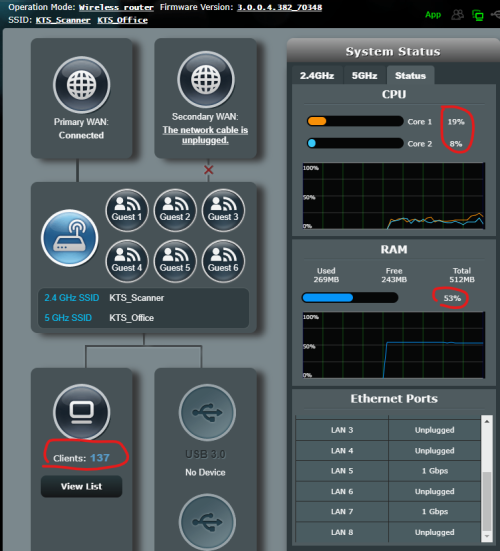 This post has been edited by Ching Aik: Dec 28 2022, 09:18 AM |
|
|
Dec 28 2022, 10:25 AM
|

Senior Member
2,734 posts Joined: Mar 2008
|
QUOTE(trishala21 @ Dec 21 2022, 03:12 PM) HI Asus support, I'll simply give my configuration...it appears to work OK with the Asus ZenWIFI XT8...basically, it's the same settings page as your Asus router, except for the DNS Privacy Protocol setting and DNS Filter mode. i'm having a weird issue whereby i can't access certain websites, i tried using google DNS and cloudflare DNS same, tried turning off AI protection same, turned off firewall same, tried adding website into allowed exception list no luck, same goes with mobile device and any other computer in my home can't access some website. this persist in both LAN & Wifi, i've even gone ahead and performed a full reset of the router as well. FW is updated as well i tried using personal hotspot and access website, no issues. Model: TUF Gaming AX5400 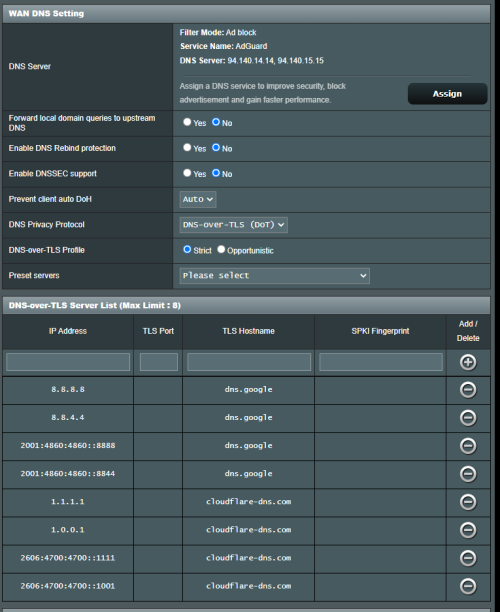 You should get this result when performing the secure DNS testing with Chrome browser Version 108.0.5359.125 (Official Build) (64-bit). You can enable ECH in the chrome://flags setting. 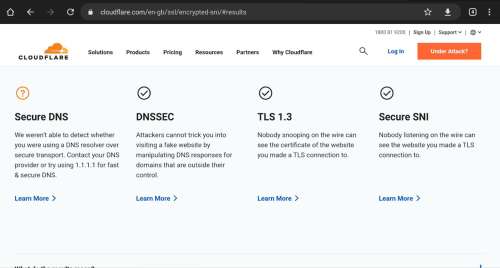 chrome://flags setup for Encrypted Client Hello (ECH) 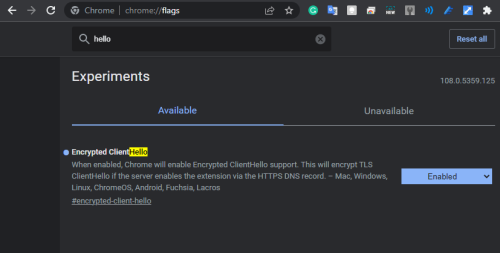 Current ECH status in the Chrome browser: https://chromestatus.com/feature/6196703843581952 More about ECH https://blog.cloudflare.com/encrypted-client-hello/ The reason why I get orange (?) mark for the Secure DNS result is because I've changed my default Secure DNS provider in my Chrome browser settings. 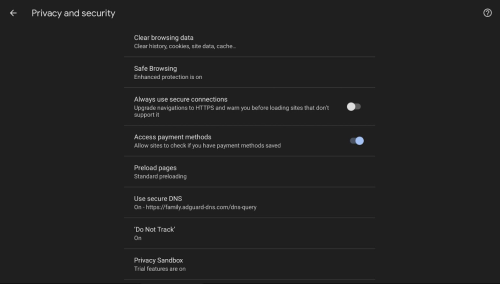 You will not be able to use the Secure DNS setting if your Chrome browser is administered by your workplace.  www.thegamer.com appears to be compliant with the most recent TLS domain configuration: 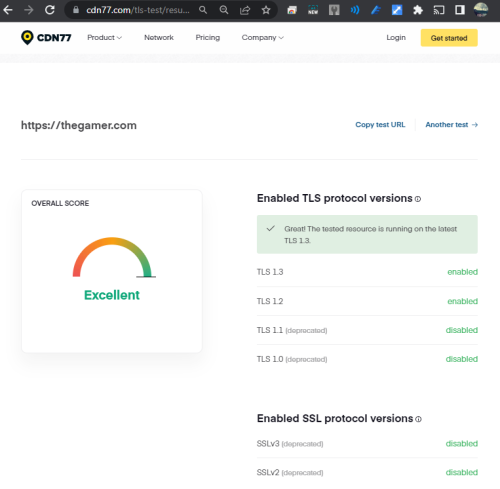 This post has been edited by eclectice: Dec 29 2022, 12:35 PM |
|
|
Dec 29 2022, 12:09 PM
|
|
Senior Member
3,544 posts Joined: Sep 2008
|
Looking forward to some wifi 7 based device being teased in CES! and hopefully we see some launch by Computex. But I'm guessing if anything, products this year would be based on draft specs and not finalised specs.
|
| Change to: |  0.0427sec 0.0427sec
 0.61 0.61
 6 queries 6 queries
 GZIP Disabled GZIP Disabled
Time is now: 12th December 2025 - 05:16 PM |
 Quote
Quote