Welcome Guest ( Log In | Register )

Outline · [ Standard ] · Linear+

Home Networking ASUS Malaysia Networking User & Technical Support, Managed by ASUS Malaysia Representative

views
     
sadlyfalways
post Jan 30 2021, 02:23 AM

Regular
******
Senior Member
1,185 posts

Joined: Nov 2020
hi guys, today my ac86u wifi mesh dropped for no apparent reason and refused to connect again. Didn’t show as node offline in asus webpage of the main ax88u router.

why is it suddenly dropping mesh after so long? i recently enabled smart connect, i know one is ax and one is not but would it be causing problems ? my macbook disconnects suddenly many times a day, and it sometimes does't reconnect automatically. it does not have wifi 6 so i dont think that is a factor
sadlyfalways
post Feb 17 2021, 01:53 PM

Regular
******
Senior Member
1,185 posts

Joined: Nov 2020
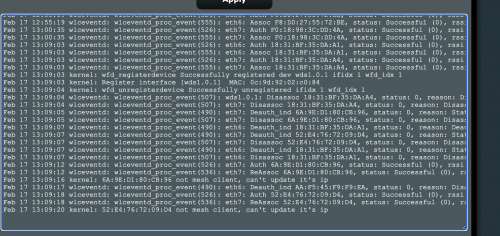
Hi, I'm running an AX88U and AC86U as AiMesh with latest firmware with AiMesh 2.0, and i keep getting connection drops and the node going offline especially after downloading torrents whilst connected to the mesh router.

What is this successfully registered dev wds1.0.1 and "not mesh client, can't update it's ip"?

user posted image
sadlyfalways
post Feb 18 2021, 04:19 AM

Regular
******
Senior Member
1,185 posts

Joined: Nov 2020
QUOTE(ASUSmy @ Feb 17 2021, 02:13 PM)
Hi sadlyfalways,

Can you trace what is the client with the same MAC address that are getting the "not mesh client, can't update it's ip"?

And is this the client that having connection drop?

Thank you
*
Hello, I found out the issue was a bad Ethernet cable. I replaced yesterday

Today weirdly I’m getting the “serial link appears to be disconnected” and “timeout waiting for pado packets” again after many months.

The only new thing I did was to add an additional ac66u-b1 as a wired aimesh node through a power line connection for the back of my house.

Could this new, old router be causing the stability issues? I am also unable to check for new firmware as am getting a warning saying the router is unable to connect to ASUS servers to check
sadlyfalways
post Feb 18 2021, 03:50 PM

Regular
******
Senior Member
1,185 posts

Joined: Nov 2020
QUOTE(ASUSmy @ Feb 18 2021, 03:19 PM)
Hi sadlyfalways,

You can try update the firmware of the RT-AC66U B1 individually and add it into the AiMesh again.

Thank you
*
Thank you. Just updated, will update if it still fails
sadlyfalways
post Feb 18 2021, 04:38 PM

Regular
******
Senior Member
1,185 posts

Joined: Nov 2020
QUOTE(ASUSmy @ Feb 18 2021, 03:19 PM)
Hi sadlyfalways,

You can try update the firmware of the RT-AC66U B1 individually and add it into the AiMesh again.

Thank you
*
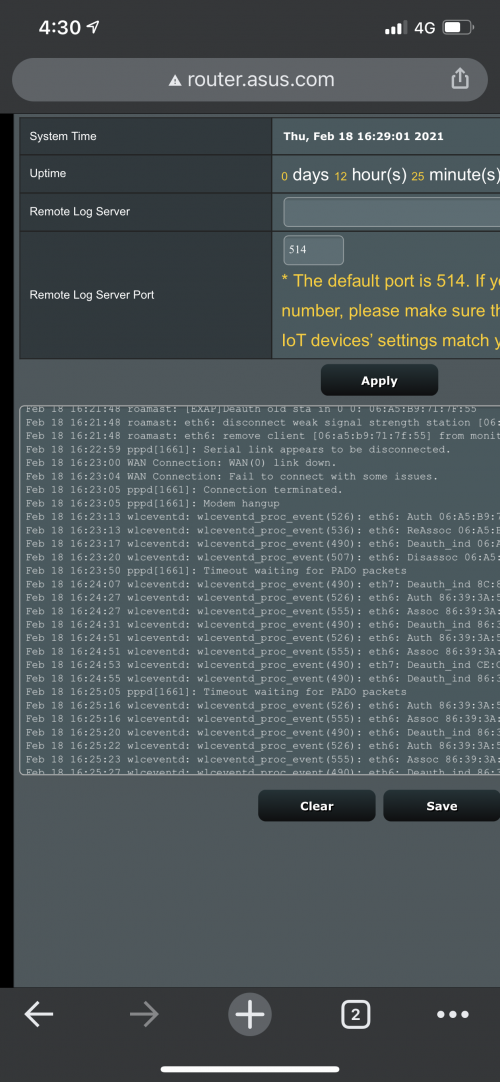
Hello, I’ve updated the ac66u and that is okay but the internet just went down again, and the log says wan is disconnected even though the modem is turned on and the phone line still works

Could this be an aimesh compatibility issue? Why would that affect the internet connection? And why does the internet not reset itself after it fails ? I can reset the router using the web ui without doing anything to the modem and it all works again

user posted image
sadlyfalways
post Feb 19 2021, 01:43 PM

Regular
******
Senior Member
1,185 posts

Joined: Nov 2020
QUOTE(ASUSmy @ Feb 19 2021, 01:18 PM)
Hi sadlyfalways,

The Internet disconnection is happen when it unable to detect the signal from the modem. "Serial link appears to be disconnected"

If you want to know whether there is compatibility issue, you can just turn of the RT-AC66U and monitor the connection.

Thank you
*
Hello, thank you for the reply

Yes I turned it off after the last connection drop and it hasn’t dropped the connection since.

If this ac66u is causing issue, what router can I buy that does not cause problems ? Something with aimesh 2.0? Or is it best to just leave it with 1 aimesh node?
sadlyfalways
post Feb 21 2021, 06:58 PM

Regular
******
Senior Member
1,185 posts

Joined: Nov 2020
Hey guys need some help, I’m using AX88U and ac86u as a mesh together. Been going great for almost a year.

5 days ago the internet started to drop, but before the internet drops all the WiFi devices would switch from the main router to the aimesh as the main router stops broadcasting. I just noticed this. After the WiFi drops, the web interface for the main router (AX88U) would not be accessible for a few minutes.

After a few minutes can log in and see the logs with the usual serial connection appears to be disconnected, modem hangup and timeout waiting for pado networks.

I initially thought it was due to adding a new router into the aimesh but even after removing it from the whole network it is still giving this issues.

At the start it used to be once a day, four days later it is happening multiple times a day. The latest one wasn’t even 20 minutes since the reset. What can I do ? Is anyone else having this problem too?
sadlyfalways
post Feb 23 2021, 12:35 PM

Regular
******
Senior Member
1,185 posts

Joined: Nov 2020
QUOTE(ASUSmy @ Feb 23 2021, 10:11 AM)
Hi sadlyfalways,

Can you send a feedback using the router GUI at Administration->Feedback.

PM me your email address once done.

Thank you
*
Hello, I’ve tried to do that multiple times when the issues happen, but the router refuses to regain an internet connection. Even if I switch the “internet” in the routers main page one and off, or restart the modem.

I’ve downloaded one of the logs, is there any other way I can send it to you guys ?
sadlyfalways
post Apr 18 2021, 10:30 AM

Regular
******
Senior Member
1,185 posts

Joined: Nov 2020
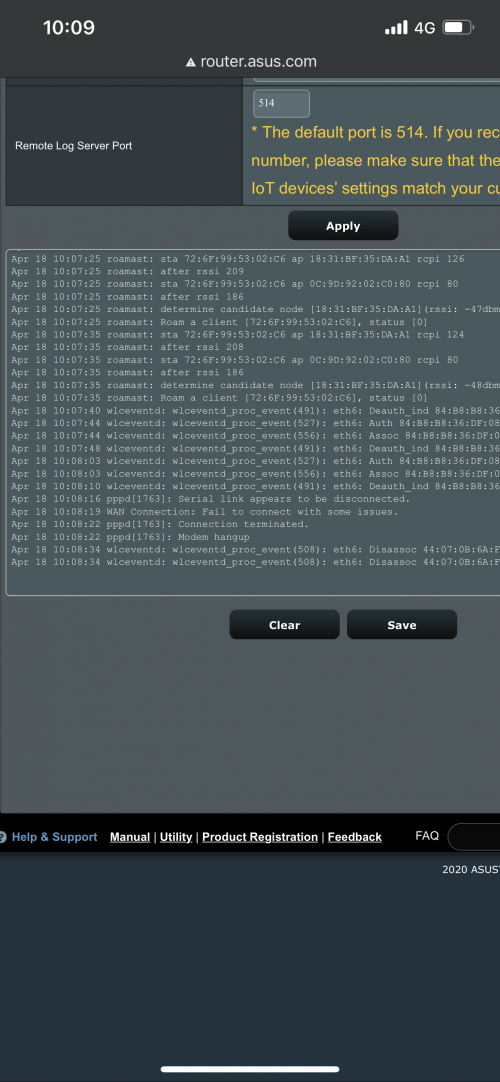
Hello, I am still having issues with my AX88U that for the past two months it is giving the serial link appears to be disconnected error.

Normally if modem drops out, internet will be restored by itself and WiFi devices will not be affected right ? But for this router of mine, all WiFi devices will be kicked off the main router and onto the AiMesh router, and the web gui will not be accessible for a good 30 seconds, before being accessible and showing the the internet is disconnected.

I’ve been complaining about this issue for months, doesn’t happen on my baby deco routers which stay connected indefinitely and cost 1/10 the price

I did not pay so much and invest in a product that is so half baked, is there any way to get compensation or refund within the warranty period ? I’ve really had enough of this router and the multiple disconnections a day

I even had to disable all of the features it came with such as ofdma and the higher end stuff, even qos caused to go down more often.

user posted image
sadlyfalways
post Apr 18 2021, 06:40 PM

Regular
******
Senior Member
1,185 posts

Joined: Nov 2020
QUOTE(blacktubi @ Apr 18 2021, 06:25 PM)
What routers do you use in your AiMesh setup?
I will suggest upgrading to the stock firmware and perform a full hard reset to fix your AiMesh issues.

Merlin is not always on the latest ASUS GPL branch that contain AiMesh related fixes. wink.gif
*
My main router is the AX88U and I have a wired AC86U as aimesh
sadlyfalways
post Apr 19 2021, 03:11 PM

Regular
******
Senior Member
1,185 posts

Joined: Nov 2020
QUOTE(ASUSmy @ Apr 19 2021, 11:18 AM)
Hi sadlyfalways,

May I know which firmware are you using? It is the beta firmware I PM you before?

Thank you
*
Hello, yes I did upgrade to that firmware you sent to me, but I’m not sure if it worked because I recently also got another firmware update notification and I did update to whatever it asked me to

Now I am using 3.0.0.4.386_42095-gcd938f7
sadlyfalways
post May 12 2021, 06:39 PM

Regular
******
Senior Member
1,185 posts

Joined: Nov 2020
But I have another question, with my ASUS AX88U, I feel websites and small items load much slower. Speedtest are wonderful, ping test also normal only, but like thumbnails and profile pictures take forever to load on my asus router.

I thought this was my internet issue because some other places I tried also had the issue and some didn’t

But when I put back my old backup routers, everything was light night quick. Usually when I open a YouTube videos and scroll through the comments, none of their profile pictures load in time and take about 15-20 seconds. With the tp link it is all loaded before I can scroll

I found that with tp link and maybe even dlink, the dns it shows in the phone settings is the dns I set, either google or unifi public dns. But with the asus the dns is the default gateway and could this be the cause of the lacklustre performance when pinging multiple small pictures on a network?
sadlyfalways
post May 13 2021, 08:43 PM

Regular
******
Senior Member
1,185 posts

Joined: Nov 2020
QUOTE(blacktubi @ May 13 2021, 06:27 PM)
ASUS routers are using dnsmasq technology which is supposed to improve performance.

This means the router is acting like a middleman which cache all DNS requests for faster result for repeated requests. This is why you see the router IP appearing as the DNS server at your computer.

However, if you find that it’s not working properly, you can disable it by inserting your desired DNS server in the LAN page on ASUSWRT web settings page.
*
Ayy thank you very much for the info. honestly i think i'm gonna switch to the deco system to have all nodes in wifi 6. gonna miss all of the great features though sad.gif

need to find a way to sell the asus safely first hahahaha
sadlyfalways
post May 14 2021, 11:54 AM

Regular
******
Senior Member
1,185 posts

Joined: Nov 2020
QUOTE(blacktubi @ May 13 2021, 10:32 PM)
Why you want to switch though?

Since you already have the RT-AX88U which is a great product, you can just purchase another ASUS WiFi 6 router to form a mesh WiFi network.
*
Basically since I decided to upgrade to the ASUS I’ve been having horribly unreliable internet. The first 3 months of ownership the WiFi 6 was so bad it didn’t work with my apple devices. Then the internet dropping started, I thought it was a Unifi problem but then it stopped after an update. Was fine until an update last October, November and the internet dropping now happens more than once daily.

I’m fine with disconnecting and reconnecting, I’m not a gamer, but this router drops WiFi and the wan together, and the wan does not come back up without a reboot so we are stuck without WiFi until someone reboots the router 2-3 times a day.

ASUS Malaysia has been great trying to help me, but it’s been months and honestly I feel I did not sign up for this when I paid the premium price I did

A single unit deco x20 is more reliable and provides better range and speed ( because the asus 2.4ghz never worked with my apple devices properly) and it only costs rm300 lmao


Sorry rant just don’t know what to do anymore


It’s very similar to this issue


https://www.snbforums.com/threads/rt-ax88u-...connects.72173/

https://www.snbforums.com/threads/rt-ax88u-...connects.72173/
sadlyfalways
post Dec 17 2022, 09:51 PM

Regular
******
Senior Member
1,185 posts

Joined: Nov 2020
QUOTE(pull007 @ Dec 15 2022, 06:52 AM)
Hi,

I need help. I just bought asus xt12 mesh wifi.

But when I do speed test on my mobile phone, I only got 300-400Mbps but my unifi is 800Mbps. The result would be the same anywhere in the house, even if I stood directly in front if the router.

May I know what can I do to get max speed?
*
if you not happy i can buy it from you lmao. i cant afford new one
sadlyfalways
post Dec 20 2022, 11:18 PM

Regular
******
Senior Member
1,185 posts

Joined: Nov 2020
Hello, I am overseas now, and got new phone.

I am unable to control my asus router anymore through the app because i forgot to bind it with my account

is there any way i can connect the app back without being there in person? I help parents with wifi issues, so will be good if i can access it on my phone

i have tried ddns, downloaded openvpn and connected, open app still ask to connect to wifi even when internet is routed through home router

any tips ?
sadlyfalways
post Jan 11 2023, 06:56 PM

Regular
******
Senior Member
1,185 posts

Joined: Nov 2020
QUOTE(silverbolt143 @ Dec 30 2022, 06:39 PM)
Ive been using 2packs XT8 for 15 months but lately it keep on crashing and rebooting for no apparent reason regardless of configuration or firmware version even after hard reset.. not sure whats the problem but sent it for RMA to Advancenet and thanks a lot they managed to claim for new sealed unit from ASUS.. while waiting for the XT8 RMA, i bought XT12.. anybody interested with the new sealed 2 packs xt8 can reach out to me..
*
ah man i thought you are going to sell your xt12 haha.

how has it been btw? I am planning on getting that or either tp link omada or ubiquiti stuff.

dream machine pro only 349 euro where i am now, might buy and bring back malaysia to setup
sadlyfalways
post May 6 2023, 01:45 AM

Regular
******
Senior Member
1,185 posts

Joined: Nov 2020
Hello, I have an AC86U that I use as the main gateway at my house.

I live overseas and use it to vpn back into the house using tunnelbrick and ASUS instant guard. Nobody has access to the router and knows the router admin password.

Today I was unable to connect using tunnel brick, which I thought was unusual. I then tried to ddns into my synology NAS and that worked as normal.

I then tried the ASUS app which said authentication failed, and I inputted my password until it said try again in 5 minutes

I remember updating the firmware recently and I can’t remember if I had any of the AI protections turned on

Wi-Fi and internet seems to be working normally back home, and I can’t check if the dns has been changed yet

Has this happened to anyone before? Either being locked out of all the apps, or someone hacked the router and changed the admin details?

Why would they do that if they want to remain under the radar?

Tf
sadlyfalways
post Jul 20 2023, 02:53 PM

Regular
******
Senior Member
1,185 posts

Joined: Nov 2020
Hey guys! I'm in the midst of contemplating which new router to buy before upgrading to unifi 1gbps plan

Anyone here who is using an X model asus router with wireshark to 3rd party vpn?

May I know what kinds of speeds you can get?

Right now i'm using an old ac86u as my vpn router, and tp link deco x90 as access point

deco can reach 800mbps without vpn

if enable vpn to singapore surfshark server via asus router can get 200mbps

its ok buy with multiple people at home can get really show

what speeds do you guys get?
sadlyfalways
post Feb 19 2024, 11:41 PM

Regular
******
Senior Member
1,185 posts

Joined: Nov 2020
QUOTE(silverbolt143 @ Feb 19 2024, 11:00 PM)
Thanks bro for the heads up...  notworthy.gif
- do i need to use a specific LAN port on the ONR to connect to the Asus router WAN port?
- that mean i can setup the PPPOE connection as usual on my Asus router?
*
I’m wondering this too, what about voip? Can still use the dlink to connect phone like normal unifi btu?

2 Pages  1 2 >Top
 

Change to:
| Lo-Fi Version
0.0597sec    0.51    7 queries    GZIP Disabled
Time is now: 12th December 2025 - 06:34 PM