however, can I suggest you guys to do something like this perhaps?
there are many TIME broadband customers out there who wish to change to ASUS router but they dont know how to do it, it is not straight forward like UNIFI since they need to connect to stock Huawei HG8145X6 ONT GPON Terminal and change the settings into BRIDGE mode
hi all, i have Asus Aimesh with TUF AX3000 as main router and AX56U as aimesh Node.
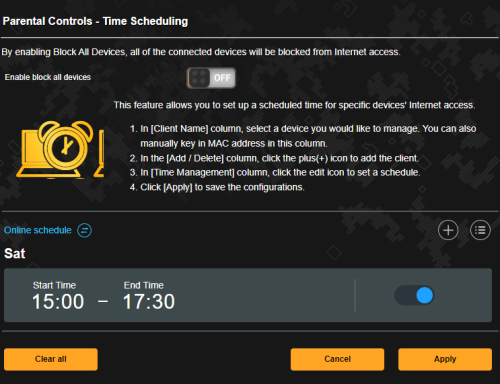
I have 3 pc connected to the wireless network. My issue is that i notice one of desktop pc with mercury wireless adapter connected to the wireless network, is not detected in the device list, and hence i couldnt set bandwidth limit or parental control over it.
Is there anyone has similar missing device issue? Appreciate your help on this. thank you.
hi all, i have Asus Aimesh with TUF AX3000 as main router and AX56U as aimesh Node.
I have 3 pc connected to the wireless network. My issue is that i notice one of desktop pc with mercury wireless adapter connected to the wireless network, is not detected in the device list, and hence i couldnt set bandwidth limit or parental control over it.
Is there anyone has similar missing device issue? Appreciate your help on this. thank you.
Hi sifu, can I setup my current AX3000 as main router and setup fiberhome ax3000 provided by unifi as mesh? I know that aimesh will not support it but any other solution that I can utilize the mesh router? Or can i use fiberhome as network expander?
Hi sifu, can I setup my current AX3000 as main router and setup fiberhome ax3000 provided by unifi as mesh? I know that aimesh will not support it but any other solution that I can utilize the mesh router? Or can i use fiberhome as network expander?
Do you have a wired connection from main to fiberhome you planned to put? If yes, you can set as Access Point. Of course you will see a lot of SSID in the wifi menu because 2 router each share 2.4ghz and 5ghz signal. So total of 4. If you dont have a wired connection, I not really recommend because the speed will cut a lot, the router have to relay wifi signal from main router than let you connect once again. basically your speed will cut at least half.
Do you have a wired connection from main to fiberhome you planned to put? If yes, you can set as Access Point. Of course you will see a lot of SSID in the wifi menu because 2 router each share 2.4ghz and 5ghz signal. So total of 4. If you dont have a wired connection, I not really recommend because the speed will cut a lot, the router have to relay wifi signal from main router than let you connect once again. basically your speed will cut at least half.
Means the best way is to connect with Lan cable. Ermmmm better to find new Asus router then as new unifi router is not working as good as my current router.
Means the best way is to connect with Lan cable. Ermmmm better to find new Asus router then as new unifi router is not working as good as my current router.
To get the best connection stability and speed, yes connect with LAN cable and u will get same experience like main router. Shouldn't be too bad for max a 300mbps line. I mean stock router can't compared with a asus one so....
This post has been edited by prokiller1199: Nov 27 2022, 04:42 PM
want to ask is it normal for my asus TUF AX5400 router having high memory usage (80%). Thanks
ASUSmy can advise on this and should i get replacement? Because my router something having connection lose from the router and notice the high memory usage (around 84%) Thanks
ASUSmy can advise on this and should i get replacement? Because my router something having connection lose from the router and notice the high memory usage (around 84%) Thanks
Same here. Last 2 days lost wifi connection suddenly. Need to restart router than OK.


 Nov 25 2022, 03:15 PM


 Quote
Quote




 0.0357sec
 0.55
0.55
 6 queries
 GZIP Disabled