Outline ·
[ Standard ] ·
Linear+
Home Networking ASUS Malaysia Networking User & Technical Support, Managed by ASUS Malaysia Representative
|
joeyrm
|
 Apr 3 2020, 03:27 PM Apr 3 2020, 03:27 PM
|
Getting Started


|
Hi there, I currently have RT-AC66UB1, RT-AC68UI and RP-AC55. All of the devices are running on original Asus firmware. But i do have some enquiries though.
1) It seem that the RP-AC55 does work well as AI-Mesh. I kept getting lost internet connection on all devices connected to the node. I have to restart it on almost on daily basis to get it connected to the network. I'm running on the latest firmware.
2) Any plan to introduce DNS. This is a feature which i would like in order to allocate certain devices with specific DNS servers. Its good to have as part of parental control feature as well.
Appreciate your feedback on this
|
|
|
|
|
|
joeyrm
|
Apr 4 2020, 04:12 PM
|
Getting Started
|
QUOTE(ASUSmy @ Apr 3 2020, 04:10 PM) Hi joeyrm, 1) Make sure all the router are with the latest firmware as well. And try fix the make router 5GHz channel to 36. 2) For this can try the feature at LAN->DHCP Server->Manually Assigned IP around the DHCP list Thank you Thanks for your reply 1) Did as suggested, however, the same problem still persist. 2) Doing this will only allow IP address assignment, but not DNS server. Hope Asus will consider putting DNS field for the DHCP option as well in the future firmware. This post has been edited by joeyrm: Apr 4 2020, 04:25 PM |
|
|
|
|
|
joeyrm
|
Apr 6 2020, 01:47 PM
|
Getting Started
|
QUOTE(ASUSmy @ Apr 6 2020, 10:13 AM) Hi joeyrm, 1) May I know what is the firmware version you are using now and the signal strength between the AiMesh router and the node. 2) Is the image below is the feature you looking for? Hi. Thanks for your feedback. 1) I'm currently running on firmware version 3.0.0.4.384.81351 on the RC68U. 2) Yes. this is what i'm looking for. Will update to the latest firmware to check whether the feature is available or not. It does not appear on the current firmware though. |
|
|
|
|
|
joeyrm
|
Apr 10 2020, 08:01 PM
|
Getting Started
|
Hi ASUSmy,
I just received the AX3000 today to replace my AC68U. I have the same setup as some people above and also encounter the same problem. My router kept rebooting every 2-3 minutes even after upgrading to the latest firmware. I have also tried the Asus Merlin firmware, yet, the same problem still persist. I'm not so sure whether this is a hardware or firmware issue.
My setup as folows :
1) TM Huawei
2) Asus RT-AX3000
3) Maxis TP-Link Archer C5v connected to LAN3 AX3000
I have not setup the AI-Mesh due to this problem. This is quite annoying as I expect this router to be a good replacement to my current router. Please help escalate this problem to Asus and get them to resolve this issue.
This post has been edited by joeyrm: Apr 10 2020, 08:14 PM
|
|
|
|
|
|
joeyrm
|
Apr 10 2020, 08:15 PM
|
Getting Started
|
QUOTE(pl95077 @ Apr 10 2020, 08:12 PM) What is your FW version?? ASUS just release the latest FW Version 3.0.0.4.384.8601 I'm using the latest one which i updated few hours ago. Problem still persist. |
|
|
|
|
|
joeyrm
|
Apr 10 2020, 08:26 PM
|
Getting Started
|
QUOTE(pl95077 @ Apr 10 2020, 08:18 PM) hmm....worst come to worst try to downgrade the FW and factory reset, not sure it work or not Tried using the older firmware "3.0.0.4.384.8563" that i can in the support page. Sadly, not working at all.  |
|
|
|
|
|
joeyrm
|
Apr 10 2020, 11:44 PM
|
Getting Started
|
QUOTE(blacktubi @ Apr 10 2020, 08:45 PM) I believe the RT-AX3000 have some issue regarding VLAN currently. Just spoken to an ASUS engineer, they are definitely working on this. The interim solution would be to unplug your C5V from LAN3 while a fix is being developed. Thanks for your feedback. I've decided to fallback to the old router instead and keep the new one in the box. Have to keep the voice running. From my short observation, I have to agree this issue have something to do with VLAN. Seems that only one VLAN can get connected at any one time. I can get voice connected when internet is down, vice-versa. |
|
|
|
|
|
joeyrm
|
Apr 13 2020, 12:06 PM
|
Getting Started
|
QUOTE(ASUSmy @ Apr 13 2020, 10:28 AM) Hi joeyrm, Are you able to send a feedback using the RT-AX3000 and the problem occur again? I understand that you have fallback to the old router, getting more feedback will help us find the root cause of the problem. PM me your email address if you able to submit the feedback using the router GUI. Thank you Hi Asusmy, Sorry, I was not able to do that through the router. The router kept rebooting less than a minute or two after successfully establishing the internet connection. Regards |
|
|
|
|
|
joeyrm
|
Apr 20 2020, 08:18 PM
|
Getting Started
|
QUOTE(ASUSmy @ Apr 20 2020, 09:53 AM) Hi All, To all user that has problem with the RT-AX3000, try updating the beta firmware below. The model name might not the same but it is usable on RT-AX3000. https://drive.google.com/open?id=1MZXHOxMW7...dIzaPIiZPnQwvKMDo let us know if you still have any problem after the update. Thank you Hi ASUSMy, The firmware is working great so far for the past 1 hour. I have not encountered any problem so far with the firmware, even the AIMesh works well with the AC66UB1. I'll try other functions and will provide feedback if i encounter any problems later. Thanks |
|
|
|
|
|
joeyrm
|
Apr 27 2020, 05:49 PM
|
Getting Started
|
QUOTE(ASUSmy @ Apr 20 2020, 09:53 AM) Hi All, To all user that has problem with the RT-AX3000, try updating the beta firmware below. The model name might not the same but it is usable on RT-AX3000. https://drive.google.com/open?id=1MZXHOxMW7...dIzaPIiZPnQwvKMDo let us know if you still have any problem after the update. Thank you Hi ASUSmy, I'm having problem connecting to the RT-AX3000 thru the Asus Router app. I managed to connect to the router during the 1st time setup, only to get disconnected after 3-5 seconds. I'm unable to connect to the router using the app after that. I have done the setup multiple times again on the app only to encounter the same disconnection issue again and again after few seconds. I have no issue connecting to the setup page over web browser though. 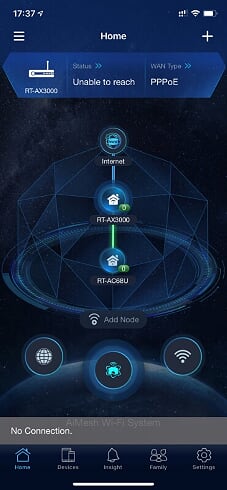 FYI, I have sent the feedback through the router page just now. |
|
|
|
|
|
joeyrm
|
Apr 27 2020, 07:43 PM
|
Getting Started
|
QUOTE(blacktubi @ Apr 27 2020, 07:31 PM) Unplug everything from the LAN port of the RT-AX3000 and update to this latest firmware then report back. https://drive.google.com/drive/folders/1MZX...dIzaPIiZPnQwvKMI'm actually already using the said firmware. What i noticed further is that both the IOS and IpadOS based Asus router app giving the same problematic result. But I have no issue with android based Asus router app. |
|
|
|
|
|
joeyrm
|
Apr 29 2020, 11:25 AM
|
Getting Started
|
QUOTE(ASUSmy @ Apr 20 2020, 09:53 AM) Hi All, To all user that has problem with the RT-AX3000, try updating the beta firmware below. The model name might not the same but it is usable on RT-AX3000. https://drive.google.com/open?id=1MZXHOxMW7...dIzaPIiZPnQwvKMDo let us know if you still have any problem after the update. Thank you Hi ASUSmy, Just checking, when is Asus expected to release the updated final release firmware for the AX3000 router? Will it support Game Boost feature as well, like AC68U? Thanks |
|
|
|
|
|
joeyrm
|
Jul 13 2020, 10:38 PM
|
Getting Started
|
Hi AsusMy, I have updated my AX3000 router to the latest firmware this afternoon, however, i'm currently being refused connection to the router's admin page once the internet is up. I have rebooted and factory reset the router multiple times today with the same result. Please do note that i cant send any feedback due to the issue. Please escalate this issue to the Asus tech team on this bug. FYI, I have used Edge, chrome, safari browsers and even asus app to access the page but to no avail.. This post has been edited by joeyrm: Jul 13 2020, 10:51 PM Attached thumbnail(s)

|
|
|
|
|
|
joeyrm
|
Jul 13 2020, 11:07 PM
|
Getting Started
|
QUOTE(jusbella @ Jul 13 2020, 11:01 PM) Try access using this link https://192.168.0.1:8443/Cannot get access. Even after i disabled the https, still encounter the same problem.. The only way to get in is too reboot the router, and get in before the internet connection gets up. |
|
|
|
|
|
joeyrm
|
Jul 14 2020, 11:44 AM
|
Getting Started
|
QUOTE(ASUSmy @ Jul 14 2020, 09:22 AM) Hi joeyrm, Can you unplug the WAN cable first, download the firmware again and access to the router GUI to update the firmware. Do a factory reset and redo the setup. Thank you Hi, i did as suggested. However, after the factory reset, my router no longer boot up easily.. Had to reboot about 10 times after i finally manage to get to the setup page.. This post has been edited by joeyrm: Jul 14 2020, 11:55 AM |
|
|
|
|
|
joeyrm
|
Jan 15 2021, 04:51 PM
|
Getting Started
|
Hi all,
I'm having problem with an AC86U. Currently, only LAN port 4 LED lite up after reboot multiple times. I have tried reset and also do recovery mode, but I cannot get through at all since the Ethernet port is not detected.
Any idea how to recover the router?
Thanks
|
|
|
|
|
|
joeyrm
|
Jan 16 2021, 03:40 PM
|
Getting Started
|
QUOTE(ASUSmy @ Jan 15 2021, 06:09 PM) Hi joeyrm, Try using the firmware restoration method. https://www.asus.com/support/FAQ/1000814/Thank you Hi, Tried that method, but my router ethernet port still not detected my laptop. The LAN 4 LED still lite up. Rgds |
|
|
|
|
|
joeyrm
|
Feb 12 2021, 01:57 PM
|
Getting Started
|
Hi all,
Just wondering, does TUF-AX3000 latest firmware (9.0.0.4.386_41994) comes with speedtest feature inside the router. So far, I couldn't find this feature in the router.
My other router (AX56U), on the other hand, has this feature in the latest firmware.
Appreciate your feedback on this.
Thanks
|
|
|
|
|
|
joeyrm
|
Mar 17 2021, 04:18 PM
|
Getting Started
|
QUOTE(XeactorZ @ Mar 16 2021, 10:46 PM) asus router inside got speedtest? how come I could not find it on my tuf-ax3000  Unfortunately, TUF-AX3000 don't have that option yet.. But its weird that AX56U and AX55U have that option already. |
|
|
|
|
|
joeyrm
|
Mar 21 2021, 03:04 PM
|
Getting Started
|
QUOTE(XeactorZ @ Mar 18 2021, 01:09 AM) Will continue stick for current firmware, until next firmware nobody complaint about it then will update  Btw I use tuf-ax3000, reason being I need to use vpn for multiple device Your reason for getting TUF-AX3000 is exactly the same as mine. I actually swapped from RT-AX3000 just for VPN Fusion coz the Merlin firmware was not stable enough to perform multiple VPN connections. |
|
|
|
|



 Quote
Quote

 0.0471sec
 0.58
0.58
 7 queries
 GZIP Disabled