Outline ·
[ Standard ] ·
Linear+
Home Networking ASUS Malaysia Networking User & Technical Support, Managed by ASUS Malaysia Representative
|
pull007
|
 Nov 23 2020, 02:20 PM Nov 23 2020, 02:20 PM
|
Getting Started


|
Hi
I have asus tuf ax3000. I experienced frequent disconnection, so I turned off the enable smart connect function. Now, I can't connect to 2.4GHz at all, but if I'm on 5GHz, there's no problem. May I know what causes this? Is it a faulty router?
Many thanks!
This post has been edited by pull007: Nov 23 2020, 02:39 PM
|
|
|
|
|
|
pull007
|
Nov 23 2020, 02:53 PM
|
Getting Started
|
QUOTE(ASUSmy @ Nov 23 2020, 02:47 PM) Hi pull007, Have you differentiate the WiFi name when you turn off the Smart Connect? You can try updating this firmware. https://drive.google.com/file/d/1e1S-exOEq5...huW2hnVNC8/viewThank you I did change the WiFi name. Only the password is the same. I also already updated the firmware above. Btw, I did some research and someone resolved the issue by setting the control channel to any number instead of auto. I did mine, and now it works! I can connect to 2.4GHz now and so far no disconnection. Weird huh? Anyway, if anyone experienced the same problem as me, try my method above. It works!  Update: it disconnected again.. and can't connect to the 2.4GHz..  . I think the router is faulty. This post has been edited by pull007: Nov 23 2020, 03:16 PM |
|
|
|
|
|
pull007
|
Nov 23 2020, 03:25 PM
|
Getting Started
|
Can I have the previous version of the firmware for asus tuf ax3000? I would like to revert back to the previous firmware.
|
|
|
|
|
|
pull007
|
Nov 23 2020, 03:59 PM
|
Getting Started
|
QUOTE(ASUSmy @ Nov 23 2020, 03:50 PM) Hi pull007, The older version you can get it from the link below. But there will be a newer version which is still under testing. Hopefully it will upload on the website soon. And may I know the 2.4GHz is happen on your laptop or phone? Is all the 2.4GHz devices having the same problem? https://www.asus.com/my/Networking/TUF-Gami...pDesk_Download/Thank you All 2.4Ghz devices including my phone, desktop PC and laptop. Thanks |
|
|
|
|
|
pull007
|
Nov 28 2020, 10:21 AM
|
Getting Started
|
QUOTE(mrjhsk @ Nov 27 2020, 01:24 AM) So a bit of a update and guidance seeking. So, I've completely fresh reinstalled windows 10 and the issue persist. However, I've noticed the subnet mask when connected to TUF AX3000 2.4Ghz wifi is 255.255.0.0 And the IP assigned to the PC is some random IP address that is not defined within the range of my wifi router setting. May I know why is the TUF AX3000 giving my Windows PC a 255.255.0.0 subnet mask? and also random assigned me random IP address. Is it a firmware issue? The Windows PC runs perfectly fine when connected to my old router being used as an access point now. Did you manage to resolve the issue? |
|
|
|
|
|
pull007
|
Jan 28 2021, 01:04 PM
|
Getting Started
|
Hi there,
I have asus tuf ax3000. My phone's wifi always randomly disconnected from the router. This happens quite frequently. Below is the log. May I know what's the issue here?
Jan 28 13:00:53 wlceventd: wlceventd_proc_event(490): eth5: Deauth_ind 4C:63:71:CF:BB:02, status: 0, reason: Disassociated due to inactivity (4), rssi:0
Jan 28 13:00:53 wlceventd: wlceventd_proc_event(490): eth5: Deauth_ind 4C:63:71:CF:BB:02, status: 0, reason: Class 3 frame received from nonassociated station (7), rssi:0
Jan 28 13:00:53 wlceventd: wlceventd_proc_event(490): eth5: Deauth_ind 4C:63:71:CF:BB:02, status: 0, reason: Class 3 frame received from nonassociated station (7), rssi:0
Jan 28 13:00:56 wlceventd: wlceventd_proc_event(526): eth5: Auth 4C:63:71:CF:BB:02, status: Successful (0), rssi:0
Jan 28 13:00:56 wlceventd: wlceventd_proc_event(555): eth5: Assoc 4C:63:71:CF:BB:02, status: Successful (0), rssi:0
Jan 28 13:01:06 wlceventd: wlceventd_proc_event(490): eth5: Deauth_ind 4C:63:71:CF:BB:02, status: 0, reason: Disassociated due to inactivity (4), rssi:0
Jan 28 13:01:06 wlceventd: wlceventd_proc_event(490): eth5: Deauth_ind 4C:63:71:CF:BB:02, status: 0, reason: Class 3 frame received from nonassociated station (7), rssi:0
Jan 28 13:01:54 wlceventd: wlceventd_proc_event(526): eth6: Auth 4C:63:71:CF:BB:02, status: Successful (0), rssi:0
Jan 28 13:01:54 wlceventd: wlceventd_proc_event(555): eth6: Assoc 4C:63:71:CF:BB:02, status: Successful (0), rssi:0
This post has been edited by pull007: Jan 28 2021, 01:12 PM
|
|
|
|
|
|
pull007
|
Jan 28 2021, 01:09 PM
|
Getting Started
|
QUOTE(blacktubi @ Jan 28 2021, 01:08 PM) Internet disconnected or WiFi disconnected? The logs you show are related to WiFi Wifi disconnected. I will edit my initial post |
|
|
|
|
|
pull007
|
Jan 28 2021, 01:42 PM
|
Getting Started
|
QUOTE(blacktubi @ Jan 28 2021, 01:13 PM) From what I see, it is a Xiaomi device that's facing unstable WiFi. What is the WiFi signal when this is happening? It could be due to weak signal which means your device will struggle to maintain a connection. Do you use the smart connect feature? If yes, disable it and use different name for 5Ghz and 2.4Ghz. Isolate whether it is due to the 5Ghz or 2.4Ghz. The WiFi signal was strong but after disconnected, my phone couldn't connect to it again. (2.4GHz) I already separated my wifi. The problem happened only on 2.4Ghz WiFi so when this happens, i have to connect to 5GHz WiFi and after a few minutes, I can connect to 2.4 GHz again. So, is it really my phone issue? This post has been edited by pull007: Jan 28 2021, 01:44 PM |
|
|
|
|
|
pull007
|
Jan 28 2021, 02:28 PM
|
Getting Started
|
QUOTE(blacktubi @ Jan 28 2021, 02:20 PM) If it is not happening to other devices then it is probably due to your phone. Well, I will monitor other devices then. Thanks for your input |
|
|
|
|
|
pull007
|
Jan 29 2021, 05:12 PM
|
Getting Started
|
QUOTE(footie_ft @ Jan 29 2021, 04:05 PM) Question: I got ax3000 (main) and ac68u (mesh) with Unifi 100MB. Is this enough to support 4 workstation (online meeting and class), 2 iPad, 2 phone and 1 TV? The ax3000 will disconnect/hang sometimes for few minutes and affect all devices. I think issue with device more than Unifi as I was not able to connect using Asus app to it. I have just updated the firmware today but problem still persist. It's getting harder for me to work this way. Yeah, I think it's the problem with the router. Don't buy ax3000. I have the same problem as you. It will randomly disconnect/hang. Try to swap and use your ac68u as the main router? This post has been edited by pull007: Jan 29 2021, 05:13 PM |
|
|
|
|
|
pull007
|
Jan 31 2021, 03:24 PM
|
Getting Started
|
QUOTE(okboy @ Jan 31 2021, 07:09 AM) Can recommend wifi router, need a streaming 4K movie and need wide coverage. currently using RT-AC1300UHP. Don't buy TUF AX3000. There's wifi dropping issues. Others maybe ok as per suggestions by blacktubi. |
|
|
|
|
|
pull007
|
Feb 21 2021, 09:42 PM
|
Getting Started
|
QUOTE(msafiedin @ Feb 15 2021, 01:31 PM) just bought the new tuf ax3000 for main router to pair with my ax3000. I set the TUf to reboot every 2 days WHenever the TUF reboot, i will have some issue with the 2.4ghz on the TUF router. The normal ax3000 works 100% all time. Also as most of my device at home works with Wifi6. I enabled both 2.4 and 5 channel to use Wifi ax 6 mode. But again, the 2.4 ax mode always giving issue not able to connect. UNlike my ax3000, wifi 6 on both band does not have any issue at all. Why is TUF is worse then AX3000 model? I agree. I faced the same situation as you. Using TUF AX3000. The 5GHz WiFi works fine, but always can't connect to the 2.4GHz wifi. I have downgraded the firmware to the oldest version. Let's see whether I still get disconnected or not. Fingers crossed! This post has been edited by pull007: Feb 22 2021, 12:35 AM |
|
|
|
|
|
pull007
|
Feb 23 2021, 06:16 AM
|
Getting Started
|
QUOTE(pull007 @ Feb 21 2021, 09:42 PM) I agree. I faced the same situation as you. Using TUF AX3000. The 5GHz WiFi works fine, but always can't connect to the 2.4GHz wifi. I have downgraded the firmware to the oldest version. Let's see whether I still get disconnected or not. Fingers crossed! Hello, When I was using the old firmware, the problem went away. But the problem is the router auto updated the firmware to the latest and the problem persists. May I know how can I turn the auto update off please? Many thanks! |
|
|
|
|
|
pull007
|
Feb 23 2021, 07:43 PM
|
Getting Started
|
QUOTE(ASUSmy @ Feb 23 2021, 10:37 AM) Hi pull007, May I know what is the TUF-AX3000 2.4GHz Authentication Method when you are using the latest firmware? Try set it as WPS2-Personal or WPA/WPA2-Personal. Thank you Hi, I'm already using WPA2-Personal. Please help me. I just want to use the old firmware. Could you please tell me how to stop the auto update? |
|
|
|
|
|
pull007
|
Feb 25 2021, 08:14 PM
|
Getting Started
|
QUOTE(ASUSmy @ Feb 24 2021, 02:25 PM) Hi pull007. May I know what is the old firmware version that you tested okay? And have you try the beta version on the website? Version 9.0.0.4.386.41994 Beta Version. Thank you I used this version. Version 3.0.0.4.384.8591. It seems to work on me. I did try the beta version. There's still dropping connection on the 2.4GHz wifi. 5GHz is solid, but it is weak on certain spots upstairs. May I know whether I can stop the auto update or not? If cannot, I'm thinking of buying another asus ax3000 and use it as aimesh node to expand my 5GHz coverage since I don't have problem with 5GHz. Is that doable? This post has been edited by pull007: Feb 25 2021, 08:17 PM |
|
|
|
|
|
pull007
|
Apr 23 2021, 07:09 PM
|
Getting Started
|
Hi,
I have asus tuf ax1000. If in front of the router, I can get 800Mbps speed. But, on the second floor, I only get 100Mbps. If I buy ax55 as aimesh router and put it on the second floor, will it improve my 5GHz WiFi speed? How much speed improvement I'll get?
|
|
|
|
|
|
pull007
|
Dec 15 2022, 06:52 AM
|
Getting Started
|
Hi,
I need help. I just bought asus xt12 mesh wifi.
But when I do speed test on my mobile phone, I only got 300-400Mbps but my unifi is 800Mbps. The result would be the same anywhere in the house, even if I stood directly in front if the router.
May I know what can I do to get max speed?
This post has been edited by pull007: Dec 15 2022, 06:53 AM
|
|
|
|
|
|
pull007
|
Feb 24 2023, 01:04 AM
|
Getting Started
|
QUOTE(blacktubi @ Feb 21 2023, 09:17 PM) I am using the TIME 1Gbps plan.  This is my Wi-Fi speed on my iPhone. Connected to the mesh node of my ZenWiFi XT12. The ZenWiFi XT12 is a monster. Since I paid for 1Gbps, I want to make sure I can use at least 80% of the speed. Edit: Also worth mentioning the congestion management algorithm of XT12 is superb. My loaded latency is =<25ms. May I ask do you separate the 2.4GHz and 5GHz wifi and connected to 5GHz to get this speed? Do you enable QoS as well? How about channel bandwidth? Set at 20/40/80MHz This post has been edited by pull007: Feb 24 2023, 01:28 AM |
|
|
|
|
|
pull007
|
Feb 25 2023, 11:27 PM
|
Getting Started
|
Just want to update, after a hard reset of both of my asus xt12 routers, I get full speed now. Didn't know what happen last time. Probably didn't set up properly. Now I'm happy. . No extra tweak of settings needed 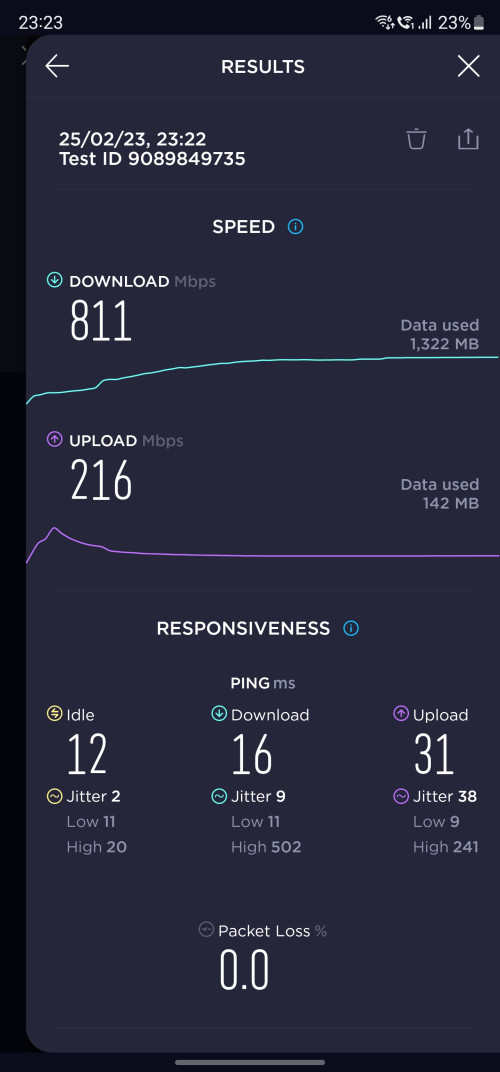 I'm subscribed to unifi 800Mbps This post has been edited by pull007: Feb 25 2023, 11:28 PM |
|
|
|
|
|
pull007
|
Dec 1 2024, 10:33 PM
|
Getting Started
|
Hi, I need help.
Recently unifi contacted me about free upgrade from 800Mbps to 1Gbps and I said yes. Today the technician came and changed my modem to d link fx3060v which acts as both the modem and the router.
My question is, I have asus mesh xt12 but I couldn't connect them to the unifi modem.
Any help on how to connect them?
|
|
|
|
|



 Quote
Quote

 0.0507sec
 0.59
0.59
 7 queries
 GZIP Disabled