Welcome Guest ( Log In | Register )

826 Pages « < 748 749 750 751 752 > » Bottom

Outline · [ Standard ] · Linear+

Home Networking ASUS Malaysia Networking User & Technical Support, Managed by ASUS Malaysia Representative

views
     
blacktubi
post Jan 14 2023, 11:12 PM

-
Group Icon
Elite
8,415 posts

Joined: Jul 2008

QUOTE(pakmulau @ Jan 14 2023, 08:42 PM)
Hi good evening to all. Just received my Asus RT AX53U today.

I got problem to comprehend the instruction to setup Aimesh system.

Do I need to setup AX53U as router first with all the PPPoE and password before I can upgrade the firmware and set as Aimesh node?
*
Update to latest firmware first

RT-AX53U got some AiMesh issue with factory default firmware
pakmulau
post Jan 15 2023, 09:21 AM

On my way
****
Junior Member
589 posts

Joined: Mar 2016
QUOTE(blacktubi @ Jan 14 2023, 11:12 PM)
Update to latest firmware first

RT-AX53U got some AiMesh issue with factory default firmware
*
Thank you bro. Already finish setup after firmware update. The process as easy as 123.
eclectice
post Jan 15 2023, 08:21 PM

Look at all my stars!!
*******
Senior Member
2,734 posts

Joined: Mar 2008
QUOTE(blacktubi @ Jan 13 2023, 10:10 PM)
I have the ZENWIFI XT12 and it does support DNS-to-TLS

ASUS admin probably forget to add this feature on their portal
*
Thank you, Blacktubi. Yes, they should double-check everything they post on their website or they will lose a customer due to a confusion
zeese
post Jan 20 2023, 10:22 AM

Warning Level
******
Senior Member
1,818 posts

Joined: Jan 2005
From: Kuala Lumpur
QUOTE
user posted image


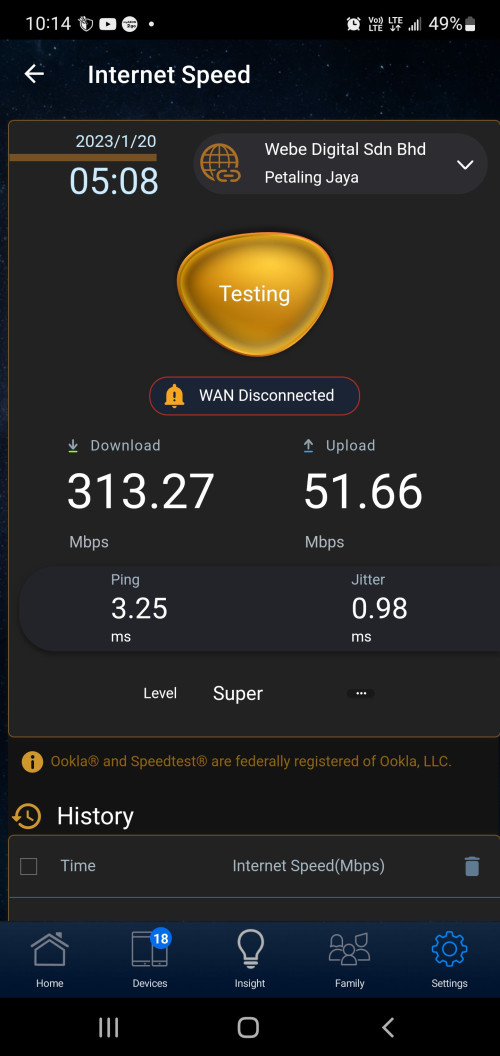
Hi guys. When I'm doing speed test using asus router apps, it can do speed test just fine but there's a message that says WAN DISCONNECTED.

WAN isn't disconnected because i can surf internet just fine, and the speedtest also works fine. Why it says WAN DISCONNECTED?

My router is TUF-AX300.
Apps version is 1.0.0.75.2

This post has been edited by zeese: Jan 20 2023, 10:23 AM
TSASUSmy
post Jan 20 2023, 11:08 AM

Look at all my stars!!
*******
Senior Member
2,319 posts

Joined: Mar 2010
QUOTE(zeese @ Jan 20 2023, 10:22 AM)
Hi guys. When I'm doing speed test using asus router apps, it can do speed test just fine but there's a message that says WAN DISCONNECTED.

WAN isn't disconnected because i can surf internet just fine, and the speedtest also works fine. Why it says WAN DISCONNECTED?

My router is TUF-AX300.
Apps version is 1.0.0.75.2
*
Hi zeese,

Can you try updating the firmware of the router?

Thank you
zeese
post Jan 20 2023, 11:15 AM

Warning Level
******
Senior Member
1,818 posts

Joined: Jan 2005
From: Kuala Lumpur
QUOTE(ASUSmy @ Jan 20 2023, 11:08 AM)
Hi zeese,

Can you try updating the firmware of the router?

Thank you
*
It's already update to the latest firmware.
Router : TUF-AX3000
Firmware : 3.0.0.4.388_22237

Anyway, this is not big issue for me... I'm just asking, probably there's a simple solution. Otherwise, I dont really care as long as I can run the built in speedtest biggrin.gif

This post has been edited by zeese: Jan 20 2023, 11:16 AM
TSASUSmy
post Jan 20 2023, 11:25 AM

Look at all my stars!!
*******
Senior Member
2,319 posts

Joined: Mar 2010
QUOTE(zeese @ Jan 20 2023, 11:15 AM)
It's already update to the latest firmware.
Router : TUF-AX3000
Firmware : 3.0.0.4.388_22237

Anyway, this is not big issue for me... I'm just asking, probably there's a simple solution. Otherwise, I dont really care as long as I can run the built in speedtest biggrin.gif
*
Hi zeese,

Maybe there is a bug on the APP that caused the APP to show the WAN is disconnected. If possible, can you try send a feedback using the APP? Will request HQ to check what caused the bug.

You can send the feedback at Settings->System Settings->Feedback.

PM me your email address used once done.

Thank you
zeese
post Jan 20 2023, 11:28 AM

Warning Level
******
Senior Member
1,818 posts

Joined: Jan 2005
From: Kuala Lumpur
QUOTE(ASUSmy @ Jan 20 2023, 11:25 AM)
Hi zeese,

Maybe there is a bug on the APP that caused the APP to show the WAN is disconnected. If possible, can you try send a feedback using the APP? Will request HQ to check what caused the bug.

You can send the feedback at Settings->System Settings->Feedback.

PM me your email address used once done.

Thank you
*
Noted. Will do so later. Thank you very much.

This post has been edited by zeese: Jan 20 2023, 11:29 AM
dragon528
post Jan 22 2023, 02:14 AM

On my way
****
Junior Member
532 posts

Joined: Aug 2007


Hi everyone,

Currently, I'm facing some issues with the AiMesh connection.
My current set up is AC88U (Main router) and AC68-B1 (Node).

I have successfully set up the AiMesh, but it doesn't work well as expected.
The Node I tested with Ethernet backhaul or Wifi, the connection is not stable and I keep getting intermittent disconnection.
If I direct use Wifi or Lan cable to connect to the main router, the connection is perfectly fine. But if is connected to the Node, the connection is not stable.

The way I test it to confirm the unstable connection is that I use cmd with 192.168.0.1 -t
I can see a lot of "request time out".

Any help will be appreciated. TIA

Edit with pic.

This post has been edited by dragon528: Jan 22 2023, 10:19 AM


Attached thumbnail(s)
Attached Image
ntw
post Jan 22 2023, 02:29 PM

One Each At A Time
******
Senior Member
1,432 posts

Joined: Aug 2010
From: Ipoh mali~~~


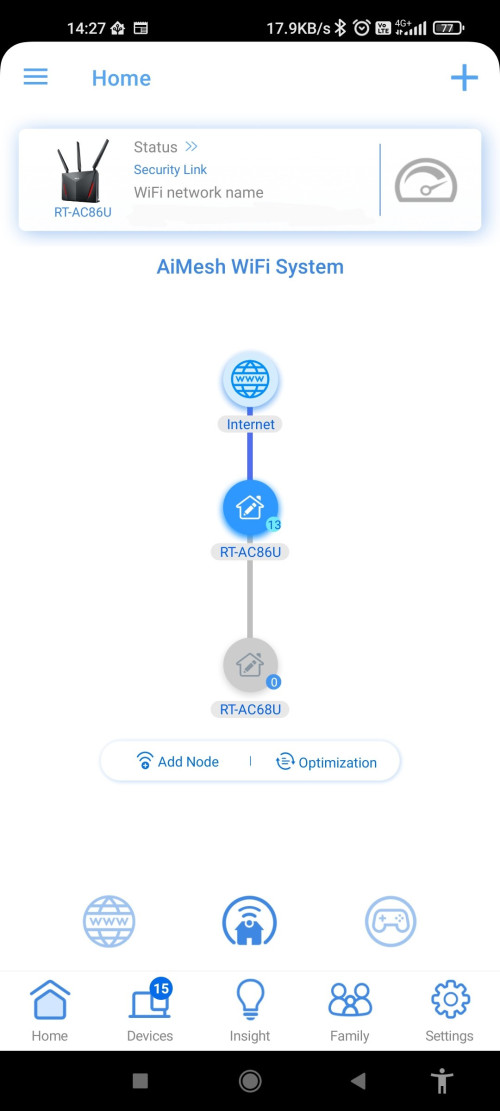
Hi, I'm having issue with AiMesh setup. Main router is RT-AC86u. After adding a RT-AC68u as an AiMesh node it shows the node as Offline. I have tried connecting the AiMesh node using WiFi and Ethernet both having same issue

user posted image
rogue
post Jan 25 2023, 01:45 AM

Getting Started
**
Junior Member
75 posts

Joined: Jun 2006
@AsusMy, I'd like to suggest you and your team behind AsusWRT to consider supporting IPv6-only networks using your product(s). One of the reasons is, with many ISP's in Malaysia implementing CGNAT on WAN, it clearly shows that IPv4 is already exhausted and ISP's need to reserve as many IPv4 IP address as they can. This makes IPv4 scarce and rare and expensive to customers unlike before.

Welcome to IPv6. No NAT no nonsense just direct end-to-end communication as intended.

On your product(s), the key components to make this work are:-

1. NAT64
2. DNS64
3. CLAT (X464LAT)

#1 -- This is similar to IPv4 NAT44 but translate an IPv4 to IPv6 address using the given well-known or GUA /96 prefix.

#2 -- This resolves an IPv4-only domain to have a synthetic IPv6 address by translating it using the configured /96 prefix.

#3 -- This takes care of IPv4 literals in applications that still use legacy AF_INET.

All 3 components work hand in hand together for an IPv6-only network to work properly. With this in place, you can run IPv4-only applications on IPv6-only LAN.

If your team decides to take on this project/challenge, bare in mind you have to consider customer networks that have dynamic IPv6 Prefix Delegation assigned to them by their ISP.


Some references:

https://github.com/toreanderson/clatd
https://github.com/vitlabuda/tundra-nat64
http://www.litech.org/tayga/
https://sites.google.com/site/tmoipv6/464xlat
https://datatracker.ietf.org/doc/html/rfc6877

Cheers.
n8210
post Jan 26 2023, 10:28 AM

Look at all my stars!!
*******
Senior Member
2,678 posts

Joined: Mar 2005


Product: RT-AX55
Problem: IQIYI cannot load

I replaced the TM Unifi dlink modem (black) with Asus RT-AX55. Everything working fine, except IQIYI on my smart tv. Other apps all works. IQIYI keeps showing connection error.

If I use back dlink router, or connect smart tv to phone and use data, IQIYI will load on tv. Only when I use RTAX55, then IQIYI cannot work.

I don't even have clue where to begin checking and tweaking. Please help. Thank you.

1) I have tried reset RTAX55 to factory setting. It did not help.
2) I have updated router firmware. Did not help.
3) I have updated smart tv firmware and apps. Uninstall and reinstall too. All did not work.

What will work is, connect to dlink/mobile data first, then load IQIYI app, switch back to Asus router, and I can continue watching. The intermediate disconnection will not prevent IQIYI from continuing. But it is impossible to load IQIYI when connected to Asus router.
jusbella
post Jan 26 2023, 12:36 PM

Look at all my stars!!
*******
Senior Member
3,037 posts

Joined: Dec 2011


QUOTE(n8210 @ Jan 26 2023, 10:28 AM)
Product: RT-AX55
Problem: IQIYI cannot load

I replaced the TM Unifi dlink modem (black) with Asus RT-AX55. Everything working fine, except IQIYI on my smart tv. Other apps all works. IQIYI keeps showing connection error.

If I use back dlink router, or connect smart tv to phone and use data, IQIYI will load on tv. Only when I use RTAX55, then IQIYI cannot work.

I don't even have clue where to begin checking and tweaking. Please help. Thank you.

1) I have tried reset RTAX55 to factory setting. It did not help.
2) I have updated router firmware. Did not help.
3) I have updated smart tv firmware and apps. Uninstall and reinstall too. All did not work.

What will work is, connect to dlink/mobile data first, then load IQIYI app, switch back to Asus router, and I can continue watching. The intermediate disconnection will not prevent IQIYI from continuing. But it is impossible to load IQIYI when connected to Asus router.
*
Try change ur smart tv dns to google dns.

Primary: 8.8.8.8
Altenate: 8.8.4.4
TSASUSmy
post Jan 26 2023, 01:56 PM

Look at all my stars!!
*******
Senior Member
2,319 posts

Joined: Mar 2010
QUOTE(ntw @ Jan 22 2023, 02:29 PM)
Hi, I'm having issue with AiMesh setup. Main router is RT-AC86u. After adding a RT-AC68u as an AiMesh node it shows the node as Offline. I have tried connecting the AiMesh node using WiFi and Ethernet both having same issue

user posted image
*
Hi ntw,

May I know what firmware version are you using for both the router?

If both is the latest firmware, have you try to factory reset the main router and redo the setup?

If you have done both of them, can you send a feedback using the router GUI at Administration->Feedback. Do PM me the email address used once done, will request HQ to check log.

Thank you
TSASUSmy
post Jan 26 2023, 01:58 PM

Look at all my stars!!
*******
Senior Member
2,319 posts

Joined: Mar 2010
QUOTE(dragon528 @ Jan 22 2023, 02:14 AM)
Hi everyone,

Currently, I'm facing some issues with the AiMesh connection.
My current set up is AC88U (Main router) and AC68-B1 (Node).

I have successfully set up the AiMesh, but it doesn't work well as expected.
The Node I tested with Ethernet backhaul or Wifi, the connection is not stable and I keep getting intermittent disconnection.
If I direct use Wifi or Lan cable to connect to the main router, the connection is perfectly fine. But if is connected to the Node, the connection is not stable.

The way I test it to confirm the unstable connection is that I use cmd with 192.168.0.1 -t
I can see a lot of "request time out".

Any help will be appreciated. TIA

Edit with pic.
*
Hi dragon528,

May I know what firmware version are you using for both the router?

If both is the latest firmware, have you try to factory reset the main router and redo the setup?

If you have done both of them, can you send a feedback using the router GUI at Administration->Feedback. Do PM me the email address used once done, will request HQ to check log.

Thank you
TSASUSmy
post Jan 26 2023, 02:01 PM

Look at all my stars!!
*******
Senior Member
2,319 posts

Joined: Mar 2010
QUOTE(rogue @ Jan 25 2023, 01:45 AM)
@AsusMy, I'd like to suggest you and your team behind AsusWRT to consider supporting IPv6-only networks using your product(s). One of the reasons is, with many ISP's in Malaysia implementing CGNAT on WAN, it clearly shows that IPv4 is already exhausted and ISP's need to reserve as many IPv4 IP address as they can. This makes IPv4 scarce and rare and expensive to customers unlike before.

Welcome to IPv6. No NAT no nonsense just direct end-to-end communication as intended.

On your product(s), the key components to make this work are:-

1. NAT64
2. DNS64
3. CLAT (X464LAT)

#1 -- This is similar to IPv4 NAT44 but translate an IPv4 to IPv6 address using the given well-known or GUA /96 prefix.

#2 -- This resolves an IPv4-only domain to have a synthetic IPv6 address by translating it using the configured /96 prefix.

#3 -- This takes care of IPv4 literals in applications that still use legacy AF_INET.

All 3 components work hand in hand together for an IPv6-only network to work properly. With this in place, you can run IPv4-only applications on IPv6-only LAN.

If your team decides to take on this project/challenge, bare in mind you have to consider customer networks that have dynamic IPv6 Prefix Delegation assigned to them by their ISP.
Some references:

https://github.com/toreanderson/clatd
https://github.com/vitlabuda/tundra-nat64
http://www.litech.org/tayga/
https://sites.google.com/site/tmoipv6/464xlat
https://datatracker.ietf.org/doc/html/rfc6877

Cheers.
*
Hi rogue,

Thank you for your suggestion, will share it to our RD at HQ.

Thank you


n8210
post Jan 26 2023, 05:19 PM

Look at all my stars!!
*******
Senior Member
2,678 posts

Joined: Mar 2005


QUOTE(jusbella @ Jan 26 2023, 12:36 PM)
Try change ur smart tv dns to google dns.

Primary: 8.8.8.8
Altenate: 8.8.4.4
*
Thanks. I tried (i) the DNS settings above, and also (ii) turning IPv6 off and on. Both did not work.
n8210
post Jan 27 2023, 03:59 PM

Look at all my stars!!
*******
Senior Member
2,678 posts

Joined: Mar 2005


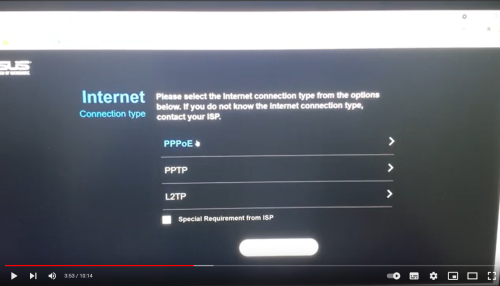
I have solved my problem. Issue lies with Asus setting. What I did was re-reset for the 3rd or 4th time. The difference is, at the beginning of the quick setup stages, where I key in my unifi id and password and also tick "special requirement from ISP", now there is another box for another line.. if not mistaken is "DHCP on". I followed the setting by a Malaysian youtuber, and maybe it was based on an older firmware, there was no second line included, so I have always omit ticking this second box.

Now I added the second box, so IQIYI works. Can someone help give a simple explanation what is this and why it did not allow IQIYI to work previously? Thanks.
jusbella
post Jan 27 2023, 04:36 PM

Look at all my stars!!
*******
Senior Member
3,037 posts

Joined: Dec 2011


QUOTE(n8210 @ Jan 27 2023, 03:59 PM)
I have solved my problem. Issue lies with Asus setting. What I did was re-reset for the 3rd or 4th time. The difference is, at the beginning of the quick setup stages, where I key in my unifi id and password and also tick "special requirement from ISP", now there is another box for another line.. if not mistaken is "DHCP on". I followed the setting by a Malaysian youtuber, and maybe it was based on an older firmware, there was no second line included, so I have always omit ticking this second box.

Now I added the second box, so IQIYI works. Can someone help give a simple explanation what is this and why it did not allow IQIYI to work previously? Thanks.
*
Any screenshot of that setting?

By default DHCP is on.
n8210
post Jan 27 2023, 06:24 PM

Look at all my stars!!
*******
Senior Member
2,678 posts

Joined: Mar 2005


QUOTE(jusbella @ Jan 27 2023, 04:36 PM)
Any screenshot of that setting?

By default DHCP is on.
*
Sorry, since it is working now, I dare not reset it and go through the process again. I can only say 90% is my personal assumption, by ticking that box, then it worked. Cos in my process from yesterday and today, I have reset my router a few times. The last time, I tick the second box, that being the main difference. I believe this is the reason because after input unifi id and password, I did not alter anything else. Luckily I checked my IQIYI app and it worked. So I immediately stopped.

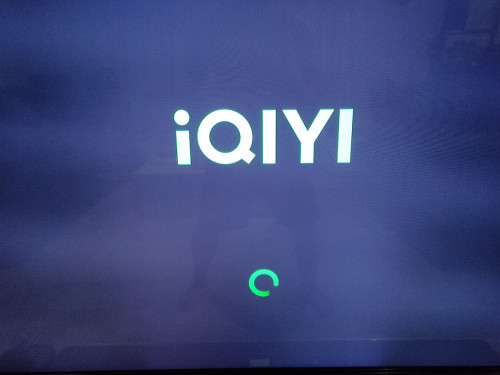
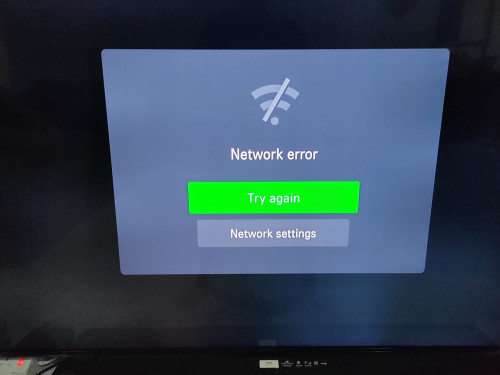
Attached pictures of IQIYI cannot load.
And instead of the screenshot of my router setting, I show the youtube link and a screenshot of it. In the latest firmware, below there are 2 boxes to tick. This perhaps is an older firmware, so it only showed one. I recall when I first setup during newly purchase, there was only 1 box too.
https://www.youtube.com/watch?v=16w6oEfcr6U&t=230s

user posted image

user posted image

user posted image

826 Pages « < 748 749 750 751 752 > » Top
 

Change to:
| Lo-Fi Version
0.0328sec    0.51    6 queries    GZIP Disabled
Time is now: 12th December 2025 - 06:34 PM