Outline ·
[ Standard ] ·
Linear+
Home Networking ASUS Malaysia Networking User & Technical Support, Managed by ASUS Malaysia Representative
|
junclj
|
 Jan 10 2020, 04:01 PM Jan 10 2020, 04:01 PM
|

|
QUOTE(christina1 @ Jan 10 2020, 01:07 PM) Hi guys, Is this temperature below OK for ASUS router.. Legend: 2.4 GHz - 5 GHz - CPU Current Temperatures: 49 °C - 55 °C - 78 °C CPU should be maintaining between 60°c ~ 65°c |
|
|
|
|
|
christina1
|
Jan 10 2020, 05:08 PM
|
|
|
QUOTE(junclj @ Jan 10 2020, 04:01 PM) CPU should be maintaining between 60°c ~ 65°c Is this temperature too high? |
|
|
|
|
|
junclj
|
Jan 10 2020, 05:25 PM
|
|
|
QUOTE(christina1 @ Jan 10 2020, 05:08 PM) Is this temperature too high? Still acceptable but probably is caused by the high room temperature. You may try to attach fans on it too. |
|
|
|
|
|
thomas1983
|
Jan 11 2020, 01:32 AM
|
Getting Started

|
Hi guys , Can anyone kindly share me the unifi lite setting on a DSL-AC52U? Thanks  |
|
|
|
|
|
christina1
|
Jan 11 2020, 08:16 PM
|
|
|
Hi guys,
Which ASUS router is for large business that can connect 100 concurrent users ?
ASUS 86U, ASUS ROG GT5300 or ROG Rapture GT-AX11000 ?
This post has been edited by christina1: Jan 11 2020, 08:16 PM
|
|
|
|
|
|
hongli.11.hongli
|
Jan 12 2020, 02:56 AM
|
Getting Started
|
QUOTE(christina1 @ Jan 11 2020, 08:16 PM) Hi guys, Which ASUS router is for large business that can connect 100 concurrent users ? ASUS 86U, ASUS ROG GT5300 or ROG Rapture GT-AX11000 ? For business you may consider BRT-AC828, it can support Up to 250 Simultaneous Client Connections, M.2 Slot for Faster Storage and also captive portal. |
|
|
|
|
|
hongli.11.hongli
|
Jan 12 2020, 02:57 AM
|
Getting Started
|
QUOTE(thomas1983 @ Jan 11 2020, 01:32 AM) Hi guys , Can anyone kindly share me the unifi lite setting on a DSL-AC52U? Thanks you may try this: https://youtu.be/yfz7xw86ap0 |
|
|
|
|
|
hongli.11.hongli
|
Jan 12 2020, 03:00 AM
|
Getting Started
|
QUOTE(pakji @ Jan 10 2020, 12:46 AM) CES 2020 ASUS Router no news for new model more power full 8 port LAN then AX11000 like that I think already announced before CES RT-AX89X it has RJ45 for 10Gbps BaseT for WAN/LAN x 1, RJ45 for 1Gbps BaseT for LAN x 8, RJ45 for 1Gbps BaseT for WAN x 1 https://www.asus.com/Networking/RT-AX89X/specifications/Only thing still can't find this in Malaysia market |
|
|
|
|
|
hongli.11.hongli
|
Jan 12 2020, 03:02 AM
|
Getting Started
|
QUOTE(whtrader @ Jan 5 2020, 01:53 AM) Hi guys, So i have setup AI Mesh. Works well for the 5G  My ques, can the RP-AC55 ethernet port used for PC to surf internet? Plug in seem cannot? 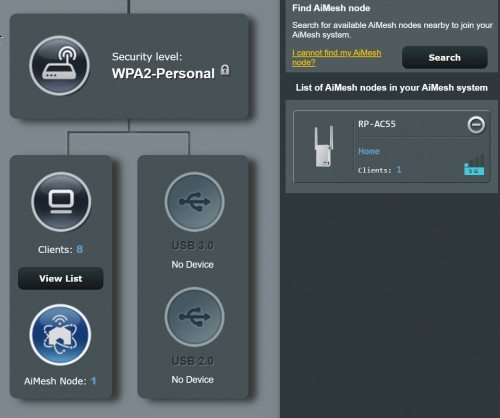 Friend your RP-AC55 too far from your main router, the signal so low? I think it does affect your throughput from RP-AC55 |
|
|
|
|
|
SUSpakji
|
Jan 12 2020, 04:21 AM
|
|
|
QUOTE(hongli.11.hongli @ Jan 12 2020, 03:00 AM) I think already announced before CES RT-AX89X it has RJ45 for 10Gbps BaseT for WAN/LAN x 1, RJ45 for 1Gbps BaseT for LAN x 8, RJ45 for 1Gbps BaseT for WAN x 1 https://www.asus.com/Networking/RT-AX89X/specifications/Only thing still can't find this in Malaysia market RT-AX89X is = AX6000 but not AX11000 i think need wait new AX11000 then AX6000 |
|
|
|
|
|
whtrader
|
Jan 12 2020, 11:50 AM
|
Getting Started
|
QUOTE(hongli.11.hongli @ Jan 12 2020, 03:02 AM) Friend your RP-AC55 too far from your main router, the signal so low? I think it does affect your throughput from RP-AC55 Thanks. Ya have move to a better location. Was trying testing the ethernet function. In aimesh mode can only as backhaul. |
|
|
|
|
|
SUSnasilemaksedap
|
Jan 12 2020, 04:22 PM
|
Getting Started
|
QUOTE(christina1 @ Jan 11 2020, 08:16 PM) Hi guys, Which ASUS router is for large business that can connect 100 concurrent users ? ASUS 86U, ASUS ROG GT5300 or ROG Rapture GT-AX11000 ? I have the ax11000 and its been great. Can conaider for bizness |
|
|
|
|
|
nitehawk
|
Jan 12 2020, 09:17 PM
|
|
|
QUOTE(christina1 @ Jan 10 2020, 01:07 PM) Hi guys, Is this temperature below OK for ASUS router.. Legend: 2.4 GHz - 5 GHz - CPU Current Temperatures: 49 °C - 55 °C - 78 °C I am using RT-AC86U, where can I read the CPU temperature? |
|
|
|
|
|
blacktubi
|
Jan 12 2020, 10:48 PM
|
-

|
QUOTE(nitehawk @ Jan 12 2020, 09:17 PM) I am using RT-AC86U, where can I read the CPU temperature? You can only see those when you're using a third party firmware like ASUSWRT-Merlin. Don't worry too much about the temps as it is self-regulating. |
|
|
|
|
|
nitehawk
|
Jan 12 2020, 11:00 PM
|
|
|
QUOTE(blacktubi @ Jan 12 2020, 10:48 PM) You can only see those when you're using a third party firmware like ASUSWRT-Merlin. Don't worry too much about the temps as it is self-regulating. Thanks for the clarification. |
|
|
|
|
|
nitehawk
|
Jan 12 2020, 11:23 PM
|
|
|
Recently, I bought 2 units of RT-AC86U and configured them in AiMesh mode. I noticed the AiMesh node is assigned a dynamic IP address. Is it possible to change to a static IP?
Also, what is the best way to install cooling fan? Suck or blow air into the unit? Where shall I install the radiator sheet?
|
|
|
|
|
|
kombeng7
|
Jan 13 2020, 04:09 AM
|
New Member
|
QUOTE(SilentVampire @ Jan 9 2020, 09:49 PM) You need to tick the ISP specific requirement for Unifi and Maxis because both ISP uses VLAN tagging. However, TIME does not use that, so you don't have to configure anything for TIMR. Thank you for the information. Already setup and everthing works fine. |
|
|
|
|
|
christina1
|
Jan 13 2020, 10:54 AM
|
|
|
.....................
This post has been edited by christina1: Jan 13 2020, 11:34 AM
|
|
|
|
|
TSASUSmy
|
Jan 16 2020, 10:49 AM
|
|
|
QUOTE(nitehawk @ Jan 12 2020, 11:23 PM) Recently, I bought 2 units of RT-AC86U and configured them in AiMesh mode. I noticed the AiMesh node is assigned a dynamic IP address. Is it possible to change to a static IP? Also, what is the best way to install cooling fan? Suck or blow air into the unit? Where shall I install the radiator sheet? Hi nitehawk, You may manually change the AiMesh Node IP using the IP binding feature in the client list. Check the AiMesh Node current IP address and go to the client list and search for the same IP address. Click the IP address and change the IP address that you want and then click Apply. You may need to restart the node if the IP address didn't change after you apply the setting. Thank you |
|
|
|
|



 Quote
Quote


 0.0227sec
 0.31
0.31
 6 queries
 GZIP Disabled