Welcome Guest ( Log In | Register )

Outline · [ Standard ] · Linear+

Home Networking ASUS Malaysia Networking User & Technical Support, Managed by ASUS Malaysia Representative

views
     
kombeng7
post Jan 8 2020, 10:20 PM

New Member
*
Newbie
41 posts

Joined: Jan 2014
Hi,

I just purchased AX11000.

I cannot connect to UNIFI using PPPoE username and password. What other settings that I need to configure?
Could anyone please share the setup guides for both UNIFI and TIME Internet?

Thank you.

EDIT: Just realised for UNIFI you need to tick the ISP specific requirement or something like that. Still want to know if there if there any specific setup for TIME though. Thanks.

This post has been edited by kombeng7: Jan 9 2020, 08:45 AM
kombeng7
post Jan 13 2020, 04:09 AM

New Member
*
Newbie
41 posts

Joined: Jan 2014
QUOTE(SilentVampire @ Jan 9 2020, 09:49 PM)
You need to tick the ISP specific requirement for Unifi and Maxis because both ISP uses VLAN tagging. However, TIME does not use that, so you don't have to configure anything for TIMR.
*
Thank you for the information. Already setup and everthing works fine.
kombeng7
post May 10 2020, 05:42 PM

New Member
*
Newbie
41 posts

Joined: Jan 2014
I am using AX11000 with the latest firmware, 3.0.0.4.384_9165.

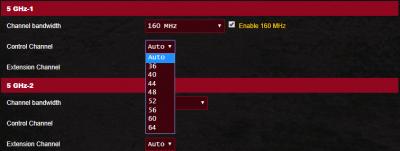
My problem is that I cannot select 80 or 160mhz bandwith for 5Ghz Band 1 or 2.

From my understanding you have to select channel 42, 58, 106, 112, 138 and 155 for 80mhz and 50 and 114 for 160mhz.
Attached Image

However, these channels are not in my dropdown selection list.
Attached Image
Attached Image
Attached Image

I have also tried all the other channels and selected 80 or 160mhz but the when checking with NetSpot, the bandwith remains at 40mhz.

I tried both with and without Smart Connect but still could not connect to 80 or 160mhz.

Could anyone guide me on how to solve this?

Thank you.
kombeng7
post May 13 2020, 12:25 AM

New Member
*
Newbie
41 posts

Joined: Jan 2014
QUOTE(ASUSmy @ May 12 2020, 02:36 PM)
Hi kombeng7,

May I know which region do you select for the router?

Try disable the Smart Connect and check 1 by 1.

Thank you
*
Asia Pacific. I have tried disabling Smart Connect and tried one by one. Still the same result.
kombeng7
post May 16 2020, 02:50 AM

New Member
*
Newbie
41 posts

Joined: Jan 2014
QUOTE(ASUSmy @ May 13 2020, 10:40 AM)
Hi kombeng7,

Is the Netspot is free version? I have tested it and it seen like the Netspot cannot show the the 160MHz result.

Try Acrylic, if your WiFi running at 160MHz, it will show you the MAX Speed that you can get.

If you don't have a 160MHz devices, you can check the System Log->Wireless Log whether the 5GHz is running at 160MHz or not.

Below is my RT-AX92U, the region i selected is US with channel 116.

Thank you
*
Yes, Netspot free version somehow could not detect the 80Mhz bandwith.

I tried running with Smart Connect and full auto on bandwith, control channel and extension channel and checked with inSSIDer and both 5Ghz radio is on 80Mhz rclxm9.gif.

Next I will try with Smart Connect off and US region to manual select 160Mhz and get back to you.

Thanks for the help.

This post has been edited by kombeng7: May 16 2020, 02:51 AM


Change to:
| Lo-Fi Version
0.0374sec    0.94    7 queries    GZIP Disabled
Time is now: 10th December 2025 - 10:18 AM