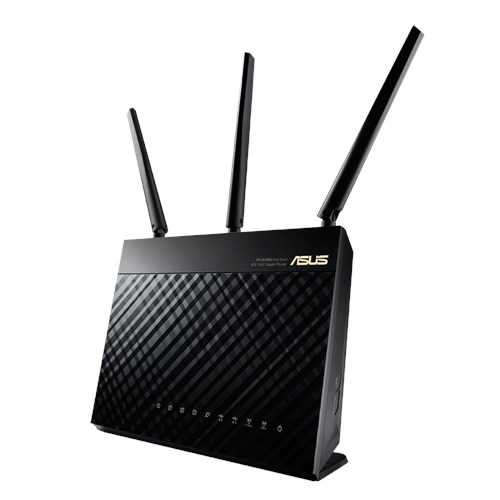
Which model of wireless router come with 8 gigabit ethernet ports?
Thank you.
Home Networking ASUS Malaysia Networking User & Technical Support, Managed by ASUS Malaysia Representative
Home Networking ASUS Malaysia Networking User & Technical Support, Managed by ASUS Malaysia Representative
|
|
 Jun 13 2015, 09:25 AM Jun 13 2015, 09:25 AM
Return to original view | Post
#1
|
 
Senior Member
699 posts Joined: May 2006  
|
Which model of wireless router come with 8 gigabit ethernet ports?
Thank you. |
|
|
|
|
|
Mar 20 2016, 10:15 AM
Return to original view | Post
#2
|
|
Senior Member
699 posts Joined: May 2006
|
What router would you recommend for a 3 storey house with 5-6 devices connected simultaneously doing one or more of the following activities:
1) Web surfing 2) Simultaneous download 3) HD video streaming from Internet and NAS 4) File sharing/storage 5) Cloud applications 6) Wirelsss printing 7) VPN Thank you. |
|
|
Mar 21 2016, 08:09 AM
Return to original view | Post
#3
|
|
Senior Member
699 posts Joined: May 2006
|
QUOTE(voncrane @ Mar 20 2016, 10:40 AM) Well for one, router placement is crucial, else you'd still have to complement with PowerLine adapters or Wireless extenders. Budget?  QUOTE(sHawTY @ Mar 20 2016, 12:48 PM) What's your budget? I don't have a specific budget. What are my options? |
|
|
Mar 21 2016, 05:44 PM
Return to original view | Post
#4
|
|
Senior Member
699 posts Joined: May 2006
|
QUOTE(voncrane @ Mar 20 2016, 10:40 AM) Well for one, router placement is crucial, else you'd still have to complement with PowerLine adapters or Wireless extenders. Budget? I am currently using Aztech homeplug. It is very slow when transferring video files over Wi-Fi (2.4n) onto my NAS. Hence, I am looking for alternatives.QUOTE(voncrane @ Mar 21 2016, 08:23 AM) The Asus RT-AC5300 placed at a strategic location on the middle floor should do the trick.. Plus it's future-proof. My UniFi termination is stuck on middle floor at the back room hence I can't move it.QUOTE(sHawTY @ Mar 21 2016, 08:49 AM) QUOTE(blacktubi @ Mar 21 2016, 10:13 AM) You probably need more than a router if your house is 4.5K square feet. Will RT-AC55UHP do the job? Can I disable IPTV and assign the port for normal ethernet usage?Asus RT-AC55UHP is great for your usage.  Thank you. |
|
|
Mar 22 2016, 11:12 AM
Return to original view | Post
#5
|
|
Senior Member
699 posts Joined: May 2006
|
QUOTE(voncrane @ Mar 22 2016, 12:16 AM) You don't have to move your Unifi installation site... Need to do some internal wiring and reposition just the router itself to the best position, to offer the most signals around the house (top and bottom floors). Routers are investments and it's wise to get the best within one's budget. That's why the question of budget came up first and your answer leading to top of the line recommendation. Due to structural constraint, structural cabling is near impossible hence I am searching for an alternative solution to homeplug. I have TP-Link TL-WR1043ND but its Wi-Fi range is rather poor. |
|
|
Mar 22 2016, 11:32 AM
Return to original view | Post
#6
|
|
Senior Member
699 posts Joined: May 2006
|
QUOTE(blacktubi @ Mar 22 2016, 11:27 AM) I believe you need more than a wireless access point. Use powerline as the backbone and buy some wireless AC router and configure it as access point. What would you recommend and how shall I configure the wireless router and establish the connections? |
|
|
|
|
|
Mar 26 2016, 05:30 PM
Return to original view | Post
#7
|
|
Senior Member
699 posts Joined: May 2006
|
For RT-AC55UHP, it is possible to change its default internal LAN subnet from 192.168.1.x to 192.168.111.x?
|
|
|
Mar 27 2016, 11:51 AM
Return to original view | Post
#8
|
|
Senior Member
699 posts Joined: May 2006
|
QUOTE(jusbella @ Mar 27 2016, 10:55 AM) Yes can. Wonderful! Thanks! |
|
|
Apr 11 2016, 03:17 PM
Return to original view | Post
#9
|
|
Senior Member
699 posts Joined: May 2006
|
Does RT-AC55UHP support TM Uni-Fi Advanced 30Mbps?
|
|
|
Apr 11 2016, 07:38 PM
Return to original view | Post
#10
|
|
Senior Member
699 posts Joined: May 2006
|
QUOTE(mintgadget @ Apr 11 2016, 06:54 PM) It's all wired. My computer is also bonded with 2 gigabit network ports. That's why is funny. It should work. Previously you have bond 4 network ports at the NAS, the NAS could be confused. Have you tried manual disabled the other two ports in the NAS? |
|
|
Apr 14 2016, 05:49 PM
Return to original view | Post
#11
|
|
Senior Member
699 posts Joined: May 2006
|
Does Asus RT-AC55UHP support LACP? If yes, how do I configure?
|
|
|
Apr 14 2016, 10:16 PM
Return to original view | Post
#12
|
|
Senior Member
699 posts Joined: May 2006
|
QUOTE(ASUSmy @ Apr 14 2016, 06:11 PM) Hi nitehawk, Which are the models that support LACP?RT-AC55UHP does not support LACP, only higher end models has this feature. Thank you And how do I reset WAN connection without rebooting? |
|
|
Apr 15 2016, 03:01 PM
Return to original view | Post
#13
|
|
Senior Member
699 posts Joined: May 2006
|
QUOTE(Xefron @ Apr 14 2016, 10:54 PM) RTAC88U support LACP.  QUOTE(ASUSmy @ Apr 15 2016, 10:09 AM) Added Thank you!Hi nitehawk, RT-AC5300 also support LACP. Thank you |
|
|
|
|
|
May 26 2016, 08:29 AM
Return to original view | Post
#14
|
|
Senior Member
699 posts Joined: May 2006
|
QUOTE(ASUSmy @ May 4 2016, 11:59 AM) Hi binary, How will we know when the Android app compatibility test for RT-AC55UHP is complete and ready?The current firmware not able to support the ASUS Router apps yet, our RD are testing it now. Will upload it in the web when it is ready. Thank you This post has been edited by nitehawk: May 26 2016, 08:31 AM |
|
|
Jun 9 2016, 01:42 AM
Return to original view | Post
#15
|
|
Senior Member
699 posts Joined: May 2006
|
QUOTE(ASUSmy @ Jun 6 2016, 09:48 AM) Hi am3, Is this available in RT-AC55UHP?There is a schedule reboot under Administration->System. You can use this feature if you want to reboot the router at a fixed time. Thank you |
|
|
Jul 28 2016, 10:11 AM
Return to original view | Post
#16
|
|
Senior Member
699 posts Joined: May 2006
|
My friend is using Maxis 30Mbps plan (previous with Astro IPTV, but has terminated IPTV). The house already have Wi-Fi setup and looking for a router replacement. What model is most suitable for this environment (Internet and Voice only)?
|
|
|
Jul 28 2016, 10:32 AM
Return to original view | Post
#17
|
|
Senior Member
699 posts Joined: May 2006
|
QUOTE(nitehawk @ Jul 28 2016, 10:11 AM) My friend is using Maxis 30Mbps plan (previous with Astro IPTV, but has terminated IPTV). The house already have Wi-Fi setup and looking for a router replacement. What model is most suitable for this environment (Internet and Voice only)? QUOTE(sHawTY @ Jul 28 2016, 10:16 AM) State the budget Below RM1000. |
|
|
Jul 28 2016, 11:17 AM
Return to original view | Post
#18
|
|
Senior Member
699 posts Joined: May 2006
|
QUOTE(nitehawk @ Jul 28 2016, 10:11 AM) My friend is using Maxis 30Mbps plan (previous with Astro IPTV, but has terminated IPTV). The house already have Wi-Fi setup and looking for a router replacement. What model is most suitable for this environment (Internet and Voice only)? QUOTE(sHawTY @ Jul 28 2016, 10:16 AM) State the budget QUOTE(nitehawk @ Jul 28 2016, 10:32 AM) Below RM1000. QUOTE(sHawTY @ Jul 28 2016, 10:47 AM) What is the main advantage of using RT-AC68U compared with other models like RT-AC1200 or RT-AC55UHP if the wireless components are disabled? Lastly, how/where do I configure the voice (they have 2 lines)?Thank you. |
|
|
Jul 28 2016, 11:43 AM
Return to original view | Post
#19
|
|
Senior Member
699 posts Joined: May 2006
|
QUOTE(sHawTY @ Jul 28 2016, 11:27 AM) 1. If you're not going to use wireless, get MikroTik instead of ASUS It is connected to the RJ11 ports. MikroTik maybe too technical for my friend to configure and managed.2. The phones are connected to the RJ11 port or RJ45 port on the Maxis router? I hope to recommend him to something that is easier to managed as his house already have AP setup and these APs (8 in total) will connect to this new router. Enabling both sets of wireless can be confusing and difficult to troubleshoot in the future. In terms of performance and features, what are the differences between these models? Thank you. |
|
|
Aug 2 2016, 01:57 AM
Return to original view | Post
#20
|
|
Senior Member
699 posts Joined: May 2006
|
A friend of mine is using RT-N12HP and it is configured to mirror Maxis router. He connects this Asus to the Maxis router via a network cable on its LAN port.
What does he mean by "mirror"? Did he configure the Asus router as Wi-Fi extender? Thank you. |
| Change to: |  0.0459sec 0.0459sec
 0.41 0.41
 7 queries 7 queries
 GZIP Disabled GZIP Disabled
Time is now: 10th December 2025 - 02:58 AM |
 Quote
Quote