

Can anyone kindly share me the unifi lite setting on a DSL-AC52U?
Thanks

Home Networking ASUS Malaysia Networking User & Technical Support, Managed by ASUS Malaysia Representative
|
|
 Jan 11 2020, 01:32 AM Jan 11 2020, 01:32 AM
Return to original view | IPv6 | Post
#1
|
 
Junior Member
159 posts Joined: Jan 2005  
|
Hi guys ,
Can anyone kindly share me the unifi lite setting on a DSL-AC52U? Thanks |
|
|
|
|
|
Sep 25 2020, 07:48 PM
Return to original view | Post
#2
|
|
Junior Member
159 posts Joined: Jan 2005
|
Dear all sifu ,
Can a Singapore set of Ac88u use as unifi router ? Afraid the setting is not compatible with msia one This post has been edited by thomas1983: Sep 25 2020, 07:58 PM |
|
|
Sep 25 2020, 11:27 PM
Return to original view | Post
#3
|
|
Junior Member
159 posts Joined: Jan 2005
|
QUOTE(pikacu @ Sep 25 2020, 11:11 PM) dont think any issue of this. just set vlan id properly under LAN>iptv You mean setting for the unifi playTV? |
|
|
Sep 26 2020, 12:35 AM
Return to original view | Post
#4
|
|
Junior Member
159 posts Joined: Jan 2005
|
QUOTE(pikacu @ Sep 25 2020, 11:37 PM)  this is my setting for Maxis FTTH. should be no difference on Unifi (if on manual). If your SG set have this preset, maybe can try..never tried it.  So I guess there is no issue right This post has been edited by thomas1983: Sep 26 2020, 12:36 AM |
|
|
Sep 26 2020, 12:33 PM
Return to original view | Post
#5
|
|
Junior Member
159 posts Joined: Jan 2005
|
QUOTE(blacktubi @ Sep 26 2020, 12:19 PM) You still need to use the VLAN settings else you will not have Internet access as well. Noted and thx sifuUnifi Internet rely on VLAN 500. |
|
|
Sep 26 2020, 03:45 PM
Return to original view | Post
#6
|
|
Junior Member
159 posts Joined: Jan 2005
|
QUOTE(blacktubi @ Sep 26 2020, 12:19 PM) You still need to use the VLAN settings else you will not have Internet access as well. Hi sifu , does it mean with the Singapore set of router I need to do manual setting instead of auto ?Unifi Internet rely on VLAN 500. Sorry as I just a noob ;( |
|
|
|
|
|
Feb 16 2021, 08:18 PM
Return to original view | Post
#7
|
|
Junior Member
159 posts Joined: Jan 2005
|
Hi all Sifus,
I have a RT-ac68u which running 3.0.0.4.374.4561 firmware ... I tried to update using either download latest firmware at web GUI and downloaded the latest firmware to computer & upload at the web GUI but both can’t upgraded to the latest firmware... It showed success updated but the firmware version stay the same =.= Anyone can help me with this ? |
|
|
Feb 16 2021, 08:43 PM
Return to original view | Post
#8
|
|
Junior Member
159 posts Joined: Jan 2005
|
Thank you very much for the help ...
Factory reset is through the reset button or Asuswrt ? QUOTE(blacktubi @ Feb 16 2021, 08:39 PM) 374.4561 is an ancient firmware and cannot be updated to the latest firmware on ASUS website directly. This post has been edited by thomas1983: Feb 16 2021, 08:51 PM You will need to install 376.3626 first to fix the partition size then only install the latest firmware from ASUS official website. Perform a factory reset after you installed the latest firmware and setup from fresh again, this is compulsory else your router will be unstable. Your router will feel like new. Download 376.3626 here: https://drivers.softpedia.com/get/Router-Sw...043763626.shtml |
|
|
Oct 17 2021, 12:16 PM
Return to original view | Post
#9
|
|
Junior Member
159 posts Joined: Jan 2005
|
Hi all sifu ,
I am using Ac88u + ac68u as node with unifi 100mbps . Somehow I noticed my iPhone 11pro max sometimes will lose internet for few mins *fb photo blank ,wechat show connecting* , sometimes I need to on off my WiFi to get it working … meantime other devices can surf as normal … Actually what’s wrong with this ya? Is my router setting issue or phone issue ? |
|
|
Oct 21 2021, 08:27 PM
Return to original view | Post
#10
|
|
Junior Member
159 posts Joined: Jan 2005
|
QUOTE(ASUSmy @ Oct 20 2021, 03:32 PM) Hi thomas1983, Yes the firmware is the latest one for both Ac88u & ac68u .Have you try to update the firmware to the latest and test again? Does this problem happen previously when you first setup this router? Thank you When first setup there is no problem at all , this happened is like one or two months back …. |
|
|
Feb 28 2022, 09:14 PM
Return to original view | Post
#11
|
|
Junior Member
159 posts Joined: Jan 2005
|
All Sifus , anyone can help with the setup for maxis home fiber 300mbps for ac59u v2?
The house phone line is from the current tplink router so does it mean if I use the ac59u then I can’t use the house phone ? This post has been edited by thomas1983: Feb 28 2022, 09:17 PM |
|
|
Sep 24 2022, 12:17 AM
Return to original view | Post
#12
|
|
Junior Member
159 posts Joined: Jan 2005
|
Hi all sifus ,
Currently I m using Ac88u as main with ac68u as node.. I am thinking to buy a ax55 so if this situation , which match is the best ? Maintain Ac88u as main or change to ax55? |
|
|
Sep 28 2022, 07:35 PM
Return to original view | Post
#13
|
|
Junior Member
159 posts Joined: Jan 2005
|
QUOTE(thomas1983 @ Sep 24 2022, 12:17 AM) Hi all sifus , @asusmy please helpCurrently I m using Ac88u as main with ac68u as node.. I am thinking to buy a ax55 so if this situation , which match is the best ? Maintain Ac88u as main or change to ax55? |
|
|
|
|
|
Apr 6 2023, 02:08 PM
Return to original view | Post
#14
|
|
Junior Member
159 posts Joined: Jan 2005
|
Hi all master here , I am using unifi 300mbps with asus Ac88u as main and ac68u as node… Speedtest if I connect to 5ghz I can get around 280mbps but I can only get around 70-90mbps if I connect to 2.4ghz … isit normal ?
Pls find attached for my setting , 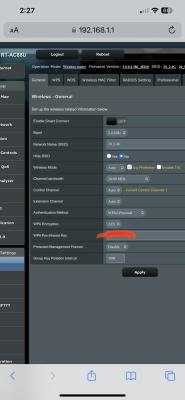
This post has been edited by thomas1983: Apr 6 2023, 02:29 PM |
|
|
Apr 6 2023, 05:48 PM
Return to original view | Post
#15
|
|
Junior Member
159 posts Joined: Jan 2005
|
QUOTE(jackytiong @ Apr 6 2023, 05:26 PM) Normal Any chance can we get better speed like 100+mbps for 2.4ghz? |
|
|
Nov 11 2023, 08:44 PM
Return to original view | Post
#16
|
|
Junior Member
159 posts Joined: Jan 2005
|
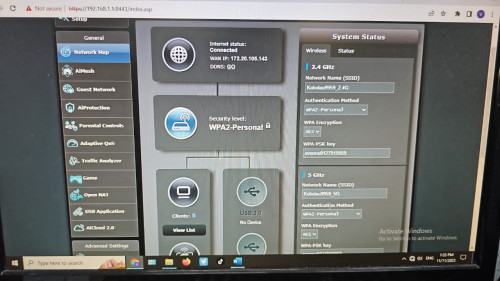 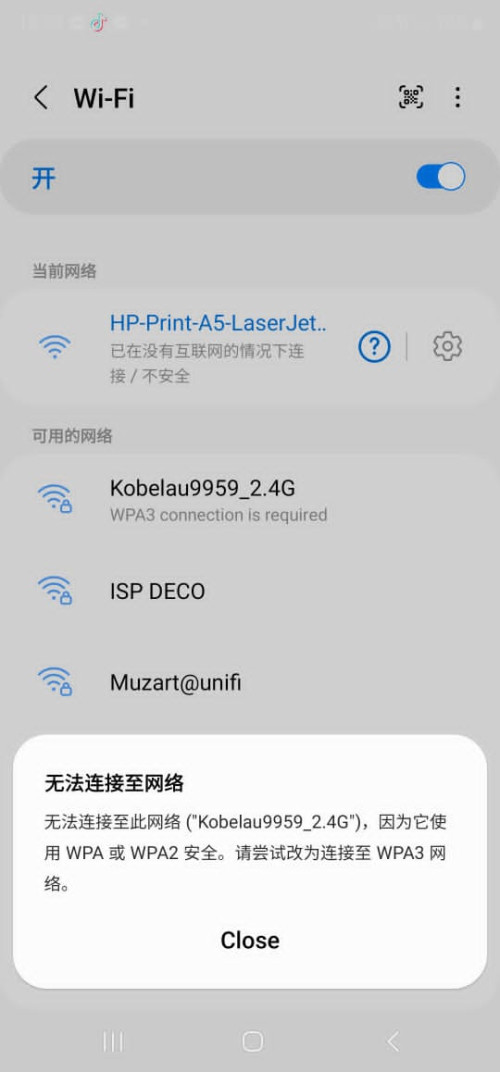 All sifu , this is a unifi biz account on a Ac88u , but there is no internet using lan … phone can’t connect to wifi too as it asked to use wpa3 network … Anyone experienced this before please help ! |
|
|
Mar 13 2025, 10:49 PM
Return to original view | Post
#17
|
|
Junior Member
159 posts Joined: Jan 2005
|
Hi guys ,
My AX88U suddenly the 5ghz wifi disappear! The 5ghz light on router also off … I am sure its enable ! The current control channel is 0, MAC address also blank I did hard reset and switch to Merlin but still no luck ;( Or its the hardware issue ? Anyone can help with this issue pls … This post has been edited by thomas1983: Mar 14 2025, 10:51 AM |
|
|
Mar 14 2025, 07:30 PM
Return to original view | Post
#18
|
|
Junior Member
159 posts Joined: Jan 2005
|
QUOTE(PRSXFENG @ Mar 14 2025, 05:43 PM) you have been hit by malware, do the firmware update to resolve it I already have the latest version but still sameThen I flash to Merlin also same … |
|
|
Mar 14 2025, 10:11 PM
Return to original view | Post
#19
|
|
Junior Member
159 posts Joined: Jan 2005
|
QUOTE(kk131 @ Mar 14 2025, 08:41 PM) Are you running the latest firmware version? Asus AICloud was hacked. yes latest 3.0.0.4_388_24232 |
|
|
Mar 15 2025, 11:41 AM
Return to original view | Post
#20
|
|
Junior Member
159 posts Joined: Jan 2005
|
QUOTE(kk131 @ Mar 15 2025, 08:20 AM) You've tried a factory reset? Yes bro … I did by pressing the reset button at the back |
| Change to: |  0.0383sec 0.0383sec
 0.43 0.43
 7 queries 7 queries
 GZIP Disabled GZIP Disabled
Time is now: 3rd December 2025 - 04:38 PM |
 Quote
Quote