Hi Asusmy, I have just purchased an Asus ac86u router. I have setup the unit as a router for my unifi and all is working great.
Only issue is that when I connect my alarm to it via lan cable in order to give my alarm Internet access, none of the 4 ports work. The led for lan does not light up nor have any Internet connection. I have tried to disable AiProtection and Firewall, reset the unit, re-setup the unit, upgrade the firmware and nothing seem to work.
However, when I connect the same cable (alarm lan cable) to another router (dlink), the unit's led lights up and has Internet connection. All working great on dlink.
Then again, I connect the Asus ac86u router to a PC via lan cable and it works. All 4 ports works without any issue.
So what seem to be the problem here? As far as I know, i don't think there is any issue with the lan cable or not it won't work on dlink router. Or is it that Asus router is picky on lan cable?
If it's a settings issue at least the lan led will light up?
Hope you can help me out on this!
Thanks.
Hi pierrechoong,
May I know what category of LAN cable you are using for the alarm? Cat5? Cat5e? Straight or cross connection?
Apologize that I am not sure what kind of lan cable is being used on the alarm...how do I check this? its written on the cable right?
The lan cable for the pc which I used is the one came with the new asus router.
The alarm I am using is Paradox alarm with its Internet module IP150.
Do keep me posted.
Thanks.
lol, same with my home alarm with IP150. Paradox already stopped support for PMH, so have no choice to use Asus router because only Asus router got provide free Asus lifetime DDNS. The alarm only can support up to 100mbps I think. My home alarm was plugged to a D-Link gigabit switch (DGS-1016D) but not from the router directly. Since my router is connected to the LAN port 1 of the gigabit switch to make the switch connected to internet. The rest LAN cables, whole house LAN wall plug and CCTV were all connected to the gigabit switch.
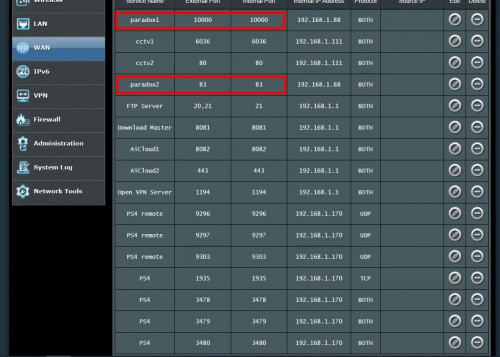
I can give you my reference for port forwarding settings. However the port 83 may different from yours, due to the port 80 was used as my home CCTV. However, the port 10000 was the default port of paradox IP150. This one is used for the mobile apps iParadox or Inside Gold for us to access from outside by 4G or wifi. You may refer the port forward settings of your old router too since all the settings were inside there.
This post has been edited by junclj: Jan 6 2020, 10:24 AM
hi. Can i know if the RT-AC88u parental control allows realtime monitoring of SPECIFIC device? My old RT-AC66u can monitor traffic, but can't identify which device is actually actively transmitting/receiving.
any other stock router firmware/software that can do the job?
How come after upgrading my RT86u firmware from 384.81049 to 384.81351, it still show 384.81049? I done it 3 times to be sure but still the same result.
How come after upgrading my RT86u firmware from 384.81049 to 384.81351, it still show 384.81049? I done it 3 times to be sure but still the same result.
If still unable to upgrade, you may need to reflash the latest firmware in rescue mode. Go to RT-AC86U official website and download "ASUS Firmware Restoration version 2.1.0.2". Also get prepare the latest firmware 3.0.0.4.384.81351.
First, you need to reset your router. So make sure you need to backup your router settings in the "save settings" feature inside your router. If you want to redo the settings manually, so just note down everything important such as unifi pppoe ID and password, port forwarding settings, wifi ssid, password etc before you proceed to reset your router.
The reset button, I think you should know what to do. Usually I am using a pen to stick inside the small hole of my router.
After you reset the router, put your router in front of your PC and use a LAN cable to connect to the PC, set your PC ethernet IPv4 default gateway as 192.168.1.1. So your PC local IP just set whatever you like as long as 192.168.1.xx.
So now, you need to switch off that router. Now use your pen and hold the reset button, another hand to power on the router. Keep hold the reset button until the power LED of your router start to blink off and on very slow. Now you can release the reset button.
Start ASUS Firmware Restoration tool and locate your RT-AC86U to flash the firmware into your router. After done, you may need to wait 5-10 minutes to wait for the router restart.
** How to ensure that your router in rescue mode? You can always open 192.168.1.1 with web browser to check."
This post has been edited by junclj: Jan 6 2020, 05:49 PM
If still unable to upgrade, you may need to reflash the latest firmware in rescue mode. Go to RT-AC86U official website and download "ASUS Firmware Restoration version 2.1.0.2". Also get prepare the latest firmware 3.0.0.4.384.81351.
First, you need to reset your router. So make sure you need to backup your router settings in the "save settings" feature inside your router. If you want to redo the settings manually, so just note down everything important such as unifi pppoe ID and password, port forwarding settings, wifi ssid, password etc before you proceed to reset your router.
The reset button, I think you should know what to do. Usually I am using a pen to stick inside the small hole of my router.
After you reset the router, put your router in front of your PC and use a LAN cable to connect to the PC, set your PC ethernet IPv4 default gateway as 192.168.1.1. So your PC local IP just set whatever you like as long as 192.168.1.xx.
So now, you need to switch off that router. Now use your pen and hold the reset button, another hand to power on the router. Keep hold the reset button until the power LED of your router start to blink off and on very slow. Now you can release the reset button.
Start ASUS Firmware Restoration tool and locate your RT-AC86U to flash the firmware into your router. After done, you may need to wait 5-10 minutes to wait for the router restart.
** How to ensure that your router in rescue mode? You can always open 192.168.1.1 with web browser to check."
hi. Can i know if the RT-AC88u parental control allows realtime monitoring of SPECIFIC device? My old RT-AC66u can monitor traffic, but can't identify which device is actually actively transmitting/receiving.
any other stock router firmware/software that can do the job?
TIA.
Hi soundguy,
There is 2 feature you can use in this router.
1) Traffic Analyzer. Shows how your network is used and by which client devices or apps.
2) Bandwidth Monitor(Adaptive QoS) Realtime bandwidth monitor for clients.
I cannot connect to UNIFI using PPPoE username and password. What other settings that I need to configure? Could anyone please share the setup guides for both UNIFI and TIME Internet?
Thank you.
EDIT: Just realised for UNIFI you need to tick the ISP specific requirement or something like that. Still want to know if there if there any specific setup for TIME though. Thanks.
This post has been edited by kombeng7: Jan 9 2020, 08:45 AM
I have a RT-AC68u for close to 5 years now - recently discovered that the wireless signals are not transmitting from the router, same for Ethernet. I used another router - my internet is working fine. Suspect the router is already busted, tried resetting but still the same.
I cannot connect to UNIFI using PPPoE username and password. What other settings that I need to configure? Could anyone please share the setup guides for both UNIFI and TIME Internet?
Thank you.
EDIT: Just realised for UNIFI you need to tick the ISP specific requirement or something like that. Still want to know if there if there any specific setup for TIME though. Thanks.
You need to tick the ISP specific requirement for Unifi and Maxis because both ISP uses VLAN tagging. However, TIME does not use that, so you don't have to configure anything for TIMR.



 Jan 6 2020, 09:05 AM



 Quote
Quote






 0.0240sec
 0.70
0.70
 6 queries
 GZIP Disabled