Welcome Guest ( Log In | Register )

Bump Topic Topic Closed RSS Feed
126 Pages « < 106 107 108 109 110 > » Bottom

Outline · [ Standard ] · Linear+

Hardware The New MacBook/MacBook Pro/Air Users Thread v5, Share your joy and your pain here ;)

views
     
mannquin
post Jun 28 2010, 12:19 AM

Casual
***
Junior Member
351 posts

Joined: Jul 2008
From: Hamilton


QUOTE(gurus @ Jun 27 2010, 04:42 PM)
totally agree with that  nod.gif


Added on June 27, 2010, 4:49 pm
if u r not using any hard cases for ur mbp, i would strongly recommend the MOSHI palmguard (it also comes with the trackguards). the material used is exceptionally great or could i just say its just simply amazing. its like a thin layer of metal and it do feels very good when u rest on it  laugh.gif

p/s: i'm using a speck seethru satin for my mbp n the palmguard is NOT advisable as it is not compatible anymore with the case unless u do a little  modification to the palmguard yourself. the case actually pushes the palmguard out of where its supposed to sit when u clip it on.
*
What's with the hard case? I thought the metal enclosure is sufficient to protect it from any damages? And wouldn't it make the macbook look bulky just like cell phones in those plastic cases? Am now considering Bodyguardz.
gurus
post Jun 28 2010, 12:59 AM

1.get up! 2.survive! 3.go back to bed!
******
Senior Member
1,242 posts

Joined: Sep 2005
From: Puchong


QUOTE(mannquin @ Jun 28 2010, 12:19 AM)
What's with the hard case? I thought the metal enclosure is sufficient to protect it from any damages? And wouldn't it make the macbook look bulky just like cell phones in those plastic cases? Am now considering Bodyguardz.
*
The case protects the MacBook from knocks n scratches. Bodyguardz will make ur MacBook scratch free but it also transform it into Kinda glossy, attracts fingerprints n smudges.

izact
post Jun 28 2010, 01:18 PM

Getting Started
**
Junior Member
95 posts

Joined: Sep 2009


QUOTE(Ojimaru @ Jun 26 2010, 05:44 PM)
What kind of quality were you expecting? And what are your MBP specs?
*
im only using mbp 13 (new spec). i know i shouldnt expected the quality would be better as HD LCD/LED watsoever. just curious and if it has the quality as to my flatscreen tv..that is just nice and adequate. Not really expecting it would better than HD. My request is if someone knows a codec or two for the video quality then it would be helpful. that's all.. tq
terence8
post Jun 28 2010, 05:28 PM

Getting Started
**
Junior Member
90 posts

Joined: Jun 2009


omg my MBP will arrive in 2 days time..so exciting..but i have a question..i have tons of songs in my windows desktop..and i have a WD hardisk..but as i know its format is NFTS..can i just like transfer the song over and put in my mac? or else what can i do?
CreamMilk
post Jun 28 2010, 05:42 PM

Casual
***
Junior Member
486 posts

Joined: Jan 2005
From: Technology paradise
QUOTE(terence8 @ Jun 28 2010, 05:28 PM)
omg my MBP will arrive in 2 days time..so exciting..but i have a question..i have tons of songs in my windows desktop..and i have a WD hardisk..but as i know its format is NFTS..can i just like transfer the song over and put in  my mac?  or else what can i do?
*
I just use a network cable (RJ-45) connect my pc and mac, share my music folder at pc. At mac, click on "connect to server" and type "smb://yourPC_IP_address

That's it, then you able to copy from your pc to mac smile.gif
of cos you need to assign your pc with a static IP first.
Ojimaru
post Jun 28 2010, 05:43 PM

On my way
****
Senior Member
561 posts

Joined: Apr 2009


QUOTE(terence8 @ Jun 28 2010, 05:28 PM)
omg my MBP will arrive in 2 days time..so exciting..but i have a question..i have tons of songs in my windows desktop..and i have a WD hardisk..but as i know its format is NFTS..can i just like transfer the song over and put in  my mac?  or else what can i do?
*
Mac OSX can read NTFS, just not write. So if you're copying your music library over to your Mac, it shouldn't run into any problems.
Eithanius
post Jun 28 2010, 05:53 PM

::+::KukuNius(tm)::+::
*******
Senior Member
3,952 posts

Joined: Apr 2005
From: Sector 1921B, Delta Quadrant


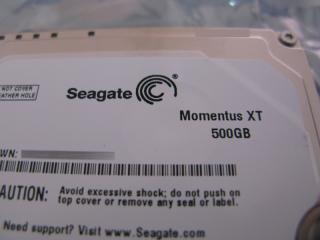
For those MBP users who are interested in a faster internal HDD, I've just installed this today... tongue.gif brows.gif

Attached Image
dinraxxx
post Jun 28 2010, 05:58 PM

Ex-Intern Editor for Lowyat.NET.
******
Senior Member
1,836 posts

Joined: Dec 2007


QUOTE(Eithanius @ Jun 28 2010, 05:53 PM)
For those MBP users who are interested in a faster internal HDD, I've just installed this today... tongue.gif brows.gif

Attached Image
*
how much is the Momentus?What's the speed rate?
nimrod323
post Jun 28 2010, 06:17 PM

Macster/Gunner\Autobot /Alphaman\
*******
Senior Member
2,664 posts

Joined: Apr 2008
From: Here and There


QUOTE(Eithanius @ Jun 28 2010, 05:53 PM)
For those MBP users who are interested in a faster internal HDD, I've just installed this today... tongue.gif brows.gif

Attached Image
*
oi how much is that? whats the performance like
Eithanius
post Jun 28 2010, 06:21 PM

::+::KukuNius(tm)::+::
*******
Senior Member
3,952 posts

Joined: Apr 2005
From: Sector 1921B, Delta Quadrant


QUOTE(nimrod323 @ Jun 28 2010, 06:17 PM)
oi how much is that? whats the performance like
*
estimated around RM 540, bought online with an external case bundle... can consider good bargain already...

I'm not into benchmarking, but coming from a 5400rpm previously, I'd say my MBP is really much more responsive...

I haven't got time to test or play with it yet, still busy with work... sweat.gif


Added on June 28, 2010, 6:59 pmJust wanna add:

The drive is of course, slightly warmer due to faster spins. Can feel the warmth on the lower right palm rest area, but as for noise and vibration - none of a problem at all...

I've noticed my MBP fans spin up much more frequently but then again it could be due to the heavy data read/write from OS restoration and my ongoing work...

This post has been edited by Eithanius: Jun 28 2010, 06:59 PM
Brasco
post Jun 28 2010, 07:50 PM

Casual
***
Junior Member
354 posts

Joined: Jan 2003
QUOTE(Ojimaru @ Jun 28 2010, 05:43 PM)
Mac OSX can read NTFS, just not write. So if you're copying your music library over to your Mac, it shouldn't run into any problems.
*
And try and get Paragon NTFS for Mac. You don't have to worry whether your external hard disk is which format any longer.
terence8
post Jun 28 2010, 07:50 PM

Getting Started
**
Junior Member
90 posts

Joined: Jun 2009


QUOTE(Ojimaru @ Jun 28 2010, 05:43 PM)
Mac OSX can read NTFS, just not write. So if you're copying your music library over to your Mac, it shouldn't run into any problems.
*
yea i understands about it..but what really is cannot write?? if let say i transfer my music to mac can it play there?? or when i do my assignment in my windows using Microsoft office and i wanna continue with my microsoft office in mac can i?? if cant what can i do?


Added on June 28, 2010, 7:51 pm
QUOTE(Brasco @ Jun 28 2010, 07:50 PM)
And try and get Paragon NTFS for Mac. You don't have to worry whether your external hard disk is which format any longer.
*
i checked about that too..but need to pay rite?? is there any free wan?


This post has been edited by terence8: Jun 28 2010, 07:51 PM
yeahs4.1
post Jun 28 2010, 10:05 PM

Audio Freako
*******
Senior Member
2,491 posts

Joined: Jun 2006
From: KL


will the 12.5mm 2.5" HDD (750GB or 1TB) fit into mid 2010 mbp 13/15/17? I'm getting mixed responses of yes and no.

http://forums.macrumors.com/showthread.php...highlight=750gb

http://forums.macrumors.com/showthread.php?t=754161&page=3

This post has been edited by yeahs4.1: Jun 28 2010, 10:06 PM
Eithanius
post Jun 28 2010, 10:39 PM

::+::KukuNius(tm)::+::
*******
Senior Member
3,952 posts

Joined: Apr 2005
From: Sector 1921B, Delta Quadrant


QUOTE(yeahs4.1 @ Jun 28 2010, 10:05 PM)
will the 12.5mm 2.5" HDD (750GB or 1TB) fit into mid 2010 mbp 13/15/17? I'm getting mixed responses of yes and no.

http://forums.macrumors.com/showthread.php...highlight=750gb

http://forums.macrumors.com/showthread.php?t=754161&page=3
*
If you're looking at the 750GB, the latest iteration is 9.5mm... only the 1TB is at 12.5mm, and spins slower at 5,200rpm instead of 5,400rpm...

But then again, I have not seen 750GB anywhere here...
yeahs4.1
post Jun 28 2010, 10:47 PM

Audio Freako
*******
Senior Member
2,491 posts

Joined: Jun 2006
From: KL


QUOTE(Eithanius @ Jun 28 2010, 10:39 PM)
If you're looking at the 750GB, the latest iteration is 9.5mm... only the 1TB is at 12.5mm, and spins slower at 5,200rpm instead of 5,400rpm...

But then again, I have not seen 750GB anywhere here...
*
i'm looking at the biggest capacity available that can be fitted in mid 2010 mbp 13", i'm fine with 5400/5200 RPM as the improvement of additional 2000RPM is reported marginal.
cRazYee
post Jun 29 2010, 07:57 AM

Look at all my stars!!
*******
Senior Member
2,642 posts

Joined: Jan 2005
From: Penang
QUOTE(Eithanius @ Jun 28 2010, 06:21 PM)
estimated around RM 540, bought online with an external case bundle... can consider good bargain already...

I'm not into benchmarking, but coming from a 5400rpm previously, I'd say my MBP is really much more responsive...

I haven't got time to test or play with it yet, still busy with work... sweat.gif


Added on June 28, 2010, 6:59 pmJust wanna add:

The drive is of course, slightly warmer due to faster spins. Can feel the warmth on the lower right palm rest area, but as for noise and vibration - none of a problem at all...

I've noticed my MBP fans spin up much more frequently but then again it could be due to the heavy data read/write from OS restoration and my ongoing work...
*
can you give me the exact model

Ojimaru
post Jun 29 2010, 08:39 AM

On my way
****
Senior Member
561 posts

Joined: Apr 2009


QUOTE(terence8 @ Jun 28 2010, 07:50 PM)
yea i understands about it..but what really is cannot write?? if let say i transfer my music to mac can it play there?? or when i do my assignment in my windows using Microsoft office and i wanna continue with my microsoft office in mac can i?? if cant what can i do?
You can transfer from the drive, but cannot transfer to the drive.

QUOTE(terence8 @ Jun 28 2010, 07:50 PM)
i checked about that too..but need to pay rite?? is there any free wan?
*
NTFS-3G
CreamMilk
post Jun 29 2010, 08:51 AM

Casual
***
Junior Member
486 posts

Joined: Jan 2005
From: Technology paradise
QUOTE(Ojimaru @ Jun 29 2010, 08:39 AM)
You can transfer from the drive, but cannot transfer to the drive.
NTFS-3G
*
sorry to ask, but I was connecting my pc and mac with RJ-45 cable, direct connection.
Open my PC share folder with smb:// protocol.
Then I just transfer files from mac to pc, which previously I backup from my pc to mac.
I am very sure I didn't install NTFS-3G or any other NTFS tool, because the mac is brand new.

May I know what happen? As I know Mac couldn't "write" to NTFS...
Although they are some file with chinese filename will give me error, but most of the files
transfer back to my pc without any problem blink.gif
Eithanius
post Jun 29 2010, 11:43 AM

::+::KukuNius(tm)::+::
*******
Senior Member
3,952 posts

Joined: Apr 2005
From: Sector 1921B, Delta Quadrant


QUOTE(cRazYee @ Jun 29 2010, 07:57 AM)
can you give me the exact model
*
ST95005620AS... If you're still in the UK, according to my friend, it's still not available there yet....
hapa
post Jun 29 2010, 02:42 PM

i kill u!!
*****
Senior Member
828 posts

Joined: Nov 2007
update for my battery issue:

user posted image
new battery from apple... but i have to pay for that cry.gif

after a few calls to apple care and gone through all the hassel, unfortunately i do not get a free battery replacement from apple care, no luck maybe. but i do get a free discount coupon from them. So, i jz purchase a new battery from apple online store with some discount..

jz to confirm, should i take out my battery when using it with power adapter??? a machines technician/worker told me that i should do so to prevent the battery from swollen but i ask her then how about the new mbp with non-removable battery? speechless her notworthy.gif

126 Pages « < 106 107 108 109 110 > » Top
Topic ClosedOptions
 

Change to:
| Lo-Fi Version
0.0301sec    0.46    6 queries    GZIP Disabled
Time is now: 10th December 2025 - 07:48 PM