Welcome Guest ( Log In | Register )

Bump Topic Topic Closed RSS Feed
495 Pages « < 467 468 469 470 471 > » Bottom

Outline · [ Standard ] · Linear+

Unifi Official TM UniFi High Speed Broadband Thread V42, READ 1ST PAGE FOR RELEVANT WIFI INFO!

views
     
wiraone
post Feb 18 2025, 10:16 PM

Who cares about all the stars?
*******
Senior Member
3,892 posts

Joined: Jan 2003
From: Back on earth!
QUOTE(aspire2oo6 @ Feb 18 2025, 10:14 PM)
how to get the free upgrade? mine no free upgrade
*
I specifically asked for the upgrade smile.gif I told the Unifi guy, I want the 500Mbps package but with 1GBps upgrade just like SWU 4.0 and he went inside, no idea talking to the manager I guess and say okay, can proceed smile.gif
aspire2oo6
post Feb 18 2025, 10:17 PM

Banned
*********
All Stars
35,468 posts

Joined: Oct 2006

QUOTE(wiraone @ Feb 18 2025, 10:16 PM)
I specifically asked for the upgrade smile.gif I told the Unifi guy, I want the 500Mbps package but with 1GBps upgrade just like SWU 4.0 and he went inside, no idea talking to the manager I guess and say okay, can proceed smile.gif
*
grrrr. unfair I did asked they said no such plan.
Anime4000
post Feb 18 2025, 11:04 PM

Look at all my stars!!
*******
Senior Member
2,399 posts

Joined: Jul 2009
From: /dev/null


QUOTE(PRSXFENG @ Feb 17 2025, 09:20 AM)
I would not be suprised
the older "cheap" AC wireless stuff from the past like the Netis or the Aztech had similar looking UI to iirc

quite dissapointing
*
No wonder Skyworth ONT GUI somewhat similar to Riger DB120-WL interface

quick inspection, still use same crap!

well, typical cheap equipment has no security update
TongCN
post Feb 19 2025, 09:05 AM

Look ma, I have lots stars :D
*******
Senior Member
6,621 posts

Joined: Aug 2008
From: Malaysia


QUOTE(diversity @ Feb 18 2025, 03:49 PM)
I walked in to UNIFI Store Shah Alam Seksyen 11 today, was offered the same thing as you. They mentioned the RM39 postpaid plan must be used for 3M, but they said can cancel after 2 month+. I was so confused. Was not given any T&Cs. They said without the postpaid plan I can't be offered the SWU package for sure.

So now I'm uncertain if I directly cancel the Rm39 plan now (don't need it and don't care if this Rm39 is wasted), I just don't want to waste another rm39 on another month. Went on live chat and couldn't get an answer while the voice hotline 100 seems to be down. This is really some dodgy practice and abysmal customer service.

Even though I have low expectations of TM as whole, today it goes down even further. After activating the postpaid plan at home, realised the expiry of the data plan and unlimited calls is 25 Feb, which is only 7 days from now. Went on live chat, and the CS person was the worst and kept recycling same answer without making sense, and incapable of even answering a simple question. Had to drive out again to tm Point dealer and they confirmed the charges will be pro rated and I'll have credit balance next month.
*
My SWU4.0 also need bundle the RM39 postpaid plan but then 2 months later, they offer me 6 months free bill on the postpaid plan (I paid 3 months dy actually and wanna cancel)

So now my Postpaid basically in free period for 6 months, gonna cancel it on 5.5 month later in case kenak charge (no contract btw)
watermineral
post Feb 19 2025, 09:38 AM

Getting Started
**
Junior Member
137 posts

Joined: Apr 2009
user posted image

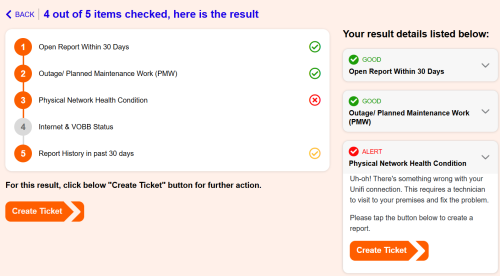
hello there, I've been experiencing constant ping spikes while gaming. I initially thought it was an issue with Maxis, having been with them for two years. However, I recently switched to Unifi, and the problem persists. When I used TMnet's EasyFix tool, it indicated a hardware issue.

I contacted TM, and they reset my port last night, but I haven had the chance to test if it resolved the ping spikes. Even after the reset, the TM EasyFix tool still detects this supposed hardware issue.

I'm using Wi-Fi, and I've tried two setups:

TM's own combo router AX3000 in combo mode
TM combo router AX3000 bridge mode pair with TPlink AX5400

Despite these changes, the ping spikes continue. I've tested both the 2.4GHz and 5GHz bands, but no difference.

Does anyone have any opinions on this?
go626201
post Feb 19 2025, 10:45 AM

Regular
******
Senior Member
1,882 posts

Joined: Sep 2017
QUOTE(watermineral @ Feb 19 2025, 09:38 AM)
user posted image

hello there, I've been experiencing constant ping spikes while gaming. I initially thought it was an issue with Maxis, having been with them for two years. However, I recently switched to Unifi, and the problem persists. When I used TMnet's EasyFix tool, it indicated a hardware issue.

I contacted TM, and they reset my port last night, but I haven had the chance to test if it resolved the ping spikes. Even after the reset, the TM EasyFix tool still detects this supposed hardware issue.

I'm using Wi-Fi, and I've tried two setups:

TM's own  combo router AX3000 in combo mode
TM combo router AX3000 bridge mode pair with TPlink AX5400

Despite these changes, the ping spikes continue. I've tested both the 2.4GHz and 5GHz bands, but no difference.

Does anyone have any opinions on this?
*
Can you try to ping 8.8.8.8 with ethernet cable connected?
As long as u are using wifi,u cant get 100% full time low ping even to local network.
tng55
post Feb 19 2025, 11:54 AM

Regular
******
Senior Member
1,433 posts

Joined: Sep 2021


QUOTE(watermineral @ Feb 19 2025, 09:38 AM)
user posted image

hello there, I've been experiencing constant ping spikes while gaming. I initially thought it was an issue with Maxis, having been with them for two years. However, I recently switched to Unifi, and the problem persists. When I used TMnet's EasyFix tool, it indicated a hardware issue.

I contacted TM, and they reset my port last night, but I haven had the chance to test if it resolved the ping spikes. Even after the reset, the TM EasyFix tool still detects this supposed hardware issue.

I'm using Wi-Fi, and I've tried two setups:

TM's own  combo router AX3000 in combo mode
TM combo router AX3000 bridge mode pair with TPlink AX5400

Despite these changes, the ping spikes continue. I've tested both the 2.4GHz and 5GHz bands, but no difference.

Does anyone have any opinions on this?
*
please use LAN Cable and test it
watermineral
post Feb 19 2025, 12:27 PM

Getting Started
**
Junior Member
137 posts

Joined: Apr 2009
ok, will need to find a laptop or a long ethernet cable.
aspire2oo6
post Feb 19 2025, 02:45 PM

Banned
*********
All Stars
35,468 posts

Joined: Oct 2006

QUOTE(watermineral @ Feb 19 2025, 09:38 AM)
user posted image

hello there, I've been experiencing constant ping spikes while gaming. I initially thought it was an issue with Maxis, having been with them for two years. However, I recently switched to Unifi, and the problem persists. When I used TMnet's EasyFix tool, it indicated a hardware issue.

I contacted TM, and they reset my port last night, but I haven had the chance to test if it resolved the ping spikes. Even after the reset, the TM EasyFix tool still detects this supposed hardware issue.

I'm using Wi-Fi, and I've tried two setups:

TM's own  combo router AX3000 in combo mode
TM combo router AX3000 bridge mode pair with TPlink AX5400

Despite these changes, the ping spikes continue. I've tested both the 2.4GHz and 5GHz bands, but no difference.

Does anyone have any opinions on this?
*
If you’re using a free router and expecting top-level gaming performance like a RM1,000 router, that’s not going to happen.

The best way to test your internet connection is by using a LAN cable (wired connection). If you don’t experience lag or spikes with a cable but do with WiFi, then your router might be the problem.

WiFi performance depends on many things, like:

Coverage – How far you are from the router.

Obstruction – Walls and furniture can block the signal.

Interference – Other electronic devices or nearby WiFi networks can mess with the signal.

WiFi Hardware – Your device’s WiFi chip also affects performance.

If your WiFi is slow or unstable, you might need a better router or a different setup!
GamersFamilia
post Feb 19 2025, 05:40 PM

Proud to be Malaysian
********
All Stars
17,760 posts

Joined: Dec 2007
From: Bandar Baru Bangi , Malaysia


QUOTE(watermineral @ Feb 19 2025, 12:27 PM)
ok, will need to find a laptop or a long ethernet cable.
*
Ethernet cable all you need
bergstein
post Feb 19 2025, 06:17 PM

Casual
***
Junior Member
352 posts

Joined: Nov 2011
Went to TM Point today, asked "my current 300mbps RM129 plan contract already finished, any promo for renew?"
can skip following story just write down for record/fun:
» Click to show Spoiler - click again to hide... «


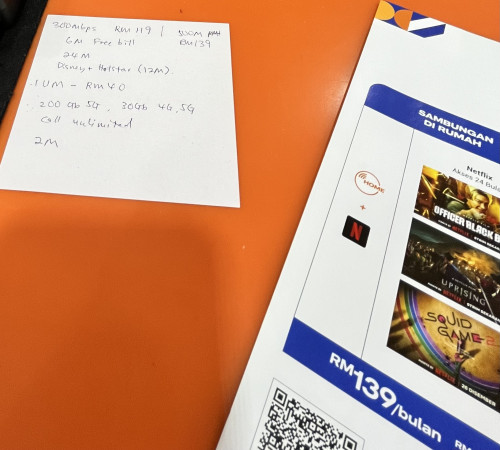
The offer I got is 300mbps + 6 months waived + 12 months Disney+ Hotstar for RM119 BUT must get Unifi Mobile plan

Now I'm more skeptical on the RM119 part, is it really RM119 (RM126 after SST)?
Because sources here mostly says 129 for 300mbps.
I don't see any way (unifi app/website/etc) to verify that now, have to wait until 7th month bill arrive?

This post has been edited by bergstein: Feb 19 2025, 06:31 PM
aspire2oo6
post Feb 19 2025, 07:01 PM

Banned
*********
All Stars
35,468 posts

Joined: Oct 2006

QUOTE(bergstein @ Feb 19 2025, 06:17 PM)
Went to TM Point today, asked "my current 300mbps RM129 plan contract already finished, any promo for renew?"
can skip following story just write down for record/fun:
» Click to show Spoiler - click again to hide... «


The offer I got is 300mbps + 6 months waived + 12 months Disney+ Hotstar for RM119 BUT must get Unifi Mobile plan

Now I'm more skeptical on the RM119 part, is it really RM119 (RM126 after SST)?
Because sources here mostly says 129 for 300mbps.
I don't see any way (unifi app/website/etc) to verify that now, have to wait until 7th month bill arrive?
*
Cheaper I think impossible yesterday they told me 300mbps was rm129

wiraone
post Feb 19 2025, 07:27 PM

Who cares about all the stars?
*******
Senior Member
3,892 posts

Joined: Jan 2003
From: Back on earth!
QUOTE(bergstein @ Feb 19 2025, 06:17 PM)
Went to TM Point today, asked "my current 300mbps RM129 plan contract already finished, any promo for renew?"
can skip following story just write down for record/fun:
» Click to show Spoiler - click again to hide... «


The offer I got is 300mbps + 6 months waived + 12 months Disney+ Hotstar for RM119 BUT must get Unifi Mobile plan

Now I'm more skeptical on the RM119 part, is it really RM119 (RM126 after SST)?
Because sources here mostly says 129 for 300mbps.
I don't see any way (unifi app/website/etc) to verify that now, have to wait until 7th month bill arrive?
*
You can initiate a chat with Maya, ask for billing related and they can tell you how much you need to pay etc. I just did yesterday to confirm my package and monthly payment.

bergstein
post Feb 19 2025, 08:34 PM

Casual
***
Junior Member
352 posts

Joined: Nov 2011
QUOTE(wiraone @ Feb 19 2025, 07:27 PM)
You can initiate a chat with Maya, ask for billing related and they can tell you how much you need to pay etc. I just did yesterday to confirm my package and monthly payment.
*
The gpt bot keep timing or say "something wrong, I'm not sure..." or just keep giving old bill price kek so in the end ask bot to connect me to live agent.
Confirmed by agent, it's RM119 (RM126 after SST), means TM point branch seems quite flexible to change the offer/price for this SWU5.0...?
user posted image
user posted image

This post has been edited by bergstein: Feb 19 2025, 08:37 PM
wiraone
post Feb 19 2025, 10:13 PM

Who cares about all the stars?
*******
Senior Member
3,892 posts

Joined: Jan 2003
From: Back on earth!
So SWU 5.0 is really really flexible. Depending on how you approach them and ask I guess smile.gif
sixguyz_jayhan
post Feb 19 2025, 11:06 PM

Getting Started
**
Junior Member
215 posts

Joined: Sep 2019
Hi everyone, any interuption on network u guys felt these few days?
PING ok, not much jittering, quite stable, but website load very slow.
wiraone
post Feb 20 2025, 07:20 AM

Who cares about all the stars?
*******
Senior Member
3,892 posts

Joined: Jan 2003
From: Back on earth!
QUOTE(sixguyz_jayhan @ Feb 19 2025, 11:06 PM)
Hi everyone, any interuption on network u guys felt these few days?
PING ok, not much jittering, quite stable, but website load very slow.
*
Mine is normal, what DNS provider do you use? Might be the dns resolution slowing your browser?
Jjuggler
post Feb 20 2025, 09:20 AM

Narcissistic Genius
******
Senior Member
1,341 posts

Joined: Dec 2016
QUOTE(Anime4000 @ Feb 18 2025, 11:04 PM)
No wonder Skyworth ONT GUI somewhat similar to Riger DB120-WL interface

quick inspection, still use same crap!

well, typical cheap equipment has no security update
*
Deswai I still prefer to use the old configuration: modem + standalone router. If a service provider wants to combine two function into a single box, that means they should assign a reliable vendor to write security patches on monthly basis, firmware with less bug, and give contract to vendor with good track record of maintaining networking device. Unifi clearly cutting down the cost to the most extreme level. I think the only current best solution is opting to maxis if still want to retain the old configuration, regardless 1G or 2G package.
muhammadnajmi96
post Feb 20 2025, 10:09 AM

Getting Started
**
Junior Member
233 posts

Joined: Jan 2013
From: Sepang


Hi, can we apply for swu5.0 at unifi store instead of tmpoint? since most of tmpoint is open on weekday only?

and also since currently under my dad name, do i have to bring him also or i can just print a letter and copy of his ic for doing the swu?

This post has been edited by muhammadnajmi96: Feb 20 2025, 10:17 AM
blacktubi
post Feb 20 2025, 10:17 AM

-
Group Icon
Elite
8,400 posts

Joined: Jul 2008

QUOTE(muhammadnajmi96 @ Feb 20 2025, 10:09 AM)
Hi, can we apply for swu5.0 at unifi store instead of tmpoint? since most of tmpoint is open on weekday only?
*
Yes, if you are referring to the official Unifi Store like the one at KLCC

495 Pages « < 467 468 469 470 471 > » Top
Topic ClosedOptions
 

Change to:
| Lo-Fi Version
0.0244sec    0.80    6 queries    GZIP Disabled
Time is now: 1st December 2025 - 10:19 PM