Welcome Guest ( Log In | Register )

Bump Topic Topic Closed RSS Feed
495 Pages « < 429 430 431 432 433 > » Bottom

Outline · [ Standard ] · Linear+

Unifi Official TM UniFi High Speed Broadband Thread V42, READ 1ST PAGE FOR RELEVANT WIFI INFO!

views
     
Jjuggler
post Jan 2 2025, 10:54 AM

Narcissistic Genius
******
Senior Member
1,343 posts

Joined: Dec 2016
QUOTE(PRSXFENG @ Jan 1 2025, 07:34 PM)
Specs

ZTE site
https://www.zte.com.cn/global/home_and_ente...xhn_f6600p.html

A teardown and specs from a Portuguese site, use Google translate
https://www.tripleoxygen.net/wiki/ont/zte/f6600p
*
Thanks man for the share. Not sure how this model will perform than the rest stock onrs.

QUOTE(blacktubi @ Jan 1 2025, 11:08 PM)
Probably for locations with ZTE OLT.

Heard that the compatibility of universal ONU with ZTE OLT is not great.
*
It is not great. I am just not happy the way tm locking down the freedom of using own equipments. Technically is possible to use bridge mode, but some reported the firmware is too buggy. For power users, is okay since they are very techy and know how to navigate through this, but for generic people, they going to suffer with not good equipments, let it be from security point of view. Remember the famouse DIR-850L issue.
Moogle Stiltzkin
post Jan 2 2025, 03:44 PM

Look at all my stars!!
*******
Senior Member
4,476 posts

Joined: Jan 2003
so, get unifi or time? confused x-x;

want to use my own pfsense router and wifi ap.

for example

for time, to use on router

QUOTE(jjj2 @ Dec 5 2024, 12:18 PM)
Scenario 1 :
If you are using a Huawei HG8240H/HG8240H5 ONU, then you can directly connect your Asus Router to LAN1 port of the ONU, and configure your PPPOE credentials in your Asus Router.

Scenario 2 :
If you are using a Huawei ONT (Eg. HG8145X6, HN8245X6S-8N-30, HG8145B7N), you need to call CS to request them to change it to the Bridge Mode, just inform them you wish to use your own router, there's no way for them to stop you for doing so.

* Note : Once it is changed to Bridge Mode, when you login to the ONT, under WAN Configuration, you can only see VOIP Profile, the Internet Profile is removed.
*
then what about unifi? any issues or instructions? Is this still valid in 2024? confused.gif
https://www.blacktubi.com/tp-link-unifi-setup/

*for pfsense
https://dev.to/froxity/setup-pfsense-with-t...alaysia-isp-ddj

This post has been edited by Moogle Stiltzkin: Jan 2 2025, 04:25 PM
msrazi
post Jan 2 2025, 04:02 PM

Getting Started
**
Junior Member
112 posts

Joined: Sep 2009


QUOTE(Moogle Stiltzkin @ Jan 2 2025, 03:44 PM)
so, get unifi or time? confused x-x;

want to use my own pfsense router and wifi ap.

for example

for time, to use on router
then what about unifi? any issues or instructions? Is this still valid in 2024?  :confused:
https://www.blacktubi.com/tp-link-unifi-setup/
*
I suggest Metro-E connection if u need a stable connection if u afford.
[revolution]
post Jan 2 2025, 04:21 PM

>> Revolution Yourself : Engage and Transform <<
******
Senior Member
1,321 posts

Joined: Aug 2007
From: KL | Taiwan


QUOTE(aniq8676 @ Dec 27 2024, 03:48 PM)
Have you tried updating the firmware to the latest version?

New Firmware version: DIR-X3060Z_240719_1.0.6
*
hi may I know how to update?
tng55
post Jan 2 2025, 06:42 PM

Regular
******
Senior Member
1,456 posts

Joined: Sep 2021


QUOTE(msrazi @ Jan 2 2025, 04:02 PM)
I suggest Metro-E connection if u need a stable connection if u afford.
*
Metro-E connection very limited area and limited infra not anywhere like unifi infra alot many area available
Yluxion
post Jan 2 2025, 09:23 PM

On my way
****
Junior Member
543 posts

Joined: Sep 2005
From: Sri Petaling, KL


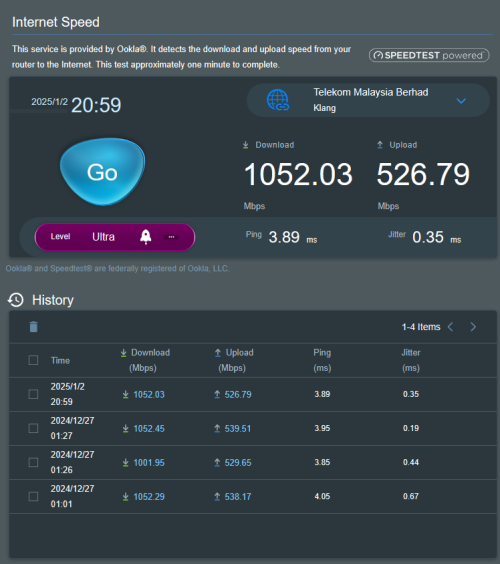
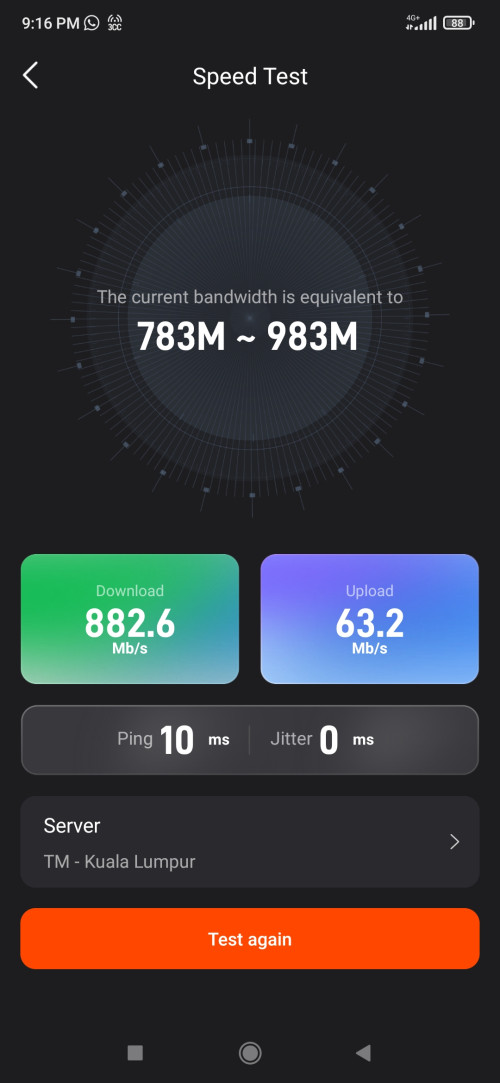
Reporting for my unifi free upgrade from 800Mbps to 1Gbps:

18 Dec - whatsapp (unifi) msg notifying for free upgrade. Submitted my application on that day.
20 Dec - call from unifi via +60379647000, for confirmation of application, T&C explanation & preferred appointment time.
24 Dec - SMS from 61000 informing of modification order successfully processed.
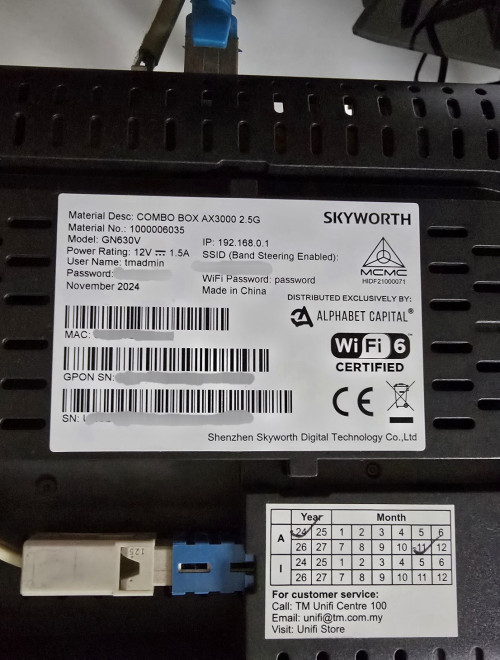
26 Dec - technicians come over, being given Skyworth GN630V 2.5G combo box by the technicians on that day.

Unfortunately, they tell me that they are not familiar with combo box thus unable help me set it as bridge mode. sweat.gif

After trials and errors, takes me 90+ minutes to successfully set it as bridge mode while using my own router. (Asus RT-AX86U Pro)
So far so good for the past 7 days, smooth sailing. thumbsup.gif

user posted image
QuantumEdge
post Jan 2 2025, 09:48 PM

Regular
******
Senior Member
1,602 posts

Joined: Jan 2016


QUOTE(Yluxion @ Jan 2 2025, 09:23 PM)
Reporting for my unifi free upgrade from 800Mbps to 1Gbps:

18 Dec - whatsapp (unifi) msg notifying for free upgrade. Submitted my application on that day.
20 Dec - call from unifi via +60379647000, for confirmation of application, T&C explanation & preferred appointment time.
24 Dec - SMS from 61000 informing of modification order successfully processed.
26 Dec - technicians come over, being given Skyworth GN630V 2.5G combo box by the technicians on that day.

Unfortunately, they tell me that they are not familiar with combo box thus unable help me set it as bridge mode.  sweat.gif

After trials and errors, takes me 90+ minutes to successfully set it as bridge mode while using my own router. (Asus RT-AX86U Pro)
So far so good for the past 7 days, smooth sailing.  thumbsup.gif

user posted image
*
I dont think GN630V is 2.5G capable
PRSXFENG
post Jan 2 2025, 09:51 PM

Look at all my stars!!
*******
Senior Member
2,615 posts

Joined: Nov 2020


QUOTE(QuantumEdge @ Jan 2 2025, 09:48 PM)
I dont think GN630V is 2.5G capable
*
Hmm, they are breaking the barrier of 940Mbps

and I just searched

https://en.skyworthdigital.com/products-detail/ProId/79.html

QUOTE
• 1*2.5GbE Ports (optional)


I dont remember that being there
and Wayback Machine confirms it

https://web.archive.org/web/20240528041624/...l/ProId/79.html

this snapshot of the website from 2024 didnt have that line

Yluxion could you provide more info about the one you received? I think it's the first time the forum has seen this version show up

So, it may be like the D-Link, new hardware version with 2.5Gbps port?

This post has been edited by PRSXFENG: Jan 2 2025, 09:58 PM
Yluxion
post Jan 2 2025, 11:18 PM

On my way
****
Junior Member
543 posts

Joined: Sep 2005
From: Sri Petaling, KL


QUOTE(PRSXFENG @ Jan 2 2025, 09:51 PM)
Hmm, they are breaking the barrier of 940Mbps

and I just searched

https://en.skyworthdigital.com/products-detail/ProId/79.html
I dont remember that being there
and Wayback Machine confirms it

https://web.archive.org/web/20240528041624/...l/ProId/79.html

this snapshot of the website from 2024 didnt have that line

Yluxion could you provide more info about the one you received? I think it's the first time the forum has seen this version show up

So, it may be like the D-Link, new hardware version with 2.5Gbps port?
*
user posted image

There's a single 2.5G port for the black one. While the white one (GN360V) ports are all 1G ports.
Moogle Stiltzkin
post Jan 3 2025, 11:28 AM

Look at all my stars!!
*******
Senior Member
4,476 posts

Joined: Jan 2003
QUOTE(msrazi @ Jan 2 2025, 01:47 AM)
They give u HG6145F3 to replace your current main router. You can use wizard to setup everything 1st. Get your service login information include password & most important thing is ONU password from your old router or ONU.  Input the ONU pwd.

HG6145F3 menu>Network>Auth>OLT Auth>Passkey is ONU password.

Once connected , Play Store Fiberhome app & use it to add your mesh clients or to use built-in speed test to test your subscribed plan. This is actual/trusted speed of your 800mbps.

user posted image
*
i got this onu box fiberhome, same model. they replaced old one for this.

It's an all in one. Last time was modem and router separate, but now this onu is 2 in one.

did not mess with the setting, just used as is, seems to work.

Is this fiberhome HG6145F3 got the backdoor and dodgy crap on it? hmm.gif


QUOTE
Since nobody post firmware dump for FiberHome, it remains unknown. But if you are worried then the Huawei ONU is confirmed safe. You should be able to just swap it.


found answer here
https://forum.lowyat.net/index.php?showtopi...ost&p=110303355

basically nobody knows sweat.gif


https://www.zdnet.com/article/multiple-back...erhome-routers/

shocking.gif

This post has been edited by Moogle Stiltzkin: Jan 3 2025, 12:17 PM
msrazi
post Jan 3 2025, 02:54 PM

Getting Started
**
Junior Member
112 posts

Joined: Sep 2009


QUOTE(Moogle Stiltzkin @ Jan 3 2025, 11:28 AM)
i got this onu box fiberhome, same model. they replaced old one for this.

It's an all in one. Last time was modem and router separate, but now this onu is 2 in one.

did not mess with the setting, just used as is, seems to work.

Is this fiberhome HG6145F3 got the backdoor and dodgy crap on it?  hmm.gif
found answer here
https://forum.lowyat.net/index.php?showtopi...ost&p=110303355

basically nobody knows  sweat.gif
https://www.zdnet.com/article/multiple-back...erhome-routers/

shocking.gif
*
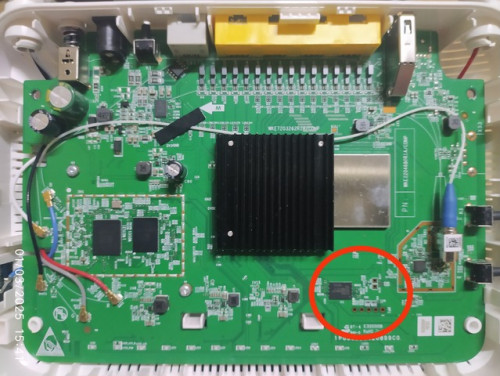
The ONR called combo router because it's ONU+router & only use 1 power supply. Backdoor? Even NEC Pasolink have backdoor for maintenance use. That's include the OLT your router connected to.

*** Update

The HG6145F3 board & the test pins is it backdoor.

user posted image

This post has been edited by msrazi: Jan 3 2025, 04:27 PM
msrazi
post Jan 3 2025, 05:10 PM

Getting Started
**
Junior Member
112 posts

Joined: Sep 2009


Just aware with someone who has physical access to your LAN port & your wifi clients. Only them can access the admin login page, the reason why we should change default admin password to strong one to avoid bad people gain full control.

More important to worry is the backdoor vulnerability of the client of the router such as smart home, NAS, server etc even. But the problem with security itself is it only for someone or owner who remember own password, not for try & error owner. No use for try & error owner if end up with factory reset i.e smartphone etc.
QuantumEdge
post Jan 3 2025, 06:05 PM

Regular
******
Senior Member
1,602 posts

Joined: Jan 2016


Hey guys, I'm deciding which ONU to giveaway to my landlord

At the moment I have Huawei hg8240h5 and ZTE F620 to choose from

Which is the better one ya?

Gonna give her a little suprise by changing her lousy fiberhome combo box to full blown tplink mesh system
msrazi
post Jan 3 2025, 06:31 PM

Getting Started
**
Junior Member
112 posts

Joined: Sep 2009


QUOTE(tng55 @ Jan 2 2025, 06:42 PM)
Metro-E connection very limited area and limited infra not anywhere like unifi infra alot many area available
*
This lease line not like a consumer ready to serve. Once u subscribe even new main & backup cable they tarik for u. I prefer to say it price than availability. But 80km SFP working fine in UPE if worry about distance.
Epic_winner091
post Jan 3 2025, 09:22 PM

Casual
***
Junior Member
342 posts

Joined: Mar 2010
From: Shah Alam


If I ever get a raise this year I want to splurge on networking gear. Should I keep using the ONR (set to bridge mode) or reuse the old ONU? The thing is, the day before the TM tech came to replace the old setup with the ONR, the internet stopped working and only came back with the ONR.

Even the tech was bewildered as the internet should keep on working.


brian8989
post Jan 3 2025, 11:58 PM

New Member
*
Newbie
4 posts

Joined: Aug 2012
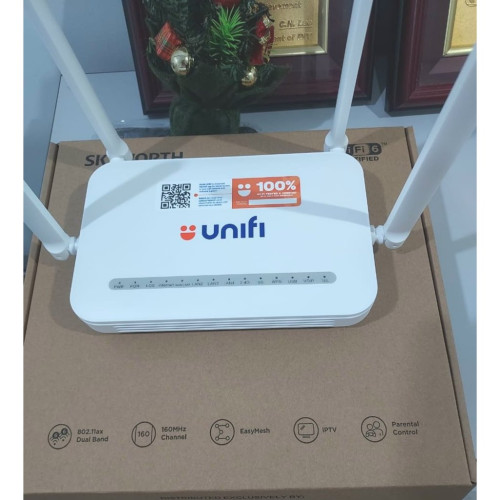
Hi, does anyone know how to use the USB port of this Unifi router Skyworth Unifi Combo Box Ax3000? I connected an external harddisk to it, planning to use it as SMB file server. But it does not appear in my network.

Please help. Thank you.

This post has been edited by brian8989: Jan 4 2025, 12:00 AM
brian8989
post Jan 4 2025, 12:01 AM

New Member
*
Newbie
4 posts

Joined: Aug 2012
user posted image

Skyworth Unifi Combo Box Ax3000

This post has been edited by brian8989: Jan 4 2025, 12:03 AM
tng55
post Jan 4 2025, 01:56 AM

Regular
******
Senior Member
1,456 posts

Joined: Sep 2021


QUOTE(brian8989 @ Jan 3 2025, 11:58 PM)
Hi, does anyone know how to use the USB port of this Unifi router Skyworth Unifi Combo Box Ax3000? I connected an external harddisk to it, planning to use it as SMB file server. But it does not appear in my network.

Please help. Thank you.
*
i think free router wont work SMB File server USB Port wont support external harddisk

get own router tplink or asus will support SMB File serve careful need check model with support SMB File server

here link https://www.tp-link.com/us/support/faq/1198/

look supported SMB file server tplink

This post has been edited by tng55: Jan 4 2025, 01:57 AM
blacktubi
post Jan 4 2025, 11:14 AM

-
Group Icon
Elite
8,421 posts

Joined: Jul 2008

QUOTE(Epic_winner091 @ Jan 3 2025, 09:22 PM)
If I ever get a raise this year I want to splurge on networking gear. Should I keep using the ONR (set to bridge mode) or reuse the old ONU? The thing is, the day before the TM tech came to replace the old setup with the ONR, the internet stopped working and only came back with the ONR.

Even the tech was bewildered as the internet should keep on working.
*
I would prefer to use the ONR on bridge mode and use your own router to handle the networking

I've tried running the ONR on router mode and connect another router to it on AP mode and the speed is throttled and it's kinda laggy due to the slow CPU on the free ONR
cyberic
post Jan 4 2025, 01:07 PM

Regular
******
Senior Member
1,132 posts

Joined: Jan 2003


For existing SWU with just less than a year contract left, will they allow to take new SWU like the 1Gb plan?

495 Pages « < 429 430 431 432 433 > » Top
Topic ClosedOptions
 

Change to:
| Lo-Fi Version
0.0203sec    1.04    6 queries    GZIP Disabled
Time is now: 22nd December 2025 - 10:00 AM