In August, I put the black Dlink 2.5GBE into bridge mode and it encountered the drop to 300Mbps. So I chunk it away and use back the Huawei Modem.
Now I try to upgrade the firmware to 2.0.3 that are supposed to resolve the issue.
So I chuck in the Dlink Bridge mode back and connect it to my Asus Router. The internet worked the same as Huawei...
Then I got stumped coz I forgot if I change the IP address of DLink router when we set it up first as router with address 192.168.1.1 (same as my Asus router). Then afterward, we change it to bridge mode. I am not sure but I think we likely change it back to 192.168.0.1 or whatever...I cannot remember.
So now I have the Dlink router still working as bridge to my Asus router.
But I don't know how to access the router to update the firmware. I tried direct connect with cable to Dlink router and use the default 192.168.0.1 to access but cannot connect. I tried change the comp IP address to 192.168.0.2 wit mask 255.255.255.0 in case need use same IP segment. Cannot.
I tried to access the bridge using 192.168.0.1 while connected to Asus router (working with the bridge)...Still no connection. Now I am lost...how to access the bridge. How to find out what IP address is the Dlink router although my web history indicated it likely should be 192.168.0.1 but still no connection?
If the IP is correct, then how to access the bridge as I have tried accessing the IP address while connected to Asus router and also tried direct cable connect to bridge still cannot access.
If you haven't change anything on the DLink combo box, you can find the default IP, login details on the sticker at the bottom of the combo box.
However, if you have already tweaked the DLink combo box but can't remember your settings, you can always reset the combo box and start your setup again.


 Jan 3 2024, 04:30 PM


 Quote
Quote


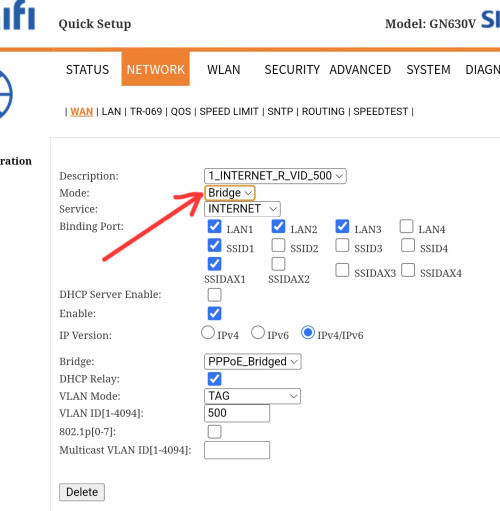
 The equipment provided by TM is modem + router combo unit, can be set to Bridge Mode.


 0.2446sec
 0.26
0.26
 7 queries
 GZIP Disabled