


Think my internet is a bit broken today
Unifi Official TM UniFi High Speed Broadband Thread V42, READ 1ST PAGE FOR RELEVANT WIFI INFO!
|
|
 Jan 7 2024, 04:20 PM Jan 7 2024, 04:20 PM
Return to original view | IPv6 | Post
#1
|
 
Senior Member
1,598 posts Joined: Jan 2016  
|
Think my internet is a bit broken today |
|
|
|
|
|
Aug 16 2024, 07:12 PM
Return to original view | IPv6 | Post
#2
|
|
Senior Member
1,598 posts Joined: Jan 2016
|
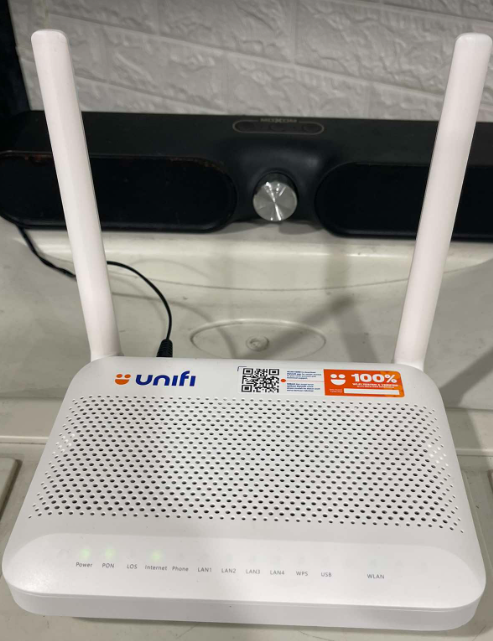 Hmm, is this the new onu router combo? 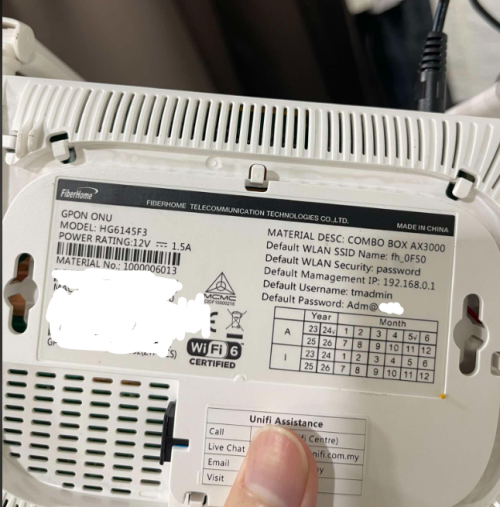 |
|
|
Aug 23 2024, 05:34 PM
Return to original view | IPv6 | Post
#3
|
|
Senior Member
1,598 posts Joined: Jan 2016
|
Can someone provide a honest review?
I would like to know the experience of Unifi at night, especially when browsing social media and watching youtube, plus visiting taobao or any china websites Been using Maxis for nearly 3 years now, I'm happy with their routing and stability However, asking them for promo plans to recontract is a nightmare Upgraded for free from 300Mbps to 500Mbps, a few months back they gave postpaid+new fiber sub users special promo (RM149 500Mbps, plus RM10 public IP)... But they refused to give me such a plan claiming I already got my free speed upgrade(which is not true, I'm paying the same as typical 500Mbps users) 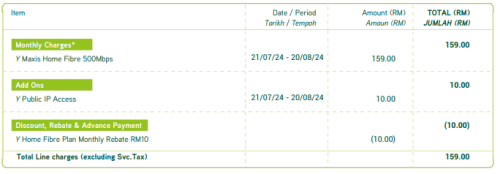 This post has been edited by QuantumEdge: Aug 23 2024, 05:36 PM |
|
|
Aug 23 2024, 06:35 PM
Return to original view | IPv6 | Post
#4
|
|
Senior Member
1,598 posts Joined: Jan 2016
|
QUOTE(cklove96 @ Aug 23 2024, 06:23 PM) unifi>time>maxis Using TIME at the moment, the routing to China is so bad...that I need to VPN back to my other house with Maxis    PRSXFENG liked this post
|
|
|
Aug 24 2024, 07:41 PM
Return to original view | IPv6 | Post
#5
|
|
Senior Member
1,598 posts Joined: Jan 2016
|
QUOTE(YoungMan @ Aug 23 2024, 07:20 PM) Usually they will only counter if you have transfer ID from Unifi. Same if you try to switch out from Unifi, TM will try to counter offer. Then you can decide to take the offer or proceed to switch out. QUOTE(kwss @ Aug 23 2024, 08:34 PM) Less than satisfactory performance during evening is a common occurance but since it's local congestion, it's dependent on your place or the specific OLT port. Google has CDN right inside TM. So everything from Android update to YouTube will be trouble free. TM has direct peering with Taobao, ByteDance and Tencent. I think some other smaller Chinese cloud provider too. You can view the list here: https://bgpview.io/asn/4788#peers-v4 Just check which AS those China website you want to access and see if they are in the list. QUOTE(MyProLife @ Aug 23 2024, 09:16 PM) TM routing to china lately is good. Can use taobao, can watch bilibili well. Weibo is okay although sometimes slow to load picture Thanks for the feedbacks, I will try to "persuade" Maxis to give me a counter offerNot so good with some western CDN tho. So Reddit loads quite badly If not, I will switch to Unifi...since I use China apps and visits websites often Stopped gaming as well, so high latency to EU and US may not be that big of a deal for me One more thing, 500Mbps subsribers will automatically get public IP right? And is it difficult to swap out the new 2 in 1 ONU router with the good old Huawei HG8240H5 ONU? |
|
|
Sep 2 2024, 10:04 PM
Return to original view | Post
#6
|
|
Senior Member
1,598 posts Joined: Jan 2016
|
I'm on M and T ISPs with DoT+Adguard
So far no issue Cant belive TM being the first to implement a full lockdown |
|
|
|
|
|
Sep 4 2024, 08:44 PM
Return to original view | IPv6 | Post
#7
|
|
Senior Member
1,598 posts Joined: Jan 2016
|
QUOTE(k-rolll @ Sep 4 2024, 08:28 PM) I can confirmed both unencrypted, DOH and DOT blocked by TM. Im from Alor Setar. Welp, you just gave TM a list of what they're supposed to block. Good luck being able to use these after tomorrowLast night my internet stop working and cause by DNS (DOH) on my Mikrotik router. Here list of well known DNS (53/DoH/Dot) blocked by TM tested on my Mikrotik and Android phone: Google = blocked Cloudflare 1.1.1.1 = blocked 1.1.1.2 = blocked 1.1.1.3 = not blocked Opendns 208.67.222.222 = blocked 208.67.222.123 (family) = not blocked 208.67.222.2 (sandbox) = not blocked Quad9 9.9.9.9 = blocked 9.9.9.10 = not blocked 9.9.9.11 = not blocked 9.9.9.12 = not blocked Adguard 94.140.14.14 = blocked 94.140.14.140 (unfiltered) = not blocked 94.140.14.15 (family) = not blocked Private (Nextdns like) = not blocked Controld freedns = not blocked Mullvad DoH and DoT = not blocked Nextdns = Not blocked Cheers!! laobeh, BladeRider88, and 2 others liked this post
|
|
|
Sep 4 2024, 09:48 PM
Return to original view | IPv6 | Post
#8
|
|
Senior Member
1,598 posts Joined: Jan 2016
|
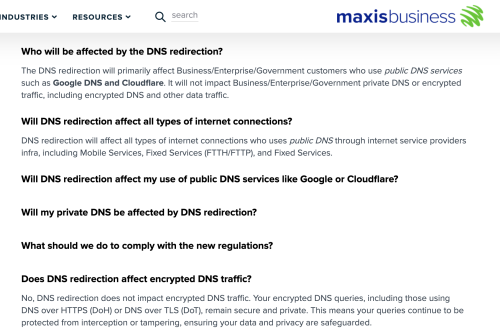 https://www.business.maxis.com.my/en/faq/da...ns-redirection/ Congrats TM According to this, Maxis is not going to touch DoT DoH They even push users to use encrypted DNS, Lmao This post has been edited by QuantumEdge: Sep 4 2024, 09:50 PM solarmystic, BladeRider88, and 2 others liked this post
|
|
|
Sep 4 2024, 09:57 PM
Return to original view | IPv6 | Post
#9
|
|
Senior Member
1,598 posts Joined: Jan 2016
|
QUOTE(PRSXFENG @ Sep 4 2024, 09:55 PM) I wonder what's TIME's opinion on this... Using Time at the moment, so far DoT still works for meWaiting for their message I think Unifi is the only ISP playing around with DoT DoH blocking PRSXFENG liked this post
|
|
|
Sep 4 2024, 09:59 PM
Return to original view | IPv6 | Post
#10
|
|
Senior Member
1,598 posts Joined: Jan 2016
|
QUOTE(samftrmd @ Sep 4 2024, 09:57 PM) It's been years since I played with router settings and IP stuff. Your answer is here Can anyone guide me on how to DoH from here? [attachmentid=11502187] Or is this Netis router too old?   |
|
|
Sep 5 2024, 03:48 PM
Return to original view | IPv6 | Post
#11
|
|
Senior Member
1,598 posts Joined: Jan 2016
|
Anyone using Ubiquity's device with DNS shield?
Are you able to bypass the current DoT/DoH block? 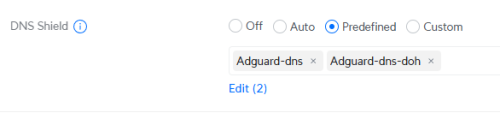 |
|
|
Sep 5 2024, 07:04 PM
Return to original view | IPv6 | Post
#12
|
|
Senior Member
1,598 posts Joined: Jan 2016
|
QUOTE(yenchenje @ Sep 5 2024, 05:04 PM) Welp guess someone was bound to mention it sooner than later Don't worry, I'll keep my mouth shut but with my wallet open at the same time... Been using it with the predefined lists and DoH is working for me without issues, can access all the sites that's blocked by TM's DNS, my selection has been mostly just redirecting me to DNS servers in SG/CA/US (DTC/CGC/iNet/Woody) All my devices in my LAN network is just using my UDM SE IP as upstream DNS server, and Unifi is doing the work Tho caveat is I lose IPv6 connectivity so that's a trade off of using 3rd party DNS server that doesn't support v6. » Click to show Spoiler - click again to hide... « It's ubnt time |
|
|
Sep 5 2024, 09:11 PM
Return to original view | IPv6 | Post
#13
|
|
Senior Member
1,598 posts Joined: Jan 2016
|
QUOTE(The.Lucas.DaY @ Sep 5 2024, 09:01 PM) Good side is no more prawnhub, OnlyFap during office hours for officer sekalian..ehhh Back to the good old DVD days I guess, instead of buying new networking equipments... We all need DVD drive back in our PC |
|
|
|
|
|
Sep 5 2024, 09:17 PM
Return to original view | IPv6 | Post
#14
|
|
Senior Member
1,598 posts Joined: Jan 2016
|
QUOTE(bezitagt @ Sep 5 2024, 09:16 PM) Why to avoid Deco series? No DoT, DoHMost likely never going to get BladeRider88 liked this post
|
|
|
Sep 5 2024, 11:02 PM
Return to original view | IPv6 | Post
#15
|
|
Senior Member
1,598 posts Joined: Jan 2016
|
QUOTE(wearwolf @ Sep 5 2024, 10:56 PM) You know.. i jsut did that. Plug in back the old Huawei and reset my AX88U. Guess what? Didnt work. Couldnt login at all. Either the login password have been changed behind my back.. or there's something inside the old HUAWEI settings that's now lost... Like you said.. would rather sacrifice the 60mbps for more control on the ASUS. But looks like i got no luck. have to grin and bear with it for now and find work arounds of my own using VPN. The bridge mode also got its own problems for some unknown reason... have to connect my server directly to the TM DLink to work properly else cannot access the internet. But being connected direct to the Dlink means "our dear ISP friend" can read its traffic more clearly... Double check your VLAN setting? Make sure you are connected to ONT's LAN1 instead of other ports?  Cross fingers.. maybe its time the ASUS/TPlink guys start making ONT Modem Routers for consumers as well liao... |
|
|
Sep 5 2024, 11:59 PM
Return to original view | IPv6 | Post
#16
|
|
Senior Member
1,598 posts Joined: Jan 2016
|
QUOTE(dev/numb @ Sep 5 2024, 11:29 PM) This thread has been entertaining. The ending will likely be tragic and all of us will probably end up slitting our wrists, but at least we managed to get a few laughs in. I'm choosing the blades now, consider we need to wait untill the end of the month to see the full effect |
|
|
Sep 6 2024, 12:30 PM
Return to original view | IPv6 | Post
#17
|
|
Senior Member
1,598 posts Joined: Jan 2016
|
QUOTE(overfloe @ Sep 6 2024, 12:21 PM) I just received this sms: Probably claims the DNS blocking as a free speed upgrade, cause "using our DNS is faster""Hi. Do you know we've upgraded your account xxx@unifi to a higher speed for FREE? Your profile will be updated soon. Enjoy your new speed!" This legit? I am not aware Unifi is offering free upgrade recently. I can't test coz not at home at the moment. dev/numb liked this post
|
|
|
Sep 6 2024, 05:57 PM
Return to original view | IPv6 | Post
#18
|
|
Senior Member
1,598 posts Joined: Jan 2016
|
According to a friend running UDM SE, DNS Shield cant be used now Once enable terus DC simmarjit liked this post
|
|
|
Sep 6 2024, 06:04 PM
Return to original view | IPv6 | Post
#19
|
|
Senior Member
1,598 posts Joined: Jan 2016
|
QUOTE(blackbox14 @ Sep 6 2024, 06:02 PM) DNS Shield is just DoH, right? Yes for the firstSo you mean they can detect even the presence of DoH now and can DC you immediately regardless of which DNS resolver you connect to? Rest I dont know, but I remember it supports different DNS services but Ubnt doesnt allow customization So TM basically blocked eveything in the list probably? |
|
|
Sep 6 2024, 06:11 PM
Return to original view | IPv6 | Post
#20
|
|
Senior Member
1,598 posts Joined: Jan 2016
|
QUOTE(soonwai @ Sep 6 2024, 06:08 PM) What servers is it using? DNS Shield is DNSCrypt right? Very canggih. 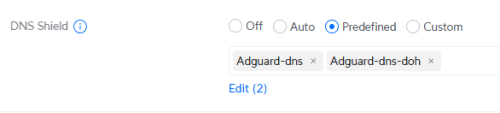 |
|
Topic ClosedOptions
|
| Change to: |  0.0534sec 0.0534sec
 0.59 0.59
 7 queries 7 queries
 GZIP Disabled GZIP Disabled
Time is now: 16th December 2025 - 09:40 PM |
 Quote
Quote
