QUOTE(NagaK @ Aug 13 2024, 02:14 PM)
Anyone had issue with Unifi in night after 9PM? Suddenly the network gotten sluggish and buffers

I think it affect Subang Jaya area last nightUnifi Official TM UniFi High Speed Broadband Thread V42, READ 1ST PAGE FOR RELEVANT WIFI INFO!
|
|
 Aug 13 2024, 02:56 PM Aug 13 2024, 02:56 PM
|
 
Junior Member
558 posts Joined: Aug 2017   
|
QUOTE(NagaK @ Aug 13 2024, 02:14 PM) Anyone had issue with Unifi in night after 9PM? Suddenly the network gotten sluggish and buffers I think it affect Subang Jaya area last night |
|
|
|
|
|
Aug 13 2024, 02:57 PM
|
|
Junior Member
558 posts Joined: Aug 2017
|
Heard some peeps getting "try me" campaign, basically free speed upgrade with renewal contract and 3 months bill waiver.
Anyone got that call? |
|
|
Aug 13 2024, 04:04 PM
|

All Stars
14,909 posts Joined: Jul 2005 
|
QUOTE(nChen @ Aug 13 2024, 05:01 AM) But RM159 for 1Gbps is crazy. 1. Ensure that your current contract has expired.2. Complete your free speed upgrade to 1Gbps. 3. Wait for one month after the speed upgrade. 4. Submit a registration for Maxis Fiber 1Gbps service. 5. Visit TM Point to submit your termination request. With some luck, TM may counteroffer you the 1Gbps service for RM159. If you haven't received any communication from TM regarding the speed upgrade, consider raising a ticket with the MCMC to expedite the process. For guidance on how to properly raise a ticket concerning the free speed upgrade with MCMC, please refer to my previous post. Link: https://forum.lowyat.net/topic/5424552/+2010 WaNaWe900 liked this post
|
|
|
Aug 13 2024, 06:05 PM
Show posts by this member only | IPv6 | Post
#4424
|

Junior Member
518 posts Joined: Aug 2005
|
Today unifi called to ask me confirm the 1gbps upgrade. I guess i should keep my current router? Don't think the new combo router offer anything better.
|
|
|
Aug 13 2024, 06:39 PM
|

Junior Member
36 posts Joined: Apr 2019
|
QUOTE(tng55 @ Aug 13 2024, 12:32 AM) mine is 500mbps RM119 SWU 3.0 6 month bill free without unifi tv Plan was 800Mbps + Ultimate TV Pack YEP 2019 (RM209/month), so out of contract for a long time already. Walked into TMPoint and asked for the SWU 1Gbps, RM159 plan (6 months waiver, 1Gbps only for 24 months, after 24 months, speed dropped to 500Mbps, price remained at RM159), and it was accepted. Not sure if other TMPoint will do the same, so your mileage may vary.someone told got offering 1Gbps RM159 without unifi tv About a week ago, upgraded to 1Gbps (with existing FibreHome ONU + own router). Today, installer came to complete the order, ie tried to install the D-Link AX3000 DPN-FX3060V Combo Box ONR. Not successful - phone OK, GPON status OK, but PPPoE login failed (even after password reset). Installer thinks it is TM system issue, said can try later if want. The good thing is there is no issue swapping the setup (FibreHome ONU + own router) with D-Link ONR. So will try again sometime in the future to see how it goes. |
|
|
Aug 13 2024, 07:28 PM
|

Senior Member
842 posts Joined: May 2009
|
If upgraded to 1Gb and set the new onr to bridge, and plug in onr to my own router lan port 1, do I need to change the WAN Pppoe setting of Asus router or any setting in Asus router?
This post has been edited by Cavino: Aug 13 2024, 07:51 PM |
|
|
|
|
|
Aug 13 2024, 08:30 PM
|
 
Staff
12,090 posts Joined: Dec 2004 From: Malaysia
|
QUOTE(Cavino @ Aug 13 2024, 07:28 PM) If upgraded to 1Gb and set the new onr to bridge, and plug in onr to my own router lan port 1, do I need to change the WAN Pppoe setting of Asus router or any setting in Asus router? Plug to your router’s WAN port as per current, no change in PPPoE settings. Cavino liked this post
|
|
|
Aug 13 2024, 09:31 PM
|

Senior Member
1,260 posts Joined: Jan 2003 From: Puchong 
|
Anybody with the black ONR able to get 1gbps download speed or still 900+ only?
|
|
|
Aug 13 2024, 09:34 PM
Show posts by this member only | IPv6 | Post
#4429
|
 
Elite
8,424 posts Joined: Jul 2008
|
QUOTE(Susuwatari @ Aug 13 2024, 09:31 PM) Anybody with the black ONR able to get 1gbps download speed or still 900+ only? Unless you're lucky else it's just 900++And, 60Mbps isn't that much of a difference on a 940Mbps connection Just use the old modem for a more stable connection Susuwatari liked this post
|
|
|
Aug 13 2024, 10:11 PM
Show posts by this member only | IPv6 | Post
#4430
|

Junior Member
87 posts Joined: Feb 2013 From: Wilayah Persekutuan, KL
|
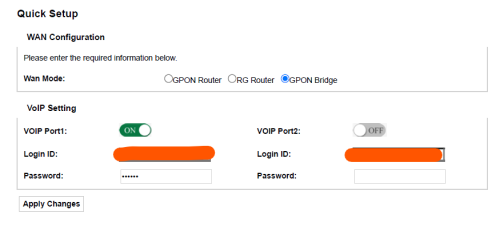
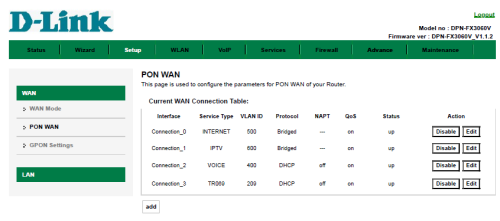
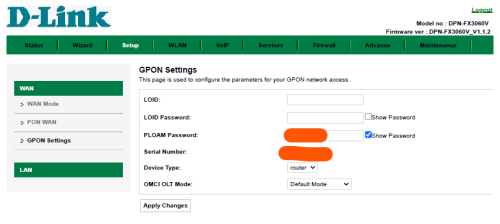
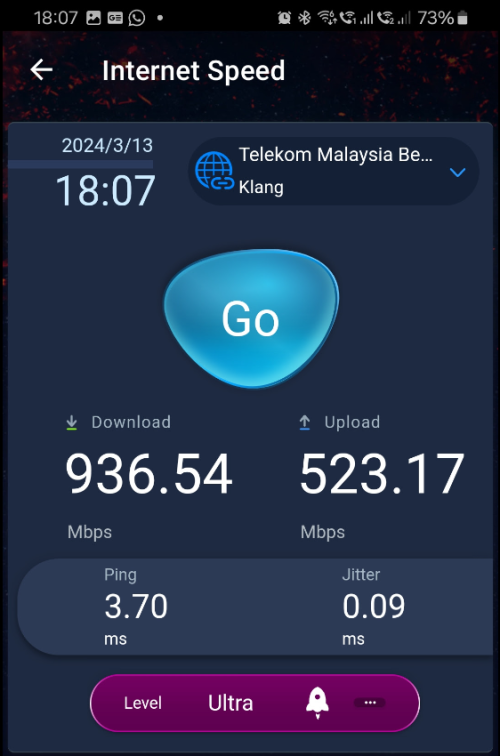
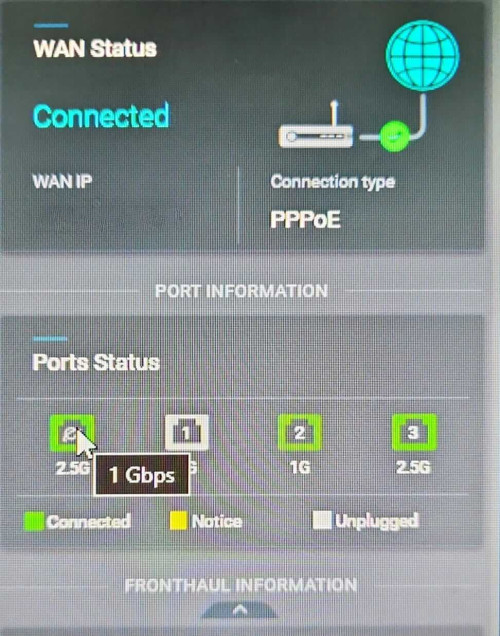
QUOTE(blacktubi @ Aug 13 2024, 09:34 PM) Unless you're lucky else it's just 900++ I've given up already, even MCMC couldn't help.And, 60Mbps isn't that much of a difference on a 940Mbps connection Just use the old modem for a more stable connection Since upgraded to a 2gbps plan to make my equipment "worth the hassle". Will downgrade after the contract finishes if need be. I noticed something new now. Seems like I cannot always get the full 2gpbs under bridge mode although I have a 2gbe wan. 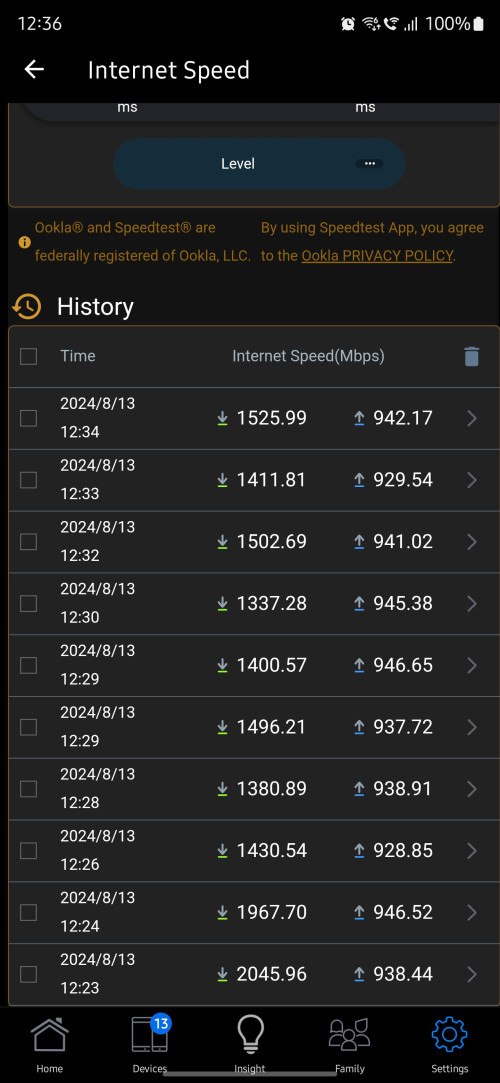 Out of 40 speedtests only 1-2 managed to hit 2gbps. These readings are taken directly from the router. No issues when the black box is operating as a GPON router. Wondering if anyone can share some insights. 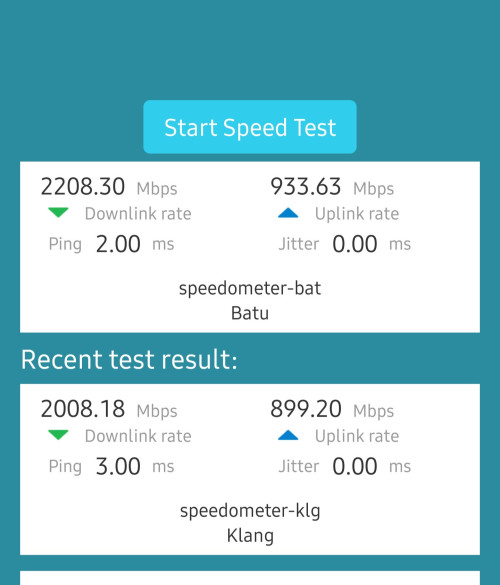 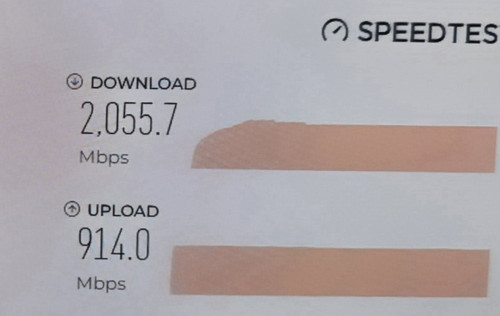 |
|
|
Aug 13 2024, 11:47 PM
Show posts by this member only | IPv6 | Post
#4431
|

Senior Member
1,058 posts Joined: Nov 2009
|
QUOTE(iotbot000 @ Aug 13 2024, 06:39 PM) Plan was 800Mbps + Ultimate TV Pack YEP 2019 (RM209/month), so out of contract for a long time already. Walked into TMPoint and asked for the SWU 1Gbps, RM159 plan (6 months waiver, 1Gbps only for 24 months, after 24 months, speed dropped to 500Mbps, price remained at RM159), and it was accepted. Not sure if other TMPoint will do the same, so your mileage may vary. But Maxis is permanently 1GB right? For RM159 as wellAbout a week ago, upgraded to 1Gbps (with existing FibreHome ONU + own router). Today, installer came to complete the order, ie tried to install the D-Link AX3000 DPN-FX3060V Combo Box ONR. Not successful - phone OK, GPON status OK, but PPPoE login failed (even after password reset). Installer thinks it is TM system issue, said can try later if want. The good thing is there is no issue swapping the setup (FibreHome ONU + own router) with D-Link ONR. So will try again sometime in the future to see how it goes. |
|
|
Aug 13 2024, 11:52 PM
Show posts by this member only | IPv6 | Post
#4432
|
|
Elite
8,424 posts Joined: Jul 2008
|
QUOTE(Verblassen @ Aug 13 2024, 10:11 PM) I've given up already, even MCMC couldn't help. What reply do you get from MCMC though?Since upgraded to a 2gbps plan to make my equipment "worth the hassle". Will downgrade after the contract finishes if need be. I noticed something new now. Seems like I cannot always get the full 2gpbs under bridge mode although I have a 2gbe wan. » Click to show Spoiler - click again to hide... « Out of 40 speedtests only 1-2 managed to hit 2gbps. These readings are taken directly from the router. No issues when the black box is operating as a GPON router. Wondering if anyone can share some insights. » Click to show Spoiler - click again to hide... « IMO I think the D-Link is just buggy at this point. |
|
|
Aug 14 2024, 12:18 AM
|
|
Staff
12,090 posts Joined: Dec 2004 From: Malaysia
|
QUOTE(eclectice @ Mar 14 2024, 08:24 AM) Bridging mode is easy to set up on the Unifi ONR D-Link DPN-FX3060V. Connect the LAN cable from the laptop/PC to any unused LAN port on the ONR to access the ONR Web UI at the default http: // 192.168.0.1. Select the "GPON-Bridge", connect the LAN cable from the LAN1 port on ONR to our third-party router's WAN port, and wait a few seconds for the ONR to reset after applying changes. Then, connect the LAN cable from the laptop/PC to any LAN port of the third-party router to configure everything (but no change is required if it works like before). Is there a default user ID and password for the D-Link black box? Or I need to remember to get it from the installer?» Click to show Spoiler - click again to hide... « |
|
|
|
|
|
Aug 14 2024, 12:24 AM
Show posts by this member only | IPv6 | Post
#4434
|
|
Junior Member
87 posts Joined: Feb 2013 From: Wilayah Persekutuan, KL
|
QUOTE(blacktubi @ Aug 13 2024, 11:52 PM) What reply do you get from MCMC though? Actually bro tbh, after seeing some of the input here I think it was not worth it to fight tooth and nail for the extra 40-60mbps.It took TM almost a month to deploy their 2nd level elite team to my place and even they said that there is nothing else that can be done. They were here for over 2 hours. A bit tedious when the issue is at the OLT side. I did get a bill rebate for Aug'24 at least lol. Discussed with the wife, she said might as well go all out with 2gbps to make sense of the equipment. Haha. QUOTE(blacktubi @ Aug 13 2024, 11:52 PM) IMO I think the D-Link is just buggy at this point. Yeahhh I couldn't explain it either. Hopefully TM will roll out something to replace this Godforsaken DLink or at least a firmware update.According to the Elite team, their next roll out will be the Skyworth model but as a wifi 7 variant. Final stages of testing apparently. Not so sure if it will come with a multi gig LAN port. This post has been edited by Verblassen: Aug 14 2024, 12:25 AM |
|
|
Aug 14 2024, 10:45 AM
|
|
All Stars
14,909 posts Joined: Jul 2005
|
Removed
This post has been edited by sHawTY: Aug 14 2024, 02:33 PM |
|
|
Aug 14 2024, 11:58 AM
Show posts by this member only | IPv6 | Post
#4436
|

Junior Member
117 posts Joined: Sep 2008 From: UEP Subang Jaya; Gombak
|
Selamat sejahtera sifu sifu sekalian.
Here to seek your knowledge & experience. My home is using Unifi with the Huawei modem and Dlink router. Router model is DIR-X3060Z. I want to enable these settings on my network: The following network components must be unblocked: Multicast address 224.0.0.200 UDP port 2000 TCP port 18888 So at the router web interface, where do I find the settings for above? 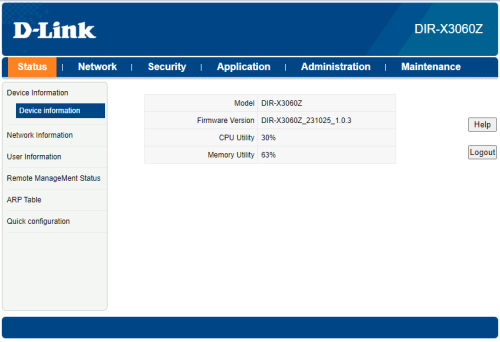 |
|
|
Aug 14 2024, 01:10 PM
|
|
Senior Member
1,457 posts Joined: Sep 2021
|
QUOTE(foxstertail @ Aug 14 2024, 11:58 AM) Selamat sejahtera sifu sifu sekalian. i think you cannot port forward Dlink by TM and also cannot apply Google DNS always TM DNS due Firmware by TMHere to seek your knowledge & experience. My home is using Unifi with the Huawei modem and Dlink router. Router model is DIR-X3060Z. I want to enable these settings on my network: The following network components must be unblocked: Multicast address 224.0.0.200 UDP port 2000 TCP port 18888 So at the router web interface, where do I find the settings for above? buy you own router can do port forward |
|
|
Aug 14 2024, 01:22 PM
Show posts by this member only | IPv6 | Post
#4438
|
|
Junior Member
117 posts Joined: Sep 2008 From: UEP Subang Jaya; Gombak
|
QUOTE(tng55 @ Aug 14 2024, 02:10 PM) i think you cannot port forward Dlink by TM and also cannot apply Google DNS always TM DNS due Firmware by TM ahh thought so. oh well.buy you own router can do port forward can recommend any router for me to consider please? that can set multicast address & port forward. also, a PoE switch is basically a router right? |
|
|
Aug 14 2024, 01:41 PM
|
|
All Stars
14,909 posts Joined: Jul 2005
|
QUOTE(foxstertail @ Aug 14 2024, 01:22 PM) can recommend any router for me to consider please? Tell us how much you're willing to pay for a routerQUOTE(foxstertail @ Aug 14 2024, 01:22 PM) also, a PoE switch is basically a router right? No. Most of them are not |
|
|
Aug 14 2024, 03:26 PM
|

Senior Member
2,694 posts Joined: Feb 2007 From: KL
|
Hi guys,
I'm seeing you guys talking bout making a complain to MCMC for the free upgrade. My package was 500mbps and got the free upgrade to 800mbps back in October 2023 (my contract already finished long time ago) Can I still get a free upgrade, example to 1Gbps? |
|
Topic ClosedOptions
|
| Change to: |  0.0207sec 0.0207sec
 0.61 0.61
 6 queries 6 queries
 GZIP Disabled GZIP Disabled
Time is now: 23rd December 2025 - 12:10 AM |
 Quote
Quote