Welcome Guest ( Log In | Register )

Bump Topic Topic Closed RSS Feed

Outline · [ Standard ] · Linear+

Unifi Official TM UniFi High Speed Broadband Thread V42, READ 1ST PAGE FOR RELEVANT WIFI INFO!

views
     
zellleonhart
post Jun 23 2024, 01:41 AM

Stars stars stars
*******
Senior Member
5,075 posts

Joined: Oct 2008


QUOTE(Maxieos @ Jun 21 2024, 11:00 PM)
Which VPN is suitable and cheap ? I mean as cheap as rm10 per month ?
*
I am using Nord VPN, it always have some promo ongoing and I managed to get 2 years license (10 devices concurrently connected) for RM420+ some time ago. This means 420/24 = RM17.5 per month.

Best is I share this account with 3 other friends who use 1-2 device at one time max, so each person < RM5 per month.

Don't cheap out on VPN, Nord is already considered the cheaper one with a good overall privacy, speed, protocol and location coverage. I used to use ExpressVPN but it is so expensive and also bought over by a nasty company.

Can also try mullvad but it's a bit more expensive I think.
Phonzy
post Jun 23 2024, 01:41 AM

On my way
****
Junior Member
542 posts

Joined: Nov 2004
From: Petaling Jaya


QUOTE(Epic_winner091 @ Jun 23 2024, 12:52 AM)
A VPN is almost mandatory at this time. Unless you only use and browse popular sites and services.
*
any VPN to suggest?
Epic_winner091
post Jun 23 2024, 01:48 AM

Casual
***
Junior Member
340 posts

Joined: Mar 2010
From: Shah Alam


I'm using Proton VPN.
thankyou
post Jun 23 2024, 01:50 AM

Regular
******
Senior Member
1,941 posts

Joined: Jan 2003
Same, using Proton VPN... so far so good but Nord VPN interface is better
YoungMan
post Jun 23 2024, 10:38 AM

Look at all my stars!!
*******
Senior Member
6,825 posts

Joined: Oct 2008
From: Kuala Lumpur


QUOTE(wiwi @ Jun 22 2024, 11:07 PM)
I tried to change Skyworth to bridge mode ,
Skyworth WAN/LAN1 connect to my Asus router WAN .

subsequently my pc can detect wifi only..no internet.

I'm not sure what went wrong?
*
Your Asus already configure properly with Unifi PPPOE username and password?
jiaen0509
post Jun 23 2024, 01:40 PM

Look at all my stars!!
*******
Senior Member
3,307 posts

Joined: Dec 2012
QUOTE(wiwi @ Jun 22 2024, 11:07 PM)
I tried to change Skyworth to bridge mode ,
Skyworth WAN/LAN1 connect to my Asus router WAN .

subsequently my pc can detect wifi only..no internet.

I'm not sure what went wrong?
*
Double-check your PPPoE credentials. This happened to me before: the installer reset my password to a new one that was easier for them to configure because their system can only show the default, initial password. After you reset it, it doesn’t appear the latest one.

When I switched back to my Asus router in Bridge mode on Combo box after they left, the WAN was connected but there was no internet connection. I called the installer back and realized he had reset my PPPoE password. After update my PPPoE password on Asus router. All works!
HumanExtinction
post Jun 23 2024, 02:33 PM

Casual
***
Junior Member
364 posts

Joined: Jan 2018
From: Tim Apple
QUOTE(xCryptik @ Jun 22 2024, 11:58 PM)
Internet is getting slow lately.

Submarine Cable  bye.gif
*
morning and afternoon still ok, after 7pm fuiyo the damn line become so damn laggy
literally every social media and streaming site load like dial up


The.Lucas.DaY
post Jun 23 2024, 02:55 PM

On my way
****
Junior Member
671 posts

Joined: May 2019

QUOTE(olivur @ Jun 21 2024, 04:56 PM)
oh dang, 115.xx was actually fine for me bro

where you at though cause I'm in pj

as in for most 60.xx used to be a cursed range, but was always good to me and those I know nearby đź« 
*
60.53.xx is a real cursed range for Discord, hardly open it on desktop app and uploading photo keep loading. Reboot router, now back to 115.xx
podrunner
post Jun 23 2024, 03:53 PM

Look at all my stars!!
*******
Senior Member
2,214 posts

Joined: Feb 2009
Hi, finally got the free speed upgrade from 800 mbps to 1gb yesterday. The installer came with one unit of white Dlink DPN-FX3060V. Currently my set up is the old grey modem + Dlink DIR-X3060Z. Installer said there’s no need to change to the combo box, that the current set up is capable. Is this correct?
Download WiFi speed around 850mpbs near the router on iPhone 14. Will speed improve using the white combo box? Many thanks.
Epic_winner091
post Jun 23 2024, 06:22 PM

Casual
***
Junior Member
340 posts

Joined: Mar 2010
From: Shah Alam


Just that if you are able to max out the WiFi 6 connection it'd be limited to 940 Mbps because the DIR-X3060Z only has Gigabit Ethernet LAN and WAN ports.

EDIT:

Also the white combo box only has Gigabit LAN so you'll be capped to 940 Mbps on Ethernet also.

This post has been edited by Epic_winner091: Jun 23 2024, 06:31 PM
karenzayn
post Jun 23 2024, 08:54 PM

Getting Started
**
Junior Member
98 posts

Joined: Sep 2019
From: Kuching
QUOTE(kakalaku @ Jun 22 2024, 05:36 PM)
what router does unifi offer to customer these days? (my plan is 300mbps fiber)

current unifi router is faulty, with frequent and random restarts. thinking of taking up their offer for changing router in exchange for 2 years contract
*
Rather renew your contract, why not swap out with a 3rd party router like TP-LINK or Asus?
podrunner
post Jun 23 2024, 11:12 PM

Look at all my stars!!
*******
Senior Member
2,214 posts

Joined: Feb 2009
QUOTE(Epic_winner091 @ Jun 23 2024, 06:22 PM)
Just that if you are able to max out the WiFi 6 connection it'd be limited to 940 Mbps because the DIR-X3060Z only has Gigabit Ethernet LAN and WAN ports.

EDIT:

Also the white combo box only has Gigabit LAN so you'll be capped to 940 Mbps on Ethernet also.
*
Thanks for replying. So not necessary to change then?
wiwi
post Jun 24 2024, 10:02 AM

Getting Started
**
Junior Member
280 posts

Joined: Jan 2003
From: HOME
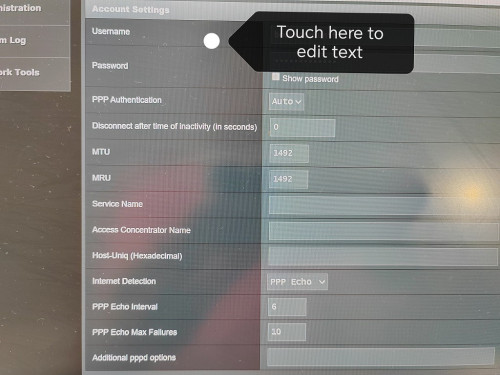
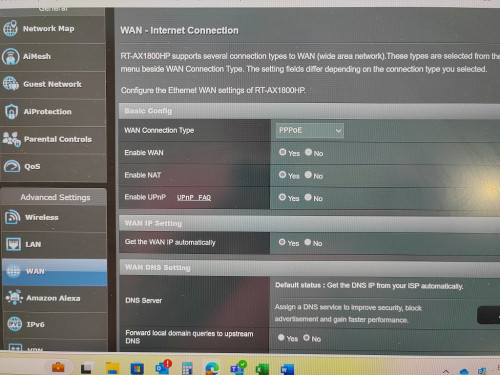
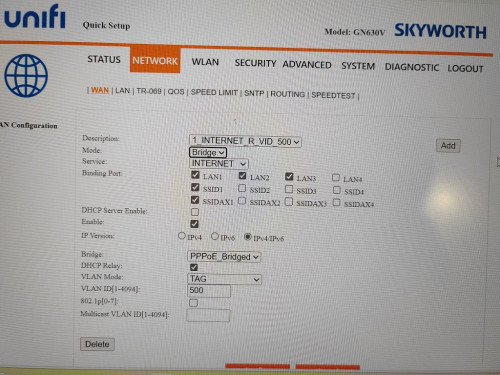
I actually changed the Unifi Skyworth Network to "Bridge".

My new Asus router, i set in PPPOE pw and user.

Weird no internet.

I attached some pics.
Did I miss any setting?

Thanks

user posted image
user posted image
user posted image
wiwi
post Jun 24 2024, 10:03 AM

Getting Started
**
Junior Member
280 posts

Joined: Jan 2003
From: HOME
texted the unifi installer.
They said the 2in1 Skyworth modem+router.
Cant swap to other 3rd party router.

I dont really believe la..!
lamusiqa
post Jun 24 2024, 10:06 AM

Casual
***
Junior Member
397 posts

Joined: Feb 2007
QUOTE(wiwi @ Jun 24 2024, 10:03 AM)
texted the unifi installer.
They said the 2in1 Skyworth modem+router.
Cant swap to other 3rd party router.

I dont really believe la..!
*
That's what they told me but when they came and installed the modem+router combo, I just went to the settings and set the device as GPON Bridge only instead of GPON Bridge+Router. Connected it to my TP-Link AX73 router and voila, it works.

The only annoyance Ive been facing since then is slow speed (300mbps) which I suspect coming from their end. Had them reset my port and speed went back to normal (1gbps) but this morning back to slow speed again.

This post has been edited by lamusiqa: Jun 24 2024, 10:14 AM
lamusiqa
post Jun 24 2024, 10:09 AM

Casual
***
Junior Member
397 posts

Joined: Feb 2007
QUOTE(wiwi @ Jun 24 2024, 10:02 AM)
I actually changed the Unifi Skyworth Network to "Bridge".

My new Asus router, i set in PPPOE pw and user.

Weird no internet.

I attached some pics.
Did I miss any setting?

Thanks

user posted image
user posted image
user posted image
*
For some routers, they will only connect to Unifi if you run a setup wizard and select Unifi preset. Some of your LAN ports will be tagged for IPTV and VOIP but you can change that in the settings later.
wiwi
post Jun 24 2024, 10:17 AM

Getting Started
**
Junior Member
280 posts

Joined: Jan 2003
From: HOME
QUOTE(lamusiqa @ Jun 24 2024, 10:06 AM)
That's what they told me but when they came and installed the modem+router combo, I just went to the settings and set the device as GPON Bridge only instead of GPON Bridge+Router. Connected it to my TP-Link AX73 router and voila, it works.

The only annoyance Ive been facing since then is slow speed (300mbps) which I suspect coming from their end. Had them reset my port and speed went back to normal (1gbps) but this morning back to slow speed again.
*
Where/ which tab to change to GPON bridge only setting?

Thanks

This post has been edited by wiwi: Jun 24 2024, 10:19 AM
lamusiqa
post Jun 24 2024, 10:24 AM

Casual
***
Junior Member
397 posts

Joined: Feb 2007
QUOTE(wiwi @ Jun 24 2024, 10:17 AM)
Where/ which tab to change to GPON bridge only setting?

Thanks
*
Can't help you there. I got the black D-link combo device that has 2.5Gb WAN port. The menu is different than your Skyworth combo. Try running a setup wizard and see if there's an option for GPON+bridge. If not, you have to go to the Advanced menu and select WAN or Network option to see if you can change it manually.
laihuhng
post Jun 24 2024, 11:41 AM

On my way
****
Junior Member
603 posts

Joined: Jun 2005


QUOTE(wiwi @ Jun 24 2024, 10:02 AM)
I actually changed the Unifi Skyworth Network to "Bridge".

My new Asus router, i set in PPPOE pw and user.

Weird no internet.

I attached some pics.
Did I miss any setting?

Thanks

user posted image
user posted image
user posted image
*
Using Quick Setup Wizard. Select Unifi's profile.
danielx90
post Jun 24 2024, 11:47 AM

Getting Started
**
Junior Member
70 posts

Joined: Jan 2011
From: Malacca
QUOTE(rifles @ Jun 21 2024, 12:57 PM)
At least i got it free upgrade from 300 to 500mbps + 6 months free when i walk in tmpoint last april.

[attachmentid=11497742]
*
Walk-in to tmpoint, disappointed that to eligible for 6mth free waiver, it said compulsory to signup their unifi mobile 39 plan (at least 3mth).

Hindsight should have visit other tmpoint branches to confirm and do comparison, and if this lady was bullshitting with me.

so if i happened to passby another tmpoint will consult to terminate that useless mobile plan earlier to minimise my loss.

Current plan:
300mbps: 129

Quoted:
300mbps: 119 + 6mth free waiver + wifi6 router
500mbps: 139 + 6mth free waiver + wifi6 router

Result:
stay with 300mbps. approx. 5mth free waiver (deduct mobile plan) + wifi6 router (unknown brand wait for technician to come)

This post has been edited by danielx90: Jun 24 2024, 11:49 AM

Topic ClosedOptions
 

Change to:
| Lo-Fi Version
0.0230sec    0.82    6 queries    GZIP Disabled
Time is now: 18th December 2025 - 03:49 AM