

QUOTE(machoez @ Feb 8 2024, 11:19 PM)
Hi sifus. If ip is 115 is it public ip?

Check if ur WAN IP matched with speedtest and ur router, if matched = public
not matched = cgnat-ed
Unifi Official TM UniFi High Speed Broadband Thread V42, READ 1ST PAGE FOR RELEVANT WIFI INFO!
|
|
 Feb 9 2024, 02:25 AM Feb 9 2024, 02:25 AM
Return to original view | IPv6 | Post
#1
|
 
Junior Member
98 posts Joined: Sep 2019 From: Kuching 
|
QUOTE(machoez @ Feb 8 2024, 11:19 PM) Hi sifus. If ip is 115 is it public ip? Check if ur WAN IP matched with speedtest and ur router, if matched = public not matched = cgnat-ed |
|
|
|
|
|
Feb 9 2024, 03:13 PM
Return to original view | Post
#2
|
|
Junior Member
98 posts Joined: Sep 2019 From: Kuching
|
QUOTE(The.Lucas.DaY @ Feb 9 2024, 01:50 PM) You mean check thru speedtest? It is able to run at full speed. How much costs if to be replace by TM technician? Here's what my ex-tm tech friend said to me,its still fine as long the modem LOS red light not lit up, so its not a big concern but you're concern and since your fiber cable is yellow, I assume that you house has a fiber wall socket, you can replace by yourself, just buy a patch cord just like this photo below...  |
|
|
Feb 20 2024, 01:25 PM
Return to original view | Post
#3
|
|
Junior Member
98 posts Joined: Sep 2019 From: Kuching
|
QUOTE(failed.hashcheck @ Feb 20 2024, 11:39 AM) its more about attempt to pancing with that pitiful Netflix package Make Netflix as ala-carte or riot  |
|
|
Mar 13 2024, 05:31 PM
Return to original view | IPv6 | Post
#4
|
|
Junior Member
98 posts Joined: Sep 2019 From: Kuching
|
QUOTE(Lon3Rang3r00 @ Mar 13 2024, 02:06 PM) Ok done mine today, very smooth since i met one Chinese CS that happens to "remember me" from an incident. She wrote on a piece of paper on how much is the SWU 4.0 price and what are the perks. I never mention to her that i'm having Netflix but i guess i'll see how it goes. Downgrade myself to 300mbps @ 119/month, 6 months waive and free Wifi Router 6, but contract renew 24 months.. which i'm ok with since not like i'm going to give up Unifi anytime soon. Will update once i got the router. AFAIK, SWU 4.0 no FSU 500MBPS right for new customers?This post has been edited by karenzayn: Mar 13 2024, 05:32 PM |
|
|
Mar 19 2024, 01:31 PM
Return to original view | IPv6 | Post
#5
|
|
Junior Member
98 posts Joined: Sep 2019 From: Kuching
|
QUOTE(Lonelybird @ Mar 18 2024, 09:17 PM) Dear sifus, Since yours is a apartment unit, so yes they can charge you bcoz is alrd consider non-standard (correct me if im wrong) and need to pull from the MDF room up to your floor unless the apartment unit a new one alrd prepared with FDP on each unit.I just signed up the 100mbps @RM 89 package. Today the technician came to do the installation. He said need to pay RM180 for wiring because my apartment dont have the wire yet. Is wiring consider non standard installation? How much you guys paid for the first time installation? Thank you. For landed properties, 1st installation some are free, some roughly charged around 50-60++ depends on what contractor you got and they use standard installation. unless your setup must be wife approval and need extra length for indoors so yep, they can charge you. aniq8676 liked this post
|
|
|
Mar 21 2024, 12:56 PM
Return to original view | IPv6 | Post
#6
|
|
Junior Member
98 posts Joined: Sep 2019 From: Kuching
|
QUOTE(Chiggah @ Mar 21 2024, 11:34 AM) Anyone noticed their Public IP is removed after the upgrade ? What plan are you using? |
|
|
|
|
|
Mar 21 2024, 01:37 PM
Return to original view | IPv6 | Post
#7
|
|
Junior Member
98 posts Joined: Sep 2019 From: Kuching
|
QUOTE(Chiggah @ Mar 21 2024, 01:17 PM) I got upgraded from 50 to 300 Double check in your router's webui and speedtest see that if the WAN Ip matched with the speedtest IPI can't remember but some of LYN members reported that 300mbps users no public IP on newer plans, existing users on old 300mbps > 500mbps plan, public IP retained Please enlighten me if this info incorrect, thanks This post has been edited by karenzayn: Mar 21 2024, 01:38 PM |
|
|
Mar 22 2024, 09:57 AM
Return to original view | IPv6 | Post
#8
|
|
Junior Member
98 posts Joined: Sep 2019 From: Kuching
|
QUOTE(yenchenje @ Mar 20 2024, 10:00 PM) Hobbyist, even my customers doesn't use stuff this expensive  Just checked back my stat on my router 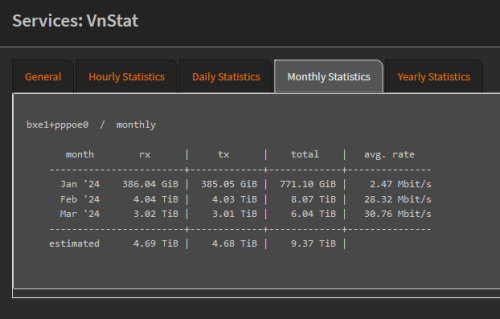  Dem, I'm still in 1-2TB range  |
|
|
Mar 22 2024, 01:46 PM
Return to original view | IPv6 | Post
#9
|
|
Junior Member
98 posts Joined: Sep 2019 From: Kuching
|
QUOTE(Infinity88 @ Mar 22 2024, 12:34 PM) I went to my local TM point to inquire about SWU 4.0 Sounds like mine yep, they don't let me ditch the VAR+ but rm149 for 500mbps, i'll take it119 : 300mbps 139 : 500mbps 6 months bill waiver But have to add additional 1 unifi tv package. Is this correct? I assume u don't have any smart device contract yes? or your previous plan got unifi tv? This post has been edited by karenzayn: Mar 22 2024, 01:48 PM |
|
|
Mar 27 2024, 12:11 PM
Return to original view | IPv6 | Post
#10
|
|
Junior Member
98 posts Joined: Sep 2019 From: Kuching
|
QUOTE(3nf0rc3r @ Mar 27 2024, 11:01 AM) Unifi agent 0379647000 just called. He offered me upgrade from 30mbps to 100mbps at the same price with condition of contract 2 years. I told the fellow already upgrade without contract so what is he talking about. He claims that the previous upgrade was from government, not permanent cause no black and white. Went to checked the unifi dashboard really still showing 30mbps despite having been upgraded to 100mbps based on speedtest. Double check via bill statement, even my plan shows 300mbps SWU, but on the bill shows 500mbps adv plus.Also that number is not from a TM Agent, that's TM's Sales Dept. |
|
|
Apr 4 2024, 11:16 AM
Return to original view | IPv6 | Post
#11
|
|
Junior Member
98 posts Joined: Sep 2019 From: Kuching
|
QUOTE(fruitie @ Apr 4 2024, 11:06 AM) Hi all, how does the Netflix bundle work? Can we use it on the Netflix app, or must we use the UniFi TV app? I asked because my cousin is migrating to Australia, and she wants to install fiber for her parents back in her hometown. She is considering using the bundled Netflix in Australia if allowed. It should be working on any device since you're taking Netflix via unifi (as long don't sign in to a tv in aus bcoz might trigger the netflix household detection, mobile device should be OK) |
|
|
Apr 4 2024, 11:18 AM
Return to original view | IPv6 | Post
#12
|
|
Junior Member
98 posts Joined: Sep 2019 From: Kuching
|
QUOTE(wanrayz2003 @ Apr 3 2024, 08:54 PM) Hi guys, what is pasword to enable developer options in unifi-tv stb? Might check in some UPB groups in FB, there's some ppl running a service to do that but at the cost voiding your upb warranty. |
|
|
Apr 6 2024, 08:26 PM
Return to original view | Post
#13
|
|
Junior Member
98 posts Joined: Sep 2019 From: Kuching
|
QUOTE(laihuhng @ Apr 6 2024, 11:02 AM) Are we able to remote access Dlink DPN-FX3060V from outside? If yes, mind sharing how to get it done? Thanks in advance. Wireguard VPN GUI (Docker) + DDNS is your best friend (other sifus can recommend other solutions as well) make sure just the open WG port on your router. Technically you need a small, low powered server (and runs CasaOS) to become a middleman in your home network. This post has been edited by karenzayn: Apr 6 2024, 08:26 PM |
|
|
|
|
|
Apr 8 2024, 04:33 PM
Return to original view | Post
#14
|
|
Junior Member
98 posts Joined: Sep 2019 From: Kuching
|
RM0 Unifi: Hey there! As a token of our appreciation for your loyalty with Unifi TV, starting from 24/04/2024 we're giving you a special upgrade to the Disney+ Hotstar Premium Plan at no additional cost! More info at i.unifi.my/dy2 . T&C apply. Happy streaming!
Anyone received this msg? |
|
|
May 2 2024, 12:26 PM
Return to original view | IPv6 | Post
#15
|
|
Junior Member
98 posts Joined: Sep 2019 From: Kuching
|
QUOTE(failed.hashcheck @ May 1 2024, 06:45 PM) Do tm lock your account to specific router? Not really, My Asus router going kaput, so I swap to my backup TM provided Fiberhome (SR1041F) router. All settings checked. But my pppoe keep dialing into this internal ip 172.20.*.* that have no internet connection. Today the technician come, they also can't explain what happen. so they request pppoe reset. Now my internet worked on this fiberhome router. When the technician leave, I tried to swap the router to slightly decent TPlink router from Celcom. The problem returns. pppoe dialed into 172.20.*.* ip again. Tried spoof the MAC from original previous Fiberhome router, also no go. Now I suspicious already. So I swap yet again to yet another TM fiberhome router (SR1041Y), also same problem. I give up, swap back to the original Fiberhome SR1041F, it worked?!?!! Do I need to call TM to reset my account every time I change ruter or what? I swapped one of my workplace warehouse from AZ-Tech to Fiberhome like yours (from one of our closed store and just lying around) and slap the PPPOE from the AZ-Tech and works fine... |
|
|
May 10 2024, 06:21 PM
Return to original view | IPv6 | Post
#16
|
|
Junior Member
98 posts Joined: Sep 2019 From: Kuching
|
QUOTE(yolldddd @ May 10 2024, 05:54 PM) What's the advantage of bridge mode as compared to the normal ppoe(i think) Basically, if you have your own router, just turning the combo box to a ONU onlyFaster speed? Better control? |
|
|
May 12 2024, 08:03 PM
Return to original view | IPv6 | Post
#17
|
|
Junior Member
98 posts Joined: Sep 2019 From: Kuching
|
QUOTE(shykull @ May 12 2024, 05:53 PM) Hi guys, 300mbps plan right? well you're behind a cgnat nowJust a quick question, I am setting up a webserver at home, I have open up port 443 for ssl connection on my router and setup duckdns. But I cant seem to be able to connect to my server via my duckdns address. Do I need to request the port to be open on the ISP side? im on the 300mbps package btw. cheers better route your webserver to CF tunnel with your own domain. unless you upgrade to 500mbps should be no problemo |
|
|
May 16 2024, 12:16 AM
Return to original view | IPv6 | Post
#18
|
|
Junior Member
98 posts Joined: Sep 2019 From: Kuching
|
QUOTE(Jjuggler @ May 16 2024, 12:10 AM) Just got this unit for RM70. Happy loot. Try run with your OLT and pppoe details and see if TM allows it coz im consider getting one (or more)   Unfortunately, I am unable to test 2Gbps connection since I am using 30Mbps fibre only at the moment. Will be useful for me to explore the features of the router lor. to swap out my mom's homestay and her siblings that i managed to a single box setup for ease of maintenance hehe. |
|
|
Jun 11 2024, 09:44 PM
Return to original view | IPv6 | Post
#19
|
|
Junior Member
98 posts Joined: Sep 2019 From: Kuching
|
Did poke around the new combo box from Skyworth GN630V > No bridge mode > Build in Ookla Speedtest with TM servers > Quite not bad interface > Wifi performance is not bad Might useful for homestay/Airbnb/Rented unit/perfer one box solution but not for me since i need more control over my network, just my 2 cents. NagaK and cHiLdHo0drEaMz liked this post
|
|
|
Jun 23 2024, 08:54 PM
Return to original view | Post
#20
|
|
Junior Member
98 posts Joined: Sep 2019 From: Kuching
|
QUOTE(kakalaku @ Jun 22 2024, 05:36 PM) what router does unifi offer to customer these days? (my plan is 300mbps fiber) Rather renew your contract, why not swap out with a 3rd party router like TP-LINK or Asus?current unifi router is faulty, with frequent and random restarts. thinking of taking up their offer for changing router in exchange for 2 years contract |
|
Topic ClosedOptions
|
| Change to: |  0.0678sec 0.0678sec
 0.30 0.30
 7 queries 7 queries
 GZIP Disabled GZIP Disabled
Time is now: 1st December 2025 - 06:21 PM |
 Quote
Quote