Outline ·
[ Standard ] ·
Linear+
Unifi Official TM UniFi High Speed Broadband Thread V42, READ 1ST PAGE FOR RELEVANT WIFI INFO!
|
wiwi
|
 Jun 22 2024, 10:56 PM Jun 22 2024, 10:56 PM
|
Getting Started


|
Hi ,
Just installed 300mbs Unifi.
The given router+modem (skyworth GN630V) has poor coverage imo.
Went to get an Asus AX1800HP and plug it to the Skyworth.
Effect seems same.
Did I miss something?
Do I need to do some settings changes?
Thanks in advance
|
|
|
|
|
|
wiwi
|
Jun 22 2024, 11:07 PM
|
Getting Started
|
QUOTE(NagaK @ Jun 22 2024, 11:02 PM) Try to change bridge mode on Skyworth or disable Wifi on Skyworth I tried to change Skyworth to bridge mode , Skyworth WAN/LAN1 connect to my Asus router WAN . subsequently my pc can detect wifi only..no internet. I'm not sure what went wrong? This post has been edited by wiwi: Jun 22 2024, 11:15 PM |
|
|
|
|
|
wiwi
|
Jun 24 2024, 10:02 AM
|
Getting Started
|
I actually changed the Unifi Skyworth Network to "Bridge". My new Asus router, i set in PPPOE pw and user. Weird no internet. I attached some pics. Did I miss any setting? Thanks 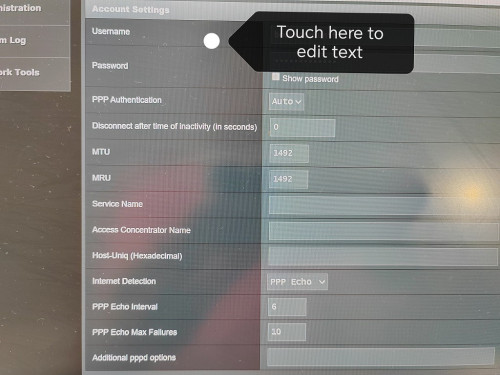 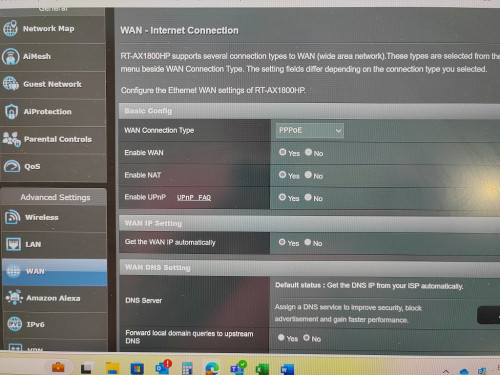 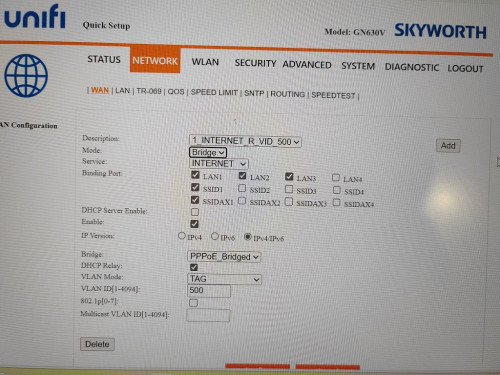 |
|
|
|
|
|
wiwi
|
Jun 24 2024, 10:03 AM
|
Getting Started
|
texted the unifi installer.
They said the 2in1 Skyworth modem+router.
Cant swap to other 3rd party router.
I dont really believe la..!
|
|
|
|
|
|
wiwi
|
Jun 24 2024, 10:17 AM
|
Getting Started
|
QUOTE(lamusiqa @ Jun 24 2024, 10:06 AM) That's what they told me but when they came and installed the modem+router combo, I just went to the settings and set the device as GPON Bridge only instead of GPON Bridge+Router. Connected it to my TP-Link AX73 router and voila, it works. The only annoyance Ive been facing since then is slow speed (300mbps) which I suspect coming from their end. Had them reset my port and speed went back to normal (1gbps) but this morning back to slow speed again. Where/ which tab to change to GPON bridge only setting? Thanks This post has been edited by wiwi: Jun 24 2024, 10:19 AM |
|
|
|
|



 Quote
Quote

 0.2137sec
 0.60
0.60
 7 queries
 GZIP Disabled