Welcome Guest ( Log In | Register )

Bump Topic Topic Closed RSS Feed
495 Pages « < 136 137 138 139 140 > » Bottom

Outline · [ Standard ] · Linear+

Unifi Official TM UniFi High Speed Broadband Thread V42, READ 1ST PAGE FOR RELEVANT WIFI INFO!

views
     
coolguy_0925
post May 27 2024, 10:48 PM

Look at all my stars!!
*******
Senior Member
4,550 posts

Joined: Jan 2003
QUOTE(toytoy @ May 27 2024, 10:39 PM)
Dunno if it's placebo effect. Webpages seems to load faster.
But even with 800Mpbs i don't really fully utilize it unless download big files.
PS5 and Xbox usually can't get past 200Mpbs.
*
Only you alone using?

Probably if more users sharing then will feel the advantage of higher speed smile.gif

or... keep it for future proof lo biggrin.gif

Mine from DL 300M to 500M and UL from 50M to 100M also no feel

2 person sharing mainly for browsing, streaming & gaming

Even before with 300M all the activities were smooth enough
kwss
post May 28 2024, 03:41 AM

Regular
******
Senior Member
1,208 posts

Joined: Aug 2018
Unifi has blocked encrypted DNS for both Google and Cloudflare. This has included both port 853 and 443.
Visiting https://dns.google no longer works on Unifi

On top of that, any unencrypted DNS resolution is now being poisoned.
Example: resolving pornhub.com with unencrypted Google or Cloudflare DNS will return the blocked IP.
stella_purple
post May 28 2024, 03:52 AM

Casual
***
Junior Member
392 posts

Joined: Oct 2011
QUOTE(kwss @ May 28 2024, 03:41 AM)
Unifi has blocked encrypted DNS for both Google and Cloudflare. This has included both port 853 and 443.
Visiting https://dns.google no longer works on Unifi

On top of that, any unencrypted DNS resolution is now being poisoned.
Example: resolving pornhub.com with unencrypted Google or Cloudflare DNS will return the blocked IP.
*
No wonder Internet suddenly not working 😅

Thought Google / cloudflare server got issue

This post has been edited by stella_purple: May 28 2024, 03:52 AM
ycktech
post May 28 2024, 04:18 AM

Getting Started
**
Junior Member
210 posts

Joined: Nov 2006
Block streaming site also suddenly.
Digi is using unifi backbone also is it?


Can use back at 4.20AM today.
I think they testing the new blocking method.

This post has been edited by ycktech: May 28 2024, 04:26 AM
kwss
post May 28 2024, 04:44 AM

Regular
******
Senior Member
1,208 posts

Joined: Aug 2018
Unifi ended their DNS poisoning for Google and Cloudflare!

I am about to write some codes with python + scapy to investigate where they do the poisoning. No more opportunity sad.gif

EDIT:
Based on early observation, the packet injection is done on egress of TM core network (hop 4 and above).
It is just an observation and cannot be proven 100% without writing custom software.

The sure thing is they didn't redirect those DNS resolver address to TM DNS. I proved this by querying records that fail DNSSEC validation. On TM they success. On Cloudflare and Google DNS they still fail.

This post has been edited by kwss: May 28 2024, 04:52 AM
SUSyolldddd
post May 28 2024, 07:10 AM

On my way
****
Junior Member
535 posts

Joined: Aug 2015
QUOTE(kwss @ May 28 2024, 03:41 AM)
Unifi has blocked encrypted DNS for both Google and Cloudflare. This has included both port 853 and 443.
Visiting https://dns.google no longer works on Unifi

On top of that, any unencrypted DNS resolution is now being poisoned.
Example: resolving pornhub.com with unencrypted Google or Cloudflare DNS will return the blocked IP.
*
No wonder lahhh

I thought it was my router when dns.google cannot be acess

Was pulliny my hair out restarting router and btu multiple timeees

Rupanya is tmnet punya kerja

But yyyyy??? They want to block pipu using private dns???

This post has been edited by yolldddd: May 28 2024, 07:11 AM
ycktech
post May 28 2024, 07:22 AM

Getting Started
**
Junior Member
210 posts

Joined: Nov 2006
This TM pattern cheh cheh.
Initially block port 25 la then block by dns la, in future maybe block by gateway.

Today I just know my public ip become private ip already. My synology website cannot access from outside liao.
Jialat lo.

This post has been edited by ycktech: May 28 2024, 07:23 AM
may_day
post May 28 2024, 07:52 AM

Getting Started
**
Junior Member
92 posts

Joined: Nov 2009
QUOTE(blacktubi @ May 27 2024, 10:52 AM)
SWU 4.0 offering free 6 months but must get Uni5G @ RM39 for at least 3 months.

RM129 for 300Mbps, after SST should be same price as yours.

Free new WiFi 6 router, either D-Link or new Skyworth all in one unit.
*
May I ask, is it TM lock the LAN port for the new WiFi 6 router?

My brother have applied SWU 4.0 , he got new router last week but 4 LAN Port all can't working

PRSXFENG
post May 28 2024, 08:10 AM

Look at all my stars!!
*******
Senior Member
2,611 posts

Joined: Nov 2020


QUOTE(may_day @ May 28 2024, 07:52 AM)
May I ask, is it TM lock the LAN port for the new WiFi 6 router?

My brother have applied SWU 4.0 , he got new router last week but 4 LAN Port all can't working
*
I think it is reserved for the UnifiTV Box

depending on the router, you might be able to change it over to be a normal LAN port
or if there are profiles, changing it from Unifi Home to Unifi Business should do it
Lancer07
post May 28 2024, 09:54 AM

On my way
****
Junior Member
599 posts

Joined: Jul 2021
My cousin plan to migrate from maxis to unfi 100mbps.

However, unifi offer 36 months contract + free 6 months rebate.

Normally contract is 2 years for new user, how come 3 years now?
aa123aa
post May 28 2024, 11:23 AM

Getting Started
**
Junior Member
180 posts

Joined: Mar 2015
QUOTE(jiaen0509 @ May 27 2024, 10:33 PM)
1. If you continue with Fiberhome and the own router, the maximum speed for both WiFi and LAN can reach approximately 940Mbps.
2. This is incorrect. The white model cannot achieve 1Gbps via LAN, but reachable on WiFi; however, the black model can reach full 1Gbps since it has a 2.5G LAN port.
3. If you use the stock router provided by TM, proceed with the newly provided combo box better, in that case you will get full 1gbps on Wifi. If you have your own router (better than TM provided router) or using mesh system, stick with Fiberhome and Asus so that you can continue with current router/+mesh. Unless you have a 2.5G router. In that case, you can pair it with the black combo to get your own router and full 1Gbps speed. Otherwise as long as you plugged with fiberhome, max 940mbps
*
Clearer now. Thanks for the info yea.
3. ""Unless you have a 2.5G router. In that case, you can pair it with the black combo to get your own router and full 1Gbps speed."" --> how can we pair this combo with own asus router le? need ask the technician to configurate the black combo as bridge mode?

Thanks smile.gif
Omochao
post May 28 2024, 12:24 PM

Enthusiast
*****
Junior Member
835 posts

Joined: Nov 2007
From: Land of Forgotten
QUOTE(satcure645 @ May 27 2024, 01:35 PM)
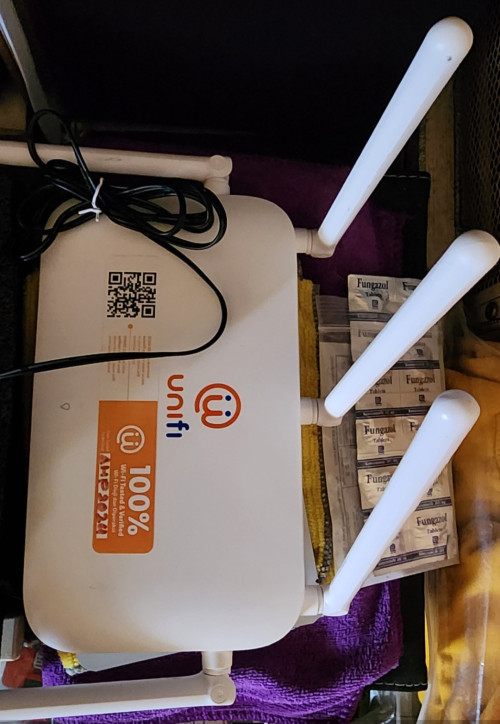
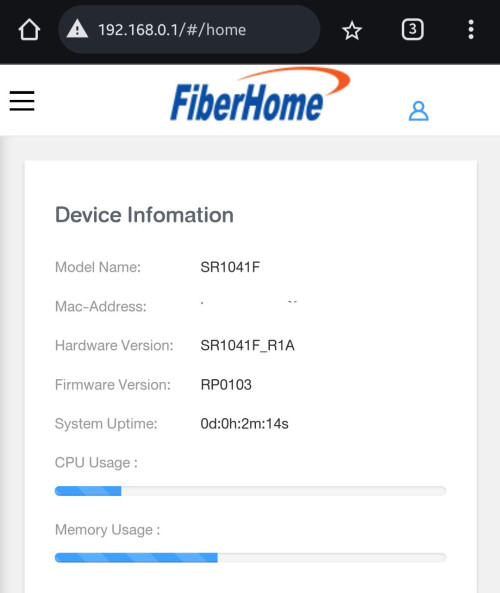
Fibrehome SR1041F
Firrmware RP0103

Bought from Shopee, SR1041F AX3000, 5 antennas model (3 at the back 2 at side)

user posted image

user posted image
*
drop you a pm kindly check
jiaen0509
post May 28 2024, 01:01 PM

Look at all my stars!!
*******
Senior Member
3,305 posts

Joined: Dec 2012
QUOTE(aa123aa @ May 28 2024, 11:23 AM)
Clearer now. Thanks for the info yea.
3. ""Unless you have a 2.5G router. In that case, you can pair it with the black combo to get your own router and full 1Gbps speed."" --> how can we pair this combo with own asus router le? need ask the technician to configurate the black combo as bridge mode?

Thanks smile.gif
*
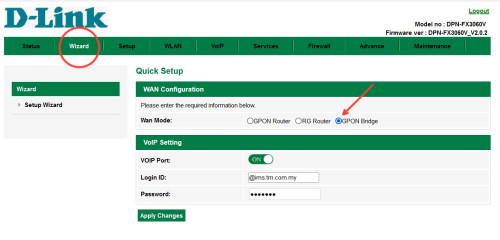
1. Connect the fiber to the Black combo.
2. Use an LAN cable to connect the 2.5G Port on the Black combo to your ASUS 2.5G WAN port.
3. Follow the instructions below to change the Black combo to GPON Bridge mode.

user posted image

You can use this method as well on White combo or with existing Asus rounter. Just the speed has limitations to max of 940mbps.

🤭 I have learned from all the information shared by members here. Let’s try and get back to us see whether does it works or not.
aa123aa
post May 28 2024, 02:16 PM

Getting Started
**
Junior Member
180 posts

Joined: Mar 2015
QUOTE(jiaen0509 @ May 28 2024, 01:01 PM)
1. Connect the fiber to the Black combo.
2. Use an LAN cable to connect the 2.5G Port on the Black combo to your ASUS 2.5G WAN port.
3. Follow the instructions below to change the Black combo to GPON Bridge mode.

user posted image

You can use this method as well on White combo or with existing Asus rounter. Just the speed has limitations to max of 940mbps.

🤭 I have learned from all the information shared by members here. Let’s try and get back to us see whether does it works or not.
*
Thanks lot; appreciate that!
YoungMan
post May 28 2024, 03:14 PM

Look at all my stars!!
*******
Senior Member
6,818 posts

Joined: Oct 2008
From: Kuala Lumpur


QUOTE(keong8867 @ May 27 2024, 10:01 PM)
TM point now can get 6 month offer also? Then why I should find agent?
*
Agent = you no need take leave and cue at Tmpoint. Just submit all requirement and wait for the installation to happen.

QUOTE(may_day @ May 28 2024, 07:52 AM)
May I ask, is it TM lock the LAN port for the new WiFi 6 router?

My brother have applied SWU 4.0 , he got new router last week but 4 LAN Port all can't working
*
If all 4 lan port not working, it's the router problem. Call them to change new one.

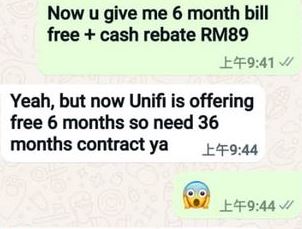
QUOTE(Lancer07 @ May 28 2024, 09:54 AM)
My cousin plan to migrate from maxis to unfi 100mbps.

However, unifi offer 36 months contract + free 6 months rebate.

Normally contract is 2 years for new user, how come 3 years now?
*
That's why need to be careful. Next time probably contract auto renew like Astro. If in doubt, go apply at Tmpoint.

QUOTE(tng55 @ May 28 2024, 11:19 AM)
why you buy fiberhome that free router you always pay waste money

why not try TP LINK its cheap batter tp link then fiberhome daam waste you money
*
Why try Tp Link, you should promote him to try Asus.
XeactorZ
post May 28 2024, 09:44 PM

♥ PandaDog ♥
*********
All Stars
31,609 posts

Joined: Aug 2010
QUOTE(kwss @ May 28 2024, 03:41 AM)
Unifi has blocked encrypted DNS for both Google and Cloudflare. This has included both port 853 and 443.
Visiting https://dns.google no longer works on Unifi

On top of that, any unencrypted DNS resolution is now being poisoned.
Example: resolving pornhub.com with unencrypted Google or Cloudflare DNS will return the blocked IP.
*
luckily been using adguard dns laugh.gif
surrodox2001
post May 28 2024, 11:22 PM

Getting Started
**
Junior Member
273 posts

Joined: Apr 2019


Not using google and cloudflare in my DoH setups, no problems yet... Perhaps get your VPNs ready? (It's like that right now if you wanna get stable speed for online gaming and such?)
tungfunglaw
post May 29 2024, 12:19 AM

Getting Started
**
Junior Member
259 posts

Joined: Aug 2008


QUOTE(Lancer07 @ May 28 2024, 09:54 AM)
My cousin plan to migrate from maxis to unfi 100mbps.

However, unifi offer 36 months contract + free 6 months rebate.

Normally contract is 2 years for new user, how come 3 years now?
*
i was offered 300mbps rm99 per month (a new line tho) for 2yrs by local maxis center sales team via hanky-panky method of their own.

being stopped by HQ callcenter for 3 times during the process lol


sitescope
post May 29 2024, 10:09 AM

Look at all my stars!!
*******
Senior Member
4,494 posts

Joined: Oct 2013
QUOTE(may_day @ May 28 2024, 07:52 AM)
May I ask, is it TM lock the LAN port for the new WiFi 6 router?

My brother have applied SWU 4.0 , he got new router last week but 4 LAN Port all can't working
*
All 4 lan ports not working
Or lan port no 4 isnt working ?
If no 4 then u might need to chg setting from iptv to internet

QUOTE(Lancer07 @ May 28 2024, 09:54 AM)
My cousin plan to migrate from maxis to unfi 100mbps.

However, unifi offer 36 months contract + free 6 months rebate.

Normally contract is 2 years for new user, how come 3 years now?
*
Wow nowadays contract is 36 mths ?
Got link or ss ?

This post has been edited by sitescope: May 29 2024, 10:09 AM
Lancer07
post May 29 2024, 10:31 AM

On my way
****
Junior Member
599 posts

Joined: Jul 2021
QUOTE(tungfunglaw @ May 29 2024, 12:19 AM)
i was offered 300mbps rm99 per month (a new line tho) for 2yrs by local maxis center sales team via hanky-panky method of their own.

being stopped by HQ callcenter for 3 times during the process lol
*
RM99 is good deal.


QUOTE(sitescope @ May 29 2024, 10:09 AM)
All 4 lan ports not working
Or lan port no 4 isnt working ?
If no 4 then u might need to chg setting from iptv to internet
Wow nowadays contract is 36 mths ?
Got link or ss ?
*
user posted image

Under Uinfi website, at least 24 mths only.

This agent scam my cousin by prolonging the contract.

This post has been edited by Lancer07: May 29 2024, 10:32 AM

495 Pages « < 136 137 138 139 140 > » Top
Topic ClosedOptions
 

Change to:
| Lo-Fi Version
0.0205sec    0.46    6 queries    GZIP Disabled
Time is now: 15th December 2025 - 08:17 AM