Welcome Guest ( Log In | Register )

Bump Topic Topic Closed RSS Feed
495 Pages « < 138 139 140 141 142 > » Bottom

Outline · [ Standard ] · Linear+

Unifi Official TM UniFi High Speed Broadband Thread V42, READ 1ST PAGE FOR RELEVANT WIFI INFO!

views
     
kwss
post May 30 2024, 01:24 AM

Regular
******
Senior Member
1,208 posts

Joined: Aug 2018
QUOTE(go626201 @ May 30 2024, 01:10 AM)
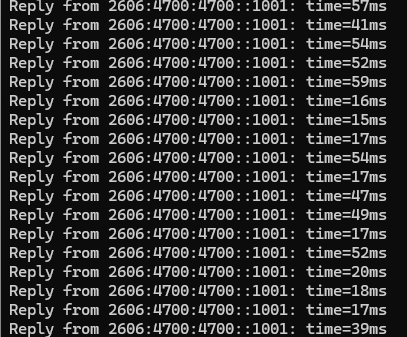
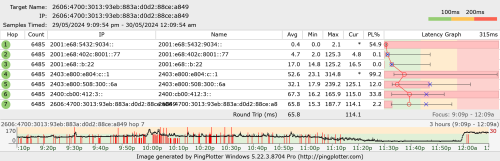
There are some serious issue with Unifi to Cloudflare ipv6 every night between 8.30pm to 12.30am.
While at the time,the speed and latency is super unstable with Cloudflare ipv6.
So whoever using IPv6 will facing issue with sites hosted on Cloudflare at night.

Random Cloudflare IPv6 Address (all cloudflare ipv6 address is affected)
user posted image
Cloudflare-DNS-IPv6-Address
user posted image
*
Where are you located and your IP address prefix? Also what DNS server are you using?
I never face problem with Cloudflare at all. I always use domain name instead of IP address.
At the moment when I ping cloudflare-dns.com, things look okay.
CODE

5 packets transmitted, 5 received, 0% packet loss, time 4005ms
rtt min/avg/max/mdev = 14.864/16.988/22.636/2.877 ms


However, if I manually ping the IP address in your graph, I do get high ping.
So I am not sure if DNS returns you an overloaded server or how.
The TTL for cloudflare-dns.com is 300 seconds so I don't think they configure it wrongly.
Kadaj
post May 30 2024, 01:28 AM

On my way
****
Junior Member
586 posts

Joined: Mar 2006
QUOTE(PRSXFENG @ May 30 2024, 12:57 AM)
Otherwise... There's always the self host option with Unbound  tongue.gif
*
I installed unbound and use the pihole conf.
Restart unbound and try dig some website but unbound doesn't respond, it shows time out.

Then I connect VPN.
Restart unbound and try dig some website, this time it works like a charm.

I suspect TM interfere something with unbound.
kwss
post May 30 2024, 01:38 AM

Regular
******
Senior Member
1,208 posts

Joined: Aug 2018
QUOTE(Kadaj @ May 30 2024, 01:28 AM)
I installed unbound and use the pihole conf.
Restart unbound and try dig some website but unbound doesn't respond, it shows time out.

Then I connect VPN.
Restart unbound and try dig some website, this time it works like a charm.

I suspect TM interfere something with unbound.
*
Recursive resolver is always done in plaintext. This method cannot be used to bypass Great Firewall of China anymore. Long time back it does work.
From a censorship point of view, this method only works for low tech censor.

But I am not sure if your problem is related to TM blocking it since it works for me. Do you manage to get a log when running on TM?
I have a suspicion it could be due to IP blacklist. TM bought a few blocks of IPv4 address and they could be on sale due to their bad history.
This can also explain why some people get "better experience" after changing IP address.
go626201
post May 30 2024, 01:53 AM

Regular
******
Senior Member
1,882 posts

Joined: Sep 2017
QUOTE(kwss @ May 30 2024, 01:24 AM)
Where are you located and your IP address prefix? Also what DNS server are you using?
I never face problem with Cloudflare at all. I always use domain name instead of IP address.
At the moment when I ping cloudflare-dns.com, things look okay.
CODE

5 packets transmitted, 5 received, 0% packet loss, time 4005ms
rtt min/avg/max/mdev = 14.864/16.988/22.636/2.877 ms


However, if I manually ping the IP address in your graph, I do get high ping.
So I am not sure if DNS returns you an overloaded server or how.
The TTL for cloudflare-dns.com is 300 seconds so I don't think they configure it wrongly.
*
JB, 2001:e68:5432:9034::/64, Self-built Adguard-Home DNS server with smartdns(With multiple upstream DNS).

For the overload server,i used CloudflareST to TCPping 40k cloudflare ipv6 address.
All will be having issue within the time. (this second low ping fast speed-18ms,and the next second or after awhile,it suddenly like shit speed and latency-70ms)

Another test with tcpping cloudflare ipv6 with 443 port at around 9pm
Ping statistics for 2400:cb00:2049:0:f1:9017:23f8:cd71:443
2801 probes sent.
2782 successful, 19 failed. (0.68% fail)
Approximate trip times in milli-seconds (successful connections only):
Minimum = 13.994ms, Maximum = 1745.812ms, Average = 363.208ms

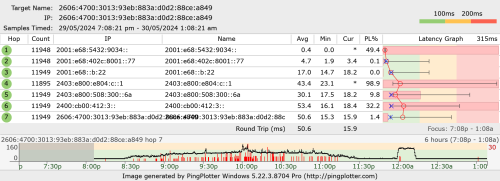
ping to Cloudflare ipv6 dns address at 9pm
user posted image

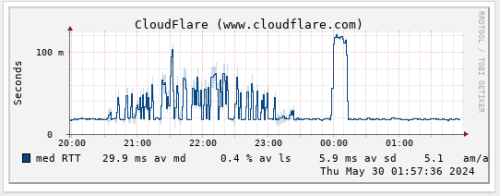
Edited:
Add cloudflare.com ipv6 smokeping
user posted image

This post has been edited by go626201: May 30 2024, 01:58 AM
kwss
post May 30 2024, 02:15 AM

Regular
******
Senior Member
1,208 posts

Joined: Aug 2018
QUOTE(go626201 @ May 30 2024, 01:53 AM)
JB, 2001:e68:5432:9034::/64, Self-built Adguard-Home DNS server with smartdns(With multiple upstream DNS).

For the overload server,i used CloudflareST to TCPping 40k cloudflare ipv6 address.
All will be having issue within the time. (this second low ping fast speed-18ms,and the next second or after awhile,it suddenly like shit speed and latency-70ms)

Another test with tcpping cloudflare ipv6 with 443 port at around 9pm
Ping statistics for 2400:cb00:2049:0:f1:9017:23f8:cd71:443
     2801 probes sent.
     2782 successful, 19 failed.  (0.68% fail)
Approximate trip times in milli-seconds (successful connections only):
     Minimum = 13.994ms, Maximum = 1745.812ms, Average = 363.208ms

ping to Cloudflare ipv6 dns address at 9pm
user posted image

Edited:
Add cloudflare.com ipv6 smokeping
user posted image
*
Alright. Now I understand the extend of your problem.
For TM it is easy, 2001:e68:/32 is one bgp entry.
Cloudflare is complicated: https://bgpview.io/asn/13335#prefixes-v6

I tried a few of your example with the matching prefix and they all route differently. When you tried different IP address, you must first make sure they are a different prefix from BGP point of view. Then you need to traceroute to see if they take a different route. Blindly pinging many IP addresses will give you the same result if they are from the same bgp entry.

In your case, or rather cloudflare case in general, it very much comes down to traffic engineering. I am not even sure how TM and Cloudflare peers and how they agree on traffic engineering parameters and all.

EDIT
traceroute can only see egress route from your point of view. ingress is always unknown and another mystery unless you can perform traceroute from that one cloudflare endpoint.

EDIT2:
A question: Does smokeping resolve a new IP address every time it ping? Or at least respect the TTL entry of the domain?

This post has been edited by kwss: May 30 2024, 02:27 AM
heLL_bOy
post May 30 2024, 09:52 AM

Regular
******
Senior Member
1,350 posts

Joined: Nov 2004
From: HEAVEN & HELL


anybody notice TM silently change to private ip address even not 100mbps package users?
soonwai
post May 30 2024, 10:04 AM


********
All Stars
11,458 posts

Joined: Oct 2007
From: KL


QUOTE(heLL_bOy @ May 30 2024, 09:52 AM)
anybody notice TM silently change to private ip address even not 100mbps package users?
*
Which package? 800Mbps here ok. Still public. I think a few 300Mbps got private. Those who got free upgrade from 100-300?
sHawTY
post May 30 2024, 10:23 AM

Frequent Reporter
********
All Stars
14,909 posts

Joined: Jul 2005

QUOTE(PRSXFENG @ May 29 2024, 11:14 PM)
Replying to ancient old post but I was also looking for it

Based solely on the image of tv with the blue flower used in the promo pic, it could be this

https://my.sharp/products/tvav/65-inch-4k-u...tc65fj1x?v=1605
Whoa. Thanks bro
Been looking for an answer for this and even the TM chat couldn't answer this question

Last time I got a Sharp 60" Android TV for RM99 monthly for 2 years which equates to RM2376
The contract is ending in June this year, let's see if I can get this 65" for the same price or not laugh.gif
Kadaj
post May 30 2024, 10:28 AM

On my way
****
Junior Member
586 posts

Joined: Mar 2006
QUOTE(kwss @ May 30 2024, 01:38 AM)
Recursive resolver is always done in plaintext. This method cannot be used to bypass Great Firewall of China anymore. Long time back it does work.
From a censorship point of view, this method only works for low tech censor.

But I am not sure if your problem is related to TM blocking it since it works for me. Do you manage to get a log when running on TM?
I have a suspicion it could be due to IP blacklist. TM bought a few blocks of IPv4 address and they could be on sale due to their bad history.
This can also explain why some people get "better experience" after changing IP address.
*
This is default plaintext method, which doesn't work for me.
QUOTE
info: processQueryTargets: . NS IN
info: sending query: . NS IN
debug: sending to target: <.> 192.58.128.30#53
debug: cache memory msg=66072 rrset=66072 infra=10184 val=66352 subnet=74504
debug: iterator[module 2] operate: extstate:module_wait_reply event:module_event_noreply
info: iterator operate: query . NS IN
-----
$ dig pi-hole.net @127.0.0.1 -p 5335
;; communications error to 127.0.0.1#5335: timed out

; <<>> DiG 9.18.24-1 <<>> pi-hole.net @127.0.0.1 -p 5335
;; global options: +cmd
;; no servers could be reached

This is when i connected to VPN and it works.
QUOTE
info: processQueryTargets: . NS IN
info: sending query: . NS IN
debug: sending to target: <.> 192.58.128.30#53
debug: cache memory msg=66937 rrset=73828 infra=8402 val=66352 subnet=74504
debug: iterator[module 2] operate: extstate:module_wait_reply event:module_event_reply
info: iterator operate: query . NS IN
info: response for . NS IN
info: reply from <.> 192.58.128.30#53
info: query response was ANSWER
-----
]$ dig pi-hole.net @127.0.0.1 -p 5335

; <<>> DiG 9.18.24-1 <<>> pi-hole.net @127.0.0.1 -p 5335
;; global options: +cmd
;; Got answer:
;; ->>HEADER<<- opcode: QUERY, status: NOERROR, id: 59333
;; flags: qr rd ra; QUERY: 1, ANSWER: 1, AUTHORITY: 0, ADDITIONAL: 1

;; OPT PSEUDOSECTION:
; EDNS: version: 0, flags:; udp: 1232
;; QUESTION SECTION:
;pi-hole.net.   IN A

;; ANSWER SECTION:
pi-hole.net.  300 IN A 3.18.136.52

;; Query time: 748 msec
;; SERVER: 127.0.0.1#5335(127.0.0.1) (UDP)
;; WHEN: Thu May 30 10:16:38 +08 2024
;; MSG SIZE  rcvd: 56

I tweak the unbound config to go through DoT method, and it works without vpn.

Just sharing my experience here. thumbsup.gif

This post has been edited by Kadaj: May 30 2024, 02:49 PM
heLL_bOy
post May 30 2024, 11:32 AM

Regular
******
Senior Member
1,350 posts

Joined: Nov 2004
From: HEAVEN & HELL


QUOTE(soonwai @ May 30 2024, 10:04 AM)
Which package? 800Mbps here ok. Still public. I think a few 300Mbps got private. Those who got free upgrade from 100-300?
*
I just notice today that my ip been privated.

i am using 300mbps, not free upgrade from 100 to 300.
hasmidzul_jojo
post May 30 2024, 11:38 AM

Getting Started
**
Junior Member
203 posts

Joined: Feb 2008
Mine using 300Mbps( free speed upgrade to 500Mbps)..and still on public ip...and actively using my public ip access.
soonwai
post May 30 2024, 11:44 AM


********
All Stars
11,458 posts

Joined: Oct 2007
From: KL


QUOTE(heLL_bOy @ May 30 2024, 11:32 AM)
I just notice today that my ip been privated.

i am using 300mbps, not free upgrade from 100 to 300.
*
Could be a mistake by TM since you're on 300Mbps. I just checked my neighbour's and they're still on public IP. They are 100Mbps, possibly upgraded to 300Mbps by now. Can't check their speed because they're still using Asus RT-N12.
hussain
post May 30 2024, 11:44 AM

Look at all my stars!!
*******
Senior Member
2,012 posts

Joined: Dec 2007
From: Malaysia


HI Guys.. Need some help.. I just got a call from unifi that finally i will get free upgrade from 800mbps to 1gbps. but they said have to installl their own router. Cant i continue to use my own router coz mine is new and is wifi 6 TP link Archer AX 73. My house is kinda large so previously using mesh did not help but after using this router speeds everywhere in the house is quite good even without mesh.. will their upgraded router be any better ?..appreciate some sifu advice.. thanks

Also will unifi be better or moving altogether to celcom fibre 1gbps?

This post has been edited by hussain: May 30 2024, 11:47 AM
heLL_bOy
post May 30 2024, 11:48 AM

Regular
******
Senior Member
1,350 posts

Joined: Nov 2004
From: HEAVEN & HELL


QUOTE(soonwai @ May 30 2024, 11:44 AM)
Could be a mistake by TM since you're on 300Mbps. I just checked my neighbour's and they're still on public IP. They are 100Mbps, possibly upgraded to 300Mbps by now. Can't check their speed because they're still using Asus RT-N12.
*
I try contact TM on this, thanks for your info thumbsup.gif
go626201
post May 30 2024, 11:57 AM

Regular
******
Senior Member
1,882 posts

Joined: Sep 2017
QUOTE(kwss @ May 30 2024, 02:15 AM)
A question: Does smokeping resolve a new IP address every time it ping? Or at least respect the TTL entry of the domain?
*
Yes, it does resolve new address with domain name host. Should be follow the ttl, i think.
aniq8676
post May 30 2024, 02:47 PM

Regular
******
Senior Member
1,524 posts

Joined: Dec 2020
From: Perak


QUOTE(heLL_bOy @ May 30 2024, 11:32 AM)
I just notice today that my ip been privated.

i am using 300mbps, not free upgrade from 100 to 300.
*
PRIVATE IP
30 Mbps
50 Mbps
100 Mbps
300 Mbps

PUBLIC IP
500 Mbps
800 Mbps
1 Gbps
2 Gbps
sp6068
post May 30 2024, 03:05 PM

Lights Out and Away We Go!
******
Senior Member
1,699 posts

Joined: Jun 2011
From: Home of Bak Kut Teh! :)


QUOTE(go626201 @ May 30 2024, 01:10 AM)
There are some serious issue with Unifi to Cloudflare ipv6 every night between 8.30pm to 12.30am.
While at the time,the speed and latency is super unstable with Cloudflare ipv6.
So whoever using IPv6 will facing issue with sites hosted on Cloudflare at night.

Random Cloudflare IPv6 Address (all cloudflare ipv6 address is affected)
user posted image
Cloudflare-DNS-IPv6-Address
user posted image
*
I have a feeling TM is throttling speed during this time. When I use the internet for browsing international sites after 2PM, speed is back to its normal state.

Slowness is peaked at night
heLL_bOy
post May 30 2024, 03:08 PM

Regular
******
Senior Member
1,350 posts

Joined: Nov 2004
From: HEAVEN & HELL


QUOTE(aniq8676 @ May 30 2024, 02:47 PM)
PRIVATE IP
30 Mbps
50 Mbps
100 Mbps
300 Mbps

PUBLIC IP
500 Mbps
800 Mbps
1 Gbps
2 Gbps
*
Thanks for your info thumbsup.gif
bugipunch
post May 30 2024, 03:14 PM

Getting Started
**
Junior Member
172 posts

Joined: Jul 2021
QUOTE(hussain @ May 30 2024, 11:44 AM)
HI Guys.. Need some help.. I just got a call from unifi that finally i will get free upgrade from 800mbps to 1gbps. but they said have to installl their own router. Cant i continue to use my own router coz mine is new and is wifi 6 TP link Archer AX 73. My house is kinda large so previously using mesh did not help but after using this router speeds everywhere in the house is quite good even without mesh.. will their upgraded router be any better ?..appreciate some sifu advice.. thanks

Also will unifi be better or moving altogether to celcom fibre 1gbps?
*
ask technician to install bridge mode and all done.
hussain
post May 30 2024, 04:10 PM

Look at all my stars!!
*******
Senior Member
2,012 posts

Joined: Dec 2007
From: Malaysia


QUOTE(bugipunch @ May 30 2024, 03:14 PM)
ask technician to install bridge mode and all done.
*
Meaning? Sorry not very tech savvy

495 Pages « < 138 139 140 141 142 > » Top
Topic ClosedOptions
 

Change to:
| Lo-Fi Version
0.0177sec    0.80    6 queries    GZIP Disabled
Time is now: 13th December 2025 - 09:37 AM