Welcome Guest ( Log In | Register )

Bump Topic Topic Closed RSS Feed
495 Pages « < 134 135 136 137 138 > » Bottom

Outline · [ Standard ] · Linear+

Unifi Official TM UniFi High Speed Broadband Thread V42, READ 1ST PAGE FOR RELEVANT WIFI INFO!

views
     
NagaK
post May 26 2024, 12:17 AM

Regular
******
Senior Member
1,194 posts

Joined: Sep 2018


QUOTE(Ashren @ May 26 2024, 12:00 AM)
Yes it will greatly help your wifi coverage across the house but pay attention on your placement. Always do zig-zag placement for vertical deployment ie double/triple storey houses. Don't put the mesh directly above each other on different floors or your wifi speed will suffer despite the excellent coverage. It has to be on the opposite far side of each other, far enough as long as it still get good signal from the other node/main router.

If you can do ethernet backhaul to all the nodes that's even better so it won't share the same wifi throughput for the main connection. I do ethernet backhaul to my nodes so I get full wifi speed and full lan speed on all of them but sometimes if let say node A is hogging the wifi, all the other nodes wifi even the main router's wifi lagging a bit since they all share the same channel, mine's 161. It's like the inteference you get from your neighbor when both of you share the same airwaves. With mesh setup you cannot set the wifi channels individually across all the nodes. To me wired AP backhaul still the best and you're not tied to only one brand and free to configure each AP nodes. That's just my 2 cents.
*
Very true I'm using my old TP LINK AX20 as AP and connect LAN via basic gigabit switch for TV Astro plug n play and PS5. Problem is Wifi took time for connect main router from AP. I want deco mesh giving great wireless for my IP camera and Air-conditioner.
If I connect 2nd node as LAN does Deco Wifi will still can be use??
Jjuggler
post May 26 2024, 12:27 AM

Narcissistic Genius
******
Senior Member
1,341 posts

Joined: Dec 2016
QUOTE(Ashren @ May 25 2024, 08:23 PM)
I got that error on 22nd a day after their scheduled maintenance on the 21st. My upgrade appt is on the 23rd imagine I cannot track my service order have to use browser everytime. Then someone on twitter posted telling ppl to relogin and BAM, back to normal. Whoever intern they hire to work on the app should stay intern till their mandatory pension age. Simple update command to flush cache also cannot handle.
*
Wonder how their portfolio description would be.

Developing cutting-edge professional mobile application that ticks all the requirement specification. tongue.gif
Ashren
post May 26 2024, 12:31 AM

Getting Started
**
Junior Member
156 posts

Joined: Dec 2010
QUOTE(NagaK @ May 26 2024, 12:17 AM)
Very true I'm using my old TP LINK AX20 as AP and connect LAN via basic gigabit switch for TV Astro plug n play and PS5. Problem is Wifi took time for connect main router from AP. I want deco mesh giving great wireless for my IP camera and Air-conditioner.
If I connect 2nd node as LAN does Deco Wifi will still can be use??
*
Yes can. There's 2 option on how you can set your deco, wirelessly or lan, Asus AiMesh can even mix both mode together. LAN to LAN to all your nodes is better because each nodes will broadcast their wifi at full speed to all clients and of course all your lan also is transmitting gigabit speed. With wireless pairing the nodes wifi throughput will degrade a bit since it's using it's wifi to transmit to the main router as well as to other wifi clients connected to it. Just like your wireless AP setup now. The wifi speed is cut into half. Mesh is just another fancy term to describe AP. Difference is it's simple and automated setup but with limitations ie you cannot configure your nodes independently like AP.

This post has been edited by Ashren: May 26 2024, 12:56 AM
sp6068
post May 26 2024, 12:39 AM

Lights Out and Away We Go!
******
Senior Member
1,699 posts

Joined: Jun 2011
From: Home of Bak Kut Teh! :)


Is anyone working inside TM can let us know WHAT THE FUCK is going on?? Since Feb already nonstop slowdowns EVERYDAY
jiaen0509
post May 26 2024, 01:51 AM

Look at all my stars!!
*******
Senior Member
3,305 posts

Joined: Dec 2012
QUOTE(Ashren @ May 25 2024, 08:09 PM)
After few days of uptime since the 1gbps upgrade I can confirm no speed fluctuation observed at least for me.
*
It seems that the black variant of the ONR can operate in Bridge mode without any speed drops (as reported by one of the members here). So, everything working well on your end yeah 👍
Epic_winner091
post May 26 2024, 10:38 AM

Casual
***
Junior Member
338 posts

Joined: Mar 2010
From: Shah Alam


QUOTE(sp6068 @ May 26 2024, 12:39 AM)
Is anyone working inside TM can let us know WHAT THE FUCK is going on?? Since Feb already nonstop slowdowns EVERYDAY
*
This can't be good for business right? Or residential plans are more affected?

I wish there's some official acknowledgement. Wonder if they oversold bandwidth after the free speed upgrades?
sp6068
post May 26 2024, 11:00 AM

Lights Out and Away We Go!
******
Senior Member
1,699 posts

Joined: Jun 2011
From: Home of Bak Kut Teh! :)


QUOTE(Epic_winner091 @ May 26 2024, 10:38 AM)
This can't be good for business right? Or residential plans are more affected?

I wish there's some official acknowledgement. Wonder if they oversold bandwidth after the free speed upgrades?
*
Their support tickets also increased significantly everyday. Last year it's usually less than 10 people waiting in line to get entertained in live chat.

Worst still, no statement from their end despite slowdowns since January this year.
cusx
post May 26 2024, 11:37 AM

On my way
****
Senior Member
585 posts

Joined: Mar 2006
From: xia's heart , !

Are those on the unifi 500Mbps (Turbo Upgrade 2018) entitled for the free upgrade to 800Mbps?

I swear I was upgraded when I checked last year, but today, I checked the speed is back to 500Mbps.


aniq8676
post May 26 2024, 11:45 AM

Regular
******
Senior Member
1,524 posts

Joined: Dec 2020
From: Perak


QUOTE(cusx @ May 26 2024, 11:37 AM)
Are those on the unifi 500Mbps (Turbo Upgrade 2018) entitled for the free upgrade to 800Mbps?

I swear I was upgraded when I checked last year, but today, I checked the speed is back to 500Mbps.
*
Livechat to reset the port
enduser
post May 26 2024, 11:49 AM

Regular
******
Senior Member
1,280 posts

Joined: Jan 2003
QUOTE(cusx @ May 26 2024, 11:37 AM)

I swear I was upgraded when I checked last year, but today, I checked the speed is back to 500Mbps.
*
Can u print ur broadband plan from the portal.
Shoot email to unifi or mcmc

If no black n white a bit difficult to prove ur case.

That's why whoever on the swu2/3/4/5 is very important to make sure ur plan name reflected on the bill

Manatau after 24mth they will taichi.

jusbella
post May 26 2024, 12:04 PM

Look at all my stars!!
*******
Senior Member
3,037 posts

Joined: Dec 2011


QUOTE(cusx @ May 26 2024, 11:37 AM)
Are those on the unifi 500Mbps (Turbo Upgrade 2018) entitled for the free upgrade to 800Mbps?

I swear I was upgraded when I checked last year, but today, I checked the speed is back to 500Mbps.
*
Me.

Last year been upgraded. Today checked still 800mbps, sometimes can reach 850mbps.
cusx
post May 26 2024, 12:28 PM

On my way
****
Senior Member
585 posts

Joined: Mar 2006
From: xia's heart , !

QUOTE(aniq8676 @ May 26 2024, 11:45 AM)
Livechat to reset the port
*
This did the trick!


QUOTE(enduser @ May 26 2024, 11:49 AM)
Can u print ur broadband plan  from the portal.
Shoot email to unifi or mcmc

If no black n white a bit difficult to prove ur case.

That's why whoever on the swu2/3/4/5 is very important to make sure ur plan name reflected on the bill

Manatau after 24mth they will taichi.
*
Good point, mine still says unifi 500Mbps (Turbo Upgrade 2018), they told me the name change is upgraded in phases. Guess I'll need to pay more attention to this.
Epic_winner091
post May 26 2024, 01:04 PM

Casual
***
Junior Member
338 posts

Joined: Mar 2010
From: Shah Alam


QUOTE(sp6068 @ May 26 2024, 11:00 AM)
Their support tickets also increased significantly everyday. Last year it's usually less than 10 people waiting in line to get entertained in live chat.

Worst still, no statement from their end despite slowdowns since January this year.
*
With all the tickets raised, insane queues at 1 am for the live chat, they must know something is up right? Or they have their heads in the sand because "popular" sites like YouTube, FB, IG, Netflix etc. are fine?
satcure645
post May 26 2024, 03:11 PM

New Member
*
Newbie
4 posts

Joined: Dec 2007
From: Kuala Lumpur


QUOTE(Omochao @ Jan 19 2024, 11:28 AM)
Finally got in touch with one kind hearted person from TM , and passed me the file to update Fiberhome SR1041F router to RP0107.

Though not much differences , but here is the minor changes;

- No more attached devices shown under "status" tab

- Cannot enable separate/multiple SSID when Bandsteering is turned on, previously I can turn on Bandsteering with 3 extra separate streams of 2.4ghz, and 2 more of 5Ghz, useful for people who wants to add another SSID for their specific devices like CCTV or that can only run on 2.4ghz , which I don't find it in any household routers unless on the enterprise grade ones. Seems like they found out about this and decide to lock it further. Though I have yet to turn all of it concurrently as I just need a separate 5Ghz for a PS5 device at home.

- Can't select bandwidth Mhz anymore, is totally locked.
With that said, RP0105 version is the best for now.
*
Possible to ask for the firmware? Thanks

wcnew
post May 26 2024, 09:24 PM

Getting Started
**
Junior Member
275 posts

Joined: Oct 2009
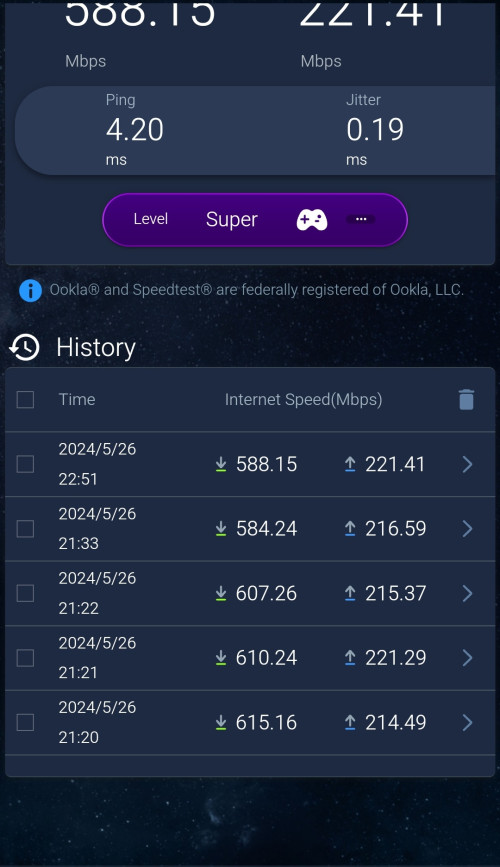
What happen to tmnut? From 800mbps average, now only
can get 500-600mbps now?
Zaryl
post May 26 2024, 09:49 PM

Hardcore Casual Gamer
******
Senior Member
1,709 posts

Joined: Jan 2003
From: Kedah Khap Khoun Khap (4K)


QUOTE(wcnew @ May 26 2024, 09:24 PM)
What happen to tmnut? From 800mbps average, now only
can get 500-600mbps now?
*
you're using CAT6 LAN cable or just Wifi 6?

LAN cable supposedly gives better speed throughput rather than Wifi due to signal loss.
wcnew
post May 26 2024, 10:56 PM

Getting Started
**
Junior Member
275 posts

Joined: Oct 2009
QUOTE(Zaryl @ May 26 2024, 09:49 PM)
you're using CAT6 LAN cable or just Wifi 6?

LAN cable supposedly gives better speed throughput rather than Wifi due to signal loss.
*
user posted image
I use my phone connect to my asus router app, test using the router inbuilt speed test...last time can get 700mbps-800mbps..

This post has been edited by wcnew: May 26 2024, 10:59 PM
ultra.m.a.n
post May 27 2024, 10:25 AM

Getting Started
**
Junior Member
73 posts

Joined: May 2014
Guys,

What is the latest package from unifi?
Currently i am on SWU 2.0 with 300mbps at RM136.75 permonth…
Plan to visit tm net later if got cheaper plan offer from them

Thanks
blacktubi
post May 27 2024, 10:52 AM

-
Group Icon
Elite
8,415 posts

Joined: Jul 2008

QUOTE(ultra.m.a.n @ May 27 2024, 10:25 AM)
Guys,

What is the latest package from unifi?
Currently i am on SWU 2.0 with 300mbps at RM136.75 permonth…
Plan to visit tm net later if got cheaper plan offer from them

Thanks
*
SWU 4.0 offering free 6 months but must get Uni5G @ RM39 for at least 3 months.

RM129 for 300Mbps, after SST should be same price as yours.

Free new WiFi 6 router, either D-Link or new Skyworth all in one unit.
Oltromen Ripot
post May 27 2024, 01:08 PM

👍 999999 person Likes this member
*******
Senior Member
4,034 posts

Joined: Dec 2019
QUOTE(Maxieos @ May 21 2024, 10:17 PM)
» Click to show Spoiler - click again to hide... «

*
QUOTE(Icehart @ May 22 2024, 12:39 AM)
» Click to show Spoiler - click again to hide... «

*
QUOTE(dev/numb @ May 22 2024, 11:41 AM)
» Click to show Spoiler - click again to hide... «

*
QUOTE(yenchenje @ May 22 2024, 10:26 PM)
» Click to show Spoiler - click again to hide... «

*
what is the opinion over the following VPN set up.
local KVM Linux VPS in KL area, with unmetered 1Gbps bandwidth

the idea is to have local VPN endpoint rather than overseas, since
target usage is heavily towards accessing local conferencing server, which currently is very slow even with 2Gbps link. Or 1Gbps link, if you consider it's the bloody white ONR.

i was thinking it would be better to set up VPN in local datacentre endpoint and then leave the international or local routing to the datacentre's own route management.
is there gotchas or flaws to this thinking?


495 Pages « < 134 135 136 137 138 > » Top
Topic ClosedOptions
 

Change to:
| Lo-Fi Version
0.0256sec    0.56    6 queries    GZIP Disabled
Time is now: 14th December 2025 - 07:40 AM