

QUOTE(satcure645 @ May 26 2024, 03:11 PM)
Possible to ask for the firmware? Thanks

what model are you on and what firmware are you using?Unifi Official TM UniFi High Speed Broadband Thread V42, READ 1ST PAGE FOR RELEVANT WIFI INFO!
|
|
 May 27 2024, 01:20 PM May 27 2024, 01:20 PM
Show posts by this member only | IPv6 | Post
#2721
|
 
Junior Member
835 posts Joined: Nov 2007 From: Land of Forgotten 
|
QUOTE(satcure645 @ May 26 2024, 03:11 PM) Possible to ask for the firmware? Thanks what model are you on and what firmware are you using? |
|
|
|
|
|
May 27 2024, 01:35 PM
|

Newbie
4 posts Joined: Dec 2007 From: Kuala Lumpur  
|
QUOTE(Omochao @ May 27 2024, 01:20 PM) what model are you on and what firmware are you using? Fibrehome SR1041FFirrmware RP0103 Bought from Shopee, SR1041F AX3000, 5 antennas model (3 at the back 2 at side) 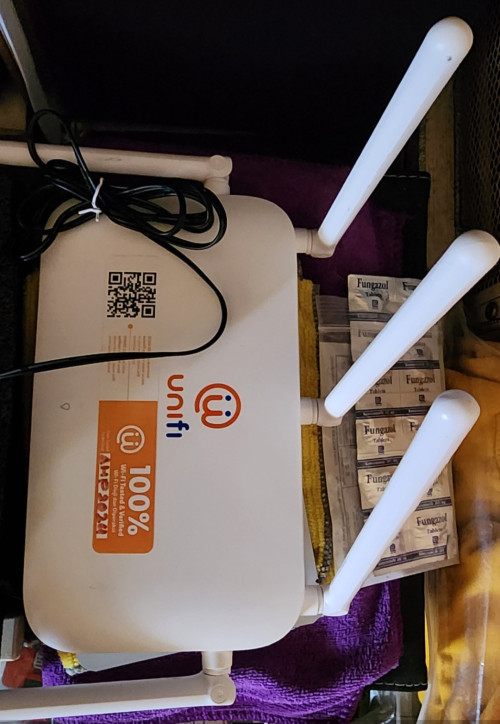 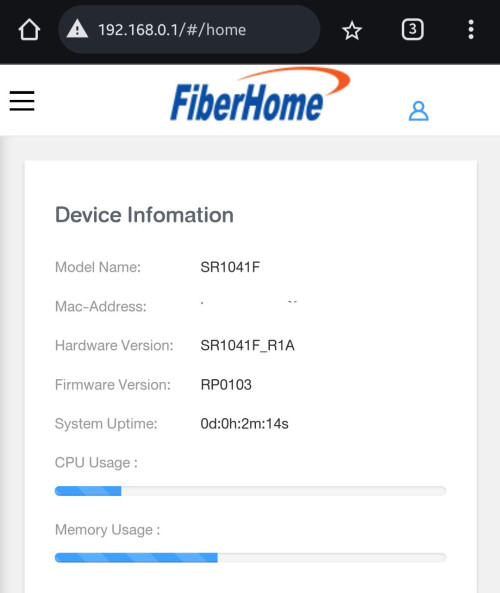 |
|
|
May 27 2024, 01:48 PM
Show posts by this member only | IPv6 | Post
#2723
|

Senior Member
1,882 posts Joined: Sep 2017
|
QUOTE(Oltromen Ripot @ May 27 2024, 01:08 PM) what is the opinion over the following VPN set up. SG could be consider as a choice. Local VPS might also have the qos to worldwide server.local KVM Linux VPS in KL area, with unmetered 1Gbps bandwidth the idea is to have local VPN endpoint rather than overseas, since target usage is heavily towards accessing local conferencing server, which currently is very slow even with 2Gbps link. Or 1Gbps link, if you consider it's the bloody white ONR. i was thinking it would be better to set up VPN in local datacentre endpoint and then leave the international or local routing to the datacentre's own route management. is there gotchas or flaws to this thinking? Quote from MY hosting site. QUOTE 80% of the bandwidth 100Mbit/s of Internet Connection is allocated for Local (Malaysia) access while the remaining 20% is allocated for International access. |
|
|
May 27 2024, 02:20 PM
|

Senior Member
1,820 posts Joined: May 2010 From: Kuala Lumpur
|
QUOTE(Oltromen Ripot @ May 27 2024, 01:08 PM) what is the opinion over the following VPN set up. Wait until AWS launches, then local instance for VPN in KL for best latency. local KVM Linux VPS in KL area, with unmetered 1Gbps bandwidth the idea is to have local VPN endpoint rather than overseas, since target usage is heavily towards accessing local conferencing server, which currently is very slow even with 2Gbps link. Or 1Gbps link, if you consider it's the bloody white ONR. i was thinking it would be better to set up VPN in local datacentre endpoint and then leave the international or local routing to the datacentre's own route management. is there gotchas or flaws to this thinking? Transit through AWS I can reduce ping to UK from 330 down to about 180! |
|
|
May 27 2024, 02:23 PM
Show posts by this member only | IPv6 | Post
#2725
|

Senior Member
4,034 posts Joined: Dec 2019
|
QUOTE(rjb123 @ May 27 2024, 02:20 PM) Wait until AWS launches, then local instance for VPN in KL for best latency. hmmm... good option as well. though my issue is now and AWS don't have timeline yet.Transit through AWS I can reduce ping to UK from 330 down to about 180! and another thing; pricing, especially after factoring in currency fluctuation. |
|
|
May 27 2024, 02:28 PM
Show posts by this member only | IPv6 | Post
#2726
|
|
Senior Member
4,034 posts Joined: Dec 2019
|
QUOTE(go626201 @ May 27 2024, 01:48 PM) SG could be consider as a choice. Local VPS might also have the qos to worldwide server. i actually want to avoid using foreign IP. primarily is to access local-hosted server.Quote from MY hosting site. my issue right now is i'm having issue with slow when direct point-to-point between home unifi and target server. that's why i am wondering if having a local vpn will help to circumvent the issue. if i browse, i rather the iplocation be detected as within malaysia than crap give me dutch or india or more exotic languages. and foreign specifically; i don't trust that a foreign vpn server will guarantee bandwidth between me and the vpn server. burnt by few vpn providers before that crap out if connecting to foreign vpn. This post has been edited by Oltromen Ripot: May 27 2024, 02:35 PM |
|
|
|
|
|
May 27 2024, 02:40 PM
Show posts by this member only | IPv6 | Post
#2727
|
|
Senior Member
1,882 posts Joined: Sep 2017
|
QUOTE(Oltromen Ripot @ May 27 2024, 02:28 PM) i actually want to avoid using foreign IP. primarily is to access local-hosted server. It may or may not fix your issue,but it should be relieve the issue. (Before rent the vps, better ensure your network to vps server network is stable enough)my issue right now is i'm having issue with slow when direct point-to-point between home unifi and target server. that's why i am wondering if having a local vpn will help to circumvent the issue. if i browse, i rather the iplocation be detected as within malaysia than crap give me dutch or india or more exotic languages. and foreign specifically; i don't trust that a foreign vpn server will guarantee bandwidth between me and the vpn server. burnt by few vpn providers before that crap out if connecting to foreign vpn. And also,local VPS monthly fee is not cheap. Normally u have to paid Yearly or Biennially or Triennially in order to get the lower subscription fee. For the monthly price,u will be able to rent 2 vps on SG or other cheaper hosting. But this year end,i think there will be more choice for local server,as there are multiple DC almost finish built in 2024 or early 2025. Edited: 1.OVH SG got private peering with unifi. low latency with full speed all the time. 2.Unifi to most SG server can hit full speed,but of course some with mid-high latency. This post has been edited by go626201: May 27 2024, 02:42 PM |
|
|
May 27 2024, 03:07 PM
Show posts by this member only | IPv6 | Post
#2728
|
|
Senior Member
875 posts Joined: Jan 2003
|
Finally upgraded from 800Mbps to 1Gbps today. The installer came with white Dlink and I asked him if he’s got the black one. He said got and went back to his van to take.
Since I’m using my own router he offered to setup GPON for me but he said never tried before. So I asked him to use back the old Huawei modem and give me the Black Dlink for backup. At first he was hesitant as he said dunno Huawei can work or not. I told him many ppl tried before and can work. So he just upgraded my speed and my existing connection just worked. Managed to get 940Mbps. Then he setup the Black Dlink to try and got the same speed. Luckily I followed this forum. Else I would’ve been stuck with the old ONR. This post has been edited by toytoy: May 27 2024, 03:07 PM |
|
|
May 27 2024, 03:23 PM
|
|
Junior Member
156 posts Joined: Dec 2010
|
QUOTE(toytoy @ May 27 2024, 03:07 PM) Finally upgraded from 800Mbps to 1Gbps today. The installer came with white Dlink and I asked him if he’s got the black one. He said got and went back to his van to take. Glad you finally got your update bro!Since I’m using my own router he offered to setup GPON for me but he said never tried before. So I asked him to use back the old Huawei modem and give me the Black Dlink for backup. At first he was hesitant as he said dunno Huawei can work or not. I told him many ppl tried before and can work. So he just upgraded my speed and my existing connection just worked. Managed to get 940Mbps. Then he setup the Black Dlink to try and got the same speed. Luckily I followed this forum. Else I would’ve been stuck with the old ONR. toytoy liked this post
|
|
|
May 27 2024, 05:34 PM
|

Junior Member
691 posts Joined: Nov 2021
|
QUOTE(Oltromen Ripot @ May 27 2024, 01:08 PM) what is the opinion over the following VPN set up. As others have said, no guarantee.local KVM Linux VPS in KL area, with unmetered 1Gbps bandwidth the idea is to have local VPN endpoint rather than overseas, since target usage is heavily towards accessing local conferencing server, which currently is very slow even with 2Gbps link. Or 1Gbps link, if you consider it's the bloody white ONR. i was thinking it would be better to set up VPN in local datacentre endpoint and then leave the international or local routing to the datacentre's own route management. is there gotchas or flaws to this thinking? Up until middle of this month I was using a commercial VPN provider that had a MY node in KL/Cyberjaya provided by Gigabit Hosting Sdn Bhd. My IP to the VPN server zero issues throughout the day, even maintaining <10ms ping during typical Unifi peak/koyak hours, but hosting server’s peering to EU is also badly affected right now. Most datacenters won’t bend over for a single rented VPS rental customer, so it’s best you contact whatever local provider and ask beforehand if they have provisions to manage routing/peering upon customer request. If your primary use case is local conferencing, maybe less of an issue if you find a decent local VPS. You only need to worry about your connection to the server. At worst, you might need to rotate your own IP range every few days (because TM), but should be minimal. This post has been edited by dev/numb: May 27 2024, 09:14 PM PRSXFENG liked this post
|
|
|
May 27 2024, 05:41 PM
|
|
Junior Member
180 posts Joined: Mar 2015
|
free upgrade to 1gbps (still waiting), would like to maintain the current asus router for mesh with fiberhome modem.
1. can continue to use current "FiberHome GPON ONU HG6240A Modem" for 1gbps? or need to request for the black dlink? 2. the new device given is it combo (modem and router)? tq This post has been edited by aa123aa: May 27 2024, 05:42 PM |
|
|
May 27 2024, 06:37 PM
Show posts by this member only | IPv6 | Post
#2732
|

Senior Member
3,305 posts Joined: Dec 2012
|
QUOTE(aa123aa @ May 27 2024, 05:41 PM) free upgrade to 1gbps (still waiting), would like to maintain the current asus router for mesh with fiberhome modem. 1. Can. After installation done. Simply unplug the fiber and cucuk back the Fiberhome. Then connect LAN cable to your Router’s WAN Port. Configuration not required.1. can continue to use current "FiberHome GPON ONU HG6240A Modem" for 1gbps? or need to request for the black dlink? 2. the new device given is it combo (modem and router)? tq 2. New devices so far all combo box (Modem+Router) if you getting white one, then it is old model. If black colour, that’s the new model. But it depends on actual situation ya. aa123aa liked this post
|
|
|
May 27 2024, 08:06 PM
Show posts by this member only | IPv6 | Post
#2733
|
|
Junior Member
348 posts Joined: Nov 2013
|
I have a friend want to change from maxis fibre to unifi. What is the best solution to get ? He receive whatsapp message that if he change it and he can get 6 month free and TV. Is it true?
|
|
|
|
|
|
May 27 2024, 08:59 PM
|
|
Junior Member
180 posts Joined: Mar 2015
|
QUOTE(jiaen0509 @ May 27 2024, 06:37 PM) 1. Can. After installation done. Simply unplug the fiber and cucuk back the Fiberhome. Then connect LAN cable to your Router’s WAN Port. Configuration not required. Thanks for the info.2. New devices so far all combo box (Modem+Router) if you getting white one, then it is old model. If black colour, that’s the new model. But it depends on actual situation ya. 1.Any idea what is the max range speed for wifi & lan? seen it here before like it will max out around 940mbps if continue to use fiberhome and router due to limitation; is that still the case? 2.If use their white/black combo, not possible to get full 1gbps via lan also right? 2. if so, combo has any better than having 2 separate device? in term of speed or coverage? Thanks |
|
|
May 27 2024, 09:00 PM
Show posts by this member only | IPv6 | Post
#2735
|

Senior Member
1,194 posts Joined: Sep 2018
|
QUOTE(toytoy @ May 27 2024, 03:07 PM) Finally upgraded from 800Mbps to 1Gbps today. The installer came with white Dlink and I asked him if he’s got the black one. He said got and went back to his van to take. Nice. My installer doesn't hesitate straight away upgrade by using my Fiberhome ONR. Still keep Dlink as backupSince I’m using my own router he offered to setup GPON for me but he said never tried before. So I asked him to use back the old Huawei modem and give me the Black Dlink for backup. At first he was hesitant as he said dunno Huawei can work or not. I told him many ppl tried before and can work. So he just upgraded my speed and my existing connection just worked. Managed to get 940Mbps. Then he setup the Black Dlink to try and got the same speed. Luckily I followed this forum. Else I would’ve been stuck with the old ONR. toytoy liked this post
|
|
|
May 27 2024, 09:34 PM
|
|
Senior Member
6,811 posts Joined: Oct 2008 From: Kuala Lumpur 
|
QUOTE(keong8867 @ May 27 2024, 08:06 PM) I have a friend want to change from maxis fibre to unifi. What is the best solution to get ? He receive whatsapp message that if he change it and he can get 6 month free and TV. Is it true? Best way is to do it at Tmpoint, also can get 6 months free. It's either 6 months free or free tv, but be careful some agent might offer you plan with 36 months contract. |
|
|
May 27 2024, 10:01 PM
Show posts by this member only | IPv6 | Post
#2737
|
|
Junior Member
348 posts Joined: Nov 2013
|
QUOTE(YoungMan @ May 27 2024, 09:34 PM) Best way is to do it at Tmpoint, also can get 6 months free. It's either 6 months free or free tv, but be careful some agent might offer you plan with 36 months contract. TM point now can get 6 month offer also? Then why I should find agent? |
|
|
May 27 2024, 10:32 PM
|
|
Senior Member
4,544 posts Joined: Jan 2003
|
QUOTE(toytoy @ May 27 2024, 03:07 PM) Finally upgraded from 800Mbps to 1Gbps today. The installer came with white Dlink and I asked him if he’s got the black one. He said got and went back to his van to take. Feel any difference from the higher 200Mbps after half day of usage?Since I’m using my own router he offered to setup GPON for me but he said never tried before. So I asked him to use back the old Huawei modem and give me the Black Dlink for backup. At first he was hesitant as he said dunno Huawei can work or not. I told him many ppl tried before and can work. So he just upgraded my speed and my existing connection just worked. Managed to get 940Mbps. Then he setup the Black Dlink to try and got the same speed. Luckily I followed this forum. Else I would’ve been stuck with the old ONR. |
|
|
May 27 2024, 10:33 PM
Show posts by this member only | IPv6 | Post
#2739
|
|
Senior Member
3,305 posts Joined: Dec 2012
|
QUOTE(aa123aa @ May 27 2024, 08:59 PM) Thanks for the info. 1. If you continue with Fiberhome and the own router, the maximum speed for both WiFi and LAN can reach approximately 940Mbps.1.Any idea what is the max range speed for wifi & lan? seen it here before like it will max out around 940mbps if continue to use fiberhome and router due to limitation; is that still the case? 2.If use their white/black combo, not possible to get full 1gbps via lan also right? 2. if so, combo has any better than having 2 separate device? in term of speed or coverage? Thanks 2. This is incorrect. The white model cannot achieve 1Gbps via LAN, but reachable on WiFi; however, the black model can reach full 1Gbps since it has a 2.5G LAN port. 3. If you use the stock router provided by TM, proceed with the newly provided combo box better, in that case you will get full 1gbps on Wifi. If you have your own router (better than TM provided router) or using mesh system, stick with Fiberhome and Asus so that you can continue with current router/+mesh. Unless you have a 2.5G router. In that case, you can pair it with the black combo to get your own router and full 1Gbps speed. Otherwise as long as you plugged with fiberhome, max 940mbps |
|
|
May 27 2024, 10:39 PM
|
|
Senior Member
875 posts Joined: Jan 2003
|
QUOTE(coolguy_0925 @ May 27 2024, 10:32 PM) Feel any difference from the higher 200Mbps after half day of usage? Dunno if it's placebo effect. Webpages seems to load faster. But even with 800Mpbs i don't really fully utilize it unless download big files. PS5 and Xbox usually can't get past 200Mpbs. |
|
Topic ClosedOptions
|
| Change to: |  0.0177sec 0.0177sec
 0.47 0.47
 6 queries 6 queries
 GZIP Disabled GZIP Disabled
Time is now: 12th December 2025 - 09:49 AM |
 Quote
Quote