

QUOTE(4WD_er @ Apr 16 2024, 11:43 AM)
Why not just use Yeacomm 5G modem, I have used it since middle of last year, super FAST, and can bypass hotspot quota. Using Yes postpaid since then 

okay. thanks. will add this router into my list if choice.U Home 5G
|
|
 Apr 16 2024, 12:10 PM Apr 16 2024, 12:10 PM
Show posts by this member only | IPv6 | Post
#1081
|
 
Junior Member
592 posts Joined: Dec 2016 From: johor  
|
QUOTE(4WD_er @ Apr 16 2024, 11:43 AM) Why not just use Yeacomm 5G modem, I have used it since middle of last year, super FAST, and can bypass hotspot quota. Using Yes postpaid since then okay. thanks. will add this router into my list if choice. |
|
|
|
|
|
Apr 16 2024, 12:28 PM
Show posts by this member only | IPv6 | Post
#1082
|
|
Junior Member
88 posts Joined: Sep 2007
|
QUOTE(xswatch @ Apr 16 2024, 08:24 AM) planning to get uhome with the router (24 months contract). but after reading last 5 pages of this topic, I think I'll settle with modified zlt x28 or aw1000 or tplink x50. still undecided until now. my maxis fibre contract will end this July, woohoo. Read a lot of good review on getniq while I was browsing. Might wanna add thatzlt x28 - modified, super cheap rm500+ only, got beta hotspot bypass mod (so can even just use yes prepaid rm30 monthly) aw1000 - faster chipset, modified, can lock band, sadly no hotspot bypass yet (if it does this will be perfect choice for me), plan to use contract free umobile / yes sim x50 - fast chipset, firmware lock not able to modified yet, but best official support from tplink + hassle free setup if I want to do mesh with other tplink deco I'll keep researching & will buy a router in July. anyway, is there any other 5g router that able to bypass hotspot & price <1.2k other than zlt x28? tks. |
|
|
Apr 16 2024, 01:41 PM
|
|
Senior Member
4,350 posts Joined: Sep 2005
|
QUOTE(xswatch @ Apr 16 2024, 12:09 PM) I see. thanks man. didn't know aw1000 can bypass hotspot already. coz the ads in most shopee seller didn't mention it. From the beginning already can bypass YES. But things are very volatile. YES could be just keeping eyes closed for now .Waiting to get a sizeable market share before enforcing stricter controls. From experience, the speed will suddenly fluctuate from Max speed to below 50mbps, especially after doing a few speed tests from various devices or after downloading a file via torrenting . When the speed comes back to normal ? , anybody's guess -------------------------------------------- Update I discovered the speed drop wasn't due to the reasons I stated above.It was due to the USB fan I bought from Shopee last month which I placed under the router. This elevated the height of the router by 2" and somewhat caused stability issues in the signal although the signal strength showed 100%. This post has been edited by Ngto: Apr 18 2024, 06:07 AM |
|
|
Apr 16 2024, 03:43 PM
Show posts by this member only | IPv6 | Post
#1084
|

Senior Member
2,729 posts Joined: Oct 2005 From: Gotham City 
|
QUOTE(mista_amin @ Apr 16 2024, 12:28 PM) Read a lot of good review on getniq while I was browsing. Might wanna add that Im using x50 and Gteniq. Both are good for the usage you looking for. but my vote would be for x50 if you have eye on setting up mesh. even my gten is plugged into a mesh setup. immobile and mista_amin liked this post
|
|
|
Apr 16 2024, 08:21 PM
|

Junior Member
180 posts Joined: Aug 2011
|
Is the free router from Umobile good enough? If I don't mind the meshing and bypass quota.
|
|
|
Apr 17 2024, 07:48 AM
|

Senior Member
1,298 posts Joined: May 2005 From: HamuHamu Chan DeKukuMalu
|
the ZTE modem from U Mobile auto updated the firmware on Sunday and now keeps restarting on 4G every now and then.
Read earlier it is a firmware issue and U mobile will replace the hardware? Anyone can verify this? |
|
|
|
|
|
Apr 17 2024, 08:36 AM
Show posts by this member only | IPv6 | Post
#1087
|
|
Junior Member
88 posts Joined: Sep 2007
|
QUOTE(netken @ Apr 17 2024, 07:48 AM) the ZTE modem from U Mobile auto updated the firmware on Sunday and now keeps restarting on 4G every now and then. What's your current firmware version? Read earlier it is a firmware issue and U mobile will replace the hardware? Anyone can verify this? Yeap will replace if modem really got issue but have to wait 1-2 weeks for replacement. Call em and they will come n pick it up. Source: FB group I'm in |
|
|
Apr 17 2024, 08:46 AM
|

Junior Member
572 posts Joined: Aug 2018
|
QUOTE(John00 @ Apr 16 2024, 08:21 PM) Is the free router from Umobile good enough? If I don't mind the meshing and bypass quota. I would think so, since the package allows you to use quite unlimited data, except no torrent. John00 liked this post
|
|
|
Apr 17 2024, 08:51 AM
|
|
Senior Member
1,298 posts Joined: May 2005 From: HamuHamu Chan DeKukuMalu
|
QUOTE(mista_amin @ Apr 17 2024, 08:36 AM) What's your current firmware version? Noted .... the firmware update seems to be using the same firmware version .... meaning i recall seeing the same version before and after ... Yeap will replace if modem really got issue but have to wait 1-2 weeks for replacement. Call em and they will come n pick it up. Source: FB group I'm in let me try to get the version later.... but i notice each time disconnect it will have the error (2021) 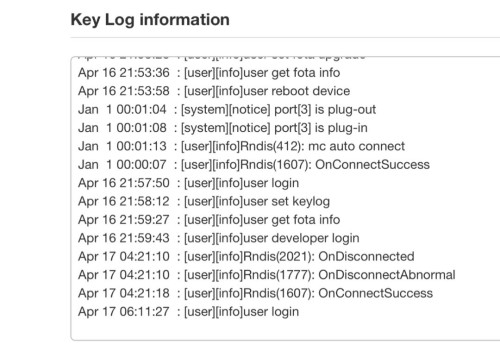 the FB u mentioned is it the U Mobile FB group? i tried to search earlier but can't find. Attached thumbnail(s) 
|
|
|
Apr 17 2024, 09:01 AM
Show posts by this member only | IPv6 | Post
#1090
|
|
Junior Member
88 posts Joined: Sep 2007
|
QUOTE(netken @ Apr 17 2024, 08:51 AM) Noted .... the firmware update seems to be using the same firmware version .... meaning i recall seeing the same version before and after ... How did u know it auto update? Got anything from the log? let me try to get the version later.... but i notice each time disconnect it will have the error (2021) the FB u mentioned is it the U Mobile FB group? i tried to search earlier but can't find. Public FB group of people discussing bout modem,mods n of course selling modem. There are people there already mod the ZTE modem to put external antenna. Ggwp |
|
|
Apr 17 2024, 09:48 AM
|
|
Senior Member
1,298 posts Joined: May 2005 From: HamuHamu Chan DeKukuMalu
|
QUOTE(mista_amin @ Apr 17 2024, 09:01 AM) How did u know it auto update? Got anything from the log? yes because i was using Zyvel 5103E ... and this ZTE nvr gave me any problems before.Public FB group of people discussing bout modem,mods n of course selling modem. There are people there already mod the ZTE modem to put external antenna. Ggwp then i swap the sim card and power up the ZTE and for a moment i saw there is firmware upgrade screen - like current version and new version - but i notice both firmware is the same .... but i didnt click anything ... next thing u know - u can see it auto updated as below. 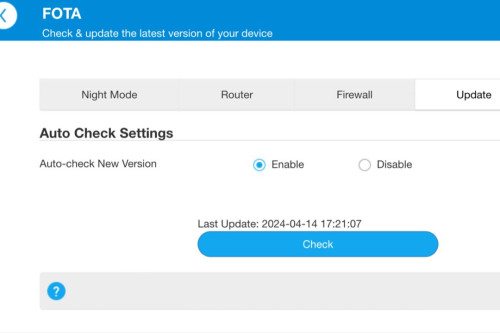 |
|
|
Apr 17 2024, 01:06 PM
Show posts by this member only | IPv6 | Post
#1092
|
|
Junior Member
88 posts Joined: Sep 2007
|
QUOTE(netken @ Apr 17 2024, 09:48 AM) yes because i was using Zyvel 5103E ... and this ZTE nvr gave me any problems before. Just checked mine and indeed got an update for firmware but it's the same version tho. Contemplating want to update or not 😅then i swap the sim card and power up the ZTE and for a moment i saw there is firmware upgrade screen - like current version and new version - but i notice both firmware is the same .... but i didnt click anything ... next thing u know - u can see it auto updated as below. 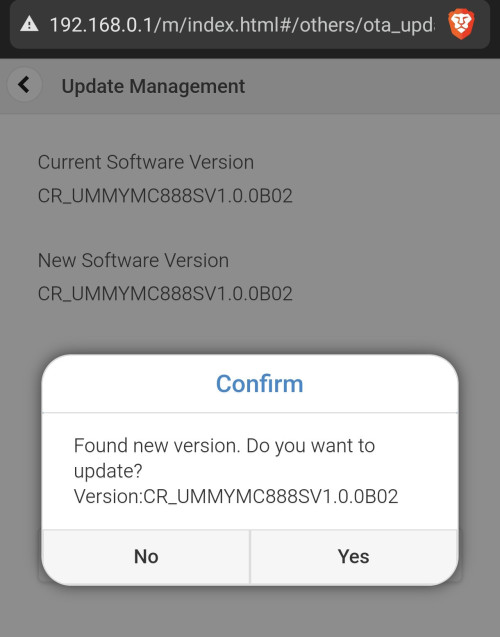 |
|
|
Apr 17 2024, 02:04 PM
Show posts by this member only | IPv6 | Post
#1093
|
|
Senior Member
1,298 posts Joined: May 2005 From: HamuHamu Chan DeKukuMalu
|
QUOTE(mista_amin @ Apr 17 2024, 01:06 PM) Just checked mine and indeed got an update for firmware but it's the same version tho. Contemplating want to update or not 😅 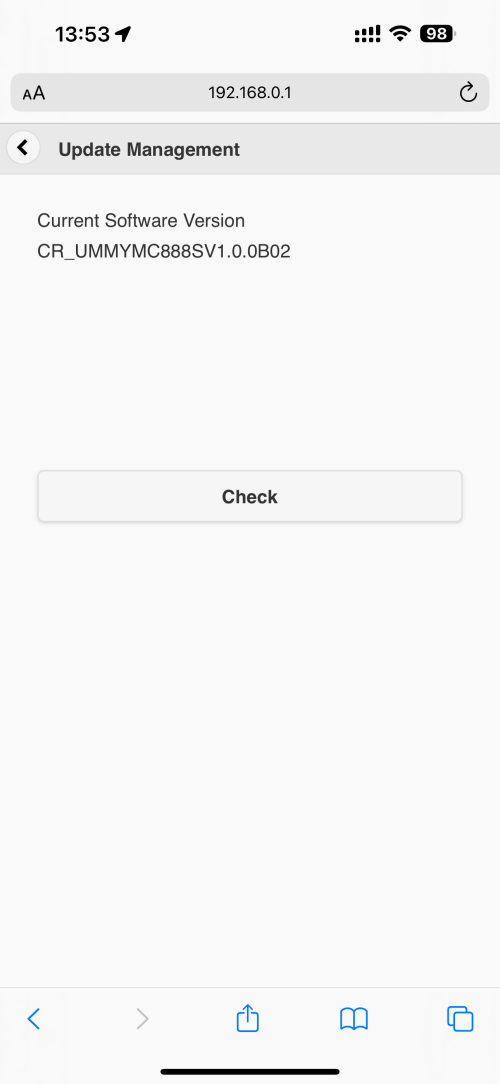 dont do it - and disable auto update quickly |
|
|
|
|
|
Apr 17 2024, 02:31 PM
|
|
Junior Member
342 posts Joined: Jan 2003
|
I just checked my MC888s and yes, I received the notice as well.
But I don't get it. It's the same sequence... Why bother issuing it? Either they don't understand how numbering works or... Will probably perform the update tomorrow AM. This post has been edited by ultrageek: Apr 17 2024, 02:31 PM |
|
|
Apr 18 2024, 02:01 AM
|

Junior Member
164 posts Joined: May 2006 From: Rawang, Selangor
|
Probably overheating. I'm facing similar problem. Touched the housing and it was hot. My solution, open up the housing and place a fan on the heatsink QUOTE(waikit1985 @ Apr 8 2024, 04:10 PM) I stay beside a 5G signal tower (about 100m distance). Signal strength is strong and speed is good but I kept disconnected from the router, the frequency of dc is quite random. Sometimes 2-3 times in 30 minutes, sometimes no dc in few hours. Not sure why, hopefully is my setting problem so that I can adjust it, otherwise I also dont know what to do. 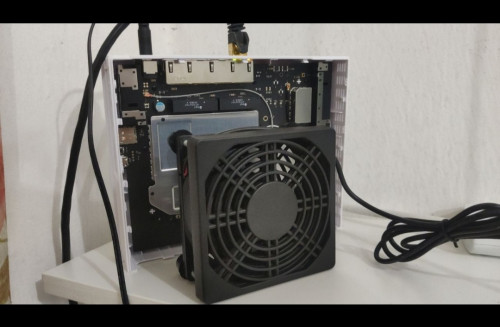 netken liked this post
|
|
|
Apr 18 2024, 02:06 AM
|
|
Junior Member
164 posts Joined: May 2006 From: Rawang, Selangor
|
Myself i got it nearly 500mbps and wasn't even full strength signal. I believed when it was below 100mbps, it was running witn only LTE band 28.
LTE band 28 can go far. But N78 can't. QUOTE(ultrageek @ Apr 10 2024, 07:40 PM) Hi, This post has been edited by ameyhazuan: Apr 18 2024, 02:08 AMThe below are my observations in comparison between the ZTE MC888s (just started my contract) and Deco X50 5G (which i pinjam from my office to test). Using the supplied ZTE MC888s, when I had first used it, it was pulling a paltry 50 to 100Mbps. I then took out that sim card, and with default settings on the Deco (I didn't change any its settings and no, my office staff isn't smart enough to change the network settings... they prefer everything default!), it was consistently getting 500 to 600Mbps! Coming here, and reading this thread, I modified as per the information provided (aka 5G NSA, Band 78, Band 28 for 4G), and the values went up to 250Mbps but still no match for the Deco. FYI, the tests were done one after another device, and to the same servers on SpeedTest (KL - ViewQwest). Any ideas what else can be done to bring the numbers closer to the Deco? I know the Deco has way superior modem, but at half it's download value for the ZTE? Thanks for the comments... |
|
|
Apr 18 2024, 08:26 AM
|
|
Senior Member
1,298 posts Joined: May 2005 From: HamuHamu Chan DeKukuMalu
|
QUOTE(ultrageek @ Apr 17 2024, 02:31 PM) I just checked my MC888s and yes, I received the notice as well. did you update it? any issues after that?But I don't get it. It's the same sequence... Why bother issuing it? Either they don't understand how numbering works or... Will probably perform the update tomorrow AM. |
|
|
Apr 18 2024, 08:27 AM
|
|
Senior Member
1,298 posts Joined: May 2005 From: HamuHamu Chan DeKukuMalu
|
QUOTE(mista_amin @ Apr 17 2024, 01:06 PM) Just checked mine and indeed got an update for firmware but it's the same version tho. Contemplating want to update or not 😅 did you upgrade?QUOTE(ameyhazuan @ Apr 18 2024, 02:01 AM) Probably overheating. I'm facing similar problem. Touched the housing and it was hot. My solution, open up the housing and place a fan on the heatsink will it void warranty? does it have any warranty stickers around the screws? read somewhere that turning off the LED lights helps reduce heat as well. |
|
|
Apr 18 2024, 11:22 AM
Show posts by this member only | IPv6 | Post
#1099
|

Senior Member
8,525 posts Joined: Jan 2003 From: The Jungle Of Pahang
|
QUOTE(netken @ Apr 18 2024, 08:27 AM) did you upgrade? Problem with most modern 5G modem routers i think, even my Tplink NV510x is hot as hell during operation before i fork up a simple USB fan router cooler and put it underneath the router. will it void warranty? does it have any warranty stickers around the screws? read somewhere that turning off the LED lights helps reduce heat as well.  |
|
|
Apr 18 2024, 11:45 AM
Show posts by this member only | IPv6 | Post
#1100
|

Senior Member
3,582 posts Joined: Oct 2007 From: everywhere in sabah
|
QUOTE(ameyhazuan @ Apr 18 2024, 02:06 AM) Myself i got it nearly 500mbps and wasn't even full strength signal. I believed when it was below 100mbps, it was running witn only LTE band 28. 5G and 4G is the same and unlike fiber, it's not going to be full speed all the timeit depends on traffic i also sometimes will go 40-50Mbps...sometimes 200-300Mbps...depending on time of day and traffic and sometimes the speed test lied, the more reliable way to test speed is by downloading something...either by using test file or just download something u want because sometimes my speed test is 40-50Mbps but download is 30MBPS...sometime it is true, it will stuck at 5MBPS |
| Change to: |  0.0234sec 0.0234sec
 1.02 1.02
 6 queries 6 queries
 GZIP Disabled GZIP Disabled
Time is now: 20th December 2025 - 01:26 PM |
 Quote
Quote