

QUOTE(netken @ Apr 18 2024, 08:27 AM)
did you upgrade?

No I did notU Home 5G
|
|
 Apr 18 2024, 01:14 PM Apr 18 2024, 01:14 PM
|
 
Junior Member
88 posts Joined: Sep 2007  
|
QUOTE(netken @ Apr 18 2024, 08:27 AM) did you upgrade? No I did not |
|
|
|
|
|
Apr 18 2024, 08:16 PM
|
|
Junior Member
342 posts Joined: Jan 2003
|
Right. Got around to updating the firmware as requested. Here is the readout from the log: Apr 18 19:55:31 : [user][info]user set fota upgrade Apr 18 19:57:19 : [user][info]Rndis(319): web req disconnect Apr 18 19:57:20 : [user][info]user set keylog Apr 18 19:57:26 : [user][info]Rndis(2021): OnDisconnected Jan 1 00:01:05 : [system][notice] port[3] is plug-out Jan 1 00:01:09 : [system][notice] port[3] is plug-in Jan 1 00:01:05 : [system][notice] port[3] is plug-out Jan 1 00:01:09 : [system][notice] port[3] is plug-in Jan 1 00:01:13 : [user][info]Rndis(412): mc auto connect Apr 18 20:12:06 : [user][info]Rndis(1607): OnConnectSuccess From the logs above, expect about 10-15mins downtime. Running Speedtest to ViewQwest (to standardise my tests): around 260Mbps. Still the same. Nothing changed. mista_amin liked this post
|
|
|
Apr 18 2024, 09:54 PM
Show posts by this member only | IPv6 | Post
#1103
|
|
Junior Member
88 posts Joined: Sep 2007
|
QUOTE(ultrageek @ Apr 18 2024, 08:16 PM) Right. Got around to updating the firmware as requested. Here is the readout from the log: Appreciate it bro. Will try to update it by tomorrow the latestApr 18 19:55:31 : [user][info]user set fota upgrade Apr 18 19:57:19 : [user][info]Rndis(319): web req disconnect Apr 18 19:57:20 : [user][info]user set keylog Apr 18 19:57:26 : [user][info]Rndis(2021): OnDisconnected Jan 1 00:01:05 : [system][notice] port[3] is plug-out Jan 1 00:01:09 : [system][notice] port[3] is plug-in Jan 1 00:01:05 : [system][notice] port[3] is plug-out Jan 1 00:01:09 : [system][notice] port[3] is plug-in Jan 1 00:01:13 : [user][info]Rndis(412): mc auto connect Apr 18 20:12:06 : [user][info]Rndis(1607): OnConnectSuccess From the logs above, expect about 10-15mins downtime. Running Speedtest to ViewQwest (to standardise my tests): around 260Mbps. Still the same. Nothing changed. |
|
|
Apr 19 2024, 02:04 AM
Show posts by this member only | IPv6 | Post
#1104
|

Senior Member
3,139 posts Joined: Feb 2014
|
anyone try this D-LINK 5G NR MiFi Mobile Hotspot DWR-U2000 ?
This post has been edited by Gold_Moderator: Apr 19 2024, 02:04 AM |
|
|
Apr 19 2024, 07:40 AM
|

Senior Member
1,298 posts Joined: May 2005 From: HamuHamu Chan DeKukuMalu
|
QUOTE(ultrageek @ Apr 18 2024, 08:16 PM) Right. Got around to updating the firmware as requested. Here is the readout from the log: some of mine latest:Apr 18 19:55:31 : [user][info]user set fota upgrade Apr 18 19:57:19 : [user][info]Rndis(319): web req disconnect Apr 18 19:57:20 : [user][info]user set keylog Apr 18 19:57:26 : [user][info]Rndis(2021): OnDisconnected Jan 1 00:01:05 : [system][notice] port[3] is plug-out Jan 1 00:01:09 : [system][notice] port[3] is plug-in Jan 1 00:01:05 : [system][notice] port[3] is plug-out Jan 1 00:01:09 : [system][notice] port[3] is plug-in Jan 1 00:01:13 : [user][info]Rndis(412): mc auto connect Apr 18 20:12:06 : [user][info]Rndis(1607): OnConnectSuccess From the logs above, expect about 10-15mins downtime. Running Speedtest to ViewQwest (to standardise my tests): around 260Mbps. Still the same. Nothing changed. Apr 18 22:04:06 : [user][info]Rndis(2021): OnDisconnected Apr 18 22:04:06 : [user][info]Rndis(1777): OnDisconnectAbnormal Apr 18 22:04:06 : [user][info]Rndis(1657): OnConnectFail, rndis_check_connect_state_count=0 Apr 18 22:04:11 : [user][info]Rndis(1657): OnConnectFail, rndis_check_connect_state_count=0 Apr 18 22:04:26 : [user][info]Rndis(1607): OnConnectSuccess Apr 18 22:04:30 : [user][info]user login Apr 18 22:04:45 : [user][info]Rndis(319): web req disconnect Apr 18 22:04:45 : [user][info]user disconnect network Apr 18 22:04:55 : [user][info]Rndis(2021): OnDisconnected Apr 18 22:05:07 : [user][info]Rndis(282): web req connect Apr 18 22:05:07 : [user][info]user connect network Apr 18 22:05:12 : [user][info]Rndis(1607): OnConnectSuccess Apr 18 22:06:05 : [user][info]user set keylog Apr 18 22:06:39 : [user][info]user set keylog Apr 19 05:39:54 : [user][info]user login Jan 1 00:00:55 : [system][notice] port[3] is plug-out Jan 1 00:01:13 : [user][info]Rndis(412): mc auto connect Apr 19 07:29:37 : [user][info]Rndis(1607): OnConnectSuccess Jan 1 00:01:12 : [user][info]Rndis(412): mc auto connect Jan 1 00:00:07 : [user][info]Rndis(1607): OnConnectSuccess |
|
|
Apr 20 2024, 09:54 AM
Show posts by this member only | IPv6 | Post
#1106
|
|
Junior Member
88 posts Joined: Sep 2007
|
Updated the firmware. Could not see any difference tbh
|
|
|
|
|
|
Apr 20 2024, 11:53 AM
Show posts by this member only | IPv6 | Post
#1107
|
|
Junior Member
342 posts Joined: Jan 2003
|
Neither do I. For fun, I've removed the option to restart the device and will now see how long before it DC's the line by itself...
|
|
|
Apr 21 2024, 02:11 AM
|

Junior Member
164 posts Joined: May 2006 From: Rawang, Selangor
|
QUOTE(netken @ Apr 18 2024, 08:27 AM) did you upgrade? yes it will void warranty. just be extra careful not to break the seal. i don't think LED contributing to the heat. I have touched most of the parts and found out that the wireless controller contributing much of the heat compared to other components. I might need to add extra heat sink on that particular spot.will it void warranty? does it have any warranty stickers around the screws? read somewhere that turning off the LED lights helps reduce heat as well. This post has been edited by ameyhazuan: Apr 21 2024, 02:33 AM |
|
|
Apr 21 2024, 02:19 AM
|
|
Junior Member
164 posts Joined: May 2006 From: Rawang, Selangor
|
QUOTE(MR_alien @ Apr 18 2024, 11:45 AM) 5G and 4G is the same and unlike fiber, it's not going to be full speed all the time i beg to differ. Yes i can agree that wireless broadband not as stable as fiber broadband. But due to our 5G infrastructure currently use in Malaysia, we can't go 5G without LTE B28 and it's on NSA mode. Limitation for single band LTE would be 150mbps. As I observed B28 on LTE modem, it matched the speed of 5G modem when it slowed down. DNB guaranteed the minimum speed of 5G in Malaysia will be 100mbps. I believe it was because of B28 LTE. Should we go SA mode, we no longer need B28 and we should start to use N28 with N78. CA would be possible.it depends on traffic i also sometimes will go 40-50Mbps...sometimes 200-300Mbps...depending on time of day and traffic and sometimes the speed test lied, the more reliable way to test speed is by downloading something...either by using test file or just download something u want because sometimes my speed test is 40-50Mbps but download is 30MBPS...sometime it is true, it will stuck at 5MBPS This post has been edited by ameyhazuan: Apr 21 2024, 02:20 AM |
|
|
Apr 21 2024, 04:36 AM
|
|
Junior Member
164 posts Joined: May 2006 From: Rawang, Selangor
|
I managed to trigger the reboot by overloading the modem. Get few devices to download huge file.
https://testfile.org/ Can use this site to download test file. Get the one with 5GB so it will take few minutes to complete. As expected, within few minutes the modem first disconnect the internet then reboot itself. Throughout experience, this could be few things 1. overheated 2. not enough power 3. other factor such as bad hardware or bad firmware looking at the heat, there was no significant increase during load. using thermal gun, just an increase of few degrees. nothing of concern. Power wise, I thought I had a breakthrough. I swapped the original power supply which is 12V x 1.5A with much higher wattage 12V x 2.5A from my Linksys router. It worked at first. Tried the download method few times and no reboot. Good sign. Switched back to original power supply and sure enough it reboot after overloading the modem. Switched back to Linksys and to my dismay the modem reboot... Any other idea? For the time being, I just keep using the Linksys power supply. See if the random reboot still occur. Last thing I can do is to setup SQM and reduce bufferbloat. At the same time this method can avoid overloading the modem and hopefully can prevent the reboot. This post has been edited by ameyhazuan: Apr 21 2024, 04:43 AM |
|
|
Apr 21 2024, 08:43 AM
Show posts by this member only | IPv6 | Post
#1111
|

Senior Member
3,582 posts Joined: Oct 2007 From: everywhere in sabah
|
QUOTE(ameyhazuan @ Apr 21 2024, 02:19 AM) i beg to differ. Yes i can agree that wireless broadband not as stable as fiber broadband. But due to our 5G infrastructure currently use in Malaysia, we can't go 5G without LTE B28 and it's on NSA mode. Limitation for single band LTE would be 150mbps. As I observed B28 on LTE modem, it matched the speed of 5G modem when it slowed down. DNB guaranteed the minimum speed of 5G in Malaysia will be 100mbps. I believe it was because of B28 LTE. Should we go SA mode, we no longer need B28 and we should start to use N28 with N78. CA would be possible. never ever rely on 4G/LTEour 4G is way too congested...like in my place, if my line drops to 4G...it's completely unusable our 4G has been congested for way too long which is why we wanna push 5G to ease that congestion |
|
|
Apr 21 2024, 11:51 AM
Show posts by this member only | IPv6 | Post
#1112
|
|
Junior Member
88 posts Joined: Sep 2007
|
QUOTE(ameyhazuan @ Apr 21 2024, 04:36 AM) I managed to trigger the reboot by overloading the modem. Get few devices to download huge file. This is a very thorough observationhttps://testfile.org/ Can use this site to download test file. Get the one with 5GB so it will take few minutes to complete. As expected, within few minutes the modem first disconnect the internet then reboot itself. Throughout experience, this could be few things 1. overheated 2. not enough power 3. other factor such as bad hardware or bad firmware looking at the heat, there was no significant increase during load. using thermal gun, just an increase of few degrees. nothing of concern. Power wise, I thought I had a breakthrough. I swapped the original power supply which is 12V x 1.5A with much higher wattage 12V x 2.5A from my Linksys router. It worked at first. Tried the download method few times and no reboot. Good sign. Switched back to original power supply and sure enough it reboot after overloading the modem. Switched back to Linksys and to my dismay the modem reboot... Any other idea? For the time being, I just keep using the Linksys power supply. See if the random reboot still occur. Last thing I can do is to setup SQM and reduce bufferbloat. At the same time this method can avoid overloading the modem and hopefully can prevent the reboot. |
|
|
Apr 21 2024, 05:49 PM
|
|
Junior Member
164 posts Joined: May 2006 From: Rawang, Selangor
|
QUOTE(ameyhazuan @ Apr 21 2024, 04:36 AM) I managed to trigger the reboot by overloading the modem. Get few devices to download huge file. All users running with SQM router now. Setting up RRD to monitor internet connection and it will register if the modem reboot. I'll leave it for few days.https://testfile.org/ Can use this site to download test file. Get the one with 5GB so it will take few minutes to complete. As expected, within few minutes the modem first disconnect the internet then reboot itself. Throughout experience, this could be few things 1. overheated 2. not enough power 3. other factor such as bad hardware or bad firmware looking at the heat, there was no significant increase during load. using thermal gun, just an increase of few degrees. nothing of concern. Power wise, I thought I had a breakthrough. I swapped the original power supply which is 12V x 1.5A with much higher wattage 12V x 2.5A from my Linksys router. It worked at first. Tried the download method few times and no reboot. Good sign. Switched back to original power supply and sure enough it reboot after overloading the modem. Switched back to Linksys and to my dismay the modem reboot... Any other idea? For the time being, I just keep using the Linksys power supply. See if the random reboot still occur. Last thing I can do is to setup SQM and reduce bufferbloat. At the same time this method can avoid overloading the modem and hopefully can prevent the reboot. |
|
|
|
|
|
Apr 21 2024, 06:05 PM
Show posts by this member only | IPv6 | Post
#1114
|
|
Junior Member
485 posts Joined: Jan 2013
|
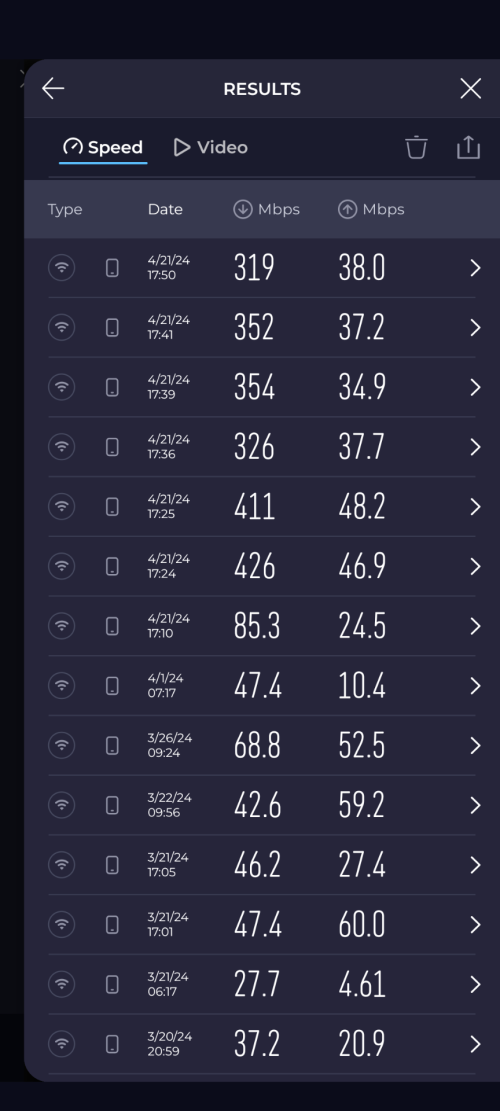 Hi. Just wanted to update. Been using UHome 5g since 20/3 and got ZTE modem. Can see my test results ranging around 30Mbps to 80Mbps. Today I just got my Deco X50 and tried to do the speedtest. Can see huge margin. Now can get 300Mbps+. Modem placement is the same for both devices. |
|
|
Apr 21 2024, 09:51 PM
|
|
Junior Member
164 posts Joined: May 2006 From: Rawang, Selangor
|
QUOTE(ameri @ Apr 21 2024, 06:05 PM) Hi. Just wanted to update. Been using UHome 5g since 20/3 and got ZTE modem. Can see my test results ranging around 30Mbps to 80Mbps. Today I just got my Deco X50 and tried to do the speedtest. Can see huge margin. Now can get 300Mbps+. Modem placement is the same for both devices. 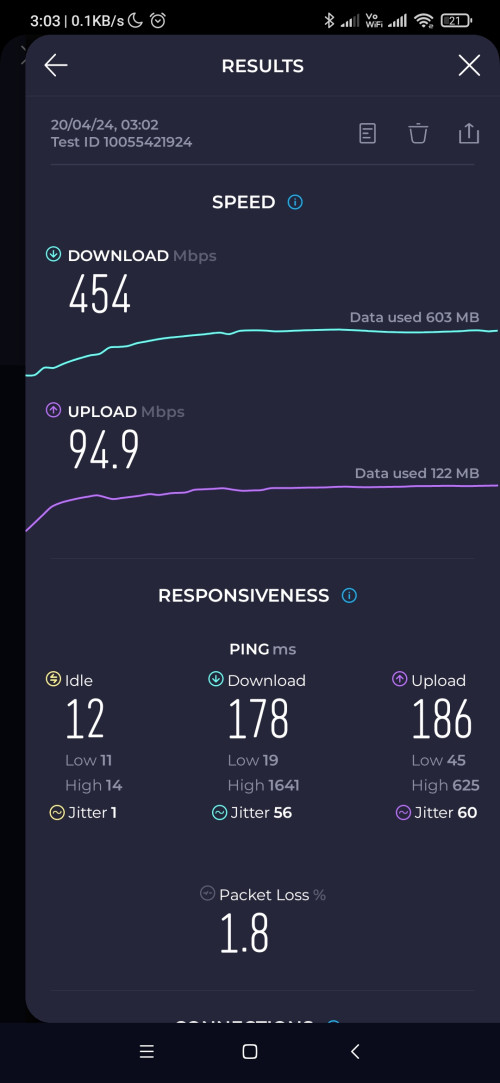 This post has been edited by ameyhazuan: Apr 21 2024, 09:51 PM |
|
|
Apr 22 2024, 08:17 AM
|
|
Senior Member
1,298 posts Joined: May 2005 From: HamuHamu Chan DeKukuMalu
|
QUOTE(ameyhazuan @ Apr 21 2024, 04:36 AM) I managed to trigger the reboot by overloading the modem. Get few devices to download huge file. for me - i only realised the DC issue after the firmware update.https://testfile.org/ Can use this site to download test file. Get the one with 5GB so it will take few minutes to complete. As expected, within few minutes the modem first disconnect the internet then reboot itself. Throughout experience, this could be few things 1. overheated 2. not enough power 3. other factor such as bad hardware or bad firmware looking at the heat, there was no significant increase during load. using thermal gun, just an increase of few degrees. nothing of concern. Power wise, I thought I had a breakthrough. I swapped the original power supply which is 12V x 1.5A with much higher wattage 12V x 2.5A from my Linksys router. It worked at first. Tried the download method few times and no reboot. Good sign. Switched back to original power supply and sure enough it reboot after overloading the modem. Switched back to Linksys and to my dismay the modem reboot... Any other idea? For the time being, I just keep using the Linksys power supply. See if the random reboot still occur. Last thing I can do is to setup SQM and reduce bufferbloat. At the same time this method can avoid overloading the modem and hopefully can prevent the reboot. please let us know if 12V x 2.5A solves the problem in the long run? |
|
|
Apr 22 2024, 09:23 AM
|
|
Junior Member
342 posts Joined: Jan 2003
|
QUOTE(ameri @ Apr 21 2024, 06:05 PM) Hi. Just wanted to update. Been using UHome 5g since 20/3 and got ZTE modem. Can see my test results ranging around 30Mbps to 80Mbps. Today I just got my Deco X50 and tried to do the speedtest. Can see huge margin. Now can get 300Mbps+. Modem placement is the same for both devices. |
|
|
Apr 22 2024, 09:36 AM
Show posts by this member only | IPv6 | Post
#1118
|
|
Senior Member
3,582 posts Joined: Oct 2007 From: everywhere in sabah
|
QUOTE(ultrageek @ Apr 22 2024, 09:23 AM) This is my problem as well when I tested between the ZTE and TP Link and on the TP Link, I can even hit 650Mbps... Unfortunately, I had to return it back to my office, but it tells the tale of different modems used. it's not the modem, it's the chipset insideany phone or router that uses qualcomm chip will always be more superior in pulling 5G signal and speed |
|
|
Apr 22 2024, 09:56 AM
|
|
Junior Member
342 posts Joined: Jan 2003
|
QUOTE(MR_alien @ Apr 22 2024, 09:36 AM) it's not the modem, it's the chipset inside Ah, yes, that's what I wanted to say! any phone or router that uses qualcomm chip will always be more superior in pulling 5G signal and speed  Thanks for the correction. |
|
|
Apr 22 2024, 10:04 AM
|
|
Senior Member
3,582 posts Joined: Oct 2007 From: everywhere in sabah
|
QUOTE(ultrageek @ Apr 22 2024, 09:56 AM) Ah, yes, that's what I wanted to say! few days ago, i put the sim card into my qualcomm phone...walk to the end of the block....it can pull 1Gbps using fast Thanks for the correction. |
| Change to: |  0.0217sec 0.0217sec
 0.89 0.89
 6 queries 6 queries
 GZIP Disabled GZIP Disabled
Time is now: 19th December 2025 - 03:56 PM |
 Quote
Quote