Welcome Guest ( Log In | Register )

6 Pages  1 2 3 > » Bottom

Outline · [ Standard ] · Linear+

 U Home 5G

views
     
ameyhazuan
post Apr 18 2024, 02:01 AM

Getting Started
**
Junior Member
164 posts

Joined: May 2006
From: Rawang, Selangor


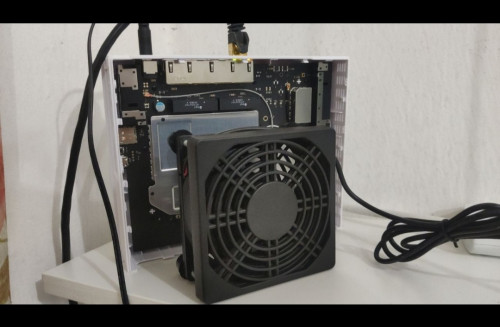
Probably overheating. I'm facing similar problem. Touched the housing and it was hot. My solution, open up the housing and place a fan on the heatsink

QUOTE(waikit1985 @ Apr 8 2024, 04:10 PM)
I stay beside a 5G signal tower (about 100m distance).
Signal strength is strong and speed is good but I kept disconnected from the router, the frequency of dc is quite random.

Sometimes 2-3 times in 30 minutes, sometimes no dc in few hours.

Not sure why, hopefully is my setting problem so that I can adjust it, otherwise I also dont know what to do.
*
user posted image
ameyhazuan
post Apr 18 2024, 02:06 AM

Getting Started
**
Junior Member
164 posts

Joined: May 2006
From: Rawang, Selangor


Myself i got it nearly 500mbps and wasn't even full strength signal. I believed when it was below 100mbps, it was running witn only LTE band 28.

LTE band 28 can go far. But N78 can't.


QUOTE(ultrageek @ Apr 10 2024, 07:40 PM)
Hi,
The below are my observations in comparison between the ZTE MC888s (just started my contract) and Deco X50 5G (which i pinjam from my office to test).

Using the supplied ZTE MC888s, when I had first used it, it was pulling a paltry 50 to 100Mbps. I then took out that sim card, and with default settings on the Deco (I didn't change any its settings and no, my office staff isn't smart enough to change the network settings... they prefer everything default!), it was consistently getting 500 to 600Mbps!

Coming here, and reading this thread, I modified as per the information provided (aka 5G NSA, Band 78, Band 28 for 4G), and the values went up to 250Mbps but still no match for the Deco.

FYI, the tests were done one after another device, and to the same servers on SpeedTest (KL - ViewQwest).

Any ideas what else can be done to bring the numbers closer to the Deco? I know the Deco has way superior modem, but at half it's download value for the ZTE?

Thanks for the comments...
*
This post has been edited by ameyhazuan: Apr 18 2024, 02:08 AM
ameyhazuan
post Apr 21 2024, 02:11 AM

Getting Started
**
Junior Member
164 posts

Joined: May 2006
From: Rawang, Selangor


QUOTE(netken @ Apr 18 2024, 08:27 AM)
did you upgrade?
will it void warranty? does it have any warranty stickers around the screws? read somewhere that turning off the LED lights helps reduce heat as well.
*
yes it will void warranty. just be extra careful not to break the seal. i don't think LED contributing to the heat. I have touched most of the parts and found out that the wireless controller contributing much of the heat compared to other components. I might need to add extra heat sink on that particular spot.

This post has been edited by ameyhazuan: Apr 21 2024, 02:33 AM
ameyhazuan
post Apr 21 2024, 02:19 AM

Getting Started
**
Junior Member
164 posts

Joined: May 2006
From: Rawang, Selangor


QUOTE(MR_alien @ Apr 18 2024, 11:45 AM)
5G and 4G is the same and unlike fiber, it's not going to be full speed all the time
it depends on traffic
i also sometimes will go 40-50Mbps...sometimes 200-300Mbps...depending on time of day and traffic
and sometimes the speed test lied, the more reliable way to test speed is by downloading something...either by using test file or just download something u want

because sometimes my speed test is 40-50Mbps but download is 30MBPS...sometime it is true, it will stuck at 5MBPS
*
i beg to differ. Yes i can agree that wireless broadband not as stable as fiber broadband. But due to our 5G infrastructure currently use in Malaysia, we can't go 5G without LTE B28 and it's on NSA mode. Limitation for single band LTE would be 150mbps. As I observed B28 on LTE modem, it matched the speed of 5G modem when it slowed down. DNB guaranteed the minimum speed of 5G in Malaysia will be 100mbps. I believe it was because of B28 LTE. Should we go SA mode, we no longer need B28 and we should start to use N28 with N78. CA would be possible.

This post has been edited by ameyhazuan: Apr 21 2024, 02:20 AM
ameyhazuan
post Apr 21 2024, 04:36 AM

Getting Started
**
Junior Member
164 posts

Joined: May 2006
From: Rawang, Selangor


I managed to trigger the reboot by overloading the modem. Get few devices to download huge file.

https://testfile.org/

Can use this site to download test file. Get the one with 5GB so it will take few minutes to complete.

As expected, within few minutes the modem first disconnect the internet then reboot itself.

Throughout experience, this could be few things

1. overheated
2. not enough power
3. other factor such as bad hardware or bad firmware

looking at the heat, there was no significant increase during load. using thermal gun, just an increase of few degrees. nothing of concern.

Power wise, I thought I had a breakthrough. I swapped the original power supply which is 12V x 1.5A with much higher wattage 12V x 2.5A from my Linksys router. It worked at first. Tried the download method few times and no reboot. Good sign. Switched back to original power supply and sure enough it reboot after overloading the modem. Switched back to Linksys and to my dismay the modem reboot...

Any other idea? For the time being, I just keep using the Linksys power supply. See if the random reboot still occur.

Last thing I can do is to setup SQM and reduce bufferbloat. At the same time this method can avoid overloading the modem and hopefully can prevent the reboot.

This post has been edited by ameyhazuan: Apr 21 2024, 04:43 AM
ameyhazuan
post Apr 21 2024, 05:49 PM

Getting Started
**
Junior Member
164 posts

Joined: May 2006
From: Rawang, Selangor


QUOTE(ameyhazuan @ Apr 21 2024, 04:36 AM)
I managed to trigger the reboot by overloading the modem. Get few devices to download huge file.

https://testfile.org/

Can use this site to download test file. Get the one with 5GB so it will take few minutes to complete.

As expected, within few minutes the modem first disconnect the internet then reboot itself.

Throughout experience, this could be few things

1. overheated
2. not enough power
3. other factor such as bad hardware or bad firmware

looking at the heat, there was no significant increase during load. using thermal gun, just an increase of few degrees. nothing of concern.

Power wise, I thought I had a breakthrough. I swapped the original power supply which is 12V x 1.5A with much higher wattage 12V x 2.5A from my Linksys router. It worked at first. Tried the download method few times and no reboot. Good sign. Switched back to original power supply and sure enough it reboot after overloading the modem. Switched back to Linksys and to my dismay the modem reboot...

Any other idea? For the time being, I just keep using the Linksys power supply. See if the random reboot still occur.

Last thing I can do is to setup SQM and reduce bufferbloat. At the same time this method can avoid overloading the modem and hopefully can prevent the reboot.
*
All users running with SQM router now. Setting up RRD to monitor internet connection and it will register if the modem reboot. I'll leave it for few days.
ameyhazuan
post Apr 21 2024, 09:51 PM

Getting Started
**
Junior Member
164 posts

Joined: May 2006
From: Rawang, Selangor


QUOTE(ameri @ Apr 21 2024, 06:05 PM)
user posted image

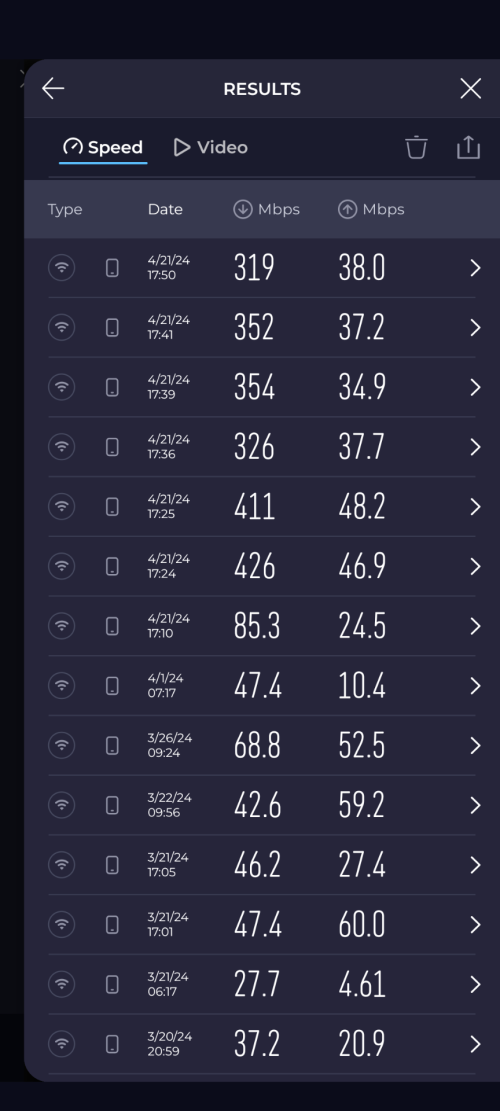
Hi. Just wanted to update. Been using UHome 5g since 20/3 and got ZTE modem. Can see my test results ranging around 30Mbps to 80Mbps.

Today I just got my Deco X50 and tried to do the speedtest. Can see huge margin. Now can get 300Mbps+.

Modem placement is the same for both devices.
*
I have no speed problem with my zte. Just make sure connected to b28 and n78. Also make sure your connected to wifi 5ghz. Use different SSID for 2.4ghz and 5ghz wifi.

user posted image

This post has been edited by ameyhazuan: Apr 21 2024, 09:51 PM
ameyhazuan
post Apr 22 2024, 02:07 PM

Getting Started
**
Junior Member
164 posts

Joined: May 2006
From: Rawang, Selangor


QUOTE(MR_alien @ Apr 22 2024, 09:36 AM)
it's not the modem, it's the chipset inside
any phone or router that uses qualcomm chip will always be more superior in pulling 5G signal and speed
*
Damn..I was tricked on getting this modem. I saw it uses Qualcomm chip. However it was not for the 5G.

5G chipset = Unisoc
Ethernet chipset = Qualcomm

Damn...
ameyhazuan
post Apr 22 2024, 02:09 PM

Getting Started
**
Junior Member
164 posts

Joined: May 2006
From: Rawang, Selangor


QUOTE(netken @ Apr 22 2024, 08:17 AM)
for me - i only realised the DC issue after the firmware update.

please let us know if 12V x 2.5A solves the problem in the long run?
*
then for sure it is firmware issue. swapping power supply did not solve.
ameyhazuan
post Apr 22 2024, 02:18 PM

Getting Started
**
Junior Member
164 posts

Joined: May 2006
From: Rawang, Selangor


QUOTE(ameyhazuan @ Apr 21 2024, 05:49 PM)
All users running with SQM router now. Setting up RRD to monitor internet connection and it will register if the modem reboot. I'll leave it for few days.
*
I ran out ideas already. SQM did not help. Modem still reboot. However I did try staying on 4G-Only mode. No reboot whatsoever till now. Can't say I'm happy. Speed is less than 100mbps, average 40mbps.

Paying RM72 a month for speed @40mbps, not worth it.

Time to place a report to Umo CS.

If there's no permanent solution from CS. I might need to put my Internet on load balancing. Secondary Internet kick in while the Main Internet rebooting.

This post has been edited by ameyhazuan: Apr 22 2024, 02:19 PM
ameyhazuan
post Apr 22 2024, 03:35 PM

Getting Started
**
Junior Member
164 posts

Joined: May 2006
From: Rawang, Selangor


QUOTE(ameyhazuan @ Apr 22 2024, 02:18 PM)
I ran out ideas already. SQM did not help. Modem still reboot. However I did try staying on 4G-Only mode. No reboot whatsoever till now. Can't say I'm happy. Speed is less than 100mbps, average 40mbps.

Paying RM72 a month for speed @40mbps, not worth it.

Time to place a report to Umo CS.

If there's no permanent solution from CS. I might need to put my Internet on load balancing. Secondary Internet kick in while the Main Internet rebooting.
*
Done report. They will send a replacement. Choosing Kaon modem this time. Never heard of this Brand before. Not much info available as well. As long as it works and give me reasonable speed, I'm happy.
ameyhazuan
post Apr 23 2024, 01:59 AM

Getting Started
**
Junior Member
164 posts

Joined: May 2006
From: Rawang, Selangor


QUOTE(netken @ Apr 22 2024, 05:52 PM)
i also reported and they have yet to contact me - how do u know they will send u a Kaon instead?
*
Eh? why they need to contact back. mine was immediate. they made the report and arrange for replacement. i should get it within 5 days. they will courier over the new modem and swap with mine. i strictly requested for kaon. they put a remark but advice me if still have stock. else it would be zte again.

i don't want zte modem. worried same thing will happen. furthermore, zte modem produces lots of heat. without having a fan, the dissipation aluminum plate on the chipsets too hot to touch.

This post has been edited by ameyhazuan: Apr 23 2024, 02:05 AM
ameyhazuan
post Apr 24 2024, 10:07 PM

Getting Started
**
Junior Member
164 posts

Joined: May 2006
From: Rawang, Selangor


QUOTE(svchia78 @ Apr 24 2024, 10:02 AM)
The hassles that the bundled modem(s) caused to users....... just go for TPLink X50 5G aje lah... More expensive but encountered no issue so far.
*
Already stuck with 24 months contract. Can't afford to pay the penalty.

This post has been edited by ameyhazuan: Apr 24 2024, 10:08 PM
ameyhazuan
post May 2 2024, 01:47 PM

Getting Started
**
Junior Member
164 posts

Joined: May 2006
From: Rawang, Selangor


QUOTE(netken @ Apr 27 2024, 02:46 PM)
i just swapped my ZTE with another new set.

first thing to do - is to disable auto update.
*
walao, you got yours already. mine still no news bangwall.gif

now i have to set at 4G. no dc so far but line slow 30-70mbps.
ameyhazuan
post May 3 2024, 04:26 AM

Getting Started
**
Junior Member
164 posts

Joined: May 2006
From: Rawang, Selangor


QUOTE(netken @ May 2 2024, 03:06 PM)
the system some how will auto update - there was some disconnect yesterday and connect back.

finally system updated the same firmware - but after updating firmware it is somehow faster speed recorded.

start to think it is the modem ZTE model - nothing to do with firmware maybe.

will monitor longer.
*
guess i have to force them to send me kaon. by the way, have you report back to them regarding the dc?
ameyhazuan
post May 3 2024, 04:35 AM

Getting Started
**
Junior Member
164 posts

Joined: May 2006
From: Rawang, Selangor


QUOTE(ameyhazuan @ May 3 2024, 04:26 AM)
guess i have to force them to send me kaon. by the way, have you report back to them regarding the dc?
*
user posted image

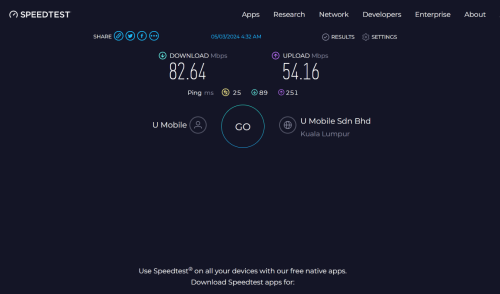
have to live with 4G at the moment. since then, never dc. what could be the problem? with 4G only no dc. with 5G will dc many times a day.
ameyhazuan
post May 4 2024, 05:45 PM

Getting Started
**
Junior Member
164 posts

Joined: May 2006
From: Rawang, Selangor


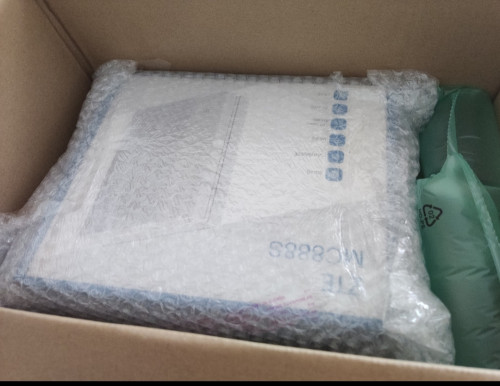
Finally got my replacement after threatened them with MCMC. No Kaon, still the same MC888S.

First thing to do, get an old Umo sim and access the modem. Upon inspecting the firmware, it's the same. Still, i disable the auto update.

Then, swap the sim card with the active one. Try to overload the modem with heavy download from multiple devices. So far no dc. Touchwood...will keep monitoring.

user posted image
ameyhazuan
post May 4 2024, 05:48 PM

Getting Started
**
Junior Member
164 posts

Joined: May 2006
From: Rawang, Selangor


QUOTE(netken @ May 3 2024, 05:32 AM)
i think Kaon option is not not widely available yet, probably waiting for reviews first on the Kaon before submitting another report.

surprisingly no DC last 24 hours - speed about 260D/60U this morning.
*
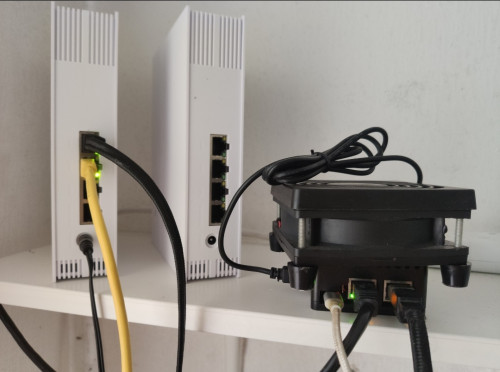
End up having 2 ZTE modem 😅

user posted image
ameyhazuan
post May 4 2024, 05:59 PM

Getting Started
**
Junior Member
164 posts

Joined: May 2006
From: Rawang, Selangor


QUOTE(cloudwan @ May 4 2024, 05:52 PM)
Eh? They didn't ask you to return the faulty one?  hmm.gif  hmm.gif
*
dunno, i asked the courier if i need to give him anything - he said no. anyway, will keep it aside just in case he wants to come and collect.

i just replace the modem. use back the same power adapter, lazy to open the new one.

This post has been edited by ameyhazuan: May 4 2024, 06:00 PM
ameyhazuan
post May 4 2024, 06:22 PM

Getting Started
**
Junior Member
164 posts

Joined: May 2006
From: Rawang, Selangor


user posted image

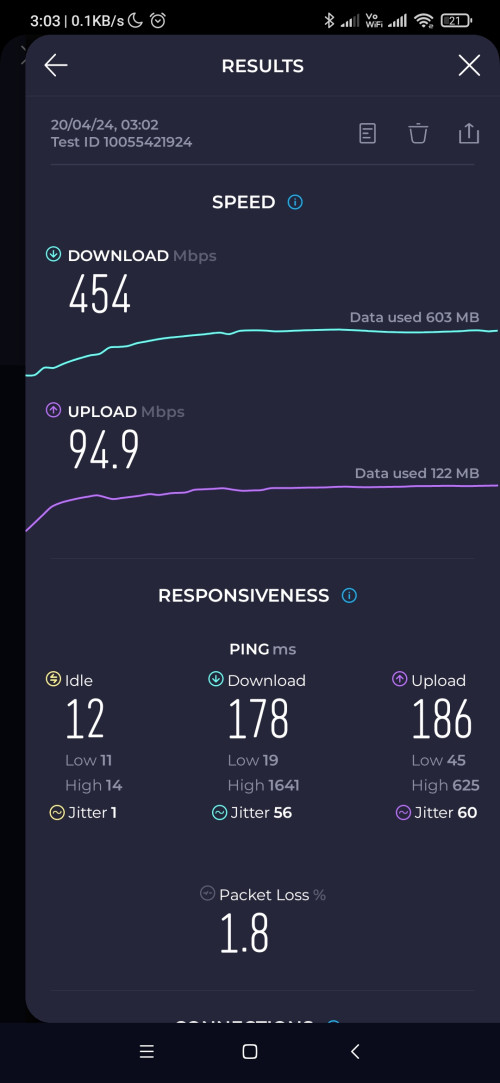
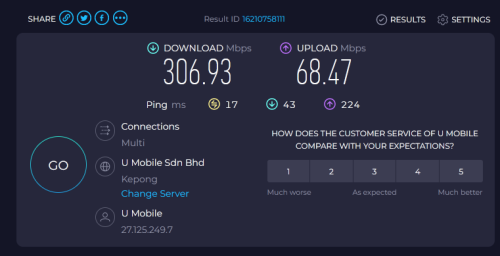
ok la. so far no dc after so many heavy downloads. speed also reasonable for early evening. hope this solves the problem and the previous modem was just one of the bad apples.

download latency is acceptable. upload has bufferbloat, might need to set sqm to reduce bufferbloat for uploading.

This post has been edited by ameyhazuan: May 4 2024, 06:23 PM

6 Pages  1 2 3 > » Top
 

Change to:
| Lo-Fi Version
0.0172sec    0.63    7 queries    GZIP Disabled
Time is now: 16th December 2025 - 11:49 AM