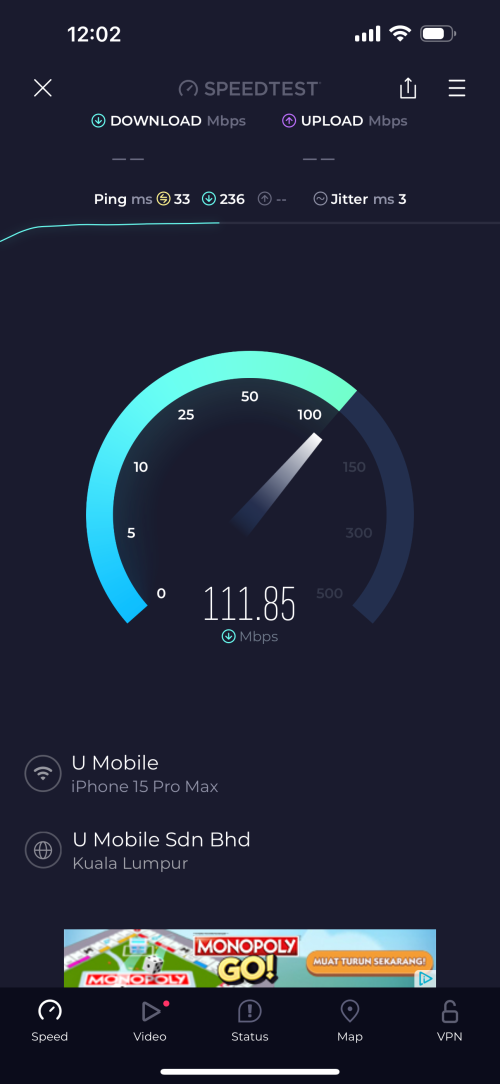
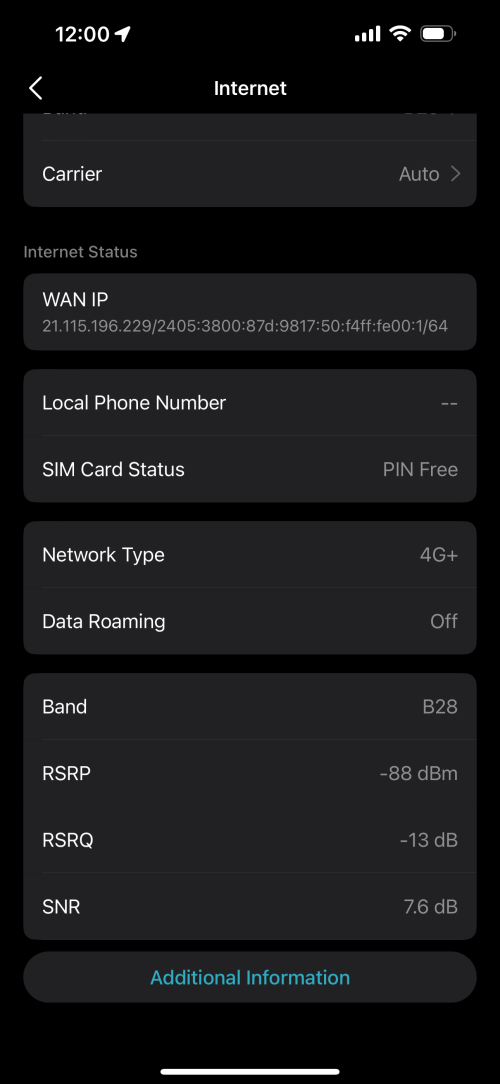
Very happy and satisfied with overall usage.
Constantly getting speeds above 350-400mb compared to the 100 from Time.
Contemplating moving the place or getting external antennas to improve reception.


U Home 5G
|
|
 Sep 5 2023, 11:56 AM Sep 5 2023, 11:56 AM
Return to original view | IPv6 | Post
#1
|
 
Senior Member
2,729 posts Joined: Oct 2005 From: Gotham City   
|
Been using and testing Deco X50 5G with UHome sim at my place. Was testing to replace my Time Fibre before going all in with U.
Very happy and satisfied with overall usage. Constantly getting speeds above 350-400mb compared to the 100 from Time. Contemplating moving the place or getting external antennas to improve reception. |
|
|
|
|
|
Sep 5 2023, 02:02 PM
Return to original view | IPv6 | Post
#2
|
|
Senior Member
2,729 posts Joined: Oct 2005 From: Gotham City
|
QUOTE(gnome @ Sep 5 2023, 01:30 PM) Oh didn't know that lol I already had a few deco units in my place. For ZTE maybe get the euro set mc810A from sing4g la kot. Previously bought in 2020, huawei b818 euro set from them and runs great till today How is the wifi range in your house? Like huawei b818, the wifi range gila limited  I just integrated this into my existing network. Remove the time modem, set x50 up and was done. I get good speeds all around. Anything above previous 100 is already good for me  |
|
|
Sep 5 2023, 02:39 PM
Return to original view | IPv6 | Post
#3
|
|
Senior Member
2,729 posts Joined: Oct 2005 From: Gotham City
|
QUOTE(gnome @ Sep 5 2023, 02:28 PM) Yeah i do that with b818 also I had m9s setup in my place.  Ah icic. Any tplink deco mesh can connect to the x50 network right? eg M4, m9 etc Added the x50, made it the main deco and change the mode to connect using sim. Was done easily. |
|
|
Oct 25 2023, 11:11 PM
Return to original view | Post
#4
|
|
Senior Member
2,729 posts Joined: Oct 2005 From: Gotham City
|
any recommended external antennas for Deco X50?
|
|
|
Nov 15 2023, 02:29 PM
Return to original view | IPv6 | Post
#5
|
|
Senior Member
2,729 posts Joined: Oct 2005 From: Gotham City
|
hi all,
I am facing some issues with my UHome 5g using deco X50. On 4g connection is stable and no drops in data. On 5g connections seems to be dropping and unstable. Any idea on what troubleshooting can be done? Trying to lock band but unable to do so 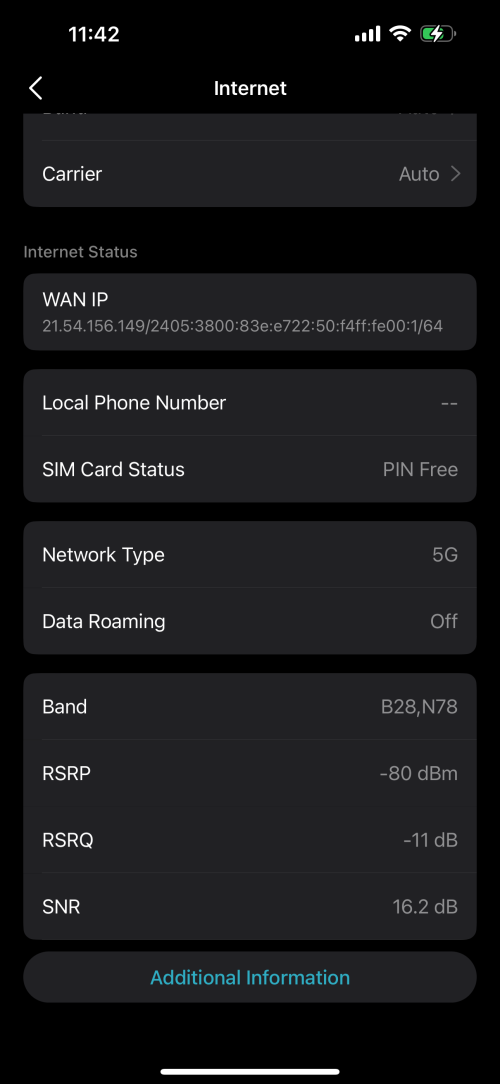  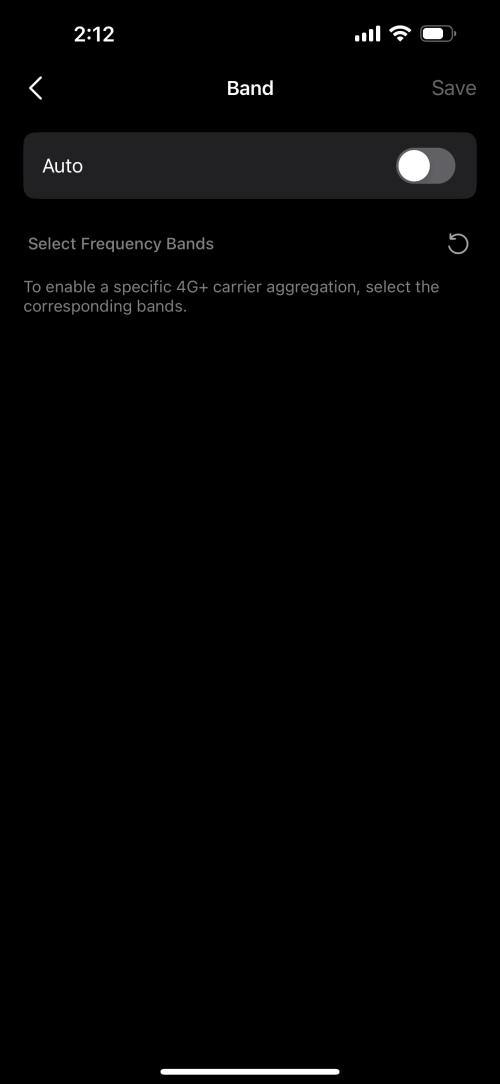 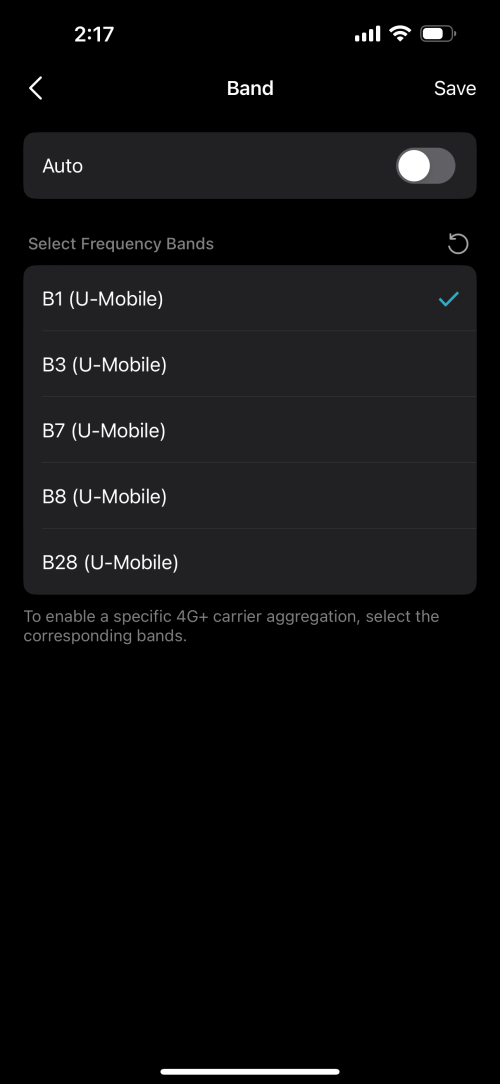 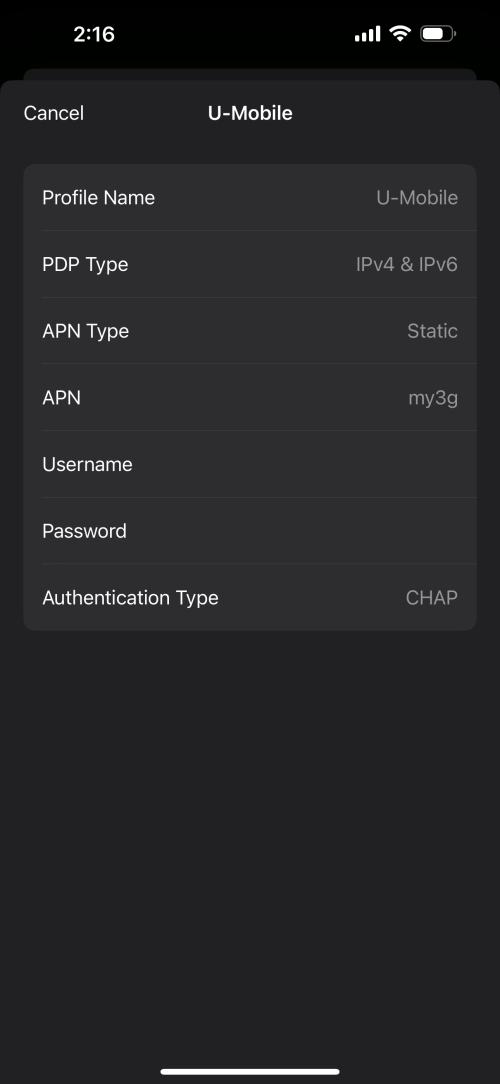 |
|
|
Nov 16 2023, 09:58 AM
Return to original view | IPv6 | Post
#6
|
|
Senior Member
2,729 posts Joined: Oct 2005 From: Gotham City
|
QUOTE(petpenyubobo @ Nov 15 2023, 08:14 PM) This is due to bad implementation by Malaysian telcos of choosing to deploy NSA 5G networks in the country. I tried to select bands manually but it's not showing anything when I deselect Auto. The ideal type of 5G network was supposed to be standalone type (SA) which only forces your device to connect to 5G and nothing else. Reason why NSA sucks is because your modem tend to choose the stronger signal band and fallback to 4G in your area. Meaning your 5G band signal in your area is weaker than your 4G network signals present. For a true standalone 5G network when you place a 5G SIM into your phone/device, even when you move to an area where 4G signals are stronger than 5G signal is will refused fallback to 4G because the telco restricts your device from connecting to any 4G networks that are available. The drawback is costs and the inability to share resources for both 4G/5G networks when you choose to implement a dedicated standalone(SA) 5G network. Your solution is to force your device to connect to ONLY 5G does it have such option? Is it a tplink thing then? |
|
|
|
|
|
Nov 16 2023, 01:58 PM
Return to original view | IPv6 | Post
#7
|
|
Senior Member
2,729 posts Joined: Oct 2005 From: Gotham City
|
The solution is to lock band to a strong 5g signal?
So if I'm unable to lock, is it a tplink issue? What can I do to solve this moving forward? Will changing to NR5103e help? |
|
|
Nov 16 2023, 04:37 PM
Return to original view | IPv6 | Post
#8
|
|
Senior Member
2,729 posts Joined: Oct 2005 From: Gotham City
|
QUOTE(cloudwan @ Nov 16 2023, 03:08 PM) Same thing happens using tplink Aginet app on my Tplink NX510v, when select manual it doesn't show anything.. In the end i just left it at AUTO and forget it.. I don't mind doing that but at 5G Auto, the connection is unstable.  Keeps dropping. Devices behave like there is no internet connectivity. It was not like this when I started using about a month ago. » Click to show Spoiler - click again to hide... « |
|
|
Nov 17 2023, 09:58 AM
Return to original view | IPv6 | Post
#9
|
|
Senior Member
2,729 posts Joined: Oct 2005 From: Gotham City
|
QUOTE(GameSky @ Nov 16 2023, 08:53 PM) got option to lock B28+N78? Then it should make it lock to 5G instead of falling back to 4G due to signal strength. On 4g I can see a list of Bands to select. On 5g no such option.  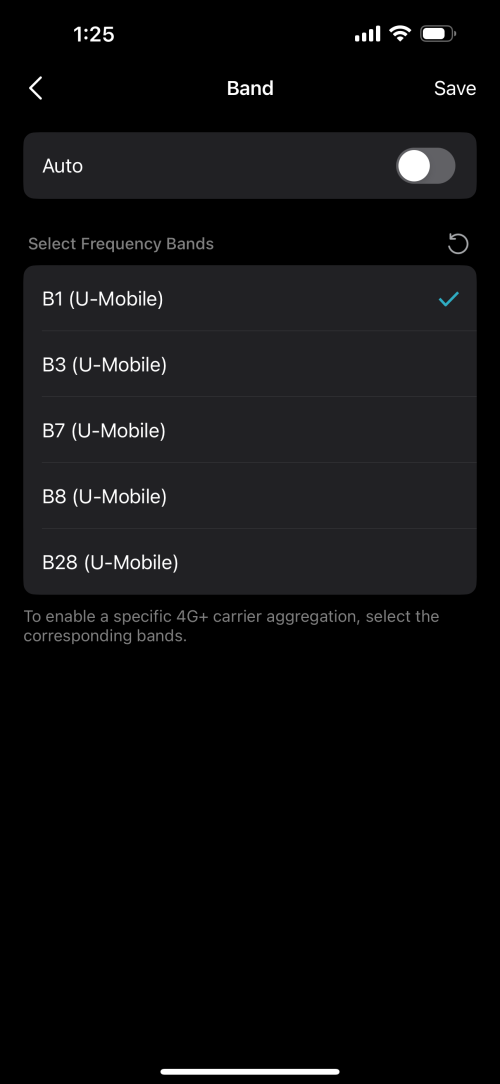 |
|
|
Nov 17 2023, 06:09 PM
Return to original view | IPv6 | Post
#10
|
|
Senior Member
2,729 posts Joined: Oct 2005 From: Gotham City
|
QUOTE(petpenyubobo @ Nov 17 2023, 03:08 PM) Most 4G modems(Even Cat6) won't be able to connect to B28. Should I be looking at changing my modem? Unless you have a draft-5G device such as Huawei B818/latest 4G phones with most recent chipsets (stand to be corrected). If I get the Zyxel 3 UK NR5103e, would I be able to lock the bands and solve this issue? or anything similar? |
|
|
Nov 17 2023, 07:09 PM
Return to original view | IPv6 | Post
#11
|
|
Senior Member
2,729 posts Joined: Oct 2005 From: Gotham City
|
QUOTE(petpenyubobo @ Nov 17 2023, 06:37 PM) Nothing wrong with your modem, as what the other forumer said just set to manual band selection mode and select only B28 for LTE and N78 for NSA 5G then SAVE. That’s the issue I’m facing. Reboot your modem and you are good to go. 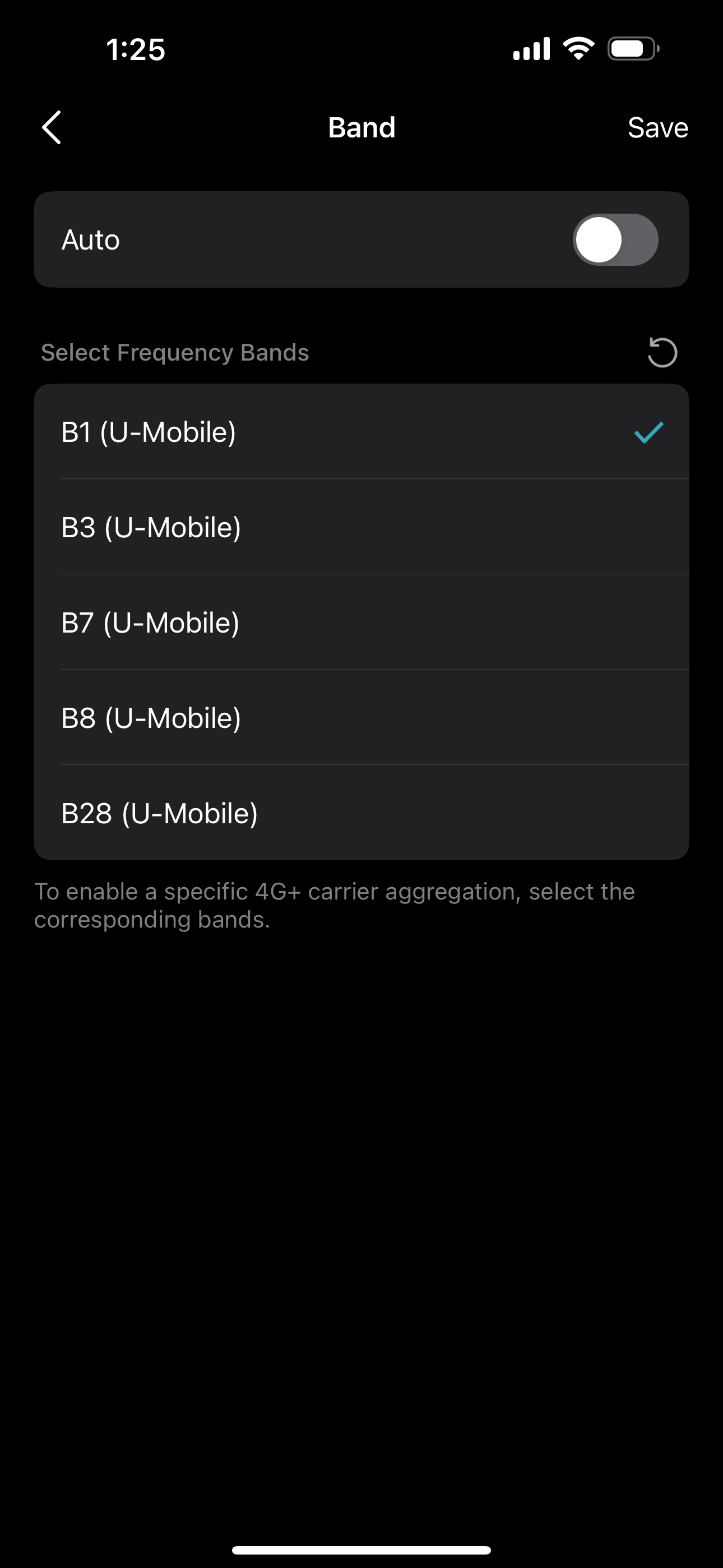 At this screen just choose manual and save your settings. Reboot your router should be connected. B28 is actually 5G band but ITU-T standards wants modem suppliers to list it as LTE instead of 5G band. I can’t select manual to lock band. The bands you see are only visible when I select 4g. When I select 5G, the list is empty.   |
|
|
Nov 17 2023, 08:29 PM
Return to original view | Post
#12
|
|
Senior Member
2,729 posts Joined: Oct 2005 From: Gotham City
|
QUOTE(petpenyubobo @ Nov 17 2023, 07:19 PM) Yes it's disguised as 4G as said. Choose B28 ONLY in 4G you're actually connecting to a 5G network. thank you. will try that and report. Save and Reboot you will be connected to DNB 5G network but with a LTE network indicator. QUOTE(JLA @ Nov 17 2023, 07:50 PM) olax wifi5, yeacomm or gteniq will give a go the band setting is 5G only / 5G SA / 5G NSA The setting not exist mean modem not able to lock 5G only network mode somebody ask and no answer https://community.tp-link.com/en/home/forum/topic/631756 tplink selling point is 5G whole home Mesh WiFi 6 ecosystem So what to do ? put modem near windows and point to the 5G tower direction thank you |
|
|
Nov 18 2023, 12:21 PM
Return to original view | IPv6 | Post
#13
|
|
Senior Member
2,729 posts Joined: Oct 2005 From: Gotham City
|
QUOTE(petpenyubobo @ Nov 17 2023, 07:19 PM) Yes it's disguised as 4G as said. Choose B28 ONLY in 4G you're actually connecting to a 5G network. Thank you. This helped. Save and Reboot you will be connected to DNB 5G network but with a LTE network indicator. Any idea on how to read the signal strength info? I am trying a few places to see best place for the signal. 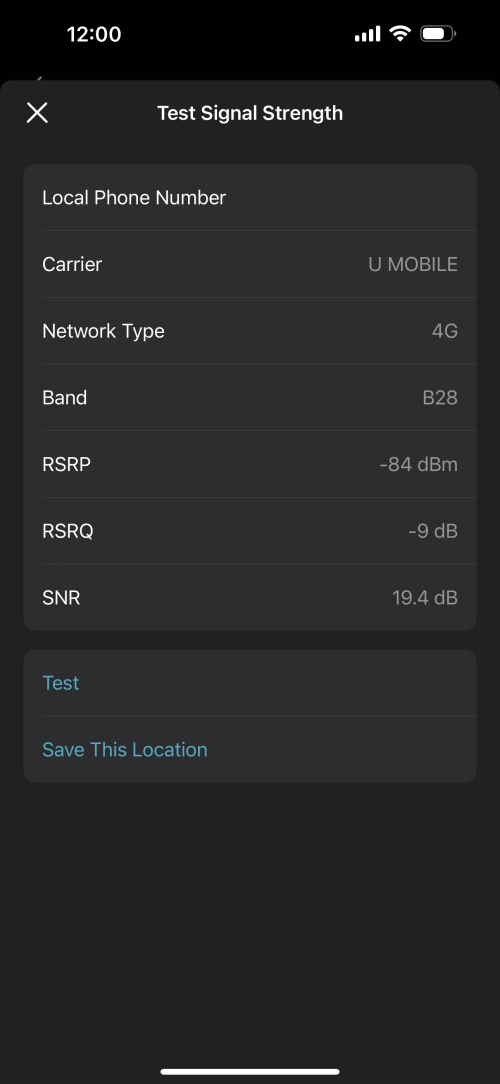 » Click to show Spoiler - click again to hide... « |
|
|
|
|
|
Nov 23 2023, 09:12 AM
Return to original view | Post
#14
|
|
Senior Member
2,729 posts Joined: Oct 2005 From: Gotham City
|
QUOTE(harmeet15 @ Nov 15 2023, 02:29 PM) hi all, Apparently this was a device issue and tplink asked to do a rma. I am facing some issues with my UHome 5g using deco X50. On 4g connection is stable and no drops in data. On 5g connections seems to be dropping and unstable. Any idea on what troubleshooting can be done? Trying to lock band but unable to do so So now with new unit, the issue is not there anymore. |
|
|
Nov 23 2023, 11:48 PM
Return to original view | Post
#15
|
|
Senior Member
2,729 posts Joined: Oct 2005 From: Gotham City
|
QUOTE(ad2000 @ Nov 23 2023, 01:26 PM) My x50-5g no issues, works flawlessly can maintain average DL speed 500Mbps UL 60 Mbps with 4 bar 5G signal. The only setback I have with TP LInk is the x50-POE , I have three of them installed as Wi-Fi mesh at living room, 2nd floor hall and kitchen. two of them just cannot update firmware no matter what method I tried, other than that, I am happy with the connection stability and signal strength I was using for 1.5 months with similar speeds as you mentioned. No idea what triggered the situation I faced. For POE, maybe try connecting them to main deco via ethernet? Would that help? |
|
|
Nov 24 2023, 09:40 AM
Return to original view | IPv6 | Post
#16
|
|
Senior Member
2,729 posts Joined: Oct 2005 From: Gotham City
|
QUOTE(ad2000 @ Nov 24 2023, 08:18 AM) I've tried all including hard reset and connect via lan with direct power without POE switch.. nada. Notice one thing with U home 5G, during heavy rain/thunderstorm it will sometime switch to 4G, have to switch back to 5G manually or wait until rain stop it will revert back to 5G... Had experienced same scenario once when using N103e. Maybe because of tower issue? I think is common and known for that to happen during rain. |
|
|
Apr 2 2024, 11:52 PM
Return to original view | Post
#17
|
|
Senior Member
2,729 posts Joined: Oct 2005 From: Gotham City
|
QUOTE(therain01 @ Mar 29 2024, 11:11 PM) Apologize for off topic. Just wondering if anyone run mesh with the modem router from UMOBILE? I'm using deco x50 5g which is setup to be used with my previous deco m9 mesh. I'm planning to connect the modem router to mesh AP 1 wirelessly, then mesh AP 1 to mesh AP 2 with eth wire. Would this work? working perfectly fine. next I'll be trying to use another 5g modem and plug it via ethernet to my x60 already setup with 3 nodes. |
|
|
Apr 3 2024, 11:30 PM
Return to original view | Post
#18
|
|
Senior Member
2,729 posts Joined: Oct 2005 From: Gotham City
|
QUOTE(therain01 @ Apr 3 2024, 02:30 PM) Thanks for the information. Does it require to connect the first master mesh router with the 5g modem router using eth cable? Or it can be done wirelessly? 5g sim goes into the deco 5g, that will be your main deco, then can connect to other decos wirelessly or wired depending on how you plan to set them up. |
|
|
Apr 16 2024, 03:43 PM
Return to original view | IPv6 | Post
#19
|
|
Senior Member
2,729 posts Joined: Oct 2005 From: Gotham City
|
QUOTE(mista_amin @ Apr 16 2024, 12:28 PM) Read a lot of good review on getniq while I was browsing. Might wanna add that Im using x50 and Gteniq. Both are good for the usage you looking for. but my vote would be for x50 if you have eye on setting up mesh. even my gten is plugged into a mesh setup. immobile and mista_amin liked this post
|
|
|
Apr 28 2024, 10:33 PM
Return to original view | Post
#20
|
|
Senior Member
2,729 posts Joined: Oct 2005 From: Gotham City
|
QUOTE(immobile @ Apr 28 2024, 11:45 AM) thank you. if you don't mind me asking, at this particular point of time, only TP- Link x50 could support setting up mesh right? what about Zyxel NR5103E/5G EE modem? to my knowledge, yes. only x50 5g can double as mesh. apologies as i am new with this U Home 5G package. I have been too long using my Huawei B618-65D with Digi i150 plan. Decided to give U Home and Yes a shot after reading up here. tqtq sifus  otherwise, you can always plug in lan from 5g modem to mesh lan port known as Access Point mode. immobile liked this post
|
| Change to: |  0.0694sec 0.0694sec
 0.58 0.58
 7 queries 7 queries
 GZIP Disabled GZIP Disabled
Time is now: 14th December 2025 - 08:22 AM |
 Quote
Quote