Welcome Guest ( Log In | Register )

Outline · [ Standard ] · Linear+

 U Home 5G

views
     
ultrageek
post Apr 10 2024, 07:40 PM

Casual
***
Junior Member
342 posts

Joined: Jan 2003
Hi,
The below are my observations in comparison between the ZTE MC888s (just started my contract) and Deco X50 5G (which i pinjam from my office to test).

Using the supplied ZTE MC888s, when I had first used it, it was pulling a paltry 50 to 100Mbps. I then took out that sim card, and with default settings on the Deco (I didn't change any its settings and no, my office staff isn't smart enough to change the network settings... they prefer everything default!), it was consistently getting 500 to 600Mbps!

Coming here, and reading this thread, I modified as per the information provided (aka 5G NSA, Band 78, Band 28 for 4G), and the values went up to 250Mbps but still no match for the Deco.

FYI, the tests were done one after another device, and to the same servers on SpeedTest (KL - ViewQwest).

Any ideas what else can be done to bring the numbers closer to the Deco? I know the Deco has way superior modem, but at half it's download value for the ZTE?

Thanks for the comments...

This post has been edited by ultrageek: Apr 10 2024, 08:27 PM
ultrageek
post Apr 14 2024, 11:41 AM

Casual
***
Junior Member
342 posts

Joined: Jan 2003
While I don't face your random and frequent DC's , I too am facing some daily or every alternate day DC's. No firmware to update according to the portal.

I will see the following error on the display logs (Advance Settings > Others):
Apr 13 12:51:26 : [user][info]Rndis(1657): OnConnectFail, rndis_check_connect_state_count=0

Annoying... not sure whether it helps anyone else
ultrageek
post Apr 14 2024, 11:56 AM

Casual
***
Junior Member
342 posts

Joined: Jan 2003
QUOTE(MR_alien @ Apr 14 2024, 11:47 AM)
did u try to reset it?
*
Yeah, reboot the modem solves the problem. Hence, the annoyance... I doubt other modems face these kind of problems?
ultrageek
post Apr 15 2024, 03:41 PM

Casual
***
Junior Member
342 posts

Joined: Jan 2003
For me, my MC888s displays full bar with -89dBm. And even though full bar, most of the time, around 250Mbps on this modem...

Now waiting to see when is the next occasion it's going to DC...

Checking the logs, this is what I would see:
Apr 13 12:45:28 : [user][info]Rndis(1657): OnConnectFail, rndis_check_connect_state_count=0
ultrageek
post Apr 17 2024, 02:31 PM

Casual
***
Junior Member
342 posts

Joined: Jan 2003
I just checked my MC888s and yes, I received the notice as well.

But I don't get it. It's the same sequence... Why bother issuing it? Either they don't understand how numbering works or...

Will probably perform the update tomorrow AM.

This post has been edited by ultrageek: Apr 17 2024, 02:31 PM
ultrageek
post Apr 18 2024, 08:16 PM

Casual
***
Junior Member
342 posts

Joined: Jan 2003
Right. Got around to updating the firmware as requested. Here is the readout from the log:

Apr 18 19:55:31 : [user][info]user set fota upgrade
Apr 18 19:57:19 : [user][info]Rndis(319): web req disconnect
Apr 18 19:57:20 : [user][info]user set keylog
Apr 18 19:57:26 : [user][info]Rndis(2021): OnDisconnected
Jan 1 00:01:05 : [system][notice] port[3] is plug-out
Jan 1 00:01:09 : [system][notice] port[3] is plug-in
Jan 1 00:01:05 : [system][notice] port[3] is plug-out
Jan 1 00:01:09 : [system][notice] port[3] is plug-in
Jan 1 00:01:13 : [user][info]Rndis(412): mc auto connect
Apr 18 20:12:06 : [user][info]Rndis(1607): OnConnectSuccess

From the logs above, expect about 10-15mins downtime.

Running Speedtest to ViewQwest (to standardise my tests): around 260Mbps. Still the same. Nothing changed.


ultrageek
post Apr 20 2024, 11:53 AM

Casual
***
Junior Member
342 posts

Joined: Jan 2003
Neither do I. For fun, I've removed the option to restart the device and will now see how long before it DC's the line by itself...
ultrageek
post Apr 22 2024, 09:23 AM

Casual
***
Junior Member
342 posts

Joined: Jan 2003
QUOTE(ameri @ Apr 21 2024, 06:05 PM)
user posted image

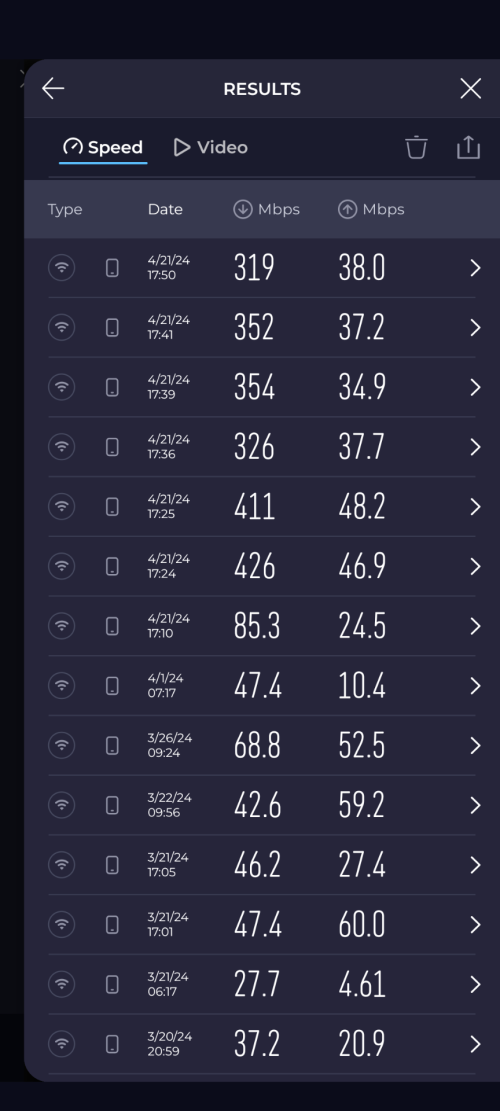
Hi. Just wanted to update. Been using UHome 5g since 20/3 and got ZTE modem. Can see my test results ranging around 30Mbps to 80Mbps.

Today I just got my Deco X50 and tried to do the speedtest. Can see huge margin. Now can get 300Mbps+.

Modem placement is the same for both devices.
*
This is my problem as well when I tested between the ZTE and TP Link and on the TP Link, I can even hit 650Mbps... Unfortunately, I had to return it back to my office, but it tells the tale of different modems used.
ultrageek
post Apr 22 2024, 09:56 AM

Casual
***
Junior Member
342 posts

Joined: Jan 2003
QUOTE(MR_alien @ Apr 22 2024, 09:36 AM)
it's not the modem, it's the chipset inside
any phone or router that uses qualcomm chip will always be more superior in pulling 5G signal and speed
*
Ah, yes, that's what I wanted to say! tongue.gif
Thanks for the correction.
ultrageek
post Apr 24 2024, 09:25 AM

Casual
***
Junior Member
342 posts

Joined: Jan 2003
Update: In-spite of the so called firmware update, my ZTE got DC'ed late last night...
ultrageek
post Apr 29 2024, 10:47 AM

Casual
***
Junior Member
342 posts

Joined: Jan 2003
It'll be interesting to see how much the Tenda will be made available here then. Thanks for sharing.
ultrageek
post May 3 2024, 04:02 PM

Casual
***
Junior Member
342 posts

Joined: Jan 2003
So my office bosses are allowing me to use the Deco for long term. And so here are my findings after resetting it and messing around. Comparisons will be made against the ZTE that U Mobile provides:
a) Averaging 600Mbps on SpeedTest to ViewQWest across two tests performed in the morning and now (in the midst of PJ's thunderstorm!)
b) Unable to split the wifi signals to individual 2.4 and 5Ghz
c) Unable to control the strength of the wifi signal (Don't like the idea I'm blasting out my frequency for all and sunder to view)
d) Unable to lock the 5G and 4G network bands
e) Unable to lock to just 5G signal and not fallback to 4G
f) Everything is performed through the app (Web portal is pretty much information only for the Deco)

So in short, if you want a very controlled and PnP device, this is for you! smile.gif

Also, came across this in TP Link's website:
https://www.tp-link.com/my/home-networking/...i/archer-nx200/

This post has been edited by ultrageek: May 3 2024, 04:14 PM
ultrageek
post May 3 2024, 09:31 PM

Casual
***
Junior Member
342 posts

Joined: Jan 2003
QUOTE(petpenyubobo @ May 3 2024, 06:02 PM)
Are you from TP-Link marketing team or one of their resellers? They seem to do a lot of indirect promotional posts around in this forum using accounts to give testimonials about their products.

Not to say their products are not high quality but the local resellers on can be sometimes unreliable and dishonest.

Used to buy from one of the main local reseller/distributor, but ended up receiving a used unit with notable scratches on its SIM slot and teared protective sticker.

That was the last time I bought from them.I learn to always forgive but NEVER to forget.

Prefer to buy direct from a reliable China supplier directly if possible.
*
Uh no. Just an ordinary Joe having the chance to use both the ZTE (mine from the 2 year contract) and the TP-Link (from my organisation as we were planning to use this on roadshows, lease line backup, etc. and how it would tahan running 24x7)...

If you are like me, on a 2 year contract with the given ZTE, then you would know that all that I have mentioned, are user changeable, whereas it's not possible with the TP-Link. All those features are locked which is a pity as I thought the TP-Link would be better in that regards.

Oh well...


ultrageek
post May 6 2024, 12:04 PM

Casual
***
Junior Member
342 posts

Joined: Jan 2003
Wonder when might this make its way here:
https://www.dlink.com.sg/product/dwr-x2000-...er/#nf_overview
ultrageek
post May 6 2024, 12:15 PM

Casual
***
Junior Member
342 posts

Joined: Jan 2003
QUOTE(immobile @ May 6 2024, 12:10 PM)
wifi speed
*
You might want to check whether you are on 2.4 or 5Ghz? 5Gigs will provide a higher bandwidth than 2.4Ghz

Dunno whether you will be able to split the two frequencies as I couldn't find a way to do so on my Deco 5G...
ultrageek
post May 9 2024, 12:06 PM

Casual
***
Junior Member
342 posts

Joined: Jan 2003
Hi Folks,
Any 5G modems to suggest as the Deco isn't able to split nor control the WIFI signal strength?

Now many modems have been put forth, and having checked them out in Shopee, almost all (sans the Deco and Huawei (?)), are 2nd hand or resold here with a limited warranty (aka 1 / 3 / 6 months).
How stable are these resold modems? Anybody had any failures after the sellers warranty expired?

Thanks in advance...
ultrageek
post May 14 2024, 09:10 AM

Casual
***
Junior Member
342 posts

Joined: Jan 2003
QUOTE(hustlerism @ May 14 2024, 03:06 AM)
Is it true that ZTE MC888s AX3000 is problematic?
*
Define problematic? tongue.gif

A few of us had DC's that requires a reboot to resolve on a frequent basis...
ultrageek
post May 24 2024, 09:11 PM

Casual
***
Junior Member
342 posts

Joined: Jan 2003
QUOTE(netken @ May 24 2024, 05:52 PM)
user posted image
user posted image
user posted image

packing back the ZTE for exchange.

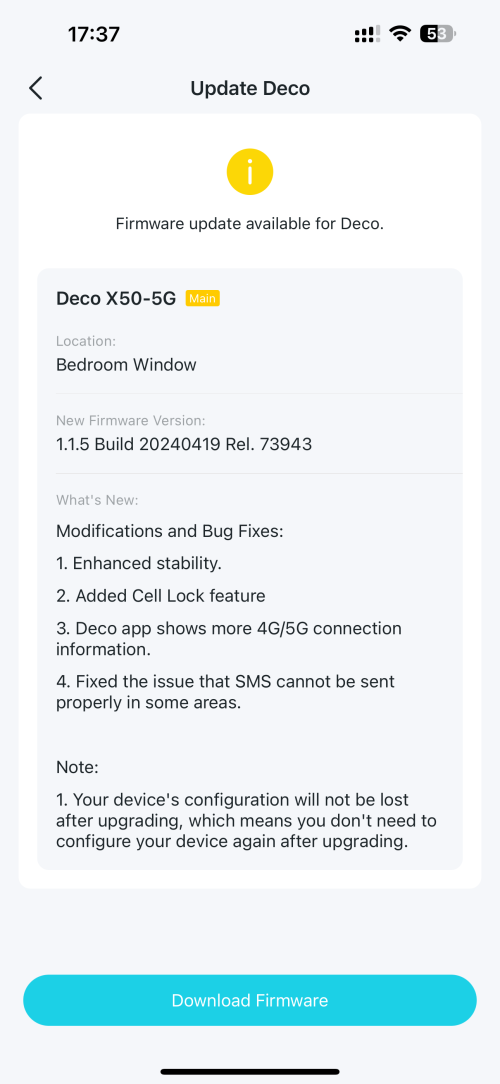
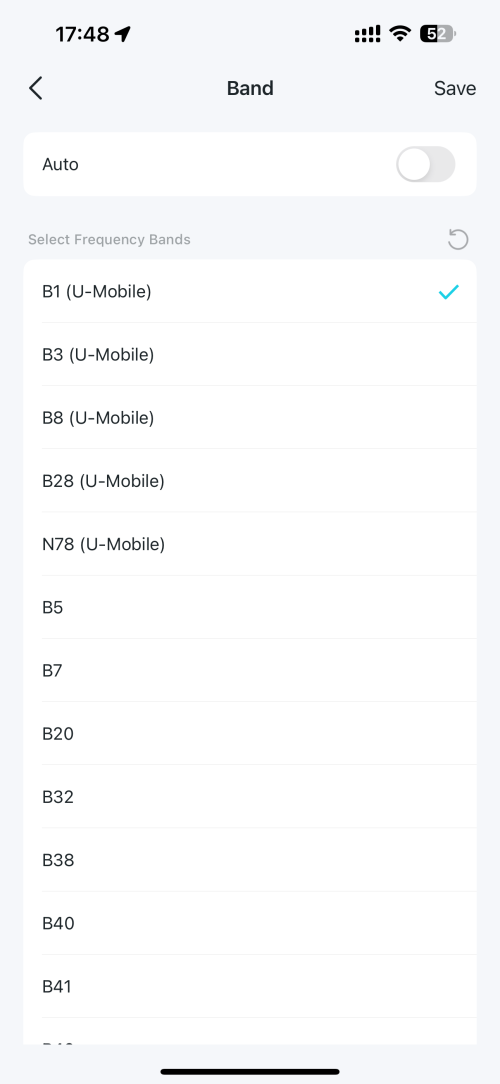
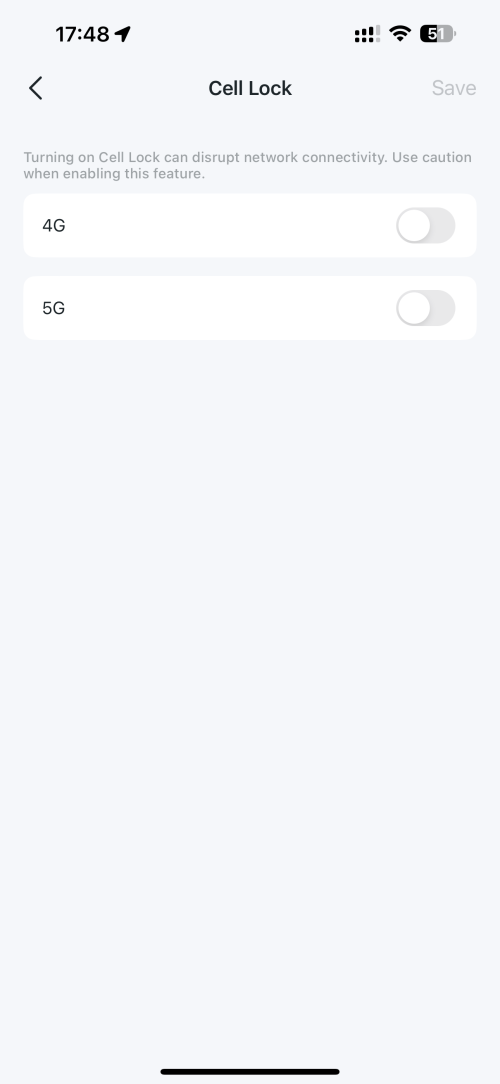
put in the Umobile into the deco x50 5g and walla! now deco x50 can lock band and even lock cell ...
*
OOOOOoooo... thanks for this. Time for me to update mine then!
ultrageek
post May 30 2024, 03:41 PM

Casual
***
Junior Member
342 posts

Joined: Jan 2003
QUOTE(KEIofD @ May 30 2024, 12:27 PM)
Lately I've been able to connect to B28 band only with X50-5G, browsing feel a bit choppy compare to b28+n78, speedtest is still ~300mbps though, anyone facing this issue too?
*
I've left mine at Auto and fluctuates beween 350 to 600 ... testing on Fast.com now (30th May @ 1540H from Damansara), I'm getting 520Mbps...
ultrageek
post Jun 15 2024, 11:07 AM

Casual
***
Junior Member
342 posts

Joined: Jan 2003
Just thought I'd share...

Recently purchased a Zyxel NR5103Ev2. So here's the result vs a loaned Deco 5G from my office.

It's light... as in like light light of the ZTE MC888s that U gave me on the contract. Which makes the Deco feel like a ton of bricks.
Do i light prefer it lighter or heavier, can't say. tongue.gif

It runs cooler too. Aesthetics out of the way, it performs almost similar bandwidth results on Fast.com (they were placed next to each other). Circa 500Mbps... when the tests were run this AM around 0900H.

So, what can I do with it? You can:
Lock the bands
Split the Wifi signals (2.4 and 5Ghz split and not merged)
Control the strength of the Wifi signal (singular here as the changing the strength affects both Wifi split, not as individual strengths)

So far, I haven't been able to:
Schedule a reboot
Data Usage is noted in bytes and require a few clicks to get there...
And the App can't detect the Wifi that my phone is using in order to configure itself. But that's ok, I prefer the web portal (everything can be controlled through here).

Will update to let you'll know how long this is working without any reboots.

2 Pages  1 2 >Top
 

Change to:
| Lo-Fi Version
0.0888sec    0.84    7 queries    GZIP Disabled
Time is now: 14th December 2025 - 03:40 AM