

I want to try the Umobile line with my Xiaoxi 13T Pro, but seems like cannot detect. I check the DNB supported device, and 13T Pro is not on the list. Is that the reason ah?
U Home 5G
U Home 5G
|
|
 Apr 13 2024, 11:17 PM Apr 13 2024, 11:17 PM
Return to original view | Post
#1
|
 
Junior Member
180 posts Joined: Aug 2011  
|
I want to try the Umobile line with my Xiaoxi 13T Pro, but seems like cannot detect. I check the DNB supported device, and 13T Pro is not on the list. Is that the reason ah?
|
|
|
|
|
|
Apr 14 2024, 11:44 AM
Return to original view | IPv6 | Post
#2
|
|
Junior Member
180 posts Joined: Aug 2011
|
QUOTE(MR_alien @ Apr 14 2024, 10:59 AM) did u buy a package on the app? Do I need to buy? From the app it seems I already have a high speed data |
|
|
Apr 14 2024, 11:47 AM
Return to original view | IPv6 | Post
#3
|
|
Junior Member
180 posts Joined: Aug 2011
|
QUOTE(MR_alien @ Apr 14 2024, 11:46 AM) yes, u need to buy a package for 5G to be activated No wonder.... Alright thanks, thought my phone has issue...if u just use it as it is...it's 4G only the "5G ready data" is not what you think/what it meant |
|
|
Apr 16 2024, 08:21 PM
Return to original view | Post
#4
|
|
Junior Member
180 posts Joined: Aug 2011
|
Is the free router from Umobile good enough? If I don't mind the meshing and bypass quota.
|
|
|
May 4 2024, 11:08 PM
Return to original view | Post
#5
|
|
Junior Member
180 posts Joined: Aug 2011
|
QUOTE(4WD_er @ Apr 17 2024, 08:46 AM) I would think so, since the package allows you to use quite unlimited data, except no torrent. Reporting back...Using phone can reach 300mbps With the ZTE modem... 100mbps also quite hard... Avg is 40 50 across the day. I would say if you need the speed, spend the money and get a decent modem... But since I'm on contract already, might as well continue. I don't need the high speed data, but it's always better to have the speed. immobile liked this post
|
|
|
May 5 2024, 10:01 PM
Return to original view | Post
#6
|
|
Junior Member
180 posts Joined: Aug 2011
|
QUOTE(mista_amin @ May 5 2024, 09:05 PM) Have this kind of problem in the beginning as well. What I did was: You know what, I just remember I splitted it into two bands, and I forgot to connect to the 5GHz one! 1) split the WiFi to 2.4ghz n 5ghz 2) Modem placement near window  It's late now, so result may be better, but I can get >300mbps! And it's now directly at the window already. I'll report back in some time later, monitor how's the speed fluctuation. |
|
|
|
|
|
May 9 2024, 07:40 PM
Return to original view | Post
#7
|
|
Junior Member
180 posts Joined: Aug 2011
|
QUOTE(John00 @ May 5 2024, 10:01 PM) You know what, I just remember I splitted it into two bands, and I forgot to connect to the 5GHz one! After nearly one week of usage, happy to say I am a satisfied customer. It's late now, so result may be better, but I can get >300mbps! And it's now directly at the window already. I'll report back in some time later, monitor how's the speed fluctuation. -Need to connect to the 5GHz SSID (duh) -Place near the window. I tried to move it down a bit onto a table nearby. Maybe 1m distance, speed dropped 100mbps lol. -Router quite sensitive to location, as many has mentioned, not as stable as smartphones. |
|
|
May 19 2024, 10:29 PM
Return to original view | Post
#8
|
|
Junior Member
180 posts Joined: Aug 2011
|
QUOTE(year2020 @ May 19 2024, 11:23 AM) Just got the UM68 plan with router. I took the ZTE C888S router. Sounds like not optimum placement. Now my modem is literally beside a window. If you can find a spot that would be great.However the speed I'm getting is only about 50mbps. This is after I connect to 5GHz wifi. If connect to 2.4GHz I will only get 25mbps. I check from cellmapper, there are 2 towers start with 703 within 500m to my house. There are no building in between, the first tower is on private hospital and the second tower is on indoor swimming pool. I'm on fifth floor and my building is the tallest. No other building blocking the path. What else can i do? I don't expect to get 300mbps but I read 5G DNB should be minimum 100mbps. I tried locking 4G band 28, but no difference. In fact download suffers and drop to 20mbps. Appreciate any pointers. |
|
|
May 28 2024, 08:37 PM
Return to original view | Post
#9
|
|
Junior Member
180 posts Joined: Aug 2011
|
Reporting in, my ZTE MC888s so far has 17 days uptime already.
How to check for DC ya? |
|
|
May 30 2024, 08:39 PM
Return to original view | Post
#10
|
|
Junior Member
180 posts Joined: Aug 2011
|
QUOTE(ameyhazuan @ May 28 2024, 09:23 PM) advance settings > other > device log Interesting, mine only shows this, maybe it did reboot without me noticing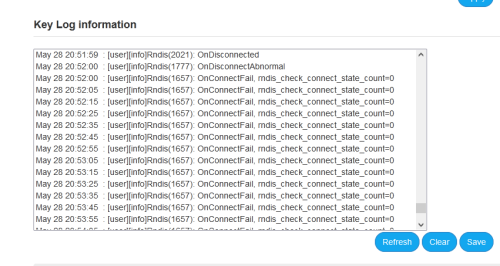 anyway, dc is normal. 4g modem does the same. depends on telco's tower. what bothering us was the modem frequent reboot.  QUOTE(Zaryl @ May 28 2024, 09:54 PM) nice! Not sure if I saw it wrong or misinterpreted, maybe it was just 17 hours lol.for uptime, could you please show us the Detailed Info page? scroll to bottom and you can see the timer. it's right at the bottom of the main page when you entered admin website. i'm having the same router as yours too, but it keeps on auto rebooting on certain times. longest uptime it has was 12 hours. shortest was 2 minutes.  But here it is showing 65 hours? 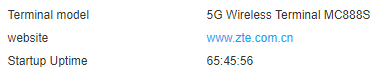 |
| Change to: |  0.0158sec 0.0158sec
 0.67 0.67
 7 queries 7 queries
 GZIP Disabled GZIP Disabled
Time is now: 15th December 2025 - 01:04 PM |
 Quote
Quote