|
jayko
|
 Nov 28 2025, 06:23 PM Nov 28 2025, 06:23 PM
|

|
QUOTE(cloudwan @ Nov 28 2025, 05:14 PM) Ya, i tested yesterday when i set connection to only 5G and lock band to N77/N78 only and it won't connect. I have to to choose 5G/4G/3G option and lock band to B28/N77/N78 only then i can connect for internet. Hence it's still using NSA and not SA. What a bummer.. Btw the moment it starts to rain even if its a light shower Ultra5G in my area would revert to normal 5G.  Do i understand correct in the first place? You are using the same sim card when put on the phone, you get ultra 5g, but on the tp link, you only get NSA? To me this doesn't make sense at all. Because since this is home 5g, you should be getting consistent connection, which is ultra 5g. Tp link you can't just set to 5g only, because for nsa to work it needs 4g for b28. And 5g for n78. With your tp link, either you upgrade the firmware or call um to ask them rectify for you. |
|
|
|
|
|
cloudwan
|
Nov 28 2025, 08:53 PM
|
|
|
QUOTE(jayko @ Nov 28 2025, 06:23 PM) Do i understand correct in the first place? You are using the same sim card when put on the phone, you get ultra 5g, but on the tp link, you only get NSA? To me this doesn't make sense at all. Because since this is home 5g, you should be getting consistent connection, which is ultra 5g. Tp link you can't just set to 5g only, because for nsa to work it needs 4g for b28. And 5g for n78. With your tp link, either you upgrade the firmware or call um to ask them rectify for you. No in my phone i am using a different umobile hp prepaid/postpaid sim, uhome5G sim i never used in my phone. So basically 2 different sim. Only on my phone it could connect to Ultra5G, but uhome5G in router die die won't connect. Makes me think that umobile purposedly doing that on purpose.  |
|
|
|
|
|
jayko
|
Nov 28 2025, 10:51 PM
|
|
|
QUOTE(cloudwan @ Nov 28 2025, 08:53 PM) No in my phone i am using a different umobile hp prepaid/postpaid sim, uhome5G sim i never used in my phone. So basically 2 different sim. Only on my phone it could connect to Ultra5G, but uhome5G in router die die won't connect. Makes me think that umobile purposedly doing that on purpose. you should call UM to verify this matter, does uhome sim support Ultra 5G? anyway, the fastest verification is to put your uhome5sim to your phone to test, if its get ultra5G, means your tplink is having problem wor !  |
|
|
|
|
|
eauyong
|
Nov 30 2025, 08:47 AM
|
Getting Started

|
QUOTE(cloudwan @ Nov 28 2025, 05:14 PM) Ya, i tested yesterday when i set connection to only 5G and lock band to N77/N78 only and it won't connect. I have to to choose 5G/4G/3G option and lock band to B28/N77/N78 only then i can connect for internet. Hence it's still using NSA and not SA. What a bummer.. Btw the moment it starts to rain even if its a light shower Ultra5G in my area would revert to normal 5G. in Malaysia’s 2030–2035 Outlook Timeframe | Role | | 2025 | Continues as 4G anchor band; DNB uses it for NSA 5G. | | 2027–2030 | Gradual shift to 5G n28 in low-density regions. | | 2030–2035 | Expected full 5G Standalone n28 deployment — seamless nationwide low-band 5G. |
|
|
|
|
|
|
contestchris
|
Dec 1 2025, 09:47 PM
|
|
|
Anyone can compare YES vs Umobile Home 5G broadband? With the default stock router.
|
|
|
|
|
|
cloudwan
|
Dec 2 2025, 06:41 AM
|
|
|
QUOTE(contestchris @ Dec 1 2025, 10:08 PM) Looks like they have two new routers, how do these compare to the previous ones? 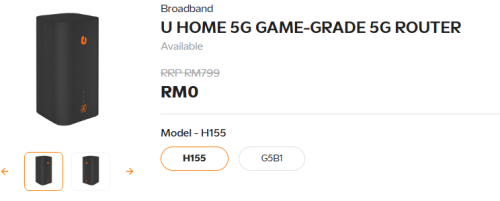 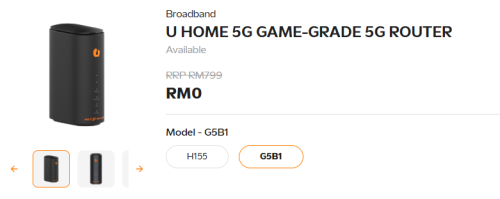 The previous model are a piece of crap, i have the previous model before these 2, at the same location where i put my TPLink NX510v, the max download i got with it is around 100mbps but with my Tplink i could get around 300mbps.. Waste of silicon.. I would say from the looks of the new routers, the 2nd unit could be an ZTE unit while the 1st one is probably Huawei origin? I could be wrong tho. For semenanjung UM partners with Huawei for their network and ZTE for borneo, so i guess if your in semenanjung better take the 1st unit? Both of them should be better than their old model i think.. |
|
|
|
|
|
BOTAK_WAI
|
Dec 2 2025, 02:13 PM
|
|
|
QUOTE(contestchris @ Dec 1 2025, 10:08 PM) Looks like they have two new routers, how do these compare to the previous ones? take that H155, it's a huawei. G5B is ZTE |
|
|
|
|
|
MR_alien
|
Dec 7 2025, 11:29 AM
|
|
|
QUOTE(contestchris @ Dec 1 2025, 10:08 PM) Looks like they have two new routers, how do these compare to the previous ones? Find out what chipset they use instead of worrying what brand it is |
|
|
|
|
|
Joshua_0718
|
Dec 9 2025, 10:02 AM
|
|
|
Can I subscribe the borneo plan but use in semenanjung?
|
|
|
|
|
|
cloudwan
|
Dec 9 2025, 04:33 PM
|
|
|
QUOTE(Joshua_0718 @ Dec 9 2025, 10:02 AM) Can I subscribe the borneo plan but use in semenanjung? No u cannot. They can detect it. |
|
|
|
|
|
jsnhoh
|
Dec 9 2025, 04:51 PM
|
|
|
QUOTE(Joshua_0718 @ Dec 9 2025, 10:02 AM) Can I subscribe the borneo plan but use in semenanjung? You are unable to use U Postpaid Borneo 38/U Postpaid Borneo 68's Unlimited Data in Peninsular Malaysia. However, you have an allocation of 10GB of High-speed Data monthly to be used when you are in Peninsular Malaysia. |
|
|
|
|
|
contestchris
|
Dec 14 2025, 10:08 PM
|
|
|
Does U Home 5G have access to the ULTRA 5G network, and if so, does it have access to 5G SA and 5G Advanced (not sure which is the better mode) On the landing page, it doesn't mention about ULTRA 5G coverage https://www.u.com.my/en/personal/broadband/wireless |
|
|
|
|
|
MR_alien
|
Dec 15 2025, 02:26 PM
|
|
|
QUOTE(contestchris @ Dec 14 2025, 10:08 PM) Does U Home 5G have access to the ULTRA 5G network, and if so, does it have access to 5G SA and 5G Advanced (not sure which is the better mode) On the landing page, it doesn't mention about ULTRA 5G coverage https://www.u.com.my/en/personal/broadband/wirelessYes, it can access ultra 5G I thought umobile ultra 5G is 5G SA..never heard of 5G advance |
|
|
|
|



 Quote
Quote





 0.0152sec
 0.26
0.26
 6 queries
 GZIP Disabled