Welcome Guest ( Log In | Register )

Bump Topic Topic Closed RSS Feed
453 Pages « < 434 435 436 437 438 > » Bottom

Outline · [ Standard ] · Linear+

Unifi Official TM UniFi High Speed Broadband Thread V40, READ 1ST PAGE FOR RELEVANT WIFI INFO

views
     
soonwai
post Sep 10 2023, 04:15 PM


********
All Stars
11,456 posts

Joined: Oct 2007
From: KL


QUOTE(LDP @ Sep 10 2023, 09:23 AM)
TM just came recently and gave me the new DLink router AX 3000..Regular speed test on my laptop can only hit 90 Mbps for dload speed...Worse still the laptop is sitting next to the router...I have just upgraded to 300 Mbps recently with free upgrade to 500 Mbps...Sian ler...
*
Post more details rather than have us ask for it or guess. Test with a cable to verify that TM is not scamming you. Testing with wifi is subjective.

And always try another cable.

For a fairly low bar as reference, my MacBook Air M1 Late 2020 & Unifi 800/200. Guess what wifi router.
user posted image

This post has been edited by soonwai: Sep 10 2023, 04:37 PM
simmarjit
post Sep 10 2023, 04:15 PM

Enthusiast
*****
Junior Member
980 posts

Joined: Dec 2011


QUOTE(totally_skint @ Sep 10 2023, 02:51 PM)
That would be a pretty ancient laptop  biggrin.gif
*
Yea haha
QUOTE(LDP @ Sep 10 2023, 03:09 PM)
Macbook M1 Pro can easily hit 1000 Mbps.
*
Well you never give that info earlier, how to guess LOL
soonwai
post Sep 10 2023, 04:20 PM


********
All Stars
11,456 posts

Joined: Oct 2007
From: KL


QUOTE(simmarjit @ Sep 10 2023, 04:15 PM)
Yea haha

Well you never give that info earlier, how to guess LOL
*
LOL. Got a feeling TM didn't change the modem. Probably still HG650a. or 99% of the time, cable problem even if testing using wifi.
countingcrows
post Sep 10 2023, 04:24 PM

Getting Started
**
Junior Member
258 posts

Joined: Feb 2023
QUOTE(LDP @ Sep 10 2023, 09:23 AM)
TM just came recently and gave me the new DLink router AX 3000..Regular speed test on my laptop can only hit 90 Mbps for dload speed...Worse still the laptop is sitting next to the router...I have just upgraded to 300 Mbps recently with free upgrade to 500 Mbps...Sian ler...
*
Super old iPhone with TM's Free D-Link DIR-X3060Z.

user posted image
soonwai
post Sep 10 2023, 04:49 PM


********
All Stars
11,456 posts

Joined: Oct 2007
From: KL


QUOTE(countingcrows @ Sep 10 2023, 04:24 PM)
Super old iPhone with TM's Free D-Link DIR-X3060Z.

user posted image
*
Super old iPhone with super old wifi router. Both around the same age. Unifi 800/200.
user posted image

Which SG server do you normally use for Ookla Speedtest?

This post has been edited by soonwai: Sep 10 2023, 04:50 PM
countingcrows
post Sep 10 2023, 04:53 PM

Getting Started
**
Junior Member
258 posts

Joined: Feb 2023
QUOTE(soonwai @ Sep 10 2023, 04:49 PM)
Super old iPhone with super old wifi router. Both around the same age. Unifi 800/200.
user posted image

Which SG server do you normally use for Ookla Speedtest?
*
I think it was Singtel.
Oltromen Ripot
post Sep 10 2023, 07:22 PM

👍 999999 person Likes this member
*******
Senior Member
4,034 posts

Joined: Dec 2019
Wake me up when September ends.

20 days left.
15 weekdays left.


Xanxeviera.
post Sep 10 2023, 07:27 PM

Getting Started
**
Junior Member
203 posts

Joined: Jun 2020
user posted image”Fahmi umum apa harini”
Oltromen Ripot
post Sep 10 2023, 07:35 PM

👍 999999 person Likes this member
*******
Senior Member
4,034 posts

Joined: Dec 2019
QUOTE(Xanxeviera. @ Sep 10 2023, 07:27 PM)
user posted image”Fahmi umum apa harini”
*
Chronicle of #ApaMenteriKomunikasiBuatHariIni
AVFAN
post Sep 10 2023, 07:51 PM

20k VIP Club
*********
All Stars
24,454 posts

Joined: Nov 2010
QUOTE(eternity4av @ Sep 9 2023, 03:12 PM)
hi im currently at 800mbps, currently paying 199+6% sst = 210.94 with ruby pack, is it a good deal or i shall go to swu 3.0?
*
yr deal already is better than any SWU.

what u can do is... if u like watching TV.... check bill what price u r charged for Ruby.

if u r charged RM30, u can get ultimate plus with netflix basic + a few more VOD apps if u top up RM40, get free UPB too.

if u r charged RM60 already, it will just be +RM10.


sadlyfalways
post Sep 10 2023, 08:11 PM

Regular
******
Senior Member
1,185 posts

Joined: Nov 2020
QUOTE(yenchenje @ Sep 10 2023, 12:17 PM)
1Gbps upgrade success, but so far after playing around with the router to set it to multiple modes, no dice to be able to just set it to Bridge mode.

Will be patiently waiting for a guide to change it so I can swap back to my OPNSense router which I recently just upgraded to have 10GBe + 1GBe ports :’)
*
Bruh you can’t set the gigabit router to bridge mode? What a downgrade from the current tm setup 😭😭 makes me not want to upgrade. I can’t run my udm se in access point mode, and double Nat reduces the speeds so much especially with a pppoe connection 😢😢😢😢
yenchenje
post Sep 10 2023, 10:41 PM

Enthusiast
*****
Junior Member
932 posts

Joined: Dec 2019
QUOTE(sadlyfalways @ Sep 10 2023, 08:11 PM)
Bruh you can’t set the gigabit router to bridge mode? What a downgrade from the current tm setup 😭😭 makes me not want to upgrade. I can’t run my udm se in access point mode, and double Nat reduces the speeds so much especially with a pppoe connection 😢😢😢😢
*
From what I could test in a short time just now, nope, none of the settings can clearly set the modem to bridge mode for GPON, unless someone here with 1Gbps/2Gbps have any prior experience? Except for Ultraman I guess :’)
Oltromen Ripot
post Sep 10 2023, 11:35 PM

👍 999999 person Likes this member
*******
Senior Member
4,034 posts

Joined: Dec 2019
QUOTE(sadlyfalways @ Sep 10 2023, 08:11 PM)
Bruh you can’t set the gigabit router to bridge mode? What a downgrade from the current tm setup 😭😭 makes me not want to upgrade. I can’t run my udm se in access point mode, and double Nat reduces the speeds so much especially with a pppoe connection 😢😢😢😢
*
QUOTE(yenchenje @ Sep 10 2023, 10:41 PM)
From what I could test in a short time just now, nope, none of the settings can clearly set the modem to bridge mode for GPON, unless someone here with 1Gbps/2Gbps have any prior experience? Except for Ultraman I guess :’)
*
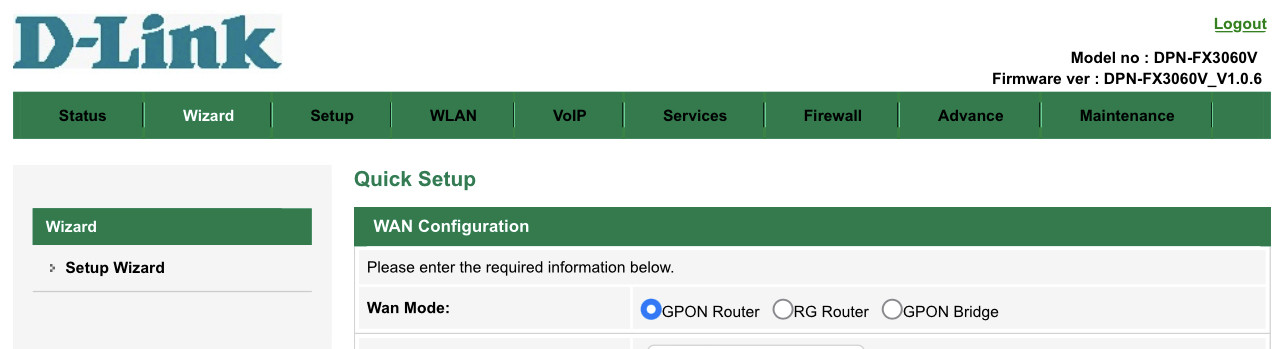
What's the difference?

GPON Router:
• itself become a router
• everything that you expect a router to be like
• Maximum 2 VoIP config on RJ11 port1 and port2
• Maximum flexibility with what you want to do; e.g. you don't want to PPPoE then send the VLAN (you want tagged or you want untagged biggrin.gif ) downstream through any LAN port you want, or (un)set unifitv VLAN on port1 (eh, UPB on its own vlan is quicker and awesome pic without delay!), on use port2 to bridge VoIP VLAN to a VoIP phone, port forwarding, DMZ, DDNS, IPv6, NTP, DNS relay, ....

RG Router:
While I didn't play with this mode before,
• the wizard offers the same config like GPON Router
• minus the VoIP configuration for 2 RJ11 ports.
• VoIP VLAN (not configuration) seems like hardcoded to downstream down LAN port3, I guess to a downstream VoIP phone.

GPON Bridge
• It only offers VOIP configuration for 2 RJ11 ports
• All other VLANs will be sent through downstream ports
• Once using this mode, the ONR turns into dumb ONU, with no option to login to reconfigure it in future (i cannot even fogure out what is the "ONU's" own IP, so cannot even attempt to login)

user posted image
cyberic
post Sep 11 2023, 07:41 AM

Regular
******
Senior Member
1,130 posts

Joined: Jan 2003


QUOTE(LDP @ Sep 10 2023, 09:23 AM)
TM just came recently and gave me the new DLink router AX 3000..Regular speed test on my laptop can only hit 90 Mbps for dload speed...Worse still the laptop is sitting next to the router...I have just upgraded to 300 Mbps recently with free upgrade to 500 Mbps...Sian ler...
*
I notice this twice already. Forgot what is the IP on first discovery. For 2nd discovery, with IP 110.x.x.x, I get 90 ish. When on 175.x.x.x, I can get 500mbps.
zioburosky13
post Sep 11 2023, 09:10 AM

On my way
****
Junior Member
554 posts

Joined: Jan 2003


QUOTE(simmarjit @ Sep 10 2023, 08:51 AM)
For 2Gbps there is a way to get that full speed rather than 1+1
*
Interesting, how to do it? What hardwares do I need to get, if I choose to upgrade to 2Gbps package?
simmarjit
post Sep 11 2023, 10:40 AM

Enthusiast
*****
Junior Member
980 posts

Joined: Dec 2011


QUOTE(zioburosky13 @ Sep 11 2023, 09:10 AM)
Interesting, how to do it? What hardwares do I need to get, if I choose to upgrade to 2Gbps package?
*
Everything is in here https://forum.lowyat.net/topic/4925452
Zelda85
post Sep 11 2023, 11:47 AM

On my way
****
Senior Member
695 posts

Joined: Jun 2008
Hi guys just want to know how you guys apply SWU 3.0 - 300Mbps package. with he Mesh router.
jhleo1
post Sep 11 2023, 11:59 AM

Look at all my stars!!
*******
Senior Member
4,381 posts

Joined: Jan 2003
Do you read what previously posted? Almost everyday we talked about. Or your question diff from those info given?

QUOTE(Zelda85 @ Sep 11 2023, 11:47 AM)
Hi guys just want to know how you guys apply SWU 3.0 - 300Mbps package. with he Mesh router.
*
totally_skint
post Sep 11 2023, 12:12 PM

Regular
******
Senior Member
1,185 posts

Joined: Mar 2007


QUOTE(jhleo1 @ Sep 11 2023, 11:59 AM)
Do you read what previously posted? Almost everyday we talked about. Or your question diff from those info given?
*
Ever tried finding a needle in a haystack? tongue.gif
A lot of these updates (with links to relevant posts) should be posted on the first page.
Zelda85
post Sep 11 2023, 12:21 PM

On my way
****
Senior Member
695 posts

Joined: Jun 2008
QUOTE(jhleo1 @ Sep 11 2023, 11:59 AM)
Do you read what previously posted? Almost everyday we talked about. Or your question diff from those info given?
*
QUOTE(totally_skint @ Sep 11 2023, 12:12 PM)
Ever tried finding a needle in a haystack?  tongue.gif
A lot of these updates (with links to relevant posts) should be posted on the first page.
*
ok will search on first page ...

453 Pages « < 434 435 436 437 438 > » Top
Topic ClosedOptions
 

Change to:
| Lo-Fi Version
0.0245sec    0.35    6 queries    GZIP Disabled
Time is now: 5th December 2025 - 11:17 PM