Welcome Guest ( Log In | Register )

Bump Topic Topic Closed RSS Feed
453 Pages « < 436 437 438 439 440 > » Bottom

Outline · [ Standard ] · Linear+

Unifi Official TM UniFi High Speed Broadband Thread V40, READ 1ST PAGE FOR RELEVANT WIFI INFO

views
     
dudester
post Sep 11 2023, 04:09 PM

Regular
******
Senior Member
1,226 posts

Joined: Nov 2017
QUOTE(lowlock @ Sep 11 2023, 12:51 PM)
just upgraded to swu 3.0 300mbps and i got dlink ax3000. got few question.

1. why the 2.4ghz performance so weak compared to my previous tplink ac1200? download only aroud 50++ mbps. still have few old device running on 2.4ghz. no problem on 5ghz and new device.
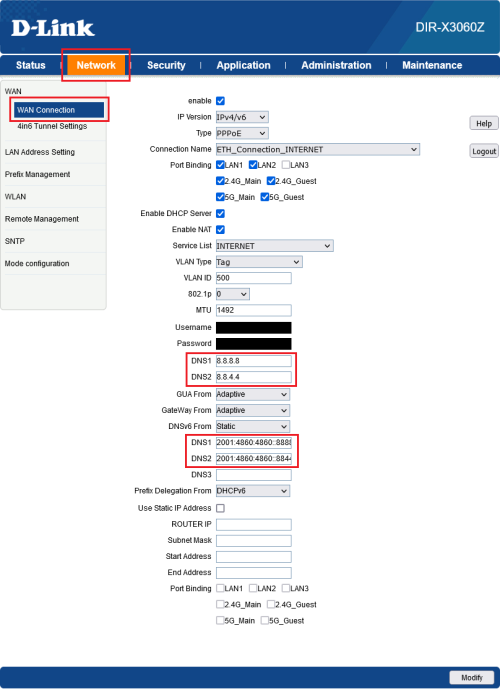
2. how to set dns on the router.

thanks
*
Is your mesh (2nd router) working? I had to WPS pair mine again after i off and on and relocate
1mr3tard3d
post Sep 11 2023, 04:12 PM

Regular
******
Senior Member
1,137 posts

Joined: Oct 2018


QUOTE(keong8867 @ Sep 11 2023, 03:49 PM)
Is it the problem of router? Or the line problem? Today is the first day I upgrade to 500mbps
*
QUOTE
There's such a thing as bandwidth limitation (or cap) on download server side. 200-300 mbps is very fast di in general for a single connection.

no, the download server is referring to your (download source - google drive/steam/wetransfer/gofile/pixeldrain,etc)
in short, if your speedtest could go up to 500 Mbps, then u r good
LostAndFound
post Sep 11 2023, 04:17 PM

Look at all my stars!!
*******
Senior Member
6,262 posts

Joined: Jul 2005
From: UEP Subang Jaya


QUOTE(keong8867 @ Sep 11 2023, 03:49 PM)
Is it the problem of router? Or the line problem? Today is the first day I upgrade to 500mbps
*
Your house now have a bigger pipe for water to come in. When you test with speedtest, the water company say the pipe can full low from their loji. But now you are testing with water from another loji which is further away and pass through different pipe. That loji has to serve many many people at a time, and even though their pipe is much bigger than yours they won't give you all the water they can generate.

Speedtest is reliable to show that everything is working well, if you really want to verify try to torrent a big file (depending on your ethics, can always torrent some ISO for open source Linux distro). But for single-source download, don't expect to get 500 mbps everywhere.
keong8867
post Sep 11 2023, 04:26 PM

Casual
***
Junior Member
348 posts

Joined: Nov 2013
QUOTE(LostAndFound @ Sep 11 2023, 04:17 PM)
Your house now have a bigger pipe for water to come in. When you test with speedtest, the water company say the pipe can full low from their loji. But now you are testing with water from another loji which is further away and pass through different pipe. That loji has to serve many many people at a time, and even though their pipe is much bigger than yours they won't give you all the water they can generate.

Speedtest is reliable to show that everything is working well, if you really want to verify try to torrent a big file (depending on your ethics, can always torrent some ISO for open source Linux distro). But for single-source download, don't expect to get 500 mbps everywhere.
*
I understand what you are saying. This is the first time that I use 500mbps. So I'm not familiar how it works. When I using 100mbps before,i download in steam or epic games it always get the full speed 100mbps. But this time i download it but it only get 200-300mbps , so i thinking is it the router problem.

2 years ago when install unifi, the first router they give me that cant get 100 mbps, and it will dc when I using. But after it change to AC1200, everything is fine
yenchenje
post Sep 11 2023, 04:27 PM

Enthusiast
*****
Junior Member
932 posts

Joined: Dec 2019
QUOTE(LostAndFound @ Sep 11 2023, 03:46 PM)
There's such a thing as bandwidth limitation (or cap) on download server side. 200-300 mbps is very fast di in general for a single connection.
*
Unless the server on speed test side is like 20 years old, most speed test servers nowadays able to sustain 1Gbps without much issues, or even 10Gbps.

500mbps is like a walk in the park even for local Malaysia speedtest servers. Their router/connection is the one that’s not working properly here
bugipunch
post Sep 11 2023, 04:30 PM

Getting Started
**
Junior Member
172 posts

Joined: Jul 2021
QUOTE(lowlock @ Sep 11 2023, 12:51 PM)
just upgraded to swu 3.0 300mbps and i got dlink ax3000. got few question.

1. why the 2.4ghz performance so weak compared to my previous tplink ac1200? download only aroud 50++ mbps. still have few old device running on 2.4ghz. no problem on 5ghz and new device.
2. how to set dns on the router.

thanks
*
looks like congested channel. Download wifi scanner and scan which 1 has best performance. For my area best performance is channel 1 for 2.4ghz.
LostAndFound
post Sep 11 2023, 04:31 PM

Look at all my stars!!
*******
Senior Member
6,262 posts

Joined: Jul 2005
From: UEP Subang Jaya


QUOTE(keong8867 @ Sep 11 2023, 03:35 PM)
speedtest I got 500mbps. But when I use , or download it dont get 500mbps. Only 200-300mbps
*
QUOTE(yenchenje @ Sep 11 2023, 04:27 PM)
Unless the server on speed test side is like 20 years old, most speed test servers nowadays able to sustain 1Gbps without much issues, or even 10Gbps.

500mbps is like a walk in the park even for local Malaysia speedtest servers. Their router/connection is the one that’s not working properly here
*
Why you comment without reading his messages above? So confidently diagnosing summore, better than TM support ni.
yenchenje
post Sep 11 2023, 04:31 PM

Enthusiast
*****
Junior Member
932 posts

Joined: Dec 2019
QUOTE(keong8867 @ Sep 11 2023, 04:26 PM)
I  understand what you are saying. This is the first time that I use 500mbps. So I'm not familiar how it works. When I using 100mbps before,i download in steam or epic games it always get the full speed 100mbps. But this time i download it but it only get 200-300mbps , so i thinking is it the router problem.

2 years ago when install unifi, the first router they give me that cant get 100 mbps, and it will dc when I using. But after it change to AC1200, everything is fine
*
Since you’re currently on 500mbps, your BTU should still be separated from your router, do you still have your old AC1200 kicking around? If you have the know how, try changing it back to AC1200 and do a speedtest (Putting old PPPoE credentials back and see)

I personally won’t trust D-Link’s equipment too much due to their track record. Best case is just getting like the AX50 and replace it completely. You lose the mesh but the AX50’s internal radio should still be better than your D-Link
yenchenje
post Sep 11 2023, 04:33 PM

Enthusiast
*****
Junior Member
932 posts

Joined: Dec 2019
QUOTE(LostAndFound @ Sep 11 2023, 04:31 PM)
Why you comment without reading his messages above? So confidently diagnosing summore, better than TM support ni.
*
Overlooked that message. Whoops tongue.gif

Still my point stands tho, to your message I quoted. Speedtest servers generally are uncapped till at least gigabit.
keong8867
post Sep 11 2023, 04:36 PM

Casual
***
Junior Member
348 posts

Joined: Nov 2013
QUOTE(yenchenje @ Sep 11 2023, 04:31 PM)
Since you’re currently on 500mbps, your BTU should still be separated from your router, do you still have your old AC1200 kicking around? If you have the know how, try changing it back to AC1200 and do a speedtest (Putting old PPPoE credentials back and see)

I personally won’t trust D-Link’s equipment too much due to their track record. Best case is just getting like the AX50 and replace it completely. You lose the mesh but the AX50’s internal radio should still be better than your D-Link
*
yes AC1200 is still with me. I trying to find is AC1200 can support up to 500mbps or not
lowlock
post Sep 11 2023, 04:43 PM

Getting Started
**
Junior Member
179 posts

Joined: Dec 2009
From: Rumahku syurgaku


QUOTE(aniq8676 @ Sep 11 2023, 02:59 PM)
2.4GHz (40MHz Bandwidth)
user posted image

DNS
user posted image
*
i follow all your setting but my dns is still 192.168.1.1

check through cmd ipconfig/all


edit:my bad. check through router status it switch already to the one i set.

This post has been edited by lowlock: Sep 11 2023, 04:51 PM
lowlock
post Sep 11 2023, 04:44 PM

Getting Started
**
Junior Member
179 posts

Joined: Dec 2009
From: Rumahku syurgaku


QUOTE(dudester @ Sep 11 2023, 04:09 PM)
Is your mesh (2nd router) working? I had to WPS pair mine again after i off and on and relocate
*
im only using 1 unit
westlife
post Sep 11 2023, 04:48 PM

10k Club
********
All Stars
14,251 posts

Joined: Jan 2011
QUOTE(keong8867 @ Sep 11 2023, 02:32 PM)
My account is finally upgraded to swu 3.0. It free speed upgrade to 500mbps, but when I do speedtest, it have 500mbps. But when I use it on download, the speed is teribble. I download game in Steam, it around 100mbps -200mbps only. When I use Epic to download, it get better, i have 450mbps. Is this normally or I should complaint to 100?
*

server itself has limited bandwidth, not just simply Becos u have higher speed Internet then u can get full speed also.
dawho
post Sep 11 2023, 04:52 PM

Enthusiast
*****
Senior Member
782 posts

Joined: Oct 2009


guys wanna ask..in my account details it say i have stay with unifi 3.0...but i remember that when i change 3.0 still not out yet iinm....so does that mean my bill will be 119?
LostAndFound
post Sep 11 2023, 05:04 PM

Look at all my stars!!
*******
Senior Member
6,262 posts

Joined: Jul 2005
From: UEP Subang Jaya


QUOTE(yenchenje @ Sep 11 2023, 04:33 PM)
Overlooked that message. Whoops tongue.gif

Still my point stands tho, to your message I quoted. Speedtest servers generally are uncapped till at least gigabit.
*
You mean the message which specifically said DOWNLOAD server and never mentioned speedtest server at all?
dudester
post Sep 11 2023, 05:12 PM

Regular
******
Senior Member
1,226 posts

Joined: Nov 2017
QUOTE(lowlock @ Sep 11 2023, 04:44 PM)
im only using 1 unit
*
Maybe thats why. When my mesh extender was not working i was getting 10-15mbps.
My old ASUS AX1300 was better for 2.4. I think the TM one is weak.
Oltromen Ripot
post Sep 11 2023, 05:25 PM

👍 999999 person Likes this member
*******
Senior Member
4,034 posts

Joined: Dec 2019
QUOTE(keong8867 @ Sep 11 2023, 03:35 PM)
speedtest I got 500mbps. But when I use , or download it dont get 500mbps. Only 200-300mbps
*
(1) Your local internet exchange is shared between users. The congestion when you speedtest-ed maybe lower than when you are downloading.

(2) The "weather" and network conditions when you speedtest-ed and when you are downloading are not necessarily the same.

(3) The IP network path between your testing device and speedtest server is NOT the same IP network path taken between your downloading device and your download server. You cannot expect the same experience of driving from Johor Bahru to Arau and of driving from Johor Bahru to Kota Bharu, eventhough both passes through Kuala Lumpur.

(4) What you should use speedtest for, is to test what is the maximum capability of network connection between your testing device and your ISP. Can it reach your subscribed speed at all in the first place? For example, assuming you are using ethernet cable, if at any time and against multiple speedtest servers, you can only get maxed 400Mbps of a 500Mbps subscription, then you already determine that either your testing device is crap or router is crap or your fibre line is crap.

But since you already proven that you are able to get 500Mbps, even if only just once, that means there is already no issue between your test device to your router to your ISP and to your speedtest server (unless wear and tear over time).

Apart from the confidence that the path up to ISP is "500Mbps-rated", everything else are variables that impact your download speed.

This post has been edited by Oltromen Ripot: Sep 11 2023, 05:28 PM

Oltromen Ripot
post Sep 11 2023, 06:41 PM

👍 999999 person Likes this member
*******
Senior Member
4,034 posts

Joined: Dec 2019
Wake me up when September ends.

19 days left.
14 weekdays left.

Oltromen Ripot
post Sep 11 2023, 06:47 PM

👍 999999 person Likes this member
*******
Senior Member
4,034 posts

Joined: Dec 2019
QUOTE(Xanxeviera. @ Sep 10 2023, 07:27 PM)
user posted image”Fahmi umum apa harini”
*
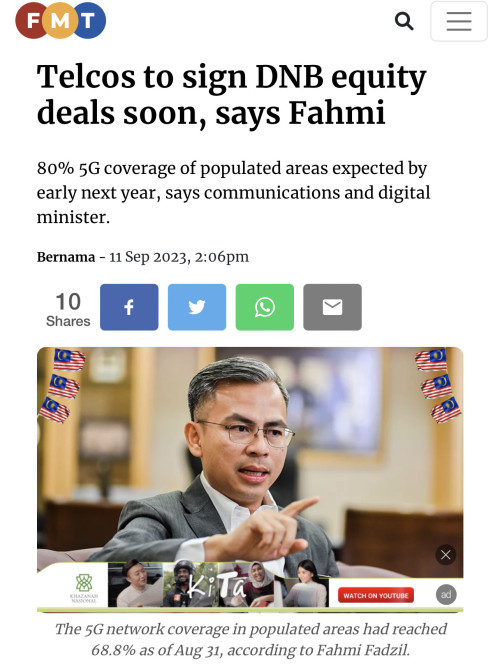
Another news also on 10th September, late night.
Bername dateline is on 11th.

Chronicle of #ApaMenteriKomunikasiBuatHariIni

user posted image

user posted image
pokchik
post Sep 11 2023, 07:25 PM

I'm getting too old for this sh*t
******
Senior Member
1,304 posts

Joined: Mar 2010


QUOTE(dawho @ Sep 11 2023, 04:52 PM)
guys wanna ask..in my account details it say i have stay with unifi 3.0...but i remember that when i change 3.0 still not out yet iinm....so does that mean my bill will be 119?
*
some of the forumnists here also stated that they were 'auto' changed to SWU3.0.
if your package is with 300Mbps, then most likely you're getting it for RM119 + SST..
btw, have you done a speedtest lately? 300Mbps package for SWU3.0 plan should come with free upgrade to 500Mbps for 1yr..
though I honestly think that there should be some installers coming over to your house to validate that.

how to know actual bill? you can call 100.. or wait for your next bill.

not sure if you're entitled for Mesh Wifi 6 routers.. but IMO, they suck.

This post has been edited by pokchik: Sep 11 2023, 07:27 PM

453 Pages « < 436 437 438 439 440 > » Top
Topic ClosedOptions
 

Change to:
| Lo-Fi Version
0.0188sec    0.45    6 queries    GZIP Disabled
Time is now: 5th December 2025 - 02:50 PM