Welcome Guest ( Log In | Register )

Bump Topic Topic Closed RSS Feed
413 Pages « < 99 100 101 102 103 > » Bottom

Outline · [ Standard ] · Linear+

 Official TM UniFi High Speed Broadband Thread V39, READ 1ST PAGE FOR RELEVANT WIFI INFO

views
     
aniq8676
post Apr 4 2021, 12:48 PM

Regular
******
Senior Member
1,524 posts

Joined: Dec 2020
From: Perak


QUOTE(dino89 @ Apr 4 2021, 10:46 AM)
Ya i upgraded from the rm199 plan 500mbps
May i ask m9 plus is better in which area compared to the x20 ya? If lets say i take the 3 pack x20, will it be better than the 2 pack m9 plus in coverage? Or is it bcos of the limiting 2 antennas in the x20 compared to the m9plus 4 antennas (if not mistaken)

Its seems that its between a high end wifi 5 wiremesh vs a entry wifi 6 wifi mesh
*
Deco M9 Plus has 8 internal antennas, Tri-Band, WIFI 5, can cover up to 6,500 sq ft

Deco X20 has 2 internal antennas, the latest security WPA3, WIFI6, can cover up to 5,800 sq ft

in terms of coverage, the Deco M9 Plus win

This post has been edited by aniq8676: Apr 4 2021, 12:50 PM
dino89
post Apr 4 2021, 01:27 PM

Dino89 Trading
*******
Senior Member
4,966 posts

Joined: Mar 2011


QUOTE(aniq8676 @ Apr 4 2021, 12:48 PM)
Deco M9 Plus has 8 internal antennas, Tri-Band, WIFI 5, can cover up to 6,500 sq ft

Deco X20 has 2 internal antennas, the latest security WPA3, WIFI6, can cover up to 5,800 sq ft

in terms of coverage, the Deco M9 Plus win
*
Oh 8 internal antennas somore sweat.gif
Coverage actually can be negated with more "packs" of x20 right?

Now i guess its just whether i want to future proof with Wifi 6 mesh or stick with a good wifi 5 mesh
aniq8676
post Apr 4 2021, 01:31 PM

Regular
******
Senior Member
1,524 posts

Joined: Dec 2020
From: Perak


QUOTE(dino89 @ Apr 4 2021, 01:27 PM)
Oh 8 internal antennas somore sweat.gif
Coverage actually can be negated with more "packs" of x20 right?

Now i guess its just whether i want to future proof with Wifi 6 mesh or stick with a good wifi 5 mesh
*
1. YES
2. Depends on you, whether to take WIFI 6 or not
brianklc
post Apr 5 2021, 10:32 AM

Casual
***
Junior Member
372 posts

Joined: Sep 2006
QUOTE(dino89 @ Apr 4 2021, 01:27 PM)
Oh 8 internal antennas somore sweat.gif
Coverage actually can be negated with more "packs" of x20 right?

Now i guess its just whether i want to future proof with Wifi 6 mesh or stick with a good wifi 5 mesh
*
If u have the budget, take Deco X90, it’s not just about future proof (as u can always upgrade ur router) but to improve the speed delivered by the satellite deco unit. Am quite surprised that I can still get 310+ via x90 as compared to 160+ via M9 for 300mbps package.
StevenL
post Apr 5 2021, 10:55 AM

Enthusiast
*****
Junior Member
732 posts

Joined: Jul 2010
QUOTE(neekun @ Apr 4 2021, 12:27 PM)
Mine not mesh but all my 5ghz network same ssid so it auto switches to the stronger signal as I walk from room to room
*
Noob here...

I'm assuming you have another gigabyte router as repeater? May i know how many & type of router u have? Thanks
aniq8676
post Apr 5 2021, 12:16 PM

Regular
******
Senior Member
1,524 posts

Joined: Dec 2020
From: Perak


QUOTE(brianklc @ Apr 5 2021, 10:32 AM)
If u have the budget, take Deco X90, it’s not just about future proof (as u can always upgrade ur router) but to improve the speed delivered by the satellite deco unit. Am quite surprised that I can still get 310+ via x90 as compared to 160+ via M9 for 300mbps package.
*
Mine Deco M4, main Deco can speed up to 330mbps while for satellite can only be around 200-280mbps , for 300mbps package
brianklc
post Apr 5 2021, 03:27 PM

Casual
***
Junior Member
372 posts

Joined: Sep 2006
QUOTE(aniq8676 @ Apr 5 2021, 12:16 PM)
Mine Deco M4, main Deco can speed up to 330mbps while for satellite can only be around 200-280mbps , for 300mbps package
*
The speed tht u get from satellite depends on house size, walls set up and building materials. By comparing both M9 and X90, it gives me quite a very huge diff with stable results from speed test at 310+ (Deco M9 @ 160+) at a location 8 meters from the satellite deco (with 1 partition wall in between), if 3 meters directly facing the satellite deco (which located at Ground Living Hall) I can get the same speed as per main deco (Deco M9 @ 310+). FYI, main deco is located at 1st floor living hall, clocking at 320-328. However, once I am at Ground back kitchen (with 2 partition walls from the satellite deco), the speed drop till 25-30, I have to repurpose my Deco M9 to boost up the back kitchen speed, unfortunately using Deco M9 at back kitchen, I can only get 150+... quite confident that with 3rd unit of X90, I can get almost full speed too...

Hence, if u have slightly more budget, u shld try X90 it’s worth the investment. As I am on 300mbps package, I won’t be able to tell how the speed reading looks like for 500mbps and 800mbps. Btw, it’s not tht expensive whn I got it from 27.3 sales. Am
not an employee of TP Link.

This post has been edited by brianklc: Apr 6 2021, 01:12 AM
QuantumEdge
post Apr 6 2021, 11:00 AM

Regular
******
Senior Member
1,595 posts

Joined: Jan 2016


Hey guys, I got some interesting news ...
Quote:
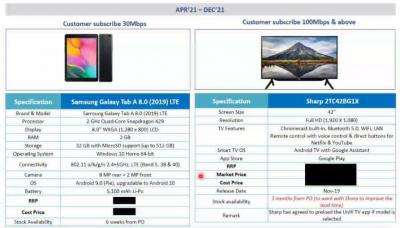
"TM dah release again Winback Package means other company fiber transfer to Unifi can enjoy this package and give away"

30mbps - Samsumg Galaxy Tab 8.0(2019)LTE.
100mbps and above - Sharp 2TC42BG1X.
Attached Image
Attached Image
Attached Image

This post has been edited by QuantumEdge: Apr 6 2021, 11:43 AM
GuyM
post Apr 6 2021, 01:52 PM

Regular
******
Senior Member
1,787 posts

Joined: Jul 2007
Anyone used Deco m4 with their stock dir842 router? What's your take?

Am currently on 100mbps using rtn12hp as repeater but not satisfied hence though of adding Deco m4 to improve it. 2.5 storey with about 2900 sqf
PRSXFENG
post Apr 6 2021, 02:15 PM

Look at all my stars!!
*******
Senior Member
2,608 posts

Joined: Nov 2020


QUOTE(GuyM @ Apr 6 2021, 01:52 PM)
Anyone used Deco m4 with their stock dir842 router? What's your take?

Am currently on 100mbps using rtn12hp as repeater but not satisfied hence though of adding Deco m4 to improve it. 2.5 storey with about 2900 sqf
*
I would suggest removing the stock router and using only the deco as the router + mesh.
GuyM
post Apr 6 2021, 02:19 PM

Regular
******
Senior Member
1,787 posts

Joined: Jul 2007
QUOTE(PRSXFENG @ Apr 6 2021, 02:15 PM)
I would suggest removing the stock router and using only the deco as the router + mesh.
*
Huh? I thought I've to connect the deco to a router ie router -> Deco 1 -> Deco etc? No?


aniq8676
post Apr 6 2021, 02:24 PM

Regular
******
Senior Member
1,524 posts

Joined: Dec 2020
From: Perak


QUOTE(GuyM @ Apr 6 2021, 02:19 PM)
Huh? I thought I've to connect the deco to a router ie router -> Deco 1 -> Deco etc? No?


*


You can use that deco mesh as your router,

You can refer to this video
GuyM
post Apr 6 2021, 02:49 PM

Regular
******
Senior Member
1,787 posts

Joined: Jul 2007
QUOTE(aniq8676 @ Apr 6 2021, 02:24 PM)


You can use that deco mesh as your router,

You can refer to this video
*
Damned... Thanks!

Last question can the Google dns be setup in mesh?
aniq8676
post Apr 6 2021, 02:54 PM

Regular
******
Senior Member
1,524 posts

Joined: Dec 2020
From: Perak


QUOTE(GuyM @ Apr 6 2021, 02:49 PM)
Damned... Thanks!

Last question can the Google dns be setup in mesh?
*
YES
ray8426
post Apr 6 2021, 03:07 PM

Casual
***
Junior Member
334 posts

Joined: Jul 2011
QUOTE(GuyM @ Apr 6 2021, 02:19 PM)
Huh? I thought I've to connect the deco to a router ie router -> Deco 1 -> Deco etc? No?


*
If you know your unifi login ID and password, you able use Deco as router.
I using Deco X20 now. thumbup.gif

QUOTE(GuyM @ Apr 6 2021, 02:49 PM)
Last question can the Google dns be setup in mesh?
Can, i use it in deco laugh.gif
You can set at DHCP server there.

This post has been edited by ray8426: Apr 6 2021, 03:39 PM
neekun
post Apr 6 2021, 04:18 PM

I'm a Mac
*******
Senior Member
2,570 posts

Joined: Jun 2006


QUOTE(StevenL @ Apr 5 2021, 10:55 AM)
Noob here...

I'm assuming you have another gigabyte router as repeater? May i know how many & type of router u have? Thanks
*
Main router is ASUS GT-AX11000 sitting next to Unifi modem. From this router LAN port i connect TPLINK power line https://www.tp-link.com/uk/home-networking/...l-wpa8630p-kit/ and on the other floor is the power line node broadcasting wireless AC signal.
PRSXFENG
post Apr 6 2021, 04:47 PM

Look at all my stars!!
*******
Senior Member
2,608 posts

Joined: Nov 2020


QUOTE(GuyM @ Apr 6 2021, 02:49 PM)
Damned... Thanks!

Last question can the Google dns be setup in mesh?
*
I don't know why but Unifi's default instructions for mesh is to connect it to the stock router and broadcast yet another wifi that will compete with your stock router (they literally tell you to forget the stock router wifi, doesn't even tell you to disable it) while also creating a double NAT

The better way is to just remove the stock router, and make one of the Deco nodes a router. More control, less back doors.
haturaya
post Apr 6 2021, 04:58 PM

Look at all my stars!!
Group Icon
Elite
2,553 posts

Joined: Jan 2003
2 options to use Mesh

1) Stock Router / own router -> Mesh (Access point mode)

or

2) Mesh (Router mode), no longer using stock router.

If you have powerful own router like Mikrotik then option 1 is better. Else option 2 will do.
GuyM
post Apr 6 2021, 09:03 PM

Regular
******
Senior Member
1,787 posts

Joined: Jul 2007
QUOTE(ray8426 @ Apr 6 2021, 03:07 PM)
If you know your unifi login ID and password, you able use Deco as router.
I using Deco X20 now. thumbup.gif
Can, i use it in deco laugh.gif
You can set at DHCP server there.
*
X20 has wpa3 and trend internet protection vs m4, correct? I have the login ID...😆

QUOTE(PRSXFENG @ Apr 6 2021, 04:47 PM)
I don't know why but Unifi's default instructions for mesh is to connect it to the stock router and broadcast yet another wifi that will compete with your stock router (they literally tell you to forget the stock router wifi, doesn't even tell you to disable it) while also creating a double NAT

The better way is to just remove the stock router, and make one of the Deco nodes a router. More control, less back doors.
*
This sounds logical
QUOTE(haturaya @ Apr 6 2021, 04:58 PM)
2 options to use Mesh

1) Stock Router / own router -> Mesh (Access point mode)
or
2) Mesh (Router mode), no longer using stock router.

If you have powerful own router like Mikrotik then option 1 is better. Else option 2 will do.
*
I have stock dlink dir842 fro TM for the longest time...
afif92
post Apr 6 2021, 09:10 PM

Casual
***
Junior Member
374 posts

Joined: Mar 2010
QUOTE(PRSXFENG @ Apr 6 2021, 04:47 PM)
I don't know why but Unifi's default instructions for mesh is to connect it to the stock router and broadcast yet another wifi that will compete with your stock router (they literally tell you to forget the stock router wifi, doesn't even tell you to disable it) while also creating a double NAT

The better way is to just remove the stock router, and make one of the Deco nodes a router. More control, less back doors.
*
Some people prefer to use Unifi TV. If using old unifi tv, the port will be used. So no more port for other devices if using deco as main router while using stock router still have 3 more free port. If using new Unifi Tv box, no need to use IPTV port. The instructions are made to be used for all situation.

413 Pages « < 99 100 101 102 103 > » Top
Topic ClosedOptions
 

Change to:
| Lo-Fi Version
0.0414sec    4.09    6 queries    GZIP Disabled
Time is now: 5th December 2025 - 01:09 PM