Outline ·
[ Standard ] ·
Linear+
Official TM UniFi High Speed Broadband Thread V39, READ 1ST PAGE FOR RELEVANT WIFI INFO
|
dino89
|
 Apr 3 2021, 10:48 PM Apr 3 2021, 10:48 PM
|

|
Hi, will be soon upgrading to Unifi 800mbps and am interested to upgrade my house router / extender system to a wifi mesh system
Want to ask which setup is recommended:
1. TP Link X20 (3 pack)
2. TP Link X60 (2 pack)
3. TP Link M9 Plus (2 pack)
My house is a typical 2 1/2 story 20 x 70 foot link house
Thanks
|
|
|
|
|
|
dino89
|
Apr 3 2021, 11:07 PM
|
|
|
QUOTE(aniq8676 @ Apr 3 2021, 11:03 PM) M9 Plus provided by TM is enough, unless you want to use latest technology WIFI6, I suggest you to take Deco X20 U mean TM provides the M9 plus a  They only offered me free M4  I do plan to future proof with WIFI6, so was leaning to X20 but X20 only has 2x2 internal antennas? My current router now is TP link archer C2300 with 3x3 antenna, will it have any performance difference? |
|
|
|
|
|
dino89
|
Apr 4 2021, 10:46 AM
|
|
|
QUOTE(aniq8676 @ Apr 3 2021, 11:16 PM) Did you upgrade using the Unifi 800Mbps Loyalty plan (RM199) ? If so, they only gave u the M4. I suggest you take the M9 Plus. I thought you were upgrading using a usual plan 800mbps (RM349)  Ya i upgraded from the rm199 plan 500mbps May i ask m9 plus is better in which area compared to the x20 ya? If lets say i take the 3 pack x20, will it be better than the 2 pack m9 plus in coverage? Or is it bcos of the limiting 2 antennas in the x20 compared to the m9plus 4 antennas (if not mistaken) Its seems that its between a high end wifi 5 wiremesh vs a entry wifi 6 wifi mesh This post has been edited by dino89: Apr 4 2021, 10:59 AM |
|
|
|
|
|
dino89
|
Apr 4 2021, 10:49 AM
|
|
|
QUOTE(neekun @ Apr 4 2021, 08:49 AM) TPLINK router no more firmware upgrade for me, mine was C5 AC1200. Recently i changed mine to ASUS GT-AX1100, got good deal on Shopee. With ASUS i can get up to max speed (800mbps) on ground floor. But first floor still weak, around 100mbps the max. So for 1st floor i stick with my current TPLINK AV1300 Powerline where speed is around 250mbps. Both also is router yes? Im looking to go for wiremesh as i dont want to keep on changing wifi as i go up and down the stairs like what i am currently doing now |
|
|
|
|
|
dino89
|
Apr 4 2021, 01:27 PM
|
|
|
QUOTE(aniq8676 @ Apr 4 2021, 12:48 PM) Deco M9 Plus has 8 internal antennas, Tri-Band, WIFI 5, can cover up to 6,500 sq ft Deco X20 has 2 internal antennas, the latest security WPA3, WIFI6, can cover up to 5,800 sq ft in terms of coverage, the Deco M9 Plus win Oh 8 internal antennas somore Coverage actually can be negated with more "packs" of x20 right? Now i guess its just whether i want to future proof with Wifi 6 mesh or stick with a good wifi 5 mesh |
|
|
|
|
|
dino89
|
Apr 7 2021, 08:28 PM
|
|
|
Hi sifus,
Want to ask i just installed TP Link X20 for my unifi, unfortunately realised that the unit only has 2 ports which one is taken by modem and the other taken by the HyppTV.
I want to ask any way to set the HyppTV port to be able to use with other devices? Eg Android TV Box?
Also any way to "force" devices to always stick to the 5ghz band instead of jumping between 2.4 and 5?
Thanks
|
|
|
|
|
|
dino89
|
Apr 7 2021, 09:22 PM
|
|
|
QUOTE(aniq8676 @ Apr 7 2021, 09:03 PM) 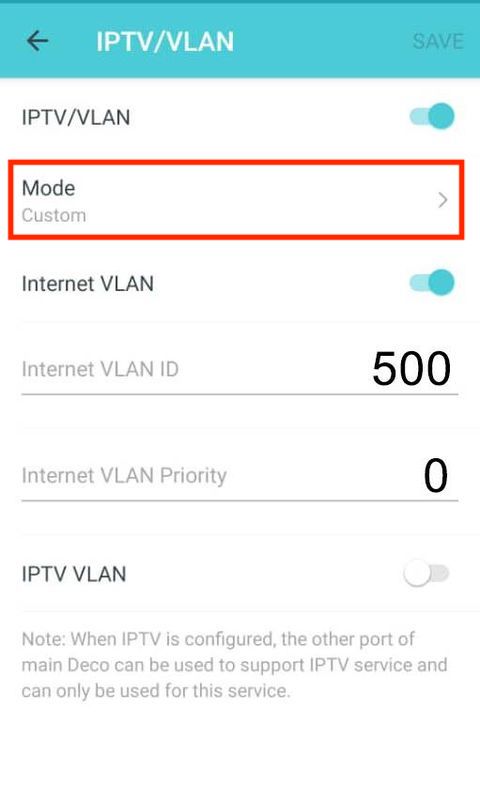 please choose "custom" For WIFI: there is a way for a device to use 5.0ghz wifi, but this method is not recommended at all set the main WIFI to 5.0Ghz, while the Guest WIFI you set to 2.4Ghz Thanks! Manaaged to off the IPTV port and now my android tv box can be plugged in via cable instead of Wifi I still have some "legacy" devices in my house that need to run on 2.4ghz, if not I will just off the 2.4ghz band. I guess for now have to leave both bands on and hope that my devices will be "smart" abit to use the 5ghz band lol |
|
|
|
|
|
dino89
|
Apr 7 2021, 11:11 PM
|
|
|
QUOTE(jacktiew @ Apr 7 2021, 10:55 PM) Turn on the guest wifi, set only for 2.4Ghz, turn off isolated from main network on the guest wifi and set 5Ghz only on main network. Problem solved. Thanks! Will consider doing this BTW is this correct for ipv6 setup? 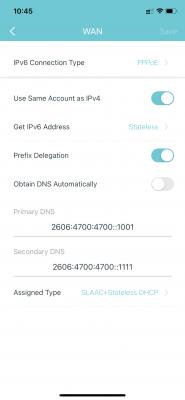
|
|
|
|
|
|
dino89
|
Apr 7 2021, 11:16 PM
|
|
|
QUOTE(aniq8676 @ Apr 7 2021, 11:14 PM)  YES Thanks! |
|
|
|
|
|
dino89
|
Apr 7 2021, 11:17 PM
|
|
|
QUOTE(jacktiew @ Apr 7 2021, 11:13 PM) I'm using it in AP mode so I'm not sure. But it seems correct to me. You can use this website to test whether you get the IPv6 address or not. http://ip6.meCant connect to the site, meaning belum lagi ipv6 Mayb need to wait awhile or restart the x20 packs Edit: On my phone, i can get thru ipv6 pages, but on my macbook cant This post has been edited by dino89: Apr 7 2021, 11:34 PM |
|
|
|
|
|
dino89
|
Apr 8 2021, 11:25 AM
|
|
|
QUOTE(jacktiew @ Apr 7 2021, 10:55 PM) Turn on the guest wifi, set only for 2.4Ghz, turn off isolated from main network on the guest wifi and set 5Ghz only on main network. Problem solved. Unfortunately my wifi printer running on guest network cant print if my devices are connected on the main network I guess i have to enable 2.4ghz on the main network for the printing works to go on |
|
|
|
|
|
dino89
|
Apr 8 2021, 03:51 PM
|
|
|
QUOTE(jacktiew @ Apr 8 2021, 01:08 PM) Once you turn off' 'isolated from main network', you should be able to ping your printer. On the deco app, i cant find this setting to turn off  |
|
|
|
|
|
dino89
|
Apr 8 2021, 09:29 PM
|
|
|
QUOTE(jacktiew @ Apr 8 2021, 08:21 PM) Maybe is you because you're using router mode. Maybe you can change the vlan under the guest wifi to 1 to see whether it works. Otherwise you have to stick with what you have now. This is mine which is using AP mode. 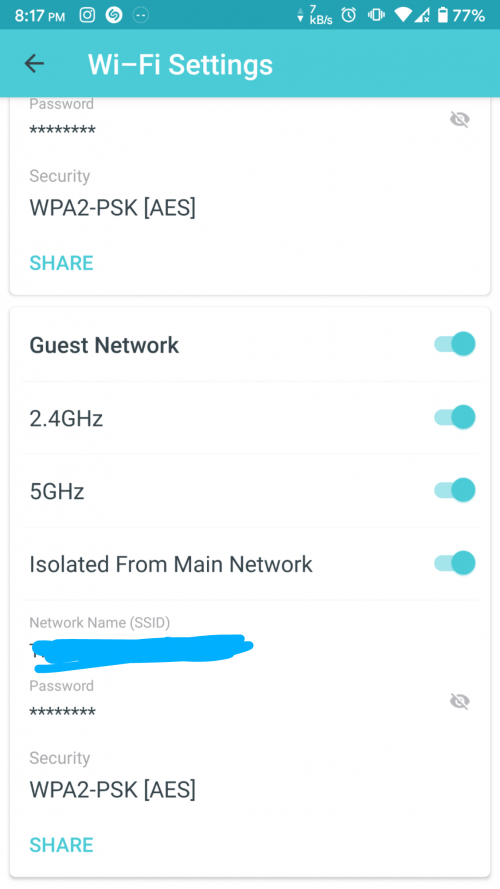 Mayb like what u said, i using as router mode Mine like this d 
|
|
|
|
|
|
dino89
|
Apr 8 2021, 09:56 PM
|
|
|
QUOTE(jacktiew @ Apr 8 2021, 09:45 PM) Mine is Deco M4. Since x20 is still new, maybe coming soon in your upcoming firmware update. Mayb u r right, so i guess need to wait and hope it will come in future software update. Only my printer and 1 old laptop at home is on 2.4ghz, the rest is on 5ghz band d |
|
|
|
|



 Quote
Quote

 0.1917sec
 0.35
0.35
 7 queries
 GZIP Disabled