Outline ·
[ Standard ] ·
Linear+
Official TM UniFi High Speed Broadband Thread V39, READ 1ST PAGE FOR RELEVANT WIFI INFO
|
YoungMan
|
 Apr 7 2021, 07:21 PM Apr 7 2021, 07:21 PM
|

|
QUOTE(jerry123939 @ Apr 7 2021, 04:58 PM) For March I paid RM69+RM10[RC fees]+6%SST=RM83.75. I paid before 4/4. No, because I UPGRADED from unifi lite to unifi fiber, the amount paid does not bring forward. I knew from TM officer there is RM115.10 on TM side but I have no idea how much I need to pay now, everything is double charge, the fees/SST. The officer does told me to pay at least RM100 for this month. Still overpaying. If you have similar encounter, please advise. TQ Maybe you can show your bill charges so that someone who know can help. Just blank out the account number and address. For UniFi/Streamyx, the first bill will be paying for 2 months. So you pay in advance. |
|
|
|
|
|
QuantumEdge
|
Apr 7 2021, 07:33 PM
|
|
|
Guys, is it possible transferring to another ISP that's on TM infra within unifi's contract without the need of paying any penalty?
|
|
|
|
|
|
YoungMan
|
Apr 7 2021, 07:44 PM
|
|
|
QUOTE(QuantumEdge @ Apr 7 2021, 08:33 PM) Guys, is it possible transferring to another ISP that's on TM infra within unifi's contract without the need of paying any penalty? Not possible without penalty. |
|
|
|
|
|
dino89
|
Apr 7 2021, 08:28 PM
|
|
|
Hi sifus,
Want to ask i just installed TP Link X20 for my unifi, unfortunately realised that the unit only has 2 ports which one is taken by modem and the other taken by the HyppTV.
I want to ask any way to set the HyppTV port to be able to use with other devices? Eg Android TV Box?
Also any way to "force" devices to always stick to the 5ghz band instead of jumping between 2.4 and 5?
Thanks
|
|
|
|
|
|
aniq8676
|
Apr 7 2021, 09:03 PM
|
|
|
QUOTE(dino89 @ Apr 7 2021, 08:28 PM) Hi sifus, Want to ask i just installed TP Link X20 for my unifi, unfortunately realised that the unit only has 2 ports which one is taken by modem and the other taken by the HyppTV. I want to ask any way to set the HyppTV port to be able to use with other devices? Eg Android TV Box? Also any way to "force" devices to always stick to the 5ghz band instead of jumping between 2.4 and 5? Thanks 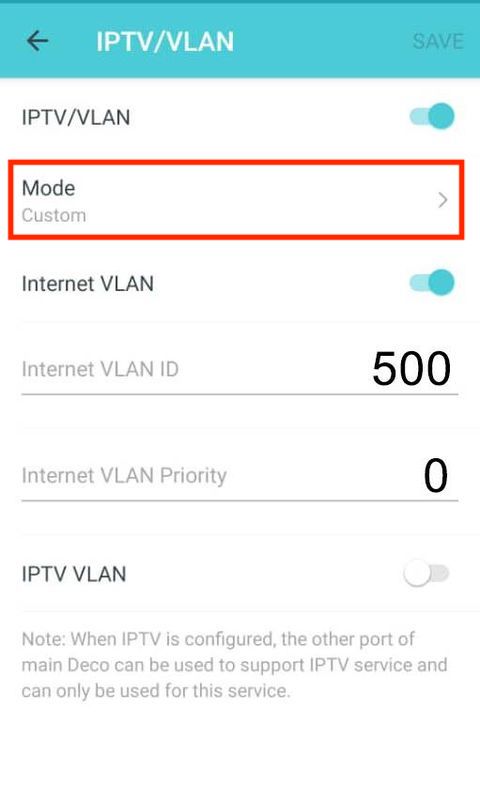 please choose "custom" For WIFI: there is a way for a device to use 5.0ghz wifi, but this method is not recommended at all set the main WIFI to 5.0Ghz, while the Guest WIFI you set to 2.4Ghz This post has been edited by aniq8676: Apr 7 2021, 09:12 PM |
|
|
|
|
|
Sam Leong
|
Apr 7 2021, 09:04 PM
|
|
|
Something messed up again with TM to ViewQwest SG? 70ms+ and peak 118ms?  routing seems to be direct connect to MYIX then to ViewQwest ady |
|
|
|
|
|
dino89
|
Apr 7 2021, 09:22 PM
|
|
|
QUOTE(aniq8676 @ Apr 7 2021, 09:03 PM) please choose "custom" For WIFI: there is a way for a device to use 5.0ghz wifi, but this method is not recommended at all set the main WIFI to 5.0Ghz, while the Guest WIFI you set to 2.4Ghz Thanks! Manaaged to off the IPTV port and now my android tv box can be plugged in via cable instead of Wifi I still have some "legacy" devices in my house that need to run on 2.4ghz, if not I will just off the 2.4ghz band. I guess for now have to leave both bands on and hope that my devices will be "smart" abit to use the 5ghz band lol |
|
|
|
|
|
go626201
|
Apr 7 2021, 10:26 PM
|
|
|
QUOTE(Sam Leong @ Apr 7 2021, 09:04 PM) Something messed up again with TM to ViewQwest SG? 70ms+ and peak 118ms? routing seems to be direct connect to MYIX then to ViewQwest ady Already few years for TM to ViewQwest SG. Routing not stable and speed also cant full speed. 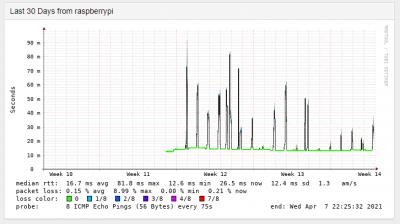 This post has been edited by go626201: Apr 7 2021, 10:27 PM
 |
|
|
|
|
|
jacktiew
|
Apr 7 2021, 10:55 PM
|
Getting Started

|
QUOTE(dino89 @ Apr 7 2021, 09:22 PM) Thanks! Manaaged to off the IPTV port and now my android tv box can be plugged in via cable instead of Wifi I still have some "legacy" devices in my house that need to run on 2.4ghz, if not I will just off the 2.4ghz band. I guess for now have to leave both bands on and hope that my devices will be "smart" abit to use the 5ghz band lol Turn on the guest wifi, set only for 2.4Ghz, turn off isolated from main network on the guest wifi and set 5Ghz only on main network. Problem solved. |
|
|
|
|
|
dino89
|
Apr 7 2021, 11:11 PM
|
|
|
QUOTE(jacktiew @ Apr 7 2021, 10:55 PM) Turn on the guest wifi, set only for 2.4Ghz, turn off isolated from main network on the guest wifi and set 5Ghz only on main network. Problem solved. Thanks! Will consider doing this BTW is this correct for ipv6 setup? 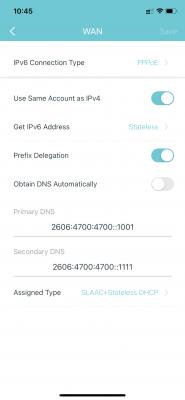
|
|
|
|
|
|
jacktiew
|
Apr 7 2021, 11:13 PM
|
Getting Started
|
QUOTE(dino89 @ Apr 7 2021, 11:11 PM) Thanks! Will consider doing this BTW is this correct for ipv6 setup?
I'm using it in AP mode so I'm not sure. But it seems correct to me. You can use this website to test whether you get the IPv6 address or not. http://ip6.me |
|
|
|
|
|
aniq8676
|
Apr 7 2021, 11:14 PM
|
|
|
QUOTE(dino89 @ Apr 7 2021, 11:11 PM) Thanks! Will consider doing this BTW is this correct for ipv6 setup?
 YES This post has been edited by aniq8676: Apr 7 2021, 11:16 PM |
|
|
|
|
|
dino89
|
Apr 7 2021, 11:16 PM
|
|
|
QUOTE(aniq8676 @ Apr 7 2021, 11:14 PM) YES Thanks! |
|
|
|
|
|
dino89
|
Apr 7 2021, 11:17 PM
|
|
|
QUOTE(jacktiew @ Apr 7 2021, 11:13 PM) I'm using it in AP mode so I'm not sure. But it seems correct to me. You can use this website to test whether you get the IPv6 address or not. http://ip6.meCant connect to the site, meaning belum lagi ipv6  Mayb need to wait awhile or restart the x20 packs Edit: On my phone, i can get thru ipv6 pages, but on my macbook cant This post has been edited by dino89: Apr 7 2021, 11:34 PM |
|
|
|
|
|
xjoshualaw29
|
Apr 7 2021, 11:33 PM
|
|
|
QUOTE(blacktubi @ Apr 7 2021, 02:20 PM) Do you happen to be provided with a D-LINK VOIP terminal? What modem are you provided with? Using Huawei Modem HG8240H and the D-Link VOIP terminal is DVG-5004S. I was not too sure whether it's the VOIP terminal having issues or line issues. |
|
|
|
|
|
blacktubi
|
Apr 7 2021, 11:43 PM
|
-

|
QUOTE(xjoshualaw29 @ Apr 7 2021, 11:33 PM) Using Huawei Modem HG8240H and the D-Link VOIP terminal is DVG-5004S. I was not too sure whether it's the VOIP terminal having issues or line issues. A hardware failure on the HG8240H is more likely. Try to get them to replace your fibre modem. |
|
|
|
|
|
jerry123939
|
Apr 7 2021, 11:45 PM
|
Getting Started
|
QUOTE(aniq8676 @ Apr 7 2021, 04:54 PM) Overpayments for old accounts are not carried over to new accounts. otherwise it will be returned in the form of a check. Yes, you need to make a new payment on the new Unifi account number Is not overpayments but is payment made to settle the old debt. Is something like I settle off Loan A payment and then apply for Loan B. Then, when the time I need to pay loan B, they tell me haven't yet settle Loan A payment and now I need to pay the amount for Loan A + Loan B + ST6%. So it means they do not accounted the payment paid for loan A and bring forward to loan B. Sorry for the complication. TQ for your time. TM billing system just hurt in the butt.  |
|
|
|
|
|
jerry123939
|
Apr 7 2021, 11:53 PM
|
Getting Started
|
QUOTE(YoungMan @ Apr 7 2021, 07:21 PM) Maybe you can show your bill charges so that someone who know can help. Just blank out the account number and address. For UniFi/Streamyx, the first bill will be paying for 2 months. So you pay in advance. I had uploaded this. I m not a new user but I m upgrade user from unifi lite to fiber. I settled my old unifi lite account service charge but is not accounted from TM and they bring forward the amount to this month. Basically they double charge me now.  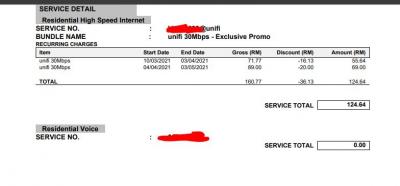 This post has been edited by jerry123939: Apr 7 2021, 11:58 PM
 |
|
|
|
|
|
ray8426
|
Apr 8 2021, 09:39 AM
|
|
|
QUOTE(jerry123939 @ Apr 7 2021, 11:53 PM) I had uploaded this. I m not a new user but I m upgrade user from unifi lite to fiber. I settled my old unifi lite account service charge but is not accounted from TM and they bring forward the amount to this month. Basically they double charge me now.
Just to ask, - when you apply? - when your fiber active?  |
|
|
|
|
|
aniq8676
|
Apr 8 2021, 09:41 AM
|
|
|
QUOTE(jerry123939 @ Apr 7 2021, 11:45 PM) Is not overpayments but is payment made to settle the old debt. Is something like I settle off Loan A payment and then apply for Loan B. Then, when the time I need to pay loan B, they tell me haven't yet settle Loan A payment and now I need to pay the amount for Loan A + Loan B + ST6%. So it means they do not accounted the payment paid for loan A and bring forward to loan B. Sorry for the complication. TQ for your time. TM billing system just hurt in the butt. did you make payment for unifi lite account before or after upgrading to fiber? If you make a payment before upgrading to Fiber it is not a problem because the unifi lite account is still active, if you make a payment for a unifi lite account after upgrading to fiber it will be a bit of a problem because the unifi lite account will be terminated automatically after the unifi fiber installation is completed on your premises at the same time. Although it is displayed "still active" This post has been edited by aniq8676: Apr 8 2021, 09:43 AM |
|
|
|
|



 Quote
Quote


 0.0391sec
 0.23
0.23
 6 queries
 GZIP Disabled