Outline ·
[ Standard ] ·
Linear+
Deluge, for Linux and Windows!
|
Xybirium
|
 Sep 10 2007, 11:04 PM Sep 10 2007, 11:04 PM
|

|
QUOTE(blackamikaze @ Sep 10 2007, 10:46 PM) u can try download Automatix http://www.getautomatix.com/or Easy Ubuntu http://easyubuntu.freecontrib.org/this program will help u install all the codec u need, better media player n other usefull stuff for ubuntu I already downloaded automatix and if I'm not mistaken, it is now automatix2. I'll try the other one. Hope it solves the problem. |
|
|
|
|
|
blackamikaze
|
Sep 11 2007, 02:35 AM
|
|
|
QUOTE(Xybirium @ Sep 10 2007, 11:04 PM) I already downloaded automatix and if I'm not mistaken, it is now automatix2. I'll try the other one. Hope it solves the problem. yeah automatix2, my mistake.. |
|
|
|
|
|
kane32
|
Sep 11 2007, 11:46 AM
|
Getting Started

|
QUOTE(bhaskar @ Sep 10 2007, 07:07 PM) i installed ubuntu 7.04 i try install deluge got problem u see picture why got problem pls help me Bhaskar ubuntu is not a window, where u can double click and install the program.. (There is no easy way here in ubuntu) u have to click on TERMINAL and enter the command to install, even if u want to connect net. (If u want learn more about it or have thousand of question just use GOOGLE to search). I've install it and running it successfully, speed is incredible. & yes ubuntu rocks, have to explore more on this OS. lets enjoy while it last  |
|
|
|
|
|
Suk
|
Sep 11 2007, 12:49 PM
|
|
|
i have download the latest deluge v5.5
from my cfosspeed, some of my connection are known as "TORRENT" but mostly throttle by TM
in the other hand, 60% of the connection are known as "UNKNOWN"
well, this serve me very well, i got get good speed from the peers
So, In conclusion, If the p2p client can send the connection packs as "UNKNOWN" then of coz u can get very good speed, b'coz TM cna not throttle u if the connection packs are sending as "unknown" they only can detect connection known as "TORRENT" only
In the other hand, my PPLIVE ( online stream ) are using P2P technology too, all the connection are known as "UNKNOWN" and watching very smooth without any buffing,
Correct me if wrong, Hopefully TM dont see this thead, BUT IT DOES
Please Share IF any p2p client doesn't send internet packs as "TORRENT"
So, Does any problem can connect to the or p2p connection
|
|
|
|
|
|
TSpraveenmarkandu
|
Sep 11 2007, 01:20 PM
|
Getting Started
|
QUOTE(kane32 @ Sep 11 2007, 11:46 AM) Bhaskar ubuntu is not a window, where u can double click and install the program.. (There is no easy way here in ubuntu) u have to click on TERMINAL and enter the command to install, even if u want to connect net. (If u want learn more about it or have thousand of question just use GOOGLE to search). I've install it and running it successfully, speed is incredible. & yes ubuntu rocks, have to explore more on this OS. lets enjoy while it last well, you are both right and wrong. most apps are just download and click install and you are done but the problem arises when there are no deb packages or when you are lacking dependencies. the headaches begin. but use the synaptic package manager, you are able to solve most install problems with that if you dont want to go into the terminal |
|
|
|
|
|
Xybirium
|
Sep 11 2007, 01:41 PM
|
|
|
I prefer to use the command line interface if I have time otherwise I use Add/Remove or Synaptic Manager.
So far installations are okay except if there is a network problem.
Can anyone point me to a good guide on compiling firmware i.e. for Linksys WAG54G. Your assistance is very much appreciated.
|
|
|
|
|
|
philipcs
|
Sep 11 2007, 03:44 PM
|
|
|
i have installed the latest version of Deluge. So far satisfy the speed at least the speed is consistent. I have downloaded 3.2G stuff in 24 hours and average speed is 40kbps. today, i am downloading HK drama from HK forum, the speed go up to 73kbps 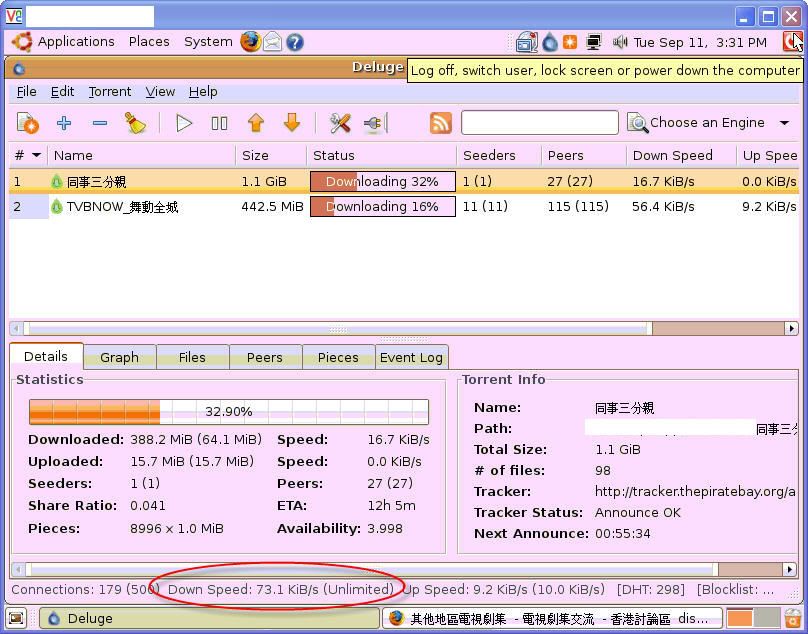 |
|
|
|
|
|
philipcs
|
Sep 11 2007, 04:04 PM
|
|
|
updates: now i got 105kbps !!!! I never got this kind of speed in my windows system. Deluge + Ubuntu Rocks!!!!!! 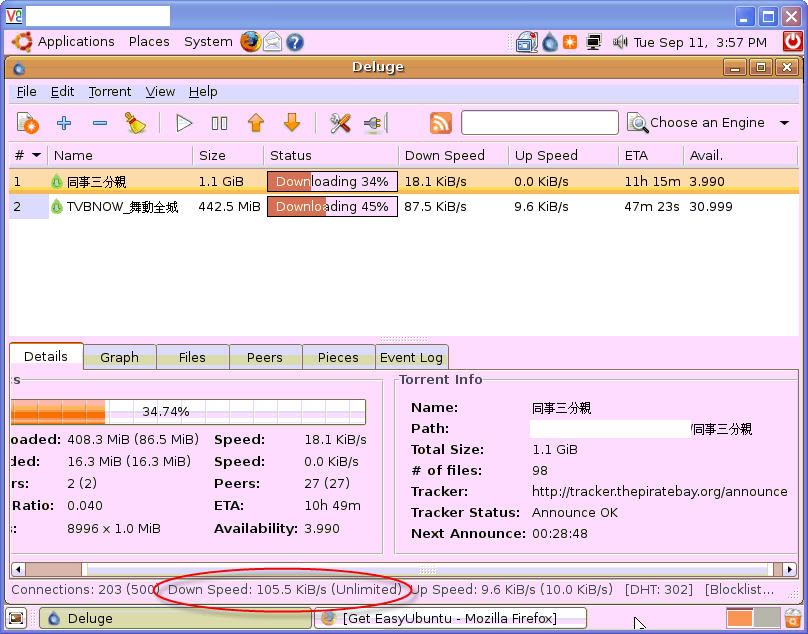 |
|
|
|
|
|
TSpraveenmarkandu
|
Sep 11 2007, 04:08 PM
|
Getting Started
|
QUOTE(philipcs @ Sep 11 2007, 04:04 PM) updates: now i got 105kbps !!!!
I never got this kind of speed in my windows system.
Deluge + Ubuntu Rocks!!!!!! nice  i see you are also vnc -ing into your system |
|
|
|
|
|
philipcs
|
Sep 11 2007, 04:14 PM
|
|
|
QUOTE(praveenmarkandu @ Sep 11 2007, 04:08 PM) nice i see you are also vnc -ing into your system ya... because i installed the ubuntu on my very old pc (P3 800) and no monitor, mouse and keyboard |
|
|
|
|
|
jy14
|
Sep 11 2007, 04:29 PM
|
|
|
QUOTE(philipcs @ Sep 11 2007, 04:14 PM) ya... because i installed the ubuntu on my very old pc (P3 800) and no monitor, mouse and keyboard wow, like that oso can ? hmmm, i'll need to learn up on VNC now. Thanks for the info. |
|
|
|
|
|
socratesman
|
Sep 11 2007, 05:40 PM
|
|
|
Not bad. I used Deluge on Debian , the speeds are wonderful. Watch out, a Windows version of Deluge is in the making. With full stream encryption |
|
|
|
|
|
hellfried
|
 Sep 11 2007, 06:42 PM Sep 11 2007, 06:42 PM
|
|
|
this is a godsend. a big thank you and a big hug to the original poster. i am now downloading a torrent at ~110 KiB/s after the previous doldrums of 5-10 KiB/s!
|
|
|
|
|
|
skullz)
|
Sep 12 2007, 04:38 AM
|
|
|
There's an alpha version for windows out already, but I've yet to test it out.. + Click Me + |
|
|
|
|
|
kane32
|
Sep 12 2007, 06:04 AM
|
Getting Started
|
lolz... getting low speed in deluge ubuntu version and window version too  is this the end ? |
|
|
|
|
|
isMEheNG
|
Sep 12 2007, 11:01 AM
|
Getting Started
|
what virtual software u all run ubuntu? VMware seem is the best choice but not a freeware... what else can run virtual ubuntu perfectly?any suggestion? |
|
|
|
|
|
scripted
|
Sep 12 2007, 11:56 AM
|
|
|
QUOTE(isMEheNG @ Sep 12 2007, 11:01 AM) what virtual software u all run ubuntu? VMware seem is the best choice but not a freeware... what else can run virtual ubuntu perfectly?any suggestion? www.virtualbox.org |
|
|
|
|
|
hpares
|
Sep 12 2007, 01:16 PM
|
|
|
Phyton is not necessary right for deluge in window? I can use it even though not install it.
|
|
|
|
|
|
slash
|
Sep 12 2007, 03:42 PM
|
|
|
Is there a guide to all this? Install Vmware, then ubuntu, then deluge?
|
|
|
|
|



 Quote
Quote





 0.0294sec
 0.27
0.27
 6 queries
 GZIP Disabled