Welcome Guest ( Log In | Register )

Bump Topic Topic Closed RSS Feed
377 Pages « < 207 208 209 210 211 > » Bottom

Outline · [ Standard ] · Linear+

Unifi Official TM UniFi High Speed Broadband Thread V38, READ 1ST PAGE FOR TURBO SPEED INFO!

views
     
Rainings
post May 22 2020, 10:00 PM

Regular
******
Senior Member
1,101 posts

Joined: Jul 2008
QUOTE(go626201 @ May 22 2020, 09:54 PM)
Try end it,and see the connection better or not.
And i suggest you try in midnight with all device off,and open 1 device at the same time to check is any device using upload speed.
*
I can't end it, it just suddenly show up on the Network after like 20-30sec will gone.
Thats the time i experience bad spike.
I still checking to see how to uninstall it.

This post has been edited by Rainings: May 22 2020, 10:00 PM
go626201
post May 22 2020, 10:23 PM

Regular
******
Senior Member
1,882 posts

Joined: Sep 2017
QUOTE(Rainings @ May 22 2020, 10:00 PM)
I can't end it, it just suddenly show up on the Network after like 20-30sec will gone.
Thats the time i experience bad spike.
I still checking to see how to uninstall it.
*
If online google saying not wrong,it is used for PC app version of Microsoft Outlook.
It should still running on background,u can try to find Hstxr.exe in Task manager>Details. Try kill it.

Edit
I think u are using the mail app by Windows right?
I just try to open it,and the system immediately start the exe.
U end the mail app,it should not running anymore.

This post has been edited by go626201: May 22 2020, 10:27 PM
Rainings
post May 22 2020, 10:27 PM

Regular
******
Senior Member
1,101 posts

Joined: Jul 2008
QUOTE(go626201 @ May 22 2020, 10:23 PM)
If online google saying not wrong,it is used for PC app version of Microsoft Outlook.
It should still running on background,u can try to find Hstxr.exe in Task manager>Details. Try kill it.
*
It's not in the Task Manager Details, It's not there, I can't find it, but when it show up on my Network Activity, I will experience spike.
It is inside C:\Program Files\WindowsApps hidden folder. I'm tempting to delete this exe. I don't use outlook on my PC, so i am thinking to delete it.

Edit:
Yes I use the Windows 10 "Mail" Application, i just removed it. It's slow and buggy.
I will monitor again.
But not sure if later will still show up the on the network or not.

This post has been edited by Rainings: May 22 2020, 10:34 PM
go626201
post May 22 2020, 10:33 PM

Regular
******
Senior Member
1,882 posts

Joined: Sep 2017
QUOTE(Rainings @ May 22 2020, 10:27 PM)
It's not in the It's not there, I can't find it, but when it show up on my Network Activity, I will experience spike.
It is inside C:\Program Files\WindowsApps hidden folder. I'm tempting to delete this exe. I don't use outlook on my PC, so i am thinking to delete it.
*
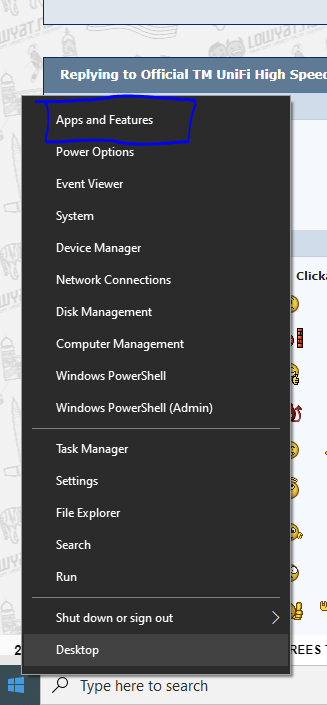
U try this.

user posted image
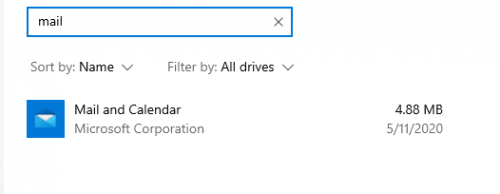
And find mail

user posted image
and click that mail and click advanced options.
Try terminate it.
And u can also uninstall it.

If want reinstall like this.
https://pureinfotech.com/reset-mail-windows-10/
sHawTY
post May 22 2020, 10:51 PM

Frequent Reporter
********
All Stars
14,909 posts

Joined: Jul 2005

QUOTE(go626201 @ May 22 2020, 09:23 PM)
What your ip range?
What plan?

Mine 800 mbps, 175.140.X.X
Twitch smooth for me.
Twitch is buttery smooth for me too
I'm on 175.136.xx.xx & 800Mb/s package as well

Google DNS with IPv6 disabled
Rainings
post May 23 2020, 01:35 AM

Regular
******
Senior Member
1,101 posts

Joined: Jul 2008
QUOTE(go626201 @ May 22 2020, 10:33 PM)
U try this.

user posted image
And find mail

user posted image
and click that mail and click advanced options.
Try terminate it.
And u can also uninstall it.

If want reinstall like this.
https://pureinfotech.com/reset-mail-windows-10/
*
I don't see any spike anymore after i uninstall that Mail App. Looks like it really solve the problem.
Just now i try to game like 3 hrs long, didn't experience any spike.
I can't thank you enough for helping me solve this issue!
notworthy.gif
go626201
post May 23 2020, 02:15 AM

Regular
******
Senior Member
1,882 posts

Joined: Sep 2017
QUOTE(Rainings @ May 23 2020, 01:35 AM)
I don't see any spike anymore after i uninstall that Mail App. Looks like it really solve the problem.
Just now i try to game like 3 hrs long, didn't experience any spike.
I can't thank you enough for helping me solve this issue!
notworthy.gif
*
No worries,after install unifi ,u may install back that mail later.
So far a lot of streamyx user is facing the same problem as the upload speed is not enough for this era.
I can understand why tm cant give more upload speed for streamyx user,but they should speed up their HSBB or SUBB for solving the problem...
Atleast they should use the shortest time to provide unifi lite 1st,better then keeping user only on streamyx.
5mbps upload speed will be able to solve 95% of latency and dc issue.
Because unifi lite connect to local exchange center with current copper cable,but after exchange center all fiber optic,it can lower latency and provide better stability as non whole copper cable to internet.
But of course 5mbps for 2020 still is a fail but it is better then nothing.

I remember when the time i get in to unifi vip5-5mbps plan,suddenly the youtube can run 720p immediately is happy for me as no more buffering issue.
But now speed fast,but routing is crap one day then one day. vmad.gif
They didn't invest more on improving routing...I can understand now their priority is expand more area,but they didn't maintain their current international network...
This kind of action is take temporary solution not effect a permanent cure.

Why dont they setup a new plan like one of SG ISP did,do a Gamers plan with latency optimization(routing optimization) with lowest packet loss if problem occurs.(QoS for Gaming or Latency-sensitive application like remote works)
I am not a gamers,but i like this kind of plan as i rather want stable low latency connection,speed could slow abit like ensure 60% of speed while peak hours.
xCryptik
post May 23 2020, 02:48 AM

On my way
****
Junior Member
584 posts

Joined: May 2013
QUOTE(go626201 @ May 23 2020, 03:15 AM)
No worries,after install unifi ,u may install back that mail later.
So far a lot of streamyx user is facing the same problem as the upload speed is not enough for this era.
I can understand why tm cant give more upload speed for streamyx user,but they should speed up their HSBB or SUBB for solving the problem...
Atleast they should use the shortest time to provide unifi lite 1st,better then keeping user only on streamyx.
5mbps upload speed will be able to solve 95% of latency and dc issue.
Because unifi lite connect to local exchange center with current copper cable,but after exchange center all fiber optic,it can lower latency and provide better stability as non whole copper cable to internet.
But of course 5mbps for 2020 still is a fail but it is better then nothing.

I remember when the time i get in to unifi vip5-5mbps plan,suddenly the youtube can run 720p immediately is happy for me as no more buffering issue.
But now speed fast,but routing is crap one day then one day.  vmad.gif
They didn't invest more on improving routing...I can understand now their priority is expand more area,but they didn't maintain their current international network...
This kind of action is take temporary solution not effect a permanent cure.

Why dont they setup a new plan like one of SG ISP did,do a Gamers plan with latency optimization(routing optimization) with lowest packet loss if problem occurs.(QoS for Gaming or Latency-sensitive application like remote works)
I am not a gamers,but i like this kind of plan as i rather want stable low latency connection,speed could slow abit like ensure 60% of speed while peak hours.
*
I want that 1ms ping ingame but on rare occasion I reached 2ms ingame.
watabakiu
post May 23 2020, 05:38 AM

Regular
******
Senior Member
1,572 posts

Joined: Oct 2015
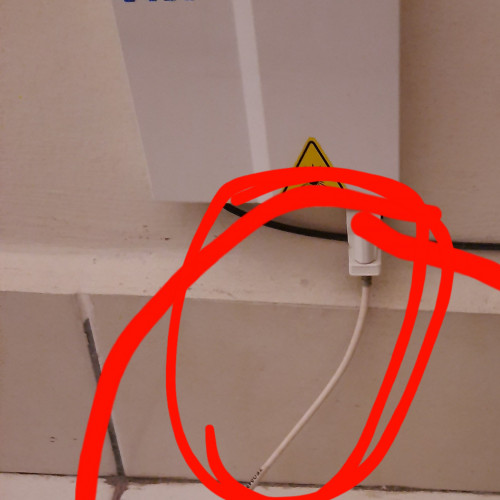
user posted image

what is the wire i circled in red called?
neuro4869
post May 23 2020, 06:13 AM

Regular
******
Senior Member
1,077 posts

Joined: May 2013
From: Purgatory


If i want to temporarily upgrade from 30MBPS RM89 to 100MBPS RM129(for 6 months later study/work from home), means that i need to renew the 2 years contract?

Btw, what's the fees for termination fees for unifi right now? Last I heard was about RM500 flat rate, now is it I have to pay the remainder of my entire contract? If so, that's kind of a dick move by TM

This post has been edited by neuro4869: May 23 2020, 06:13 AM
SUSdadah
post May 23 2020, 07:21 AM

Getting Started
**
Junior Member
161 posts

Joined: Apr 2019


QUOTE(neuro4869 @ May 23 2020, 06:13 AM)
If i want to temporarily upgrade from 30MBPS RM89 to 100MBPS RM129(for 6 months later study/work from home), means that i need to renew the 2 years contract?

Btw, what's the fees for termination fees for unifi right now? Last I heard was about RM500 flat rate, now is it I have to pay the remainder of my entire contract? If so, that's kind of a dick move by TM
*
upgrade means renew contract in my experience with tm.
MX510
post May 23 2020, 07:41 AM

Love Me Sin Hate Me Sinner
*******
Senior Member
4,038 posts

Joined: Aug 2005
From: Earth


My capping speed case is still ongoing with TM.Nut

Waiting for IPNoc to check on my issue


MatXSelamat
post May 23 2020, 08:13 AM

New Member
*
Junior Member
41 posts

Joined: Jan 2013
QUOTE(Rainings @ May 22 2020, 06:02 PM)
Thx for ur info, It even happen during mid night when everyone sleep only my device is connected.
I will try to use wireshark and see what's going on. But wireshark a bit too advance for me.
Do you have any suggestion for simple applications to check my network?
*
frankly speaking nothing wrong with your network mang

a lot UniFi user experiencing the same pattern, 8am-11pm connection disconnected, 12-7am ada connection. If you call TM hotline and asked for technician visit, the technician will say semua ok jer, maybe your fiber optic cable sudah kong doh.gif

QUOTE(heLL_bOy @ May 22 2020, 08:44 PM)
yeah.. every day after 1pm to 12:30am always slowdown. Had reported to TM they replied me that their network is fine no issue and no slowdown at all  doh.gif
*
all TM staff has been brain wash, or they think customer are idiot.

paying full Unifi fee, but only getting half cooked connection, TM is really taking customer for a ride. I hope someone starts a petition against TM and asking for huge discount to compensate for bad connectivity over the past 3 months vmad.gif vmad.gif vmad.gif
hurricane21
post May 23 2020, 10:52 AM

Senior Probation
******
Senior Member
1,389 posts

Joined: Feb 2006
From: Southern Region


Anyone using mesh wifi from TM?

What is the model?

Thinking to add-on because it seems worth, only +RM15 per month for 24 months so total is only RM360.

Thanks.
YoungMan
post May 23 2020, 11:10 AM

Look at all my stars!!
*******
Senior Member
6,799 posts

Joined: Oct 2008
From: Kuala Lumpur


QUOTE(neuro4869 @ May 23 2020, 07:13 AM)
If i want to temporarily upgrade from 30MBPS RM89 to 100MBPS RM129(for 6 months later study/work from home), means that i need to renew the 2 years contract?

Btw, what's the fees for termination fees for unifi right now? Last I heard was about RM500 flat rate, now is it I have to pay the remainder of my entire contract? If so, that's kind of a dick move by TM
*
There is no such thing as temporary upgrade. Once you upgrade, your contract will renew and you have to stay for 2 years before you can downgrade back. And downgrade will renew another 2 years contract.
Downgrade of package during contract will also incur penalty fee.
Fantasia
post May 23 2020, 11:30 AM

Look at all my stars!!
*******
Senior Member
5,482 posts

Joined: Feb 2009
Hi, my connection has been unstable recently. The connection will lost for 1-2 hours some time. No matter how many time I switch off and on my modem and router, the "Internet" LED on my RG4332 router will not lit up. May I know if anybody also encountered similar issue?
Rainings
post May 23 2020, 12:57 PM

Regular
******
Senior Member
1,101 posts

Joined: Jul 2008
QUOTE(go626201 @ May 23 2020, 02:15 AM)
No worries,after install unifi ,u may install back that mail later.
So far a lot of streamyx user is facing the same problem as the upload speed is not enough for this era.
I can understand why tm cant give more upload speed for streamyx user,but they should speed up their HSBB or SUBB for solving the problem...
Atleast they should use the shortest time to provide unifi lite 1st,better then keeping user only on streamyx.
5mbps upload speed will be able to solve 95% of latency and dc issue.
Because unifi lite connect to local exchange center with current copper cable,but after exchange center all fiber optic,it can lower latency and provide better stability as non whole copper cable to internet.
But of course 5mbps for 2020 still is a fail but it is better then nothing.

I remember when the time i get in to unifi vip5-5mbps plan,suddenly the youtube can run 720p immediately is happy for me as no more buffering issue.
But now speed fast,but routing is crap one day then one day.  vmad.gif
They didn't invest more on improving routing...I can understand now their priority is expand more area,but they didn't maintain their current international network...
This kind of action is take temporary solution not effect a permanent cure.

Why dont they setup a new plan like one of SG ISP did,do a Gamers plan with latency optimization(routing optimization) with lowest packet loss if problem occurs.(QoS for Gaming or Latency-sensitive application like remote works)
I am not a gamers,but i like this kind of plan as i rather want stable low latency connection,speed could slow abit like ensure 60% of speed while peak hours.
*
From now on, i think i will just switch it to Thunderbird as my main email client.
that Windows10 Mail app is pretty slow tbh and always getting delay receive msg.
If i didn't check the Network Activity, I will never know that stupid App randomly sending huge packet thru the line.
After i removed it, it seems like really solve the ping spike issue. I'm happy for now. rclxm9.gif
The Upload speed for Streamyx is indeed pathetic, it took me 3hrs to upload 600mb video to Youtube!
I've been asking TM to deploy HSBB for more than 10 yrs. Finally saw some light after Gobin Singh take over. Lowering down the Price for Streamyx upgrade all the existing BB user to faster speed.
I will definitely thank him in personal if I ever got chance to meet him.
Last year August, I email him and his office, KKMM did replied said they will look into it. Because countless report have been logged on MCMC but no action.
2 weeks later I received a call from TM, lucky enought my area is under NFCP, they promised they will deploy fiber EST end of March 2020 but due to MCO everything stopped.
The timing is just right when he announced NFCP, everything seems goes as a planned, guess i'm just lucky.
Hopefully no more deplay since they already resume work. Right now under new Gov For those area that promised will deploy fiber but haven't start any development, i wish them best of luck, you know what i mean.

Well, they never see this day will come, when everyone stay home under lockdown. If February you tell me Malaysia will lock down on March, I will call you fucking crazy.
They don't really care as long as all the customers keep feeding them money. This is how they work, their culture.
You as a customer got no choice, for TM: "Stay with me or GTFO I don't give a fuck."

QUOTE(MatXSelamat @ May 23 2020, 08:13 AM)
frankly speaking nothing wrong with your network mang

a lot UniFi user experiencing the same pattern, 8am-11pm connection disconnected, 12-7am ada connection. If you call TM hotline and asked for technician visit, the technician will say semua ok jer, maybe your fiber optic cable sudah kong doh.gif
all TM staff has been brain wash, or they think customer are idiot.
*
I understand there is routing issue, I did found the root cause that causes ping spike on my network.
Since MCO our Network speed is like roller coaster.

SUSCandy12
post May 23 2020, 12:59 PM

Regular
******
Senior Member
1,878 posts

Joined: Apr 2019
QUOTE(watabakiu @ May 23 2020, 05:38 AM)
user posted image

what is the wire i circled in red called?
*
It's called a fibre patch cord. You can find it easily on online shopping sites.
The white box on the wall is called a FWS(fibre wall socket or in Singapore they call it a Termination Point(TP).

But before you order, make sure you find out the correct connector head type for the one you're using. The normal one is SC-SC type which the head is blue in color, yours is white.

QUOTE(YoungMan @ May 23 2020, 11:10 AM)
There is no such thing as temporary upgrade. Once you upgrade, your contract will renew and you have to stay for 2 years before you can downgrade back. And downgrade will renew another 2 years contract.
Downgrade of package during contract will also incur penalty fee.
*
Only TM forces you to renew your contract when you upgrade/downgrade.
For other ISPs such as Celcom, Maxis and DiGi Home Fibre, as long as equipment still remains the same there is no contract renewal, and your contract will continue from the day you signed up.
Meaning if you subscribed in Jan 2020, 5 months passed 24mths -5 mths = 19mths to go, even after upgrade/downgrade your contract will still be 19mths to go.

Most plans from 30M to 300M will still use the same router so if no new equipment given your contract should not be renewed or reset back.

TM is cheating consumers with full remaining months contract of 24 months since it's giving real cheap equipment. If your plan is RM129+SST per month, does it justify 24mths X RM129 = RM3096 penalty?
SUSCandy12
post May 23 2020, 01:24 PM

Regular
******
Senior Member
1,878 posts

Joined: Apr 2019
QUOTE(go626201 @ May 22 2020, 03:39 PM)
Vultr and Linode get about 50ms,but DO get 10+-ms.
Cloudflare warp still route to HKG,but i keep sending feedback to CF,hoping them to route back to SGP or new DC like JHB.(Seems like JHB really doing great jobs for peering with alot of IX)
Maybe CF SGP really heavy utilize,so warp bandwidth cant support so many users. (I should find someone in SG to check whether they connect to.)
*
Whether it's NTT Asia, Telstra-REACH or whatever they all still need to route through HKG as a major transit point before crossing the Pacific to reach USA.

Is there a route that directly crosses the Pacific from SG without transiting through HK/GUAM/Japan first?
The only cable that can achieve this is through Telin's SEA-US cable which is meant for Indonesia.

AAG is the only major cable which is used by both NTT MSC(Maxis) and TM to transit to HK before crossing the Pacific.

Peering does not help much because when there's a surge of bandwidth requirement, your peering partners will always throttle you to avoid their own networks from being affected by your congestion.

There is 2 different things to differentiate here. Peering partners and upstream Tier-1 providers which you pay to managed your international bandwidth.

Peering partners can "BLOCK" you or throttle your surge in access to their capacity if they deem fit but upstream providers who manages your ISP's international connectivity has the responsibility of providing what you paid for and scale accordingly when traffic arises.
soonwai
post May 23 2020, 02:30 PM


********
All Stars
11,458 posts

Joined: Oct 2007
From: KL


QUOTE(hurricane21 @ May 23 2020, 10:52 AM)
Anyone using mesh wifi from TM?

What is the model?

Thinking to add-on because it seems worth, only +RM15 per month for 24 months so total is only RM360.

Thanks.
*
It's the Deco M4 2-pack. Did some tests on my Unifi 800 with it and the M9: https://forum.lowyat.net/index.php?showtopi...post&p=96378294

Note that the monthly RM15 is charged SST. So it will end up to be RM381.60.

377 Pages « < 207 208 209 210 211 > » Top
Topic ClosedOptions
 

Change to:
| Lo-Fi Version
0.0227sec    0.51    6 queries    GZIP Disabled
Time is now: 6th December 2025 - 11:55 PM