Welcome Guest ( Log In | Register )

Bump Topic Topic Closed RSS Feed
377 Pages « < 205 206 207 208 209 > » Bottom

Outline · [ Standard ] · Linear+

Unifi Official TM UniFi High Speed Broadband Thread V38, READ 1ST PAGE FOR TURBO SPEED INFO!

views
     
SUSCandy12
post May 22 2020, 10:11 AM

Regular
******
Senior Member
1,878 posts

Joined: Apr 2019
QUOTE(QuantumEdge @ May 21 2020, 11:27 PM)
Tm cheap-out after broadband price cut few years back, hence no more FWS. 3 of my friends that got fiber installed after the period all don't get the socket...
*
QUOTE(QuantumEdge @ May 21 2020, 11:27 PM)
Tm cheap-out after broadband price cut few years back, hence no more FWS. 3 of my friends that got fiber installed after the period all don't get the socket...
*
Thanks for the help of clarifying earlier, since 3 years ago TM already stopped providing the FWS(wall socket) and outdoor demarcation box for landed homes to cut costs further but turned out to be a bad decision.
Yet I don't know how they justified forcing their subscribers to sign a full 24months(2 years) pay remaining months contract when earlier subscribers only need to pay RM500 one-off early termination fee.

Remember the RM35 worth MCO handouts which claimed to be RM100? This is basically the corruption culture which is known for our country.

QUOTE(posthumous @ May 22 2020, 12:42 AM)
No I don't think they have to replace the entire length. The installation crew have with them a portable fiber optic splicing kit. Search for "fiber optic splicing" on Youtube.
I saw them using a fusion splicer on one visit at my uncle's place.
*
Not a good idea which needs a TM outsourced technician to attend and they can simply charged you repair fee as they wish else they give you a lousy service.

Did you know about optical power loss budget?

Allow me to tell you some "INSIGHTS" about TM HSBB setup. Many of its initial HSBB Phase 1 service areas actually FAILED to meet the requirements of ITU's GPON G984.2 B+ standard which allows gigabit GPON services to be deployed unlike in countries such as Thailand, Singapore, Japan and Europe.

As far as I know only the newer players such as Time, Maxis's own built fibre network and TNB's ALLO which was built later met the criterias of this standard. The most significant criteria was a maximum of using a 1:32 splitter. The earlier HSBB Phase 1 build out was using 1:64 splitters instead to cut cost at the expense of not being able to provide gigabit plans for future.

This is roughly how you calculate the total amount of power loss for your GPON line which you can more accurately measure with an OTDR meter at the FWS/TP port at your premise.

For the GPON G984.2 B+ standard the suggested power loss should not be more than 28dB.More stringent network buildouts allow a 5% reserved which limits it to only 26.5dB.

By estimation:
Fibre cable distance + Splitter ratio + Total number of connectors(readily spliced/mechanical based fast snap-on connectors) + Number of joints(fusion(melted)/mechanical)
*Also loops, temperature, environmental conditions and ageing of fibre must be considered for more accuracy.

Every splice you make in between the cable length from the OLT to the FWS results in power loss. The estimated power loss for each fusion splice is about 0.2-0.5dB.
Every kilometer of fibre length = 0.4dB loss
A 1:32 splitter roughly takes up 18dB loss, 1:64 splitter around 22dB loss
A fast mechanical snap-on connector introduce 0.5-1.0dB loss which is what TM used now to make the connector that plus into the ONT(fibre modem) after stripping the fibre cable.

Do note that fibre optic cables also age with time. Every year expect upto 0.7dB loss as it becomes older. It has about 20 years lifespan.

As you can see, the 1:64 splitter setup which TM used for their Phase 1 earlier NEVER met the ITU GPON G984.2 B+/C+ standards which is the minimum to allow gigabit plans to be offered to subscribers thus the reason why they could barely even sell 800Mbps plans.

Having a FWS actually introduces power loss as well but it allows quick swaps of patch cable between the wall socket and the fibre modem(ONT). It actually saves you the trouble of having to detect the entire cable length from the FDP box on the pole right to the connector that is inserted into the modem. If the cable is concealed and runs through your house's ceiling, imagine the amount of work needed to trace the fractures in the entire length?
jiaen0509
post May 22 2020, 10:15 AM

Look at all my stars!!
*******
Senior Member
3,305 posts

Joined: Dec 2012
QUOTE(Candy12 @ May 22 2020, 10:11 AM)
Thanks for the help of clarifying earlier, since 3 years ago TM already stopped providing the FWS(wall socket) and outdoor demarcation box for landed homes to cut costs further but turned out to be a bad decision.
Yet I don't know how they justified forcing their subscribers to sign a full 24months(2 years) pay remaining months contract when earlier subscribers only need to pay RM500 one-off early termination fee.

Remember the RM35 worth MCO handouts which claimed to be RM100? This is basically the corruption culture which is known for our country.
Not a good idea which needs a TM outsourced technician to attend and they can simply charged you repair fee as they wish else they give you a lousy service.

Did you know about optical power loss budget?

Allow me to tell you some "INSIGHTS" about TM HSBB setup. Many of its initial HSBB Phase 1 service areas actually FAILED to meet the requirements of ITU's GPON G984.2 B+ standard which allows gigabit GPON services to be deployed unlike in countries such as Thailand, Singapore, Japan and Europe.

As far as I know only the newer players such as Time, Maxis's own built fibre network and TNB's ALLO which was built later met the criterias of this standard. The most significant criteria was a maximum of using a 1:32 splitter. The earlier HSBB Phase 1 build out was using 1:64 splitters instead to cut cost at the expense of not being able to provide gigabit plans for future.

This is roughly how you calculate the total amount of power loss for your GPON line which you can more accurately measure with an OTDR meter at the FWS/TP port at your premise.

For the GPON G984.2 B+ standard the suggested power loss should not be more than 28dB.More stringent network buildouts allow a 5% reserved which limits it to only 26.5dB.

By estimation:
Fibre cable distance + Splitter ratio + Total number of connectors(readily spliced/mechanical based fast snap-on connectors) + Number of joints(fusion(melted)/mechanical)
*Also loops, temperature, environmental conditions and ageing of fibre must be considered for more accuracy.

Every splice you make in between the cable length from the OLT to the FWS results in power loss. The estimated power loss for each fusion splice is about 0.2-0.5dB.
Every kilometer of fibre length = 0.4dB loss
A 1:32 splitter roughly takes up 18dB loss, 1:64 splitter around 22dB loss
A fast mechanical snap-on connector introduce 0.5-1.0dB loss which is what TM used now to make the connector that plus into the ONT(fibre modem) after stripping the fibre cable.

Do note that fibre optic cables also age with time. Every year expect upto 0.7dB loss as it becomes older. It has about 20 years lifespan.

As you can see, the 1:64 splitter setup which TM used for their Phase 1 earlier NEVER met the ITU GPON G984.2 B+/C+ standards which is the minimum to allow gigabit plans to be offered to subscribers thus the reason why they could barely even sell 800Mbps plans.

Having a FWS actually introduces power loss as well but it allows quick swaps of patch cable between the wall socket and the fibre modem(ONT). It actually saves you the trouble of having to detect the entire cable length from the FDP box on the pole right to the connector that is inserted into the modem. If the cable is concealed and runs through your house's ceiling, imagine the amount of work needed to trace the fractures in the entire length?
*
Too technical. Yesteray my Unifi Fixed Line (Tel 1 not light up), TM technician came and check the cable. The reading show on the test pen show number "28". Is it the good reading?

*BTU changed and fixed line is working now*
SUSCandy12
post May 22 2020, 10:20 AM

Regular
******
Senior Member
1,878 posts

Joined: Apr 2019
QUOTE(asellus @ May 21 2020, 09:32 PM)
Actually TM already has a method to inexpensively expand fiber (not VDSL copper) coverage in rural areas. You will know your kampung area use this method if the drop point box is colored black instead of the usual white.
*
You mean this?

DOME Shaped Fibre Junction Box
user posted image

It's actually a junction box to divide the fibres into smaller amounts, splice them with fibre cables with less cores to run them to different roads(jalans) and gardens(tamans).

For example a 24-core fibre cable runs into the suburb of a city, you have 3 points in the suburb to serve so you separate 8 cores for each area and splice them into smaller individual 12-core fibre cables each with its own separate management trays inside the junction box.

It you see such cone shaped boxes on your utility poles but your house has no FTTH coverage chances are that these fibre cables are used for backhaul lines for your nearby wireless base stations/transmitters instead.


QuantumEdge
post May 22 2020, 10:20 AM

Regular
******
Senior Member
1,595 posts

Joined: Jan 2016


user posted image
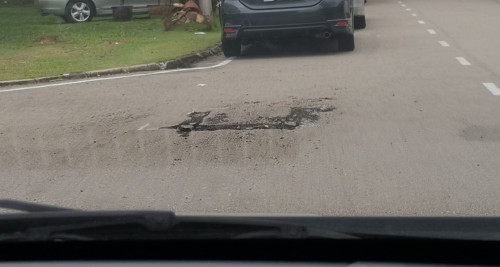
Saw TM's technicians digging roads around my taman, pretty old area... I guess we're going to get fiber via underground ducts instead of from telephone poles?
SUSCandy12
post May 22 2020, 10:22 AM

Regular
******
Senior Member
1,878 posts

Joined: Apr 2019
QUOTE(jiaen0509 @ May 22 2020, 10:15 AM)
Too technical. Yesteray my Unifi Fixed Line (Tel 1 not light up), TM technician came and check the cable. The reading show on the test pen show number "28". Is it the good reading?

*BTU changed and fixed line is working now*
*
If it is reading power loss (attenuation), it means your line ngam ngam only meets the standard to offer 1Gbps and above upto 2.4Gbps.

In future as your fibre cable ages, you might have a problem.
asellus
post May 22 2020, 10:53 AM

#gompusas
Group Icon
Elite
4,541 posts

Joined: Jan 2003
From: BSRPPG51 Access Concentrator


QUOTE(Candy12 @ May 22 2020, 10:20 AM)
You mean this?

DOME Shaped Fibre Junction Box
user posted image

It's actually a junction box to divide the fibres into smaller amounts, splice them with fibre cables with less cores to run them to different roads(jalans) and gardens(tamans).

For example a 24-core fibre cable runs into the suburb of a city, you have 3 points in the suburb to serve so you separate 8 cores for each area and splice them into smaller individual 12-core fibre cables each with its own separate management trays inside the junction box.

It you see such cone shaped boxes on your utility poles but your house has no FTTH coverage chances are that these fibre cables are used for backhaul lines for your nearby wireless base stations/transmitters instead.
*
No, the drop point looks like below.

Attached Image

The cabinet box is so small, TM just hang them on the pole too just like they do with a drop point box.

jiaen0509
post May 22 2020, 11:01 AM

Look at all my stars!!
*******
Senior Member
3,305 posts

Joined: Dec 2012
QUOTE(Candy12 @ May 22 2020, 10:22 AM)
If it is reading power loss (attenuation), it means your line ngam ngam only meets the standard to offer 1Gbps and above upto 2.4Gbps.

In future as your fibre cable ages, you might have a problem.
*
So far 800mbps with Asus Blue Cave. I got 550mbps on test speed on my iPhone 11 Pro Max with 5Ghz.
SUSCandy12
post May 22 2020, 11:01 AM

Regular
******
Senior Member
1,878 posts

Joined: Apr 2019
QUOTE(asellus @ May 22 2020, 10:53 AM)
No, the drop point looks like below.

Attached Image

The cabinet box is so small, TM just hang them on the pole too just like they do with a drop point box.
*
Looks like FDPs which used spare redundant fibre cores taken from backhaul fibre runs that were previously used for mobile base stations.

What's the M lettering behind the numbering for?
SUSCandy12
post May 22 2020, 11:05 AM

Regular
******
Senior Member
1,878 posts

Joined: Apr 2019
QUOTE(jiaen0509 @ May 22 2020, 11:01 AM)
So far 800mbps with Asus Blue Cave. I got 550mbps on test speed on my iPhone 11 Pro Max with 5Ghz.
*
Might be difficult to get anything beyond 1.2Gbps plans in future.
28dB power loss budget is the max allowed for both 1310nm and 1490nm (upstream/downstream) for GPON G984.2 B+ standard.

The 10GPON standard requirements is even higher.
heLL_bOy
post May 22 2020, 11:52 AM

Regular
******
Senior Member
1,350 posts

Joined: Nov 2004
From: HEAVEN & HELL


QUOTE(go626201 @ May 22 2020, 12:58 AM)
No,they only ensure local bandwidth with minimum 80% of subscribe speed plan.
Their edge router already super overloaded after Turbo Upgrade.
Every night some of their edge router will having overload and causing some international connection having congestion.
And they not going fix it,even u complain for weeks,and they will only give a temporary mitigate the problem,just move the heavy traffic to another transit connection which already heavy utilized.
And causing the second transit connection start having congestion issue,and another group of people start complaining ,and move the heavy traffic to third or back to the first transit connection etc.

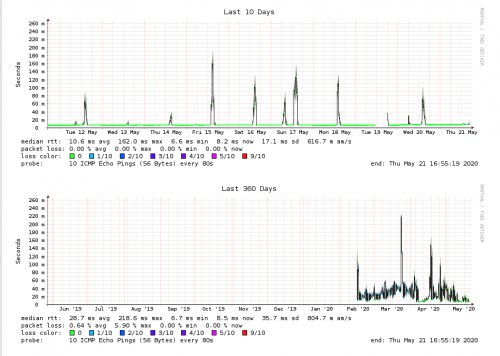
Example for OVH SG,start from December 2019 which i was not at home for weeks,and it suddenly overloaded everynight at 8pm to 11pm. (I suspect that there is someone who the hell every night backup the file causing issue)
user posted image
And when the time i came back in January,suddenly found out that the problem occurs,i start complaining to OVH Network Team.
And they told me this cant be fix on their end as the congestion is on TM side,and they tried to contact TM,but none of them replied and not giving any resolution for the problem.
And Until May 2020 as today,they still not fully fix for the line,but better without having packet loss.
Just need to tolerate the network spikes every night... bangwall.gif
*
i guess your right.. the past few days certain i was link up to SG server also congestion making speed decrease rapidly.
asellus
post May 22 2020, 11:53 AM

#gompusas
Group Icon
Elite
4,541 posts

Joined: Jan 2003
From: BSRPPG51 Access Concentrator


QUOTE(Candy12 @ May 22 2020, 11:01 AM)
Looks like FDPs which used spare redundant fibre cores taken from backhaul fibre runs that were previously used for mobile base stations.

What's the M lettering behind the numbering for?
*
The hanging cabinets all has the M suffix.
ideaplus
post May 22 2020, 12:01 PM

Enthusiast
*****
Junior Member
914 posts

Joined: Nov 2014
QUOTE(misspinky @ May 21 2020, 09:39 PM)
See, I told ya. Fishy. same old tactic from TM when they launch hidden package like this one. They will launch another package again soon just like this one but this time will be official package.
*
If this is true, seems unfair who those apply in this moment sad.gif
Rainings
post May 22 2020, 12:42 PM

Regular
******
Senior Member
1,101 posts

Joined: Jul 2008
QUOTE(heLL_bOy @ May 22 2020, 11:52 AM)
i guess your right.. the past few days certain i was link up to SG server also congestion making speed decrease rapidly.
*
I'm using Streamyx 8M, but since March my line was terrible, it's extremely laggy and ping spike in games like Apex Legends and COD Warzone.
I found that all the games server mainly from SG but the amount of ping spike is insane, it happen randomly every 5-10min.
I tot it only happen on slow Streamyx user, doesn't know that even Fiber user experience the same thing.

Right now, it greatly affected my work, I always use Slack Call, but ppl hear me like 5-8 sec delay. Sometimes my sound will break but i still can hear them clearly.
I really pulling my hair off. Tried Google Hangout or Google Meet, the call seems better, but sometimes still get voice delay and my voice will start breaking after awhile
I believe TM throttling my upload speed. But for speedtest, everything seems fine. bangwall.gif
Called technician couple of times, they went to changing the port few times, reconnect from the pole, still the same shit.
I asked them to call KL HQ see if they can do anything, the only answer I get is because traffic congested. Ntg they can do and close my report.
The technician trying their best to help me, but they really can't do anything.
My PC connect via Ethernet, modem is new TP-Link VR400 v2, the phone line is fine and Good SNR margin and no error pkts.
I really donno what to do now. icon_question.gif
user posted image

Saw the DP box on the pole since last week, they promised early June the service will available.
Went to TM point immediately after Technician told me snap the DP box number and faster go and signup for waiting list.
I hope it can minimize the issue after this.
Hopefully no more delay. puke.gif
user posted image
heLL_bOy
post May 22 2020, 02:18 PM

Regular
******
Senior Member
1,350 posts

Joined: Nov 2004
From: HEAVEN & HELL


QUOTE(Rainings @ May 22 2020, 12:42 PM)
I'm using Streamyx 8M, but since March my line was terrible, it's extremely laggy and ping spike in games like Apex Legends and COD Warzone.
I found that all the games server mainly from SG but the amount of ping spike is insane, it happen randomly every 5-10min.
I tot it only happen on slow Streamyx user, doesn't know that even Fiber user experience the same thing.

Right now, it greatly affected my work, I always use Slack Call, but ppl hear me like 5-8 sec delay. Sometimes my sound will break but i still can hear them clearly.
I really pulling my hair off. Tried Google Hangout or Google Meet, the call seems better, but sometimes still get voice delay and my voice will start breaking after awhile
I believe TM throttling my upload speed. But for speedtest, everything seems fine. bangwall.gif
Called technician couple of times, they went to changing the port few times, reconnect from the pole, still the same shit.
I asked them to call KL HQ see if they can do anything, the only answer I get is because traffic congested. Ntg they can do and close my report.
The technician trying their best to help me, but they really can't do anything.
My PC connect via Ethernet, modem is new TP-Link VR400 v2, the phone line is fine and Good SNR margin and no error pkts.
I really donno what to do now. icon_question.gif
user posted image

Saw the DP box on the pole since last week, they promised early June the service will available.
Went to TM point immediately after Technician told me snap the DP box number and faster go and signup for waiting list.
I hope it can minimize the issue after this.
Hopefully no more delay. puke.gif
user posted image
*
i think the whole TM network is messing up during this MCO. but i don't think TM is throttling the speed cos if throttling the speed and latency will not like this... previously before MCO doesn't have such issues such as slowdown and latency.

i think this timing a lot are using up the speed for torrent and some others stuff
go626201
post May 22 2020, 02:47 PM

Regular
******
Senior Member
1,882 posts

Joined: Sep 2017
QUOTE(heLL_bOy @ May 22 2020, 11:52 AM)
i guess your right.. the past few days certain i was link up to SG server also congestion making speed decrease rapidly.
*
Actually for SG servers,it really depends different Datacenter and routing,some of them totally 99% stable connection.
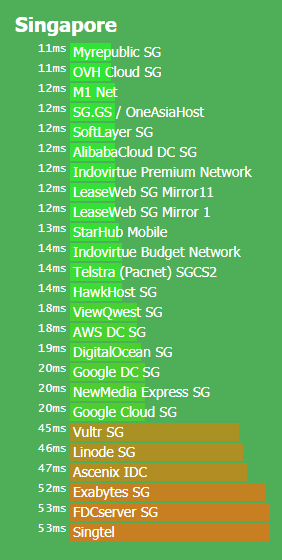
Below is my some experience for observation.
NewMedia Express normally if TM dont "kixiao",the connection and routing will get full speed and below 10ms all the time. ( I think because SGIX got peering to TM)
For OVH,seems like 90% time using the Equinix routing to TM,will having congestion at night.(TM Edge router overload causing any connection from this router crap at certain time i think)(Sometime changed to NTT,also good good bad bad anytime.)
For Telstra (Pacnet),this routing is one of the unpredictable connection for TM,sometime normal will get good routing(through MYIX) like the time i wrote this replied only having 11ms,but when the routing change to TelstraGlobal ,suddenly latency up to 100-200ms.
For Vultr,DigitalOcean,Linode,routing to TM will get different routing connection on morning evening and night.Sometimes good,sometimes bad.(This 3 cloud host,the most stable connection will be DO which using Equinix most of the time, another 2 using PCCWBTN or some-else changing anytime)
For GCP SG,unless TM kixiao,otherwise this will be stable all of the time as Google peering with most ISP included TM.
And last,Indovirtue.
This host got 2 different product line connection,Premium and Budget Network.
Premium one having more peering connection to ensure the routing is the best.(The time i wrote this replies is using Equinix)
Budget one using cheaper peering,sometime using good routing like Equinix can get 20ms+-,but sometimes get crap routing like Hurricane Electric to TM,then 200ms or 400ms will be happens.(This should also TM's faults,overload network,or maybe system auto re-route to crap routing)

The actual latency will be lower than the result by about 0-4ms,depend of website,routing,device performance,dns etc.
user posted image

This post has been edited by go626201: May 22 2020, 02:58 PM
heLL_bOy
post May 22 2020, 03:19 PM

Regular
******
Senior Member
1,350 posts

Joined: Nov 2004
From: HEAVEN & HELL


QUOTE(go626201 @ May 22 2020, 02:47 PM)
Actually for SG servers,it really depends different Datacenter and routing,some of them totally 99% stable connection.
Below is my some experience for observation.
NewMedia Express normally if TM dont "kixiao",the connection and routing will get full speed and below 10ms all the time. ( I think because SGIX got peering to TM)
For OVH,seems like 90% time using the Equinix routing to TM,will having congestion at night.(TM Edge router overload causing any connection from this router crap at certain time i think)(Sometime changed to NTT,also good good bad bad anytime.)
For Telstra (Pacnet),this routing is one of the unpredictable connection for TM,sometime normal will get good routing(through MYIX) like the time i wrote this replied only having 11ms,but when the routing change to TelstraGlobal ,suddenly latency up to 100-200ms.
For Vultr,DigitalOcean,Linode,routing to TM will get different routing connection on morning evening and night.Sometimes good,sometimes bad.(This 3 cloud host,the most stable connection will be DO which using Equinix most of the time, another 2 using PCCWBTN or some-else changing anytime)
For GCP SG,unless TM kixiao,otherwise this will be stable all of the time as Google peering with most ISP included TM.
And last,Indovirtue.
This host got 2 different product line connection,Premium and Budget Network.
Premium one having more peering connection to ensure the routing is the best.(The time i wrote this replies is using Equinix)
Budget one using cheaper peering,sometime using good routing like Equinix can get 20ms+-,but sometimes get crap routing like Hurricane Electric to TM,then 200ms or 400ms will be happens.(This should also TM's faults,overload network,or maybe system auto re-route to crap routing)

The actual latency will be lower than the result by about 0-4ms,depend of website,routing,device performance,dns etc.
user posted image
*
DigitalOcean and Vultr was quite ok the connection as I used. Telstra and NTT this both having in TM back end really having an issue. Some of hosting from Cloudflare is directed to Telstra routing instead of TM routing which previously was.

This post has been edited by heLL_bOy: May 22 2020, 03:19 PM
go626201
post May 22 2020, 03:39 PM

Regular
******
Senior Member
1,882 posts

Joined: Sep 2017
QUOTE(heLL_bOy @ May 22 2020, 03:19 PM)
DigitalOcean and Vultr was quite ok the connection as I used. Telstra and NTT this both having in TM back end really having an issue. Some of hosting from Cloudflare is directed to Telstra routing instead of TM routing which previously was.
*
Vultr and Linode get about 50ms,but DO get 10+-ms.
Cloudflare warp still route to HKG,but i keep sending feedback to CF,hoping them to route back to SGP or new DC like JHB.(Seems like JHB really doing great jobs for peering with alot of IX)
Maybe CF SGP really heavy utilize,so warp bandwidth cant support so many users. (I should find someone in SG to check whether they connect to.)
Rainings
post May 22 2020, 04:10 PM

Regular
******
Senior Member
1,101 posts

Joined: Jul 2008
QUOTE(heLL_bOy @ May 22 2020, 02:18 PM)
i think the whole TM network is messing up during this MCO. but i don't think TM is throttling the speed cos if throttling the speed and latency will not like this... previously before MCO doesn't have such issues such as slowdown and latency.

i think this timing a lot are using up the speed for torrent and some others stuff
*
I want to cry already. the delay in conference call is just killing me. cry.gif
go626201
post May 22 2020, 04:19 PM

Regular
******
Senior Member
1,882 posts

Joined: Sep 2017
QUOTE(Rainings @ May 22 2020, 04:10 PM)
I want to cry already. the delay in conference call is just killing me.  cry.gif
*
Yours looks like not enough upload speed,so if fully utilize upload speed,then your internet start having problem.
Try Data,if it smooth,then should be that problem.

Edit:
Not TM throttle your upload speed,just because your plan only have 0.5mbps for upload speed.

This post has been edited by go626201: May 22 2020, 04:20 PM
heLL_bOy
post May 22 2020, 04:23 PM

Regular
******
Senior Member
1,350 posts

Joined: Nov 2004
From: HEAVEN & HELL


QUOTE(go626201 @ May 22 2020, 03:39 PM)
Vultr and Linode get about 50ms,but DO get 10+-ms.
Cloudflare warp still route to HKG,but i keep sending feedback to CF,hoping them to route back to SGP or new DC like JHB.(Seems like JHB really doing great jobs for peering with alot of IX)
Maybe CF SGP really heavy utilize,so warp bandwidth cant support so many users. (I should find someone in SG to check whether they connect to.)
*
i see.. cloudflare JHB is which location?

377 Pages « < 205 206 207 208 209 > » Top
Topic ClosedOptions
 

Change to:
| Lo-Fi Version
0.0330sec    0.63    6 queries    GZIP Disabled
Time is now: 7th December 2025 - 01:06 AM