Welcome Guest ( Log In | Register )

Bump Topic Topic Closed RSS Feed
377 Pages « < 209 210 211 212 213 > » Bottom

Outline · [ Standard ] · Linear+

Unifi Official TM UniFi High Speed Broadband Thread V38, READ 1ST PAGE FOR TURBO SPEED INFO!

views
     
go626201
post May 24 2020, 02:29 PM

Regular
******
Senior Member
1,882 posts

Joined: Sep 2017
QUOTE(pakji @ May 24 2020, 01:56 PM)
send me link that u using Wireguard for Cloudflare VPN via Wireguard protocol
*
Use 1.1.1.1 App,that already included free "warp".
Pay for "Warp+".
Now only got official app for mobile.
PC still haven't official release.
But u can google yourself now to use for pc.(I dont know api still can use or not)

QUOTE(pakji @ May 24 2020, 01:57 PM)
yah but need link to see plan package and purchase that you using it
*
No la.
I mean the best vpn protocol in 2020 is wireguard.
You can get a vps or cloud server and install wireguard on it.
And that will be your personal VPN server. (But u need to take care the bandwidth to avoid overuse the quota)
It you want to build your own VPN,can try to get a cloud server. (Updated:delete DO,as i confirmed new server not routing optimized- IPv4 latency 40ms+-)
With running this script - https://github.com/Nyr/wireguard-install
And remember to get the server with 5.5 or 5.6 Linux kernel.It will works the best as it is officially supported on newest kernel.


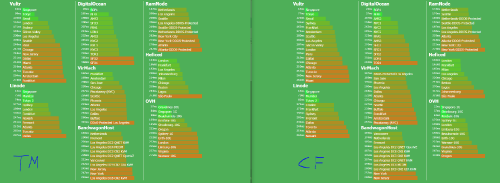
Here is a latency test with Direct TM Unifi and Cloudflare Warp on 2.33PM 24052020.
Sometime using vpn not getting lower latency as the connection to specific server is already shortest route.
if u see the sg one,u can found out go by CF the latency will drop.
for other country server,that really depend for TM as they some have good peering already for lower latency.
Morning Evening Night or Midnight can see different result.
user posted image

Edit:
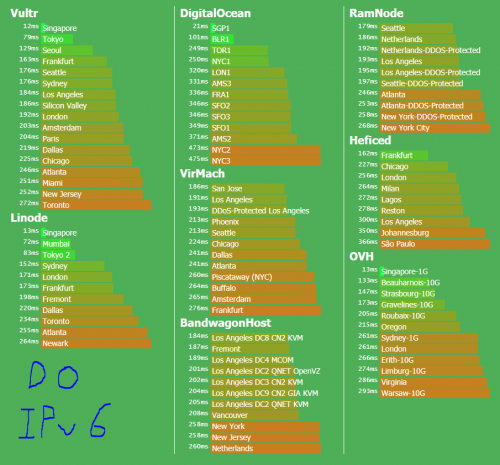
Add DO wireguard with IPv6 (No IPv4)
Unifi to DO IPv6 only 8ms! biggrin.gif
user posted image
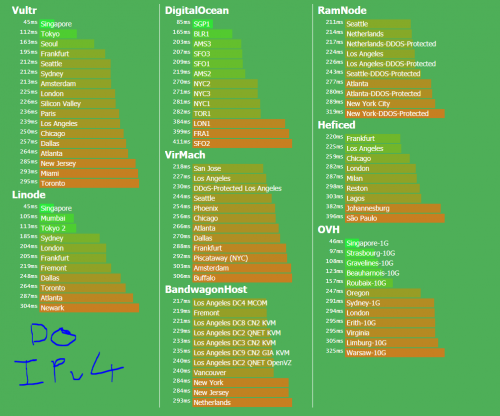
Unifi to DO IPv4 get 40+ms... doh.gif
user posted image
Dont always trust Public Speed Test from server hosting,as there might not be the same ip subnet that u are getting when u rent from them.

Edit2:
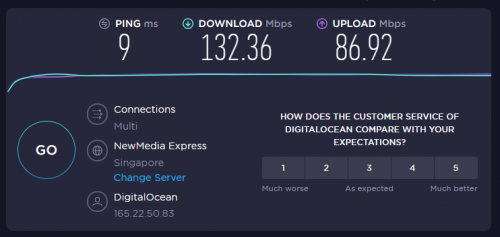
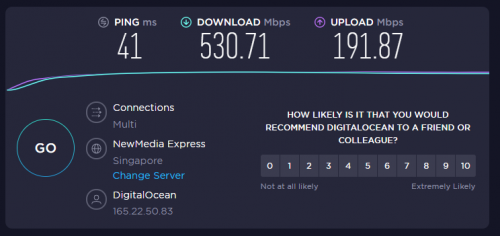
Speedtest via DO wireguard IPv4 and IPv6 to NewmediaExpress.
This IPv4 Can run high speed.
user posted image
This IPv6 Only run 100+mbps.
user posted image


This post has been edited by go626201: May 24 2020, 03:26 PM
shamsay
post May 24 2020, 06:00 PM

On my way
****
Senior Member
606 posts

Joined: Jan 2003
From: Deep Beach


Which DNS is fastest now.1.1.1.1 or 8.8.8.8 or any suggestions?. im having issue when connected office VPN in the afternoon, the connection is very slow.but when connected to maxis mobile data is fine.currently im using unifi 300Mbps.
go626201
post May 24 2020, 06:10 PM

Regular
******
Senior Member
1,882 posts

Joined: Sep 2017
QUOTE(shamsay @ May 24 2020, 06:00 PM)
Which DNS is fastest now.1.1.1.1 or 8.8.8.8 or any suggestions?. im having issue when connected office VPN in the afternoon, the connection is very slow.but when connected to maxis mobile data is fine.currently im using unifi 300Mbps.
*
Both are similar performance for unifi,but i still set my primary to google,secondary to cloudflare.
xCryptik
post May 24 2020, 06:11 PM

On my way
****
Junior Member
584 posts

Joined: May 2013
QUOTE(shamsay @ May 24 2020, 07:00 PM)
Which DNS is fastest now.1.1.1.1 or 8.8.8.8 or any suggestions?. im having issue when connected office VPN in the afternoon, the connection is very slow.but when connected to maxis mobile data is fine.currently im using unifi 300Mbps.
*
DNS can increase internet speed?
go626201
post May 24 2020, 06:35 PM

Regular
******
Senior Member
1,882 posts

Joined: Sep 2017
QUOTE(xCryptik @ May 24 2020, 06:11 PM)
DNS can increase internet speed?
*
No,use a good dns server only resolve website faster and for most malaysian using a non-tm dns server can access more "u know's sites".
miloaisdino
post May 24 2020, 07:06 PM

Regular
******
Senior Member
1,418 posts

Joined: Jul 2015
QUOTE(go626201 @ May 24 2020, 02:29 PM)
Use 1.1.1.1 App,that already included free "warp".
Pay for "Warp+".
Now only got official app for mobile.
PC still haven't official release.
But u can google yourself now to use for pc.(I dont know api still can use or not)
No la.
I mean the best vpn protocol in 2020 is wireguard.
You can get a vps or cloud server and install wireguard on it.
And that will be your personal VPN server. (But  u need to take care the bandwidth to avoid overuse the quota)
It you want to build your own VPN,can try to get a cloud server. (Updated:delete DO,as i confirmed new server not routing optimized- IPv4 latency 40ms+-)
With running this script - https://github.com/Nyr/wireguard-install
And remember to get the server with 5.5 or 5.6 Linux kernel.It will works the best as it is officially supported on newest kernel.
Here is a latency test with Direct TM Unifi and Cloudflare Warp on 2.33PM 24052020.
Sometime using vpn not getting lower latency as the connection to specific server is already shortest route.
if u see the sg one,u can found out go by CF the latency will drop.
for other country server,that really depend for TM as they some have good peering already for lower latency.
Morning Evening Night or Midnight can see different result.
user posted image

Edit:
Add DO wireguard with IPv6 (No IPv4)
Unifi to DO IPv6 only 8ms! biggrin.gif
user posted image
Unifi to DO IPv4 get 40+ms... doh.gif
user posted image
Dont always trust Public Speed Test from server hosting,as there might not be the same ip subnet that u are getting when u rent from them.

Edit2:
Speedtest via DO wireguard IPv4 and IPv6 to NewmediaExpress.
This IPv4 Can run high speed.
user posted image
This IPv6 Only run 100+mbps.
user posted image
*
Wa.. what site do u use to test all the latency at one go? i always ping by manual :/
hkspower
post May 24 2020, 07:58 PM

Casual
***
Junior Member
357 posts

Joined: Jan 2003
From: 工口


QUOTE
Wa.. what site do u use to test all the latency at one go? i always ping by manual :/]
https://www.msmbps.com/


https://codehz.github.io/pingms/
silrave
post May 24 2020, 08:08 PM

Look at all my stars!!
*******
Senior Member
5,893 posts

Joined: Jun 2006


guys wan to check with u guys
that day i complain about bill adjustment
i receive SMS they said case solve
when i try to TM Live Chat with them.
they said they cant check my billing,
need to wait bill come only know the bill adjustment
is it really like that ?
go626201
post May 24 2020, 08:12 PM

Regular
******
Senior Member
1,882 posts

Joined: Sep 2017
QUOTE(miloaisdino @ May 24 2020, 07:06 PM)
Wa.. what site do u use to test all the latency at one go? i always ping by manual :/
*
See my signature Link

I still adding new hosts everyday.
If you got any host suggestion,feel free to tell me,i will try to get the host add-in.

This post has been edited by go626201: May 24 2020, 08:17 PM
xCryptik
post May 24 2020, 08:41 PM

On my way
****
Junior Member
584 posts

Joined: May 2013
QUOTE(silrave @ May 24 2020, 09:08 PM)
guys wan to check with u guys
that day i complain about bill adjustment
i receive SMS they said case solve
when i try to TM Live Chat with them.
they said they cant check my billing,
need to wait bill come only know the bill adjustment
is it really like that ?
*
Visit TMPoint they can check for you.
miloaisdino
post May 24 2020, 08:56 PM

Regular
******
Senior Member
1,418 posts

Joined: Jul 2015
QUOTE(hkspower @ May 24 2020, 07:58 PM)
thanks!
silrave
post May 24 2020, 10:18 PM

Look at all my stars!!
*******
Senior Member
5,893 posts

Joined: Jun 2006


QUOTE(xCryptik @ May 24 2020, 08:41 PM)
Visit TMPoint they can check for you.
*
omg the scary answer
need to queue again haha
Baenre
post May 24 2020, 10:48 PM

Getting Started
**
Junior Member
50 posts

Joined: Jul 2018
Hi guys, hope to gain some insight on how I can solve my Unifi connection problem. Post will be a bit long, sorry about that.

2 weeks ago, after rebooting modem and router, my router was not picking up IP address from modem with my WAN IP showing 0.0.0.0. I raised report, called helpline, etc. and 2 technicians came to check. 1st round they came, they checked the router and modem, changed to their own router and inspected the Unifi fiber optic cable but couldn't figure out what's causing the issue saying maybe fiber optic cable was damaged or there's a problem with the port supplying the connection. 1 week passed with no Internet...

2nd round, another technician came and he fixed the issue and told me that my Huawei modem somehow got reset which is why it's causing the problem. All was good until today at around 6.20pm, Internet connection was suddenly lost. This time, no one was messing with the modem or router. Connection just dropped suddenly. I logged into router to check and again, router is not picking up IP from modem. I called hotline and told support to reset port in hopes that it will solve the problem but to no avail so support told me to wait for TM technician to call me back...

Any ideas what might be causing this and any possible solutions?

Fyi, solutions I tried are calling support to reset port, resetting router to default and configuring it again.

This post has been edited by Baenre: May 24 2020, 10:53 PM
soonwai
post May 24 2020, 11:50 PM


********
All Stars
11,458 posts

Joined: Oct 2007
From: KL


QUOTE(Baenre @ May 24 2020, 10:48 PM)
Hi guys, hope to gain some insight on how I can solve my Unifi connection problem. Post will be a bit long, sorry about that.

2 weeks ago, after rebooting modem and router, my router was not picking up IP address from modem with my WAN IP showing 0.0.0.0. I raised report, called helpline, etc. and 2 technicians came to check. 1st round they came, they checked the router and modem, changed to their own router and inspected the Unifi fiber optic cable but couldn't figure out what's causing the issue saying maybe fiber optic cable was damaged or there's a problem with the port supplying the connection. 1 week passed with no Internet...

2nd round, another technician came and he fixed the issue and told me that my Huawei modem somehow got reset which is why it's causing the problem. All was good until today at around 6.20pm, Internet connection was suddenly lost. This time, no one was messing with the modem or router. Connection just dropped suddenly. I logged into router to check and again, router is not picking up IP from modem. I called hotline and told support to reset port in hopes that it will solve the problem but to no avail so support told me to wait for TM technician to call me back...

Any ideas what might be causing this and any possible solutions?

Fyi, solutions I tried are calling support to reset port, resetting router to default and configuring it again.
*
Does your phone work?
xCryptik
post May 25 2020, 12:33 AM

On my way
****
Junior Member
584 posts

Joined: May 2013
QUOTE(silrave @ May 24 2020, 11:18 PM)
omg the scary answer
need to queue again haha
*
If you got work then maybe some problem, I always go 9AM. Confirm No.3 or 4. Haha.
Baenre
post May 25 2020, 12:41 AM

Getting Started
**
Junior Member
50 posts

Joined: Jul 2018
QUOTE(soonwai @ May 24 2020, 11:50 PM)
Does your phone work?
*
My Unifi doesn't have a phone for some reason
Hwoarang45
post May 25 2020, 07:07 AM

Hardcore Gamer
******
Senior Member
1,848 posts

Joined: Jan 2003
From: Boleh Land


QUOTE(JohnLai @ May 21 2020, 09:13 PM)
.......there are few possibilities.

1) Maybe government plans to develop those areas soon?  icon_idea.gif  Thus....land value will go up....opps...pandai-pandai lah

2) Nak pancing undi kot? laugh.gif
*
that make sense , the kampung being covered are full malay , last election totally lost , they all gone vote opposition, guess memang fishing undi , funny, all old folks there... install fiber for pakcik makcik that dont use internet there... even the technician in my area said so, he also puzzle why his home across the street there dont have. hmm.gif doh.gif
jiaen0509
post May 25 2020, 08:17 PM

Look at all my stars!!
*******
Senior Member
3,305 posts

Joined: Dec 2012
is you guy having issue to WeChat and Taobao?

Recently take longer time to load WeChat and Taobao.

But switch off Wifi, cellular data no issue.
syaigon
post May 25 2020, 08:25 PM

Getting Started
**
Junior Member
165 posts

Joined: Jan 2003


download speed seem slow not even 1mbps
sHawTY
post May 25 2020, 08:36 PM

Frequent Reporter
********
All Stars
14,909 posts

Joined: Jul 2005

QUOTE(jiaen0509 @ May 25 2020, 08:17 PM)
is you guy having issue to WeChat and Taobao?
Nope. Taobao loads instantly for me
No delays whatsoever

377 Pages « < 209 210 211 212 213 > » Top
Topic ClosedOptions
 

Change to:
| Lo-Fi Version
0.0200sec    0.47    6 queries    GZIP Disabled
Time is now: 8th December 2025 - 12:58 AM