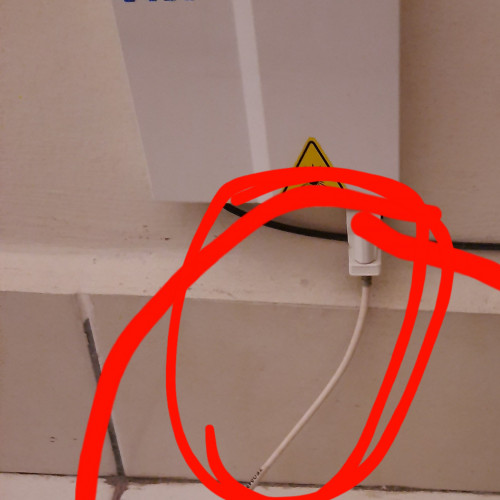
QUOTE(xCryptik @ May 24 2020, 08:41 PM)
omg the scary answer need to queue again haha
Unifi Official TM UniFi High Speed Broadband Thread V38, READ 1ST PAGE FOR TURBO SPEED INFO!
|
|
May 24 2020, 10:18 PM
|
![]() ![]() ![]() ![]() ![]() ![]() ![]()
Senior Member
5,893 posts Joined: Jun 2006 |
|
|
|
|
|
|
May 24 2020, 10:48 PM
|
![]() ![]()
Junior Member
50 posts Joined: Jul 2018 |
Hi guys, hope to gain some insight on how I can solve my Unifi connection problem. Post will be a bit long, sorry about that.
2 weeks ago, after rebooting modem and router, my router was not picking up IP address from modem with my WAN IP showing 0.0.0.0. I raised report, called helpline, etc. and 2 technicians came to check. 1st round they came, they checked the router and modem, changed to their own router and inspected the Unifi fiber optic cable but couldn't figure out what's causing the issue saying maybe fiber optic cable was damaged or there's a problem with the port supplying the connection. 1 week passed with no Internet... 2nd round, another technician came and he fixed the issue and told me that my Huawei modem somehow got reset which is why it's causing the problem. All was good until today at around 6.20pm, Internet connection was suddenly lost. This time, no one was messing with the modem or router. Connection just dropped suddenly. I logged into router to check and again, router is not picking up IP from modem. I called hotline and told support to reset port in hopes that it will solve the problem but to no avail so support told me to wait for TM technician to call me back... Any ideas what might be causing this and any possible solutions? Fyi, solutions I tried are calling support to reset port, resetting router to default and configuring it again. This post has been edited by Baenre: May 24 2020, 10:53 PM |
|
|
May 24 2020, 11:50 PM
Show posts by this member only | IPv6 | Post
#4183
|
![]() ![]() ![]() ![]() ![]() ![]() ![]() ![]()
All Stars
11,501 posts Joined: Oct 2007 From: KL |
QUOTE(Baenre @ May 24 2020, 10:48 PM) Hi guys, hope to gain some insight on how I can solve my Unifi connection problem. Post will be a bit long, sorry about that. Does your phone work?2 weeks ago, after rebooting modem and router, my router was not picking up IP address from modem with my WAN IP showing 0.0.0.0. I raised report, called helpline, etc. and 2 technicians came to check. 1st round they came, they checked the router and modem, changed to their own router and inspected the Unifi fiber optic cable but couldn't figure out what's causing the issue saying maybe fiber optic cable was damaged or there's a problem with the port supplying the connection. 1 week passed with no Internet... 2nd round, another technician came and he fixed the issue and told me that my Huawei modem somehow got reset which is why it's causing the problem. All was good until today at around 6.20pm, Internet connection was suddenly lost. This time, no one was messing with the modem or router. Connection just dropped suddenly. I logged into router to check and again, router is not picking up IP from modem. I called hotline and told support to reset port in hopes that it will solve the problem but to no avail so support told me to wait for TM technician to call me back... Any ideas what might be causing this and any possible solutions? Fyi, solutions I tried are calling support to reset port, resetting router to default and configuring it again. |
|
|
May 25 2020, 12:33 AM
|
![]() ![]() ![]() ![]()
Junior Member
584 posts Joined: May 2013 |
|
|
|
May 25 2020, 12:41 AM
|
![]() ![]()
Junior Member
50 posts Joined: Jul 2018 |
|
|
|
May 25 2020, 07:07 AM
|
![]() ![]() ![]() ![]() ![]() ![]()
Senior Member
1,849 posts Joined: Jan 2003 From: Boleh Land |
QUOTE(JohnLai @ May 21 2020, 09:13 PM) .......there are few possibilities. that make sense , the kampung being covered are full malay , last election totally lost , they all gone vote opposition, guess memang fishing undi , funny, all old folks there... install fiber for pakcik makcik that dont use internet there... even the technician in my area said so, he also puzzle why his home across the street there dont have. 1) Maybe government plans to develop those areas soon? 2) Nak pancing undi kot? |
|
|
|
|
|
May 25 2020, 08:17 PM
Show posts by this member only | IPv6 | Post
#4187
|
![]() ![]() ![]() ![]() ![]() ![]() ![]()
Senior Member
3,308 posts Joined: Dec 2012 |
is you guy having issue to WeChat and Taobao?
Recently take longer time to load WeChat and Taobao. But switch off Wifi, cellular data no issue. |
|
|
May 25 2020, 08:25 PM
|
![]() ![]()
Junior Member
165 posts Joined: Jan 2003 |
download speed seem slow not even 1mbps
|
|
|
May 25 2020, 08:36 PM
|
![]() ![]() ![]() ![]() ![]() ![]() ![]() ![]()
All Stars
14,922 posts Joined: Jul 2005 |
QUOTE(jiaen0509 @ May 25 2020, 08:17 PM) is you guy having issue to WeChat and Taobao? Nope. Taobao loads instantly for meNo delays whatsoever |
|
|
May 25 2020, 09:53 PM
|
![]() ![]() ![]() ![]() ![]() ![]() ![]()
Senior Member
4,643 posts Joined: Mar 2007 |
|
|
|
May 25 2020, 11:08 PM
|
![]() ![]()
Junior Member
102 posts Joined: Jul 2012 |
WTF is wrong with unifi and twitch lately? 115 ip
|
|
|
May 25 2020, 11:17 PM
Show posts by this member only | IPv6 | Post
#4192
|
![]() ![]() ![]() ![]() ![]() ![]()
Senior Member
1,889 posts Joined: Sep 2017 |
|
|
|
May 26 2020, 12:19 AM
|
![]() ![]()
Junior Member
271 posts Joined: Jan 2003 From: KL, wangsa Maju |
anyone having problem remote access desktop to UK or US or Europe country ? plus my wife play Just Dance Unlimited, where need online connection, quite slow. If i turn on VPN, it will solve problem. Problem happen starting at 7 pm until next morning at 4 am. I cannot do my work, then need purchase vpn to solve problem
|
|
|
|
|
|
May 26 2020, 12:54 AM
Show posts by this member only | IPv6 | Post
#4194
|
![]() ![]() ![]() ![]() ![]() ![]()
Senior Member
1,889 posts Joined: Sep 2017 |
QUOTE(kelvin4578 @ May 26 2020, 12:19 AM) anyone having problem remote access desktop to UK or US or Europe country ? plus my wife play Just Dance Unlimited, where need online connection, quite slow. If i turn on VPN, it will solve problem. Problem happen starting at 7 pm until next morning at 4 am. I cannot do my work, then need purchase vpn to solve problem To be honest,u should say what server company u are connect with problems. (Better give the problematic server ip like 175.140.50.X, X is not necessary and mask for privacy) Because not all server in uk,us or eu will have problem to connect from unifi will having problems. Examples,u connect to Microsoft cloud server which location at Los angeles get smooth experience. And the second server that hosted at Seattle get packet loss issue... Giving the ip block,and we can traceroute or ping and verify is that really got problem or not... Edit: Sometime different unifi ip block get different routing,and may get more stable connection for specific server or services. My Small Test Between 1.10AM-1.30AM To a SG Singtel IP Direct UNIFI 60.51.63.X ![]() 115.133.112.X ![]() 115.135.75.X U see this and next one,so big difference ![]() 115.135.153.X ![]() 218.208.251.X ![]() 60.53.85.X And this also crap ![]() VPN Routed Here i also included a traceroute routed by SG VPN to the same ip, and u will see the connection is well and low latency. (This is why most of us use vpn to overcome the Unifi routing issue,and i always suggest to get your own "dedicated" private VPN) ![]() Included a second traceroute which route by Cloudflare warp,but get bad routing. (This could due to Cloudflare and or "or" Singtel routing misconfigured) ![]() Included third traceroute which routed by my SG private server as VPN with Wireguard protocol. (Find a good server that have good peering with many ISP or IX,and use it to setup your own VPN) ![]() And Last Routing can be change anytime. So if one ip not okay at this hours,it may be good for use in next hour. Similarly,"Good ip" connect to another server maybe suddenly become bad ip in next mins due to routing changed. This post has been edited by go626201: May 26 2020, 01:55 AM Ashren liked this post
|
|
|
May 26 2020, 12:17 PM
Show posts by this member only | IPv6 | Post
#4195
|
![]() ![]() ![]() ![]() ![]() ![]()
Senior Member
1,878 posts Joined: Apr 2019 |
QUOTE(go626201 @ May 25 2020, 11:17 PM) You're lucky to be based in JB/Johor to have found a Unifi IP range that links directly to one of CF's VPN server which is hosted at JBIX. By connecting directly to JBIX, you get to enjoy sub 10ms ping rates to SG within 1-2 hops after that which is good routing strategy.However TM's Unifi users who are based in different regions(Northern, East Coast, Sabah/Sarawak) do not have this advantage. TM has many concentrators/edge routers spread out in different regions, probably one in every state and this is where the extra ping times is introduced especially during peak utilization season like now during festive Raya/CNY where they become overloaded with traffic. Here is what I discovered from doing reverse tracert from Equinix/NTT/internal TM servers. The round trip from Penang alone to JB would probably take up around 10ms-15ms. The round trip from Cyberjaya to SG is about 10-15ms The round trip from Sabah/Sarawak ~15-25ms Example when a undersea cable is launched such as the ASE, it claims to achieve ~60-65ms from Changi-> Tokyo.So if I was to ping a connection from KL to Tokyo, it would roughly be 5-7ms(KL-Cyberjaya)+10-12ms(Cyberjaya-SG)+60-65ms(Changi-Tokyo)=~80-85ms It gets even higher during peak hours/festive periods. Different concentrators/edge routers in different regions will get different range of IP addresses for TM Unifi. That is how they separate your IPs by location.I've read some of the users attempting to follow your advise and rebooted their modems over 10X and still not getting the 175.140.x.x range suggested is because they might not be connected to the same concentrator as you in different regions. The reason why you might get as high as 40ms to SG even when you're so closed to the island already is because probably of TM's bad routing. It is probably making a BIG U-Turn round trip from JB-TM Cybejaya NOC-SG with different IP range getting different routing results. Why certain Unifi users are now getting very bad connections is because the concentrators which they are now connected to are probably very CONGESTED now. They are believed to be located in northern region(Kedah/Penang/Perak) or East Coast(Kelantan/Terengganu) where all the balik kampung activities are now residing. I'm aware of this because the reverse tracert results shows that the ping rates from SG(datacentre)-Cyberjaya(NOC gateway) seem to be fine which only peaks around 10-12ms. |
|
|
May 26 2020, 01:29 PM
|
![]()
Junior Member
21 posts Joined: Mar 2010 From: Ipoh, Perak |
Hello guys..where can i buy a new unifi plus box remote control...my remote mati sudah..need a new one..tm point sungai petani dont have stock since feb..Or any third party remote control that work with unifi plus box?
|
|
|
May 26 2020, 01:39 PM
Show posts by this member only | IPv6 | Post
#4197
|
![]() ![]() ![]() ![]() ![]() ![]()
Senior Member
1,889 posts Joined: Sep 2017 |
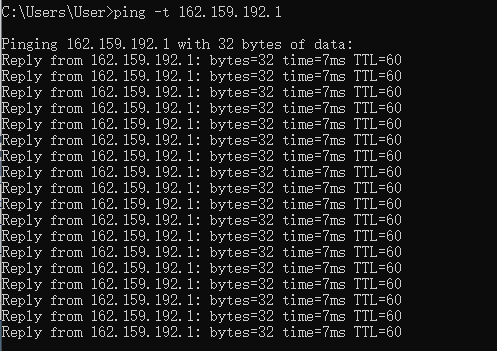
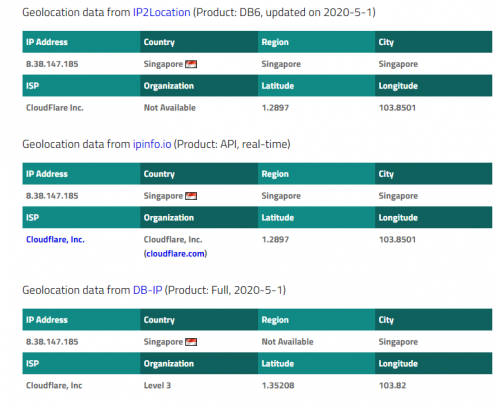
QUOTE(Candy12 @ May 26 2020, 12:17 PM) You're lucky to be based in JB/Johor to have found a Unifi IP range that links directly to one of CF's VPN server which is hosted at JBIX. By connecting directly to JBIX, you get to enjoy sub 10ms ping rates to SG within 1-2 hops after that which is good routing strategy. Acutally now CF Warp from Unifi not connect to server hosted at JBIX,it still connect to SG DC.I can confirmed that as i traceroute to any MY IP with CF Warp will add about 10ms as it goes to sg and go MY. (CF not should not have any Warp service running by JBIX)However TM's Unifi users who are based in different regions(Northern, East Coast, Sabah/Sarawak) do not have this advantage. TM has many concentrators/edge routers spread out in different regions, probably one in every state and this is where the extra ping times is introduced especially during peak utilization season like now during festive Raya/CNY where they become overloaded with traffic. Here is what I discovered from doing reverse tracert from Equinix/NTT/internal TM servers. The round trip from Penang alone to JB would probably take up around 10ms-15ms. The round trip from Cyberjaya to SG is about 10-15ms The round trip from Sabah/Sarawak ~15-25ms Example when a undersea cable is launched such as the ASE, it claims to achieve ~60-65ms from Changi-> Tokyo.So if I was to ping a connection from KL to Tokyo, it would roughly be 5-7ms(KL-Cyberjaya)+10-12ms(Cyberjaya-SG)+60-65ms(Changi-Tokyo)=~80-85ms It gets even higher during peak hours/festive periods. Different concentrators/edge routers in different regions will get different range of IP addresses for TM Unifi. That is how they separate your IPs by location.I've read some of the users attempting to follow your advise and rebooted their modems over 10X and still not getting the 175.140.x.x range suggested is because they might not be connected to the same concentrator as you in different regions. The reason why you might get as high as 40ms to SG even when you're so closed to the island already is because probably of TM's bad routing. It is probably making a BIG U-Turn round trip from JB-TM Cybejaya NOC-SG with different IP range getting different routing results. Why certain Unifi users are now getting very bad connections is because the concentrators which they are now connected to are probably very CONGESTED now. They are believed to be located in northern region(Kedah/Penang/Perak) or East Coast(Kelantan/Terengganu) where all the balik kampung activities are now residing. I'm aware of this because the reverse tracert results shows that the ping rates from SG(datacentre)-Cyberjaya(NOC gateway) seem to be fine which only peaks around 10-12ms. The first picture is using warp,and check by iplocation.net The second picture is the traceroute with Direct Unifi. The third picture is the endpoint of the warp.(It is a anycast IP,thats why it cant be manual choose server for warp) last picture is the debug page for showing the DC that connected by. (Warp on, COLO=SIN) ![]() ![]() ![]() ![]() Second,normally West Unifi to West unifi normally get within 10ms,Penang or Johor is the same,all depends of the latency between your home to the local exchange center.(For example,u will see some user that speedtest to malaysia ip only get 3-5ms,but most of us get 5-10ms for the same server) But for West to East / East to West malaysia,that really hard to say as i not sure the routing. Third,Unifi IP normally got specific blocks for every states,but sometimes u still can get the ip that is distributed for others states(For more correct,it is distributed for different user group maybe plan?),Usually unifi would not allocate 42.X.X.X / 124.X.X.X / 118.X.X.X or 1.X.X.X for me. But u can see 175.X.X.X 60.X.X.X 115.X.X.X can be get by most user from different states. (I think that 147.158.X.X should be the new ip range start use from TM 2-3years ago,normally allocate for Johor user if i am not wrong.- This ip got wrong geo-location at some IP database,maybe previously use by New Zealand) And now TM seems like set the refresh timeout longer for unifi,reboot router in short time(10-20sec) will get the same ip. But if your reboot for few more times,u still can get a new ip and new subnet.(While i am testing yesterday,i need to dc and reconnect at least 5-20times in 1min to get a new ip.) ![]() This post has been edited by go626201: May 26 2020, 01:48 PM |
|
|
May 26 2020, 01:57 PM
Show posts by this member only | IPv6 | Post
#4198
|
![]() ![]() ![]() ![]() ![]() ![]()
Senior Member
1,878 posts Joined: Apr 2019 |
QUOTE(go626201 @ May 26 2020, 01:39 PM) Third,Unifi IP normally got specific blocks for every states,but sometimes u still can get the ip that is distributed for others states(For more correct,it is distributed for different user group maybe plan?),Usually unifi would not allocate 42.X.X.X / 124.X.X.X / 118.X.X.X or 1.X.X.X for me. Trust me, similar IP blocks if you are in JB while I'm in Klang Valley but the routing is slightly different because of distance and area specific concentrators/edge routers are different.I would never get to enjoy sub <10ms to Singapore even if I connect to the CF server based in JBIX. But u can see 175.X.X.X 60.X.X.X 115.X.X.X can be get by most user from different states. (I think that 147.158.X.X should be the new ip range start use from TM 2-3years ago,normally allocate for Johor user if i am not wrong.- This ip got wrong geo-location at some IP database,maybe previously use by New Zealand) And now TM seems like set the refresh timeout longer for unifi,reboot router in short time(10-20sec) will get the same ip. But if your reboot for few more times,u still can get a new ip and new subnet.(While i am testing yesterday,i need to dc and reconnect at least 5-20times in 1min to get a new ip.) ![]() With TM's mess when it comes to routing, you might get lucky with certain ip ranges with less hops(shortcuts) but still circuit distance still plays quite role when it comes to latency. |
|
|
May 26 2020, 02:08 PM
|
![]() ![]() ![]()
Junior Member
356 posts Joined: Sep 2005 |
https://www.soyacincau.com/2020/05/26/maxis...less-broadband/
like this, Maxis tapau DiGi Infinite 150 |
|
|
May 26 2020, 02:11 PM
Show posts by this member only | IPv6 | Post
#4200
|
|
Staff
73,110 posts Joined: Sep 2005 From: KUL |
QUOTE(Morning_Star @ May 26 2020, 02:08 PM) https://www.soyacincau.com/2020/05/26/maxis...less-broadband/ Not really. It has limitation as well.like this, Maxis tapau DiGi Infinite 150 |
|
Topic ClosedOptions
|
| Change to: | 0.2404sec
0.24
9 queries
GZIP Disabled
Time is now: 15th April 2026 - 09:05 PM |