Outline ·
[ Standard ] ·
Linear+
Unifi Official TM UniFi High Speed Broadband Thread V36, READ 1ST PAGE FOR TURBO SPEED INFO!
|
lol0919
|
 Jan 21 2019, 04:03 PM Jan 21 2019, 04:03 PM
|
Getting Started


|
QUOTE(dickybird @ Jan 21 2019, 12:03 PM) Are they going to charge you the technician fee for what is basically their mistake? No, they won't charge if the issue solved from the pole without make any setting or repair internal wiring. QUOTE(AVFAN @ Jan 21 2019, 02:09 PM) just like in my case. u wonder if the installer had a reason to sabotage u or he's just plain moronic. I think the installer pulled it out mistakently, I didn't ask as i think the technician also won't know. They just come in to see the modem and then straight away go and climb up to the pole to check, seems very easy to be fixed. |
|
|
|
|
|
nag
|
Jan 21 2019, 04:04 PM
|
|
|
.
This post has been edited by nag: Jan 21 2019, 08:04 PM
|
|
|
|
|
|
dayojah
|
Jan 21 2019, 05:08 PM
|
|
|
Does your neighbour still have service after they reconnected you?
|
|
|
|
|
|
lol0919
|
Jan 21 2019, 06:34 PM
|
Getting Started
|
QUOTE(dayojah @ Jan 21 2019, 05:08 PM) Does your neighbour still have service after they reconnected you? I didn't ask, but it seems they are affected, because there are contractors installing cables now. And their cable is now connect to another pole.😅😅 This post has been edited by lol0919: Jan 21 2019, 07:03 PM |
|
|
|
|
|
dayojah
|
Jan 21 2019, 07:00 PM
|
|
|
Looks like the contractor took over your port, now they have to upgrade the infrastructure to avoid losing face  |
|
|
|
|
|
imalmighty
|
Jan 21 2019, 07:08 PM
|
|
|
QUOTE(lol0919 @ Jan 21 2019, 06:34 PM) I didn't ask, but it seems they are affected, because there are contractors installing cables now. And their cable is now connect to another pole.😅😅 Your incident reflects the true competency of TM |
|
|
|
|
|
lol0919
|
Jan 21 2019, 08:52 PM
|
Getting Started
|
QUOTE(dayojah @ Jan 21 2019, 07:00 PM) Looks like the contractor took over your port, now they have to upgrade the infrastructure to avoid losing face I think so...but doing so only will causing themselves to do extra work...  QUOTE(imalmighty @ Jan 21 2019, 07:08 PM) Your incident reflects the true competency of TM Brilliant right? There is 1 more thing i didn't mention, which my neighbor's unifi cable was originally connect from the pole situated near to another neighbor's house(right of my house) was connected to left side neighbor house's first floor as a straight line cause the cable to be hanging in front of my house(above car porch's roof), when i open my window at the first floor, i can see a black cable right in front of me, and i can touch it within the distance lol. my parents was mad when they saw it yesterday. Luckily, they moved the cable to another pole in front of their house and managed to solve all these issues within 1 day. Illustration purpose:  Top View of three house 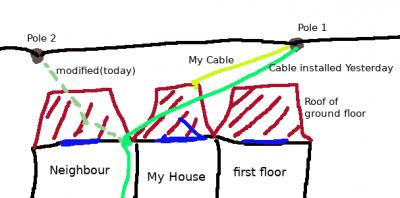 This post has been edited by lol0919: Jan 21 2019, 09:05 PM
 |
|
|
|
|
|
noobandroid
|
Jan 22 2019, 08:47 AM
|
|
|
QUOTE(SilentVampire @ Jan 21 2019, 08:44 AM) That router is very problematic. I suggest changing router. You can see the 1st page, 1st post, green text, where I mentioned about the TP-Link AC1200 having lots of issues. the TM team came to my house attempting to change my c5 router to c1200, and luckily i denied it, as they were here for a different service and not changing my router  |
|
|
|
|
|
TSSilentVampire
|
Jan 22 2019, 10:32 AM
|
|
|
QUOTE(noobandroid @ Jan 22 2019, 08:47 AM) the TM team came to my house attempting to change my c5 router to c1200, and luckily i denied it, as they were here for a different service and not changing my router Lol, good on you to reject the offer. It is really not worth it at all. |
|
|
|
|
|
dannychen
|
Jan 22 2019, 11:01 AM
|
|
|
|
|
|
|
|
|
cenkudu
|
Jan 22 2019, 11:11 AM
|
|
|
I have changed my router to TP-Link Archer C9. modem is Huawei HG8240W. Speed test direct to the router 200 mbps download and 100 mbps upload. Should I start making noise with Unifi? But have yet to change the cable to CAT6 cable. Turbo speed supposed 500 mbps
This post has been edited by cenkudu: Jan 22 2019, 11:29 AM
|
|
|
|
|
|
dannychen
|
Jan 22 2019, 11:28 AM
|
|
|
QUOTE(cenkudu @ Jan 22 2019, 11:11 AM) I have changed my router to TP-Link Archer C9. modem is Huawei HG8240W. Speed test direct to the router 200 mbps download and 100 mbps upload. Should I start making noise with Unifi? But have yet to change the cable to CAT6 cable. out of pure curiosity, what is the difference between HG8240W and HG8240H. |
|
|
|
|
|
meon55
|
Jan 22 2019, 11:52 AM
|
Getting Started
|
QUOTE(SilentVampire @ Jan 21 2019, 08:44 AM) That router is very problematic. I suggest changing router. You can see the 1st page, 1st post, green text, where I mentioned about the TP-Link AC1200 having lots of issues. its very buggy. Is it advisable that I flash it to Open WRT? or i just buy the XIAOMI MI R3P? |
|
|
|
|
|
meon55
|
Jan 22 2019, 11:58 AM
|
Getting Started
|
QUOTE(cenkudu @ Jan 22 2019, 11:11 AM) I have changed my router to TP-Link Archer C9. modem is Huawei HG8240W. Speed test direct to the router 200 mbps download and 100 mbps upload. Should I start making noise with Unifi? But have yet to change the cable to CAT6 cable. Turbo speed supposed 500 mbps Is the Lan cable provide from Tplink CAT6? |
|
|
|
|
|
cenkudu
|
Jan 22 2019, 12:04 PM
|
|
|
QUOTE(meon55 @ Jan 22 2019, 11:58 AM) Is the Lan cable provide from Tplink CAT6? oh is it? if that the case. everything has been done... |
|
|
|
|
|
soonwai
|
Jan 22 2019, 12:09 PM
|
|
|
QUOTE(dannychen @ Jan 22 2019, 11:28 AM) out of pure curiosity, what is the difference between HG8240W and HG8240H. W is TM style silver box and no wall mount holes. Optical port is at the back together with the other ports. A bit bigger than the H. White LEDs H is white case with wall mount holes. Optical port is recessed at the bottom of the case. Slightly smaller than the W. Green LEDs That's about it. Specs wise, same. |
|
|
|
|
|
meon55
|
Jan 22 2019, 12:10 PM
|
Getting Started
|
QUOTE(cenkudu @ Jan 22 2019, 12:04 PM) oh is it? if that the case. everything has been done... hahahaha i was asking you whether the Lan Cable is CAT6. I couldnt identify it is a CAT6 as its not written on the cable. |
|
|
|
|
|
jpong1
|
Jan 22 2019, 12:13 PM
|
Getting Started
|
QUOTE(meon55 @ Jan 22 2019, 12:10 PM) hahahaha i was asking you whether the Lan Cable is CAT6. I couldnt identify it is a CAT6 as its not written on the cable. as far as I know, those router with price less than RM500, all are CAT5e. (I might missed out some brand and models) |
|
|
|
|
|
cannavaro
|
Jan 22 2019, 12:36 PM
|
|
|
QUOTE(satanhead2003 @ Jan 21 2019, 07:46 AM) Anyone with realdebrid and 800mbps turbo can verify download is capped @ 35MBps? I posted before in 1 thread, can hit max speed but cannot sustain for long For me, the consistent spot is 40MBps - 50MBps Try DL multiple files at once? |
|
|
|
|
|
Jeremy_John
|
Jan 22 2019, 01:23 PM
|
Getting Started
|
If I'm using a router with gigabit lan connection to a gigabit switch which goes to PC A with gigabit lan port & PC B with 100mbps lan port
Will PC A still get gigabit connection thur the lan port?
This post has been edited by Jeremy_John: Jan 22 2019, 01:23 PM
|
|
|
|
|



 Quote
Quote





 0.0413sec
 0.33
0.33
 6 queries
 GZIP Disabled