Outline ·
[ Standard ] ·
Linear+
Unifi Official TM UniFi High Speed Broadband Thread V36, READ 1ST PAGE FOR TURBO SPEED INFO!
|
lol0919
|
 Nov 21 2018, 07:43 PM Nov 21 2018, 07:43 PM
|
Getting Started


|
My Unifi tv got this error since 1 month ago, cannot watch tv at all with the following error 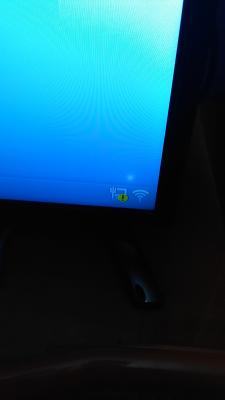
Network test result. 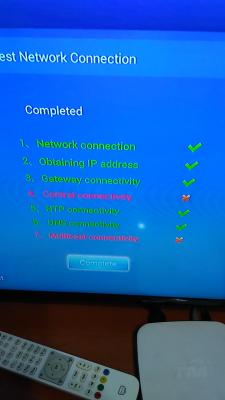
And the bottom keep show "The wired cable connected", 2 seconds later, "The wired cable disconnected" in a loop any of you facing this problem before? how to fix it? This post has been edited by lol0919: Nov 21 2018, 08:00 PM |
|
|
|
|
|
lol0919
|
Nov 21 2018, 07:53 PM
|
Getting Started
|
Another question, if TM dect phone cannot charge at all means phone base spoiled?
my dect phone cannot use since long time ago, i tot it is the battery problem so i replace with gp recyko 400mah battery, the phone is on, but not full, when i put it in the base charger, it is not charging, and no beep sound from it. the phone keep searching and show "unavailable" ,no line, no charging....
|
|
|
|
|
|
lol0919
|
Nov 21 2018, 07:56 PM
|
Getting Started
|
QUOTE(JohnLai @ Nov 21 2018, 07:51 PM) no, how to set it????? i didn't modify anything yet |
|
|
|
|
|
lol0919
|
Nov 21 2018, 11:42 PM
|
Getting Started
|
QUOTE(JohnLai @ Nov 21 2018, 08:00 PM) I don't know, I am not a seer or omniscient person. Someone was posting stuff without any information. EDIT: Just saw your edit, from what you wrote, might be cable or port issue. IGMP v2 normally results in black screen after turning it on from standby. Changing to V3 will fix the black screen, but i dont think this applies for your case. i think so, It is previously working fine with my router but suddenly cannot use, and i didn't edit anything from router settings before that. i'm just inquire through TM live chat, they suggest to send a technician to check, but need charge RM53 and if device spoiled, need buy a new one around RM300...since no more warranty already.  |
|
|
|
|
|
lol0919
|
Nov 22 2018, 04:29 PM
|
Getting Started
|
QUOTE(SilentVampire @ Nov 22 2018, 07:26 AM) BTU replacement should be free as they have lifetime warranty. not btu, btu is working fine, hypptv problem, |
|
|
|
|
|
lol0919
|
Nov 24 2018, 02:16 PM
|
Getting Started
|
QUOTE(JohnLai @ Nov 21 2018, 08:00 PM) I don't know, I am not a seer or omniscient person. Someone was posting stuff without any information. EDIT: Just saw your edit, from what you wrote, might be cable or port issue. IGMP v2 normally results in black screen after turning it on from standby. Changing to V3 will fix the black screen, but i dont think this applies for your case. you are right, it is the port issue, 1 of the lan port from my router spoiled, i did try assign vlan 600 to other ports before but not working, until i reboot the router.... now using another port and it is working fine luckily the stb has no problem and it didn't ask tm technician to come.. |
|
|
|
|
|
lol0919
|
Nov 29 2018, 11:23 AM
|
Getting Started
|
QUOTE(abubin @ Nov 29 2018, 10:52 AM) Buy your own router. Don't bother with theirs, bad quality router. QUOTE(Doraku @ Nov 29 2018, 11:00 AM) Probably D-LINK DIR842, just buy your own router, no need waste your money/renew contract just for a low end TM stock router  I'm using Aztech FG7008, my router is not good either, especially wifi, wonder the router provide by TM wil perform better or not. So this Dir-842 not good also? |
|
|
|
|
|
lol0919
|
Nov 29 2018, 11:24 AM
|
Getting Started
|
QUOTE(cannavaro @ Nov 29 2018, 11:05 AM) Eh how to get to this page? Just curious Online Portal -> Turbo Status -> Check |
|
|
|
|
|
lol0919
|
Nov 29 2018, 11:55 AM
|
Getting Started
|
QUOTE(sHawTY @ Nov 29 2018, 11:40 AM) You want a good router, buy your own No ISP in Malaysia provides a good router. Not even TIME doesn't need to be really good, at least 1. Can access configuration page without any problem. won't stuck on configuration or sometimes inaccessible to it. 2. Configuration won't go wrong(set and saved on channel 153 but running 48 or others channel) 3. Wifi won't have problem like sometimes unable to detect, or sometimes connected but no internet(on windows), and need always reboot solve problem |
|
|
|
|
|
lol0919
|
Nov 29 2018, 12:32 PM
|
Getting Started
|
QUOTE(Doraku @ Nov 29 2018, 11:53 AM) Is this your router? https://shopee.com.my/Aztech-FG7008GR(AC)-D...3178.1318268849this aztech router have better spec than DIR-842 (Better CPU and abit more RAM)  Changing to DIR-842 maybe wont perform any better and might be slower Well except with the Firmware issue More info: https://forum.lowyat.net/topic/4543383/allyup, actually the performance not bad, can perform the speeds. but the firmware is buggy and no more update (discontinued) configuration page sometimes very smooth, sometimes inaccessible, and don't know why sometimes my windows pc cannot connect to it (2pc with this problem,need reboot router to make it work), linux pc, android phone, iphone all no such problem some settings can only be change through telnet, but sometimes cannot connect at all  If the dir-842 is nothing better in terms of performance, then i think i have no choice but to buy a new router, woohoo |
|
|
|
|
|
lol0919
|
Nov 29 2018, 12:36 PM
|
Getting Started
|
QUOTE(abubin @ Nov 29 2018, 11:59 AM) 1 and 3 is what you get when using TM's router. actually my current router have all these problem(mostly firmware issue), but previous Innatech provided by tm is fine, but no choice to change it since it is not gigabit router and no wireless AC. My mum keep scold me that i bought a even lousy router...  |
|
|
|
|
|
lol0919
|
Nov 29 2018, 09:19 PM
|
Getting Started
|
QUOTE(jutamind @ Nov 29 2018, 08:37 PM) Recently got turbo to 500mb and TM changed my decade old BTU modem to Hg8240h I think. I'm using Asus AC86U with latest firmware and plug in brand new Cat 5e LAN cable. Complaint to TM as I got max download 100Mbps for Chrome or 200Mbps for Firefox but can't reach anywhere near 500 using Lan with my laptop, but when TM technician came, they tried TM Speed test and for 400+ twice using their laptops (2 different laptops some more). So I dumb founded on why TM technician can get the speed on their laptops but not mine, even though NIC card in my laptop support gigabit. Any idea how I can further increase my download speed? is there any different when you plug in the power source to your laptop? This post has been edited by lol0919: Nov 29 2018, 09:20 PM |
|
|
|
|
|
lol0919
|
Jan 20 2019, 06:11 PM
|
Getting Started
|
Anyone facing this issue before, my modem auth and tel1 keep blinking, and link is off, only lan is lights up. Router cant connect to internet. 
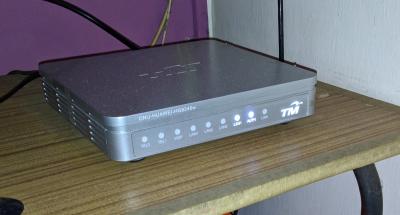
Asked tm live chat, he said no interruption at my area, and he already check and reset port, reboot modem and router also same. |
|
|
|
|
|
lol0919
|
Jan 20 2019, 06:33 PM
|
Getting Started
|
QUOTE(AVFAN @ Jan 20 2019, 06:25 PM) u got no incoming. check with yr neighbors. likely a local problem or just yr house. So, problem like this only can be solve by tm technician right? I'm just notice that my neighbour next to my house have a newly installed unifi which their cable comes from the same pole. Wonder will their technician brick mine during the installation... |
|
|
|
|
|
lol0919
|
Jan 20 2019, 10:44 PM
|
Getting Started
|
QUOTE(dayojah @ Jan 20 2019, 06:49 PM) Probably took your port, they did this to me a few times back in the Streamyx days QUOTE(soonwai @ Jan 20 2019, 07:39 PM) This happened to my neighbor last year. A new Unifi installation used my neighbor’s port because according to to TM’s records my neighbor’s port was unused. She was without Unifi for 2 weeks until TM sorted things out. Seriously, that's too much. Hope they don't do this two me. 2 hours without internet is being like a year, and i cant imagine i can survive 2 weeks without internet.😂😂 |
|
|
|
|
|
lol0919
|
Jan 20 2019, 10:56 PM
|
Getting Started
|
QUOTE(AVFAN @ Jan 20 2019, 08:44 PM) check other neighbors. if your neighbors are fine (incl the new one) and u are not, chances are u someone "did" something that affects u. i had a case where during neighbor installation, the installer unplugged my port. called the technicians, they came, plugged it back, that's it. or some grass cutter severed yr cable. unimaginable silly things do happen. Already check with them, i am the only one with this issue. I'm just enquire through live chat to ask the support to check my port status, he said it is down, and already file a report, waiting for technician to come, let's see what is the cause..🤔 |
|
|
|
|
|
lol0919
|
Jan 20 2019, 11:33 PM
|
Getting Started
|
QUOTE(nag @ Jan 20 2019, 11:03 PM) Case like this, let say if they are port others line to your port caused current user internet connection lost, report filed. If TM technician pay a visit, are TM going to charged you ? By right they won't charge you if the problem is caused by them. Correct me if wrong. |
|
|
|
|
|
lol0919
|
Jan 21 2019, 11:53 AM
|
Getting Started
|
QUOTE(AVFAN @ Jan 21 2019, 12:24 AM) give that, it's probably at problem at your house junction box or the local distribution panel. no charge, u can even call to claim a rebate on no. of days down. problem resolved, It seems my cable has been unplugged by installer while installing my neighbor's unifi. technician came just now to plugged it back... This post has been edited by lol0919: Jan 21 2019, 12:00 PM |
|
|
|
|
|
lol0919
|
Jan 21 2019, 04:03 PM
|
Getting Started
|
QUOTE(dickybird @ Jan 21 2019, 12:03 PM) Are they going to charge you the technician fee for what is basically their mistake? No, they won't charge if the issue solved from the pole without make any setting or repair internal wiring. QUOTE(AVFAN @ Jan 21 2019, 02:09 PM) just like in my case. u wonder if the installer had a reason to sabotage u or he's just plain moronic. I think the installer pulled it out mistakently, I didn't ask as i think the technician also won't know. They just come in to see the modem and then straight away go and climb up to the pole to check, seems very easy to be fixed. |
|
|
|
|



 Quote
Quote


 0.2133sec
 0.76
0.76
 7 queries
 GZIP Disabled