Outline ·
[ Standard ] ·
Linear+
TIME [OFFICIAL] TIME Fibre Broadband™ v4, Experience the ONE TRUE 2Gbps
|
jun_ng_1208
|
 Apr 14 2022, 09:52 AM Apr 14 2022, 09:52 AM
|

|
I've just recontracted with TIME for the new 500 MBps plan and also gotten the offer for HG8145X6 and 1 mesh node Currently am using the old TP Link C1200 router in the condo and also modem in the fuse box outside the main door area, I'm wondering when then technician comes to setup the new HG8145X6, do they just replace the C1200 in the living room or do they change the modem outside as well? and also is the wifi coverage of the HG8145X6 much better than the old C1200? this is my condo's layout and where the router is, can you guys suggest where should I put the mesh node for max coverage? 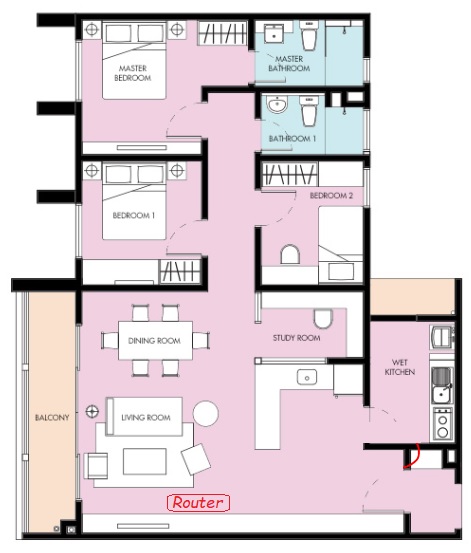 |
|
|
|
|
|
jun_ng_1208
|
Apr 22 2022, 12:40 PM
|
|
|
QUOTE(jjj2 @ Apr 21 2022, 10:19 PM) Hi JJJ I just installed the Huawei HG8145X6 and don't see any option in the router page to change the DNS tho, cos last time in the TP Link C1200 there's this field for me to input the DNS.. |
|
|
|
|
|
jun_ng_1208
|
Apr 22 2022, 03:54 PM
|
|
|
QUOTE(garybenjamin @ Apr 22 2022, 02:39 PM) Here u go or go to original post #8643 change DNS ooff macam a bit tedious lemme go study a bit when I get back  pardon the noob me but how do I open SSH tho? using CMD? |
|
|
|
|
|
jun_ng_1208
|
Apr 22 2022, 06:41 PM
|
|
|
QUOTE(garybenjamin @ Apr 22 2022, 04:54 PM) Windows 10 have SSH beta apps pre-installed u just need to activate it. Go to "Apps & Features"> Manage Optional Feature > "Add a new feature"> scroll down until u find "OpenSSH CLIENT(beta)" then click install. After install right click windows button select "Windows Power Shell" then there u go start follow the code I tried it and it says success in the end but the DNS options still didn't show up in the router page and I can't find the DNS info anywhere  My router page looks a little different than the screenshot btw 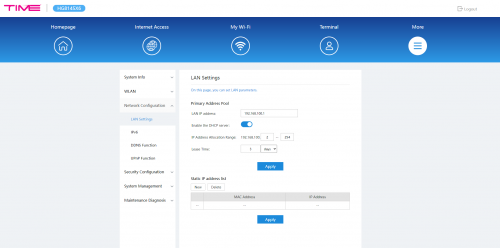 |
|
|
|
|
|
jun_ng_1208
|
Apr 25 2022, 12:29 PM
|
|
|
QUOTE(jjj2 @ Apr 23 2022, 12:26 AM) Hi, go to DHCP Server, DNS Server. Unfortunately I can't find this settings in my router page, but I did however managed to confirmed that it works using CMD > ipconfig/all BTW I've noticed that the mesh node slows down the wifi speed tremendously for me, I tried testing the wifi at the same spot with direct connect to router (300+ mbps) VS connecting thru the mesh (70+mbps) Is that normal or is there any settings that can be done? |
|
|
|
|
|
jun_ng_1208
|
Apr 25 2022, 01:38 PM
|
|
|
QUOTE(garybenjamin @ Apr 25 2022, 12:56 PM) Did u plug in Lan from router to Mesh ? If yes it shouldn't be. If no do remember speed reduce 50% on each hop level for mesh which is on wifi communicate. The mesh node and the router is in 2 different rooms so it's both wirelessly connected, so if both were connected wirelessly then the mesh node is no different than normal extender is that right? |
|
|
|
|
|
jun_ng_1208
|
Apr 25 2022, 03:53 PM
|
|
|
QUOTE(garybenjamin @ Apr 25 2022, 03:40 PM) can say so but Mesh system still slightly gain more bandwidth and more stable than normal extender. Thanks for the info bro, I've just tested the coverage at within the whole condo and it seems that the router itself is more than enough |
|
|
|
|
|
jun_ng_1208
|
May 10 2022, 11:41 AM
|
|
|
QUOTE(ahpaul82 @ May 7 2022, 10:31 AM) Hey guys, may I know how to change/enable the DHCPv6 to Google DNS in HG8145X6?  [attachmentid=11145833] thanks. My router page menu is much more simple than yours and seems to have much lesser settings to change How did you change the interface? |
|
|
|
|
|
jun_ng_1208
|
May 12 2022, 11:21 PM
|
|
|
QUOTE(ahpaul82 @ May 12 2022, 03:31 PM) is a default interface, I didn't change anything. are you using WiFi-6 Router (HG8145X6) as well? Yea wor~ But mine looks like this.. 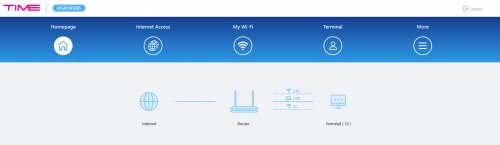 |
|
|
|
|
|
jun_ng_1208
|
Sep 2 2022, 06:13 PM
|
|
|
My time fibre dunno why suddenly goes LOS, yday still working fine but this morning KO The 192.168.100.1 now goes into the modem page instead of the router page...but I dunno what the password for it... Reboot both router and modem also useless, still goes back to LOS  Called CS but Monday only can arrange technician to come over... |
|
|
|
|
|
jun_ng_1208
|
Sep 2 2022, 11:31 PM
|
|
|
QUOTE(jjj2 @ Sep 2 2022, 11:15 PM) Hi, feel free to take a clear picture of your devices & the cable connection, you may pm me for p&c concern. Thanks. hi bro jjj2 which device ya? the router? or the modem? or both? cos the devices totally no touch at all, never moved or anything, just tiba² LOS |
|
|
|
|
|
jun_ng_1208
|
Sep 3 2022, 12:59 PM
|
|
|
QUOTE(jjj2 @ Sep 2 2022, 11:15 PM) Hi, feel free to take a clear picture of your devices & the cable connection, you may pm me for p&c concern. Thanks. The technician came today and sorted it out appratenly it's the fibre cable at the control room that was KOed |
|
|
|
|
|
jun_ng_1208
|
Oct 3 2022, 11:13 AM
|
|
|
QUOTE(jjj2 @ Oct 3 2022, 08:19 AM) Hi, haha... something to do with speed... Hopefully if they bump the speed up, it will include the existing users as well and not just new users  cos I baru renewed the contract few mths ago LOL |
|
|
|
|
|
jun_ng_1208
|
Oct 6 2022, 03:02 PM
|
|
|
QUOTE(frossonice @ Oct 6 2022, 02:22 PM) I hope tomorrow good news will be speed bumps all across the packages; 1gbps -> 2gbps 500mbps -> 1gbps 100mbps -> 500mbps while retaining current pricing structure. if I rmb correctly this was what they did in the previous speed increase in 2018 I think back then it was 100/300/500 and then they came out with 100/500/1000 and they bump the speed for the respective range accordingly |
|
|
|
|
|
jun_ng_1208
|
Nov 17 2022, 07:04 PM
|
|
|
QUOTE(jjj2 @ Nov 16 2022, 08:56 PM) Yes, me too. Change to mobile data no issue loading. Bro jjj2, i wanna ask a bit about the mesh unit, for my current TIME plan, they gimme the Huawei HG8145X6 and also one unit of the Mesh node WA8021V5 I rmb you told me before that if I use the router as main and then connect the mesh node wirelessly, the wifi speed will be reduced as it connects as a repeater. What if I don't use the router totally and use the mesh node as router and then add another WA8021V5 node to the existing one wirelessly, will I still be getting slower speed? Hope my question isn't too noobish |
|
|
|
|
|
jun_ng_1208
|
Nov 17 2022, 07:59 PM
|
|
|
QUOTE(jjj2 @ Nov 17 2022, 07:37 PM) Thanks for your answer bro! May I know how can I mesh the HG8145X6 & WA8021V5 together? Cos now I seldom turn on the WA8021V5 as it will just makes the whole network way slower like from 400mbps to 55+mbps, cos the time technician last time set it to the same WiFi SSID... |
|
|
|
|
|
jun_ng_1208
|
Jan 13 2023, 11:16 PM
|
|
|
QUOTE(xMusashii @ Jan 12 2023, 10:23 PM) Hi all, just relocated to a new place (1k sq ft), and renew my TIME contract to 500 mbps with free wifi6 router + mesh. With mesh, i get around 80mbps on my desktop, without it, i get 180mbps. Is there another way for me to get 400++ mbps? Need change to new wifi 6 router or mesh? sorry for noob question QUOTE(codenchips @ Jan 13 2023, 01:44 PM) +1 I have the same question. It's performing better without the Mesh. lol I have the same experience with the same Huawei Mesh unit provided by TIME, w/o mesh can hit 300+ mbps on wifi for my PC on 500mbps plan but with the mesh unit on the speed drops to less than 100mbps... AFAIK, this is due to the mesh is essentially a AP if you use it wirelessly, if you want full speed with the mesh on, you have to use the LAN connection between router and mesh... |
|
|
|
|



 Quote
Quote

 0.0435sec
 0.86
0.86
 7 queries
 GZIP Disabled